
Introduction
The PROW A5 Pro is a versatile 2-in-1 Bluetooth 5.2 audio adapter designed to function as both a transmitter (TX) and a receiver (RX). This device allows you to add Bluetooth capabilities to non-Bluetooth audio sources or enable wireless audio streaming to traditional wired devices. It supports advanced audio codecs like aptX Adaptive and aptX Low Latency for high-quality, synchronized sound.
What's in the Box
Carefully unpack your PROW A5 Pro. The package should contain the following items:
- 1 × PROW A5 Pro Bluetooth 5.2 Transmitter/Receiver
- 1 × Audio connector for aircraft
- 1 × Dual 3.5mm AUX Adapter
- 1 × 3.5mm Female to RCA Audio Cable
- 1 × USB-C Charging Cable
- 1 × User Manual
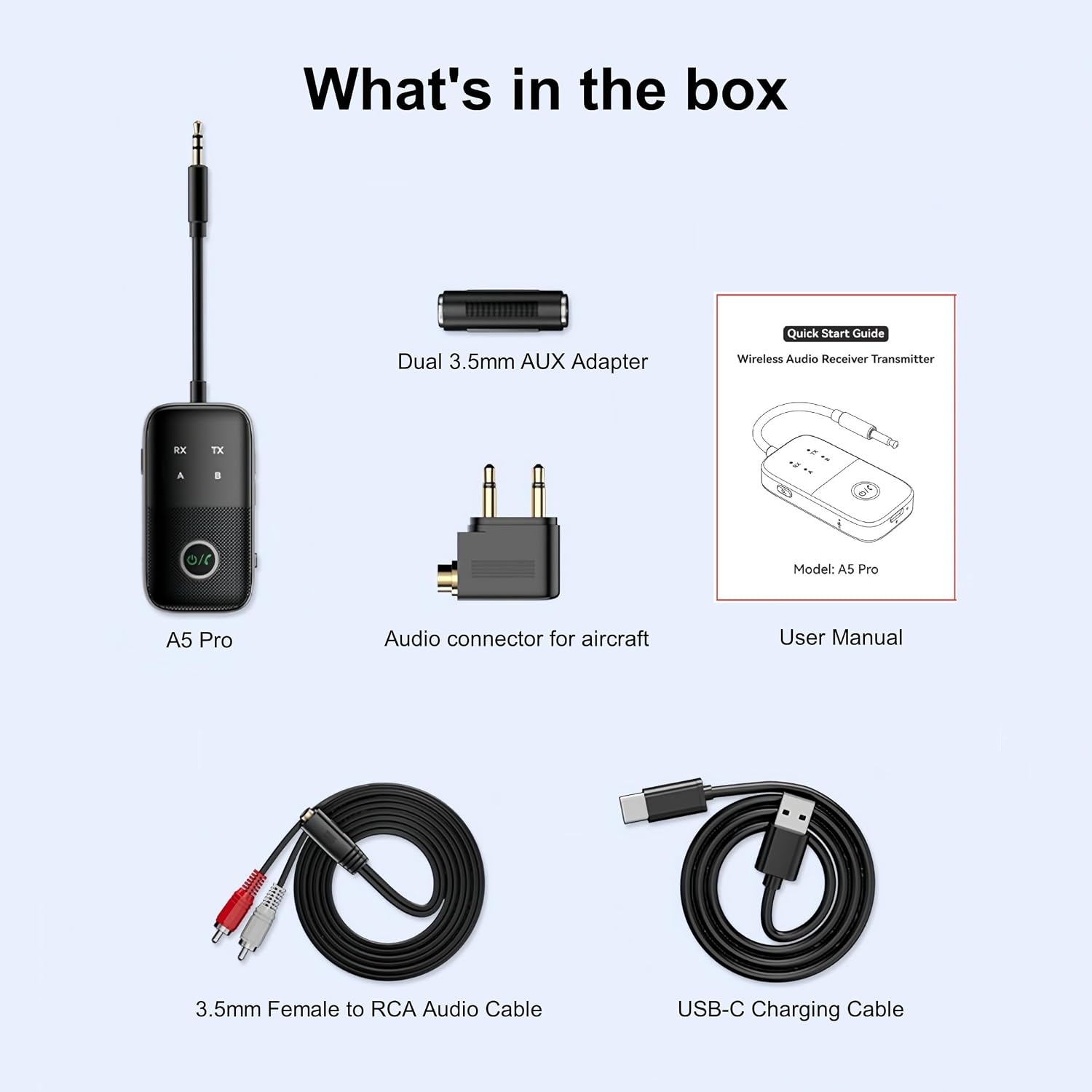
Image: All items included in the PROW A5 Pro product package.
Setup
1. Charging the Device
Before first use, fully charge the PROW A5 Pro. Connect the included USB-C Charging Cable to the device's USB-C port and plug the other end into a 5V/1000mA USB power source. A full charge takes approximately 1.5 hours. The device provides up to 12 hours of use in Transmitter (TX) mode and 10 hours in Receiver (RX) mode.

Image: Battery specifications and charging time for the PROW A5 Pro.
2. Selecting Operating Mode (TX/RX)
The PROW A5 Pro features a physical toggle switch to select between Transmitter (TX) and Receiver (RX) modes. Ensure the device is powered off before changing modes.
- TX Mode (Transmitter): Converts non-Bluetooth audio sources (e.g., TVs, PCs, airplane entertainment systems) into Bluetooth transmitters, sending audio to Bluetooth headphones or speakers.
- RX Mode (Receiver): Enables wired audio devices (e.g., car stereos, home speakers, wired headphones) to receive audio wirelessly from Bluetooth-enabled devices like smartphones or tablets.

Image: The RX/TX mode selection switch on the PROW A5 Pro.
Operating Instructions
Transmitter Mode (TX)
Use TX mode to send audio from a non-Bluetooth device to Bluetooth headphones or speakers.
- Switch the device to TX mode.
- Connect the PROW A5 Pro to your audio source (e.g., TV, PC, game console, airplane seat) using the appropriate 3.5mm audio cable or adapter.
- Power on the PROW A5 Pro. The TX indicator light will flash, indicating it's in pairing mode.
- Place your Bluetooth headphones or speaker into pairing mode.
- The PROW A5 Pro will automatically search for and connect to your Bluetooth audio device. Once connected, the TX indicator light will remain solid.
- To connect a second Bluetooth headset: Double-click the "search" button on the PROW A5 Pro. The TX indicator light will flash again. Put the second Bluetooth headset into pairing mode. The device will automatically pair with the second headset.

Image: Visual representation of TX and RX mode applications.

Image: Example of using the PROW A5 Pro to connect two Bluetooth headphones to a TV.
Receiver Mode (RX)
Use RX mode to receive audio wirelessly from a Bluetooth device (e.g., smartphone) and play it through a wired audio system.
- Switch the device to RX mode.
- Connect the PROW A5 Pro to your wired audio device (e.g., car stereo, home speakers, wired headphones) using the appropriate 3.5mm audio cable or adapter.
- Power on the PROW A5 Pro. The RX indicator light will flash, indicating it's in pairing mode.
- On your Bluetooth-enabled device (e.g., smartphone, tablet), enable Bluetooth and search for "A5 Pro" in the list of available devices.
- Select "A5 Pro" to connect. Once connected, the RX indicator light will remain solid.
- To connect a second mobile phone: In RX mode, double-click the "search" button. The RX indicator light will flash. Turn on Bluetooth on the second mobile phone and connect to "A5 Pro".

Image: Example of using the PROW A5 Pro to enable Bluetooth audio in a car.
General Operation Notes
- The device supports simultaneous connection of two Bluetooth headphones in TX mode or two mobile phones in RX mode.
- If the device is turned on and no connection is made within 10 minutes, it will automatically power off to conserve battery.
- To restore factory settings (and clear all previous pairings), long-press the "search" button for 8 seconds.
- When pairing AirPods for the first time, ensure they are inside their case.
- For optimal pairing, turn off nearby Bluetooth devices (e.g., phones, iPads) during the pairing process.
Maintenance
To ensure the longevity and optimal performance of your PROW A5 Pro, follow these maintenance guidelines:
- Keep the device dry. Moisture and liquids can damage internal circuits.
- Do not expose the device to extreme temperatures (hot or cold).
- Avoid dropping or subjecting the device to strong impacts.
- Clean the device with a soft, dry cloth. Do not use harsh chemicals or abrasive cleaners.
- Store the device in a clean, dust-free environment when not in use.
Troubleshooting
If you encounter issues with your PROW A5 Pro, refer to the following common problems and solutions:
- Indicator light is not lit normally:
Check if the device is properly plugged into the Type-C charging cable or if the battery is sufficiently charged. - Cannot enter RX receive/TX transmit mode:
Ensure the toggle switch is firmly set to the desired mode position (RX or TX). - Audio quality is not optimal or low-quality:
First, check your audio source device. For reduced latency and higher quality, ensure your device supports Bluetooth 5.2 and aptX-LL codecs. - Difficulty pairing with a device:
Try restoring the PROW A5 Pro to factory settings by long-pressing the "search" button for 8 seconds. Ensure the device you are trying to pair with is in pairing mode and that other nearby Bluetooth devices are temporarily turned off.
Specifications
| Feature | Detail |
|---|---|
| Bluetooth Version | 5.2 (Backward compatible with 5.1/5.0/4.2/4.0/3.0/2.0) |
| Pair Name | A5 Pro |
| Supported Codecs | SBC, AAC, aptX, aptX LL, aptX HD, aptX Adaptive |
| Using Time (TX Mode) | Up to 12 Hours |
| Using Time (RX Mode) | Up to 10 Hours |
| Standby Time | 30 Days |
| Battery Capacity | 300mAh (3.7V) |
| Charging Port | USB-C (5V/1000mA) |
| Full Charge Time | 1.5 Hours |
| Wireless Range | 15m (50ft) Unobstructed |
| Signal to Noise Ratio | ≥90dB |
| Distortion | ≤0.02% |
| Compatibility | iOS/Android phones, Tablets, PCs, TVs, Car stereos, All A2DP-enabled devices |
| Product Net Weight | 30g (1.06 ounces) |
| Product Dimensions | L68xW37.5xH12.5mm (2 x 1 x 0.5 inches) |
| Color | Silver-black |
Warranty and Support
The PROW A5 Pro is designed for durability and meets global safety standards including CE, FCC, and RoHS. For warranty information or technical support, please refer to the contact details provided with your purchase documentation or visit the official PROW website. Keep your purchase receipt as proof of purchase for warranty claims.

