
1. Introduction
Thank you for choosing the KENRONE KR-PL-5354-H 6-Digit Combination Smart Padlock. This manual provides detailed instructions for the proper setup, operation, maintenance, and troubleshooting of your new padlock. Please read this manual thoroughly before using the product to ensure optimal performance and security.
2. Product Overview
The KENRONE KR-PL-5354-H is a durable, waterproof smart padlock designed for various applications, including school lockers, gym lockers, gates, fences, and storage units. It features a 6-digit keypad for keyless entry and is constructed from zinc alloy with a stainless steel beam for enhanced security.
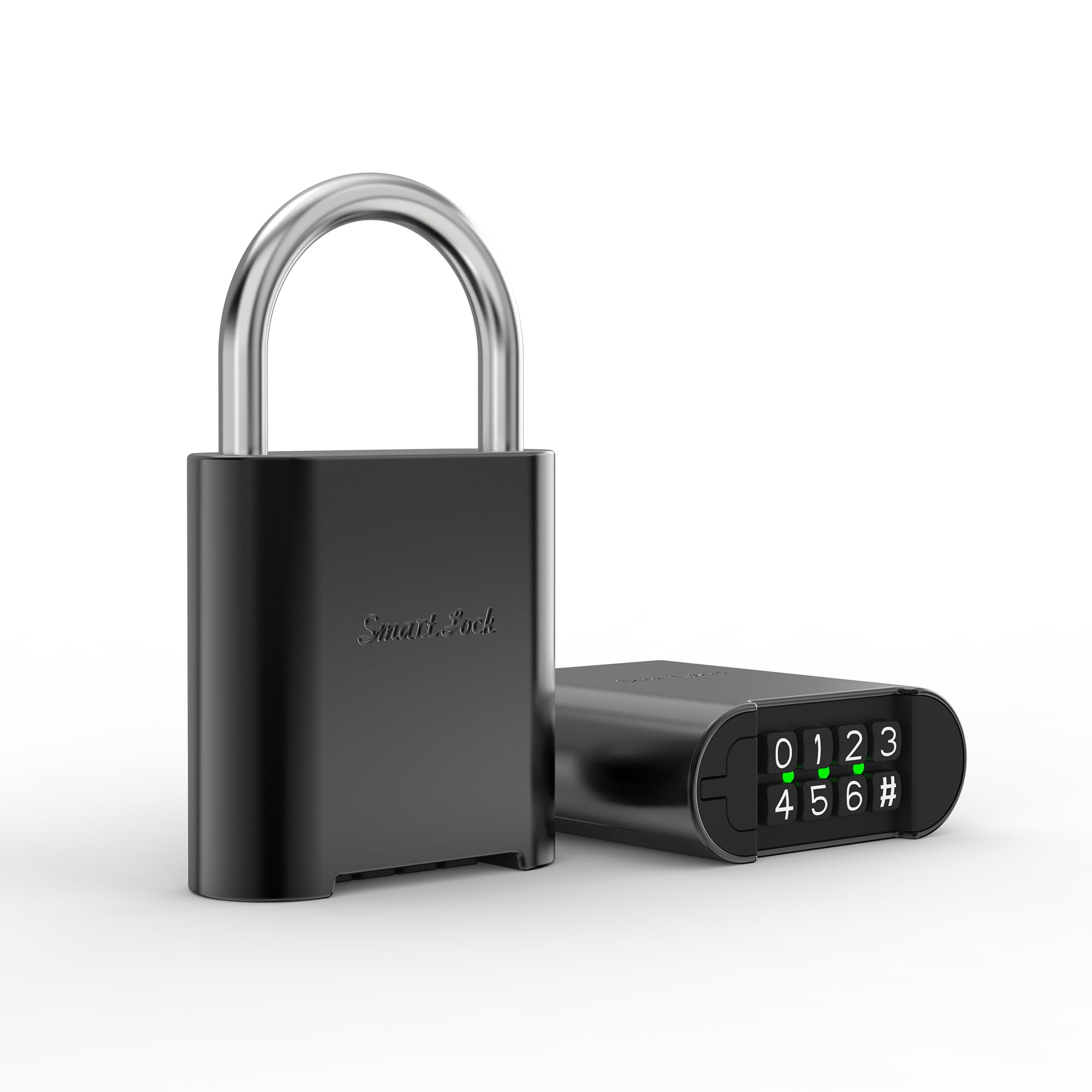
Figure 1: KENRONE KR-PL-5354-H Smart Padlock
Key Features:
- 6-Digit Combination: Offers thousands of possible combinations for enhanced security.
- IP66 Waterproof Rating: Ensures effective operation in various weather conditions, suitable for both indoor and outdoor use.
- Durable Construction: Body crafted from zinc alloy and beam from stainless steel for resilience against theft.
- USB Rechargeable: Long standby time (up to one year) and over 10,000 unlocks per charge.
- Randomized Keypad: Helps prevent fingerprint smudges from revealing code patterns.
3. Setup
Initial Unlocking:
- The padlock comes with a factory default code of "0000".
- Press the numbers 0-0-0-0 on the keypad.
- Press the unlock button (usually indicated by a padlock icon or a specific key). The shackle should release.
Setting a New Combination:
It is highly recommended to change the default combination immediately after initial unlocking.
- With the padlock unlocked and the shackle open, locate the reset button. This is typically a small button on the side or bottom of the lock, often requiring a pen or a thin object to press.
- Press and hold the reset button.
- While holding the reset button, enter your desired new 6-digit combination on the keypad. Choose a memorable but secure code.
- Release the reset button.
- Close the shackle. Test your new combination immediately to ensure it has been set correctly.
- Important: Write down your new combination and store it in a safe place. Do not store it near the padlock.
4. Operating the Padlock
Locking the Padlock:
- Ensure the shackle is fully inserted into the lock body.
- The padlock will automatically lock after a few seconds, or you may need to press a specific lock button (refer to the padlock's interface for specific indicators).
Unlocking the Padlock:
- Wake up the keypad by touching it or pressing any key if it's in sleep mode.
- Enter your 6-digit combination.
- Press the unlock button. The shackle will release, allowing you to open the padlock.
5. Maintenance
Charging the Padlock:
The padlock is equipped with a rechargeable battery. When the battery is low, an indicator light (if present) will typically flash or change color. To charge:
- Locate the USB charging port, usually covered by a waterproof seal.
- Open the seal and connect a standard USB charging cable (not included) to the port.
- Connect the other end of the cable to a USB power source (e.g., computer, wall adapter).
- A charging indicator light will illuminate. Once fully charged, the light will change or turn off.
- Ensure the waterproof seal is securely closed after charging to maintain IP66 rating.
A full charge can provide up to one year of standby time or over 10,000 unlocks.
Cleaning:
Wipe the padlock with a soft, damp cloth. Do not use abrasive cleaners or solvents, as these can damage the finish or electronic components.
6. Troubleshooting
| Problem | Possible Cause | Solution |
|---|---|---|
| Padlock does not unlock. | Incorrect combination entered. Low battery. Keypad unresponsive. |
Verify the combination and re-enter carefully. Charge the padlock using a USB cable. Ensure the keypad is awake; try touching it or pressing any key. |
| Shackle is stuck or difficult to close. | Obstruction or misalignment. Dirt or debris in the mechanism. |
Check for any physical obstructions. Clean the shackle and lock mechanism. Do not force the shackle. |
| Padlock does not respond to input. | Battery completely drained. Electronic malfunction. |
Charge the padlock for at least 30 minutes. If still unresponsive, contact customer support. |
| Cannot change combination. | Reset button not pressed correctly. Incorrect procedure followed. |
Refer to the "Setting a New Combination" section and follow steps precisely. Ensure the reset button is fully depressed. |
7. Specifications
- Model Name: 5354padlock (KR-PL-5354-H)
- Brand: KENRONE
- Lock Type: Combination Lock
- Special Feature: Passcode Unlock
- Material: Zinc Alloy (Body), Stainless Steel (Beam)
- Color: Gunmetal Gray
- Dimensions (L x W x H): 2 x 0.79 x 3.5 inches (5.08 x 2.01 x 8.89 cm)
- Item Weight: 0.45 Pounds (7.2 ounces / 202 grams)
- Waterproof Rating: IP66
- Control Method: Touch (Keypad)
- Power Source: USB Rechargeable Battery
- Battery Life: Up to 1 year standby, >10,000 unlocks per charge
- Included Components: Padlock, Instruction manual
8. Warranty and Support
KENRONE products are manufactured with quality and durability in mind. This product comes with a quality guarantee. If you encounter any issues or have questions regarding your KENRONE KR-PL-5354-H Smart Padlock, please do not hesitate to contact our customer support team.
For assistance, please refer to the contact information provided with your purchase or visit the official KENRONE website. Our team is ready to assist you with any inquiries.