
1. Product Overview
The ZARIMI A01-Ultra is a versatile cordless handheld vacuum cleaner designed for efficient cleaning in various environments, including cars, homes, and offices. It features a powerful brushless motor, multiple suction modes, and a 6-in-1 multi-functional design for vacuuming, blowing, and inflating tasks.

Image 1.1: The ZARIMI A01-Ultra Cordless Handheld Vacuum Cleaner shown with its complete set of accessories, including two batteries, charger, various nozzles, and filters.
2. Package Contents
Please verify that all items listed below are included in your package:
- ZARIMI A01-Ultra Cordless Handheld Vacuum Cleaner (1 unit)
- Rechargeable Batteries (2 units)
- Battery Charger (1 unit)
- Nozzles/Attachments (6 types): Flat Brush, Flat Suction Nozzle, Multi-Surface Nozzle, Air Suction Nozzle, Short Blow Nozzle, Long Blow Nozzle
- Reusable HEPA Filters (2 units)
- Storage Bag (1 unit)
- User's Manual (1 unit)
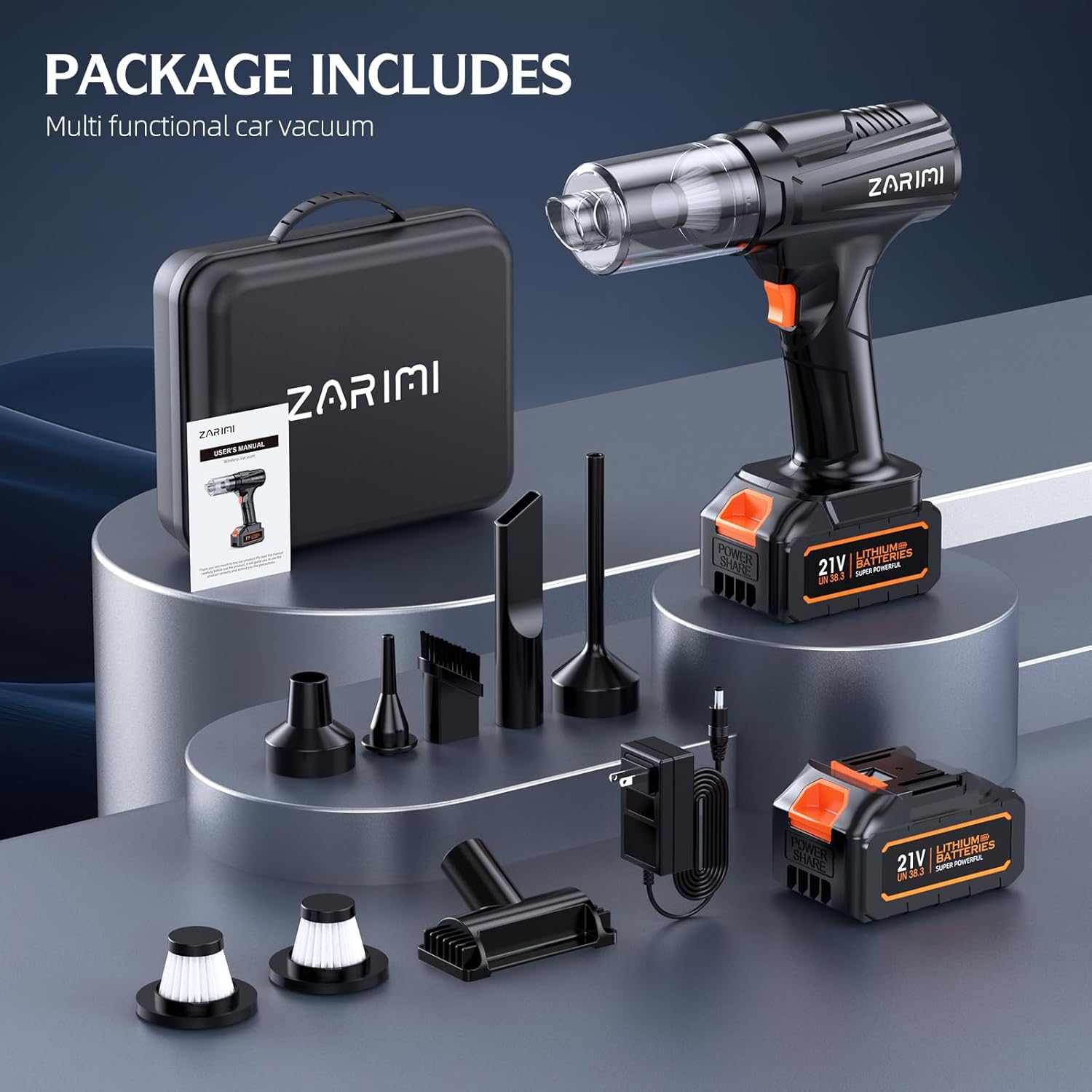
Image 2.1: Visual representation of all components included in the ZARIMI A01-Ultra package.
3. Setup Instructions
3.1 Charging the Batteries
- Connect the charger to a power outlet.
- Insert a battery into the charger. The indicator light on the charger will show the charging status.
- Allow the battery to fully charge before first use. A full charge typically takes approximately 3-4 hours.
- The vacuum includes two batteries for extended runtime.

Image 3.1: Illustration of the dual battery system, highlighting extended runtime capabilities (up to 150 minutes on low mode, 60 minutes on high mode).
3.2 Attaching Accessories
- Ensure the vacuum is turned off.
- Select the desired nozzle or attachment for your cleaning task.
- Align the attachment with the vacuum's intake or exhaust port (depending on function) and push firmly until it clicks into place.
- To remove, gently pull the attachment away from the vacuum.
4. Operating Instructions
4.1 Powering On/Off
To turn the vacuum on, press the power button located on the handle. Press it again to cycle through suction modes or to turn the unit off.
4.2 Adjusting Suction/Wind Modes
The vacuum features 3 adjustable modes for varying cleaning needs:
- First Gear (Low): Approximately 20,000 Pa suction, ideal for light dust and extended runtime.
- Second Gear (Medium): Approximately 35,000 Pa suction, suitable for general cleaning.
- Third Gear (High): Approximately 50,000 Pa suction, for stubborn debris and maximum power.
Press the power button repeatedly to cycle through these modes. The indicator lights on the vacuum will show the currently selected mode.

Image 4.1: Visual guide to the 3-speed adjustment feature, indicating different suction levels.
4.3 Multi-Functional Use
The ZARIMI A01-Ultra offers 6-in-1 functionality:
- Vacuuming: Use various nozzles for cleaning car interiors, furniture, and general surfaces.
- Dust Removal (Blowing): Attach a blow nozzle to clear dust from keyboards, electronics, or tight spaces.
- Inflating: Use the appropriate nozzle to inflate small items like balloons or air mattresses.
- Vacuum Storage: Utilize the air suction nozzle to compress vacuum storage bags.
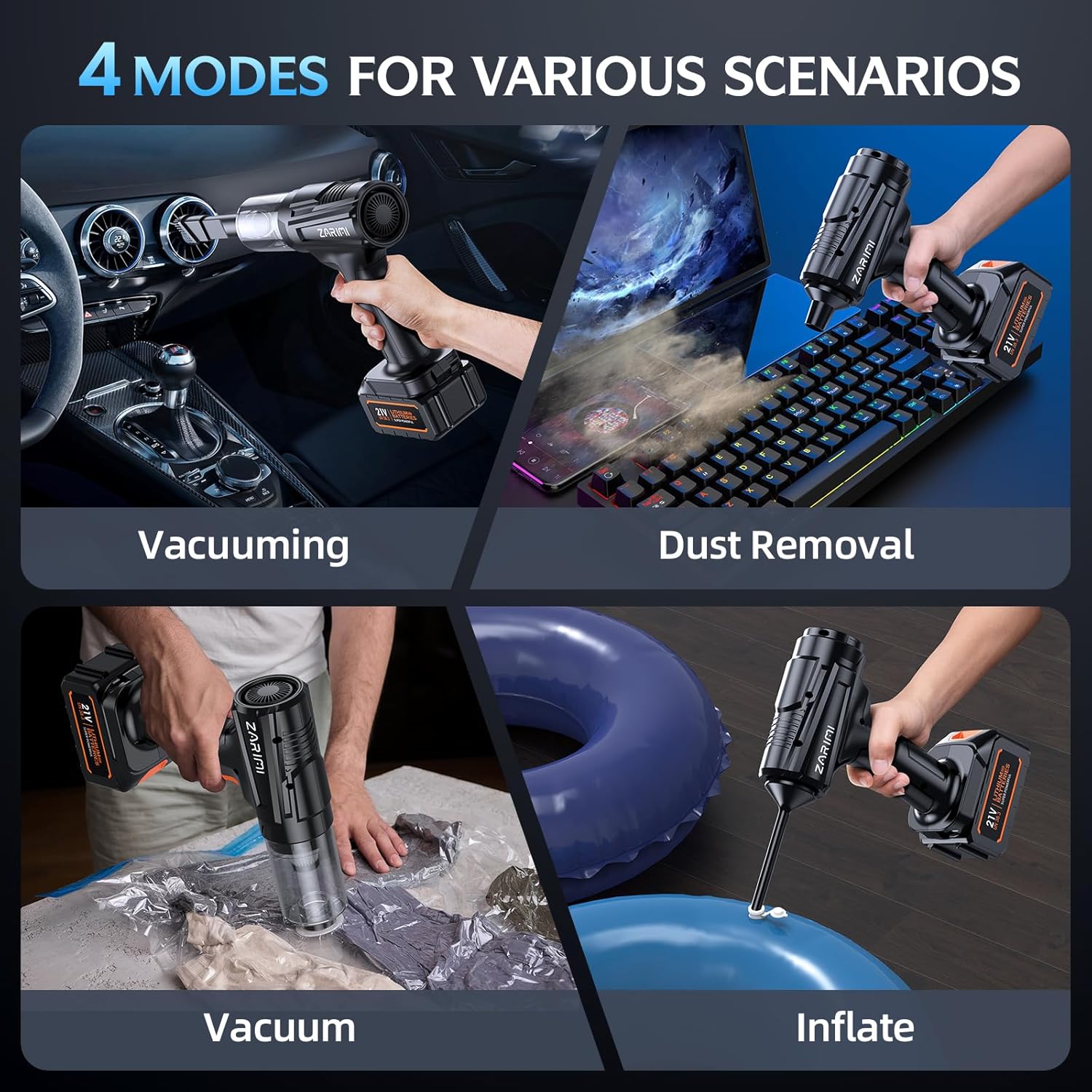
Image 4.2: Demonstrates the four primary modes of operation: vacuuming, dust removal, vacuum storage, and inflating.

Image 4.3: The vacuum cleaner effectively cleaning debris from a car floor mat.

Image 4.4: The vacuum cleaner being used to remove dust and pet hair from a sofa.

Image 4.5: The vacuum cleaner functioning as an air pump to inflate an air cushion.

Image 4.6: The vacuum cleaner used as a vacuum pump to compress items in a storage bag.
5. Maintenance
5.1 Emptying the Dust Cup
- Ensure the vacuum is turned off and disconnected from any power source.
- Rotate the dust collection cup counter-clockwise to detach it from the main unit.
- Carefully empty the contents of the dust cup into a waste bin.
- Reattach the dust cup by aligning it and rotating clockwise until secure.
5.2 Cleaning the HEPA Filter
Regular cleaning of the HEPA filter is crucial for maintaining optimal suction performance.
- After emptying the dust cup, remove the HEPA filter.
- Tap the filter gently to dislodge loose dust and debris.
- Rinse the filter under running water until clean. Do not use harsh detergents.
- Allow the filter to air dry completely before reinserting it into the vacuum. Ensure it is fully dry to prevent damage to the motor.
- Replace the filter if it shows signs of wear or damage.

Image 5.1: Step-by-step visual instructions for cleaning the vacuum's filter.
6. Troubleshooting
If you encounter issues with your ZARIMI A01-Ultra, please refer to the following common problems and solutions:
| Problem | Possible Cause | Solution |
|---|---|---|
| Vacuum does not turn on | Battery is not charged or not properly inserted. | Ensure battery is fully charged and correctly seated in the unit. |
| Low suction power | Dust cup is full, filter is clogged, or attachment is not properly sealed. | Empty dust cup, clean/replace filter, check attachment connection. |
| Battery not charging | Charger not connected, faulty charger, or battery issue. | Verify charger connection, try a different outlet, contact support if issue persists. |
| Unusual noise during operation | Obstruction in the nozzle or vacuum path. | Turn off the vacuum and check for any blockages in the nozzles or intake. |
7. Specifications
- Brand: ZARIMI
- Model Name: A01-Ultra
- Suction Power: Up to 50,000 Pa (Third Gear)
- Motor Type: Brushless Motor
- Battery Life: Up to 150 minutes (First Gear), 60 minutes (Third Gear)
- Filter Type: HEPA Filter (Reusable)
- Number of Speeds/Power Levels: 3
- Weight: Approximately 1.96 lbs (unit only) / 4.58 pounds (package weight)
- Included Components: 2 Batteries, Charger, 6 Nozzles, 2 Reusable Filters, Storage Bag
- Recommended Uses: Car, Home, Pet Hair, Keyboard
8. Warranty and Support
For warranty information, product support, or to purchase replacement parts, please contact the manufacturer or the seller directly. Refer to your purchase documentation for specific contact details and warranty terms.