
1. Introduction
The EUQQ Bluetooth Headset is designed for clear communication and comfortable wear, ideal for business calls, driving, and leisure. Featuring advanced noise-canceling technology and a long-lasting battery, this headset ensures reliable performance. This manual will guide you through the setup, operation, and maintenance of your new headset.
2. What's in the Box
- 1 x Single-ear Business Bluetooth Headset
- 1 x Charging Cable (Type-C)
- 1 x Charging Case (for 520-2 Single Ear with Charging Case model)
- 1 x Ear Cap (pre-installed)
- 2 x Spare Ear Caps (S/M/L sizes included)
- 1 x Instruction Manual
3. Product Overview
Familiarize yourself with the components and controls of your EUQQ Bluetooth Headset.

Figure 3.1: EUQQ Bluetooth Headset and Charging Case. The headset features an ergonomic design with a rotatable ear hook and microphone arm, along with a compact charging case that displays battery percentage.

Figure 3.2: Detailed view of the headset's multi-function buttons and Type-C charging port. Controls include play/pause, answer/hang up/reject calls, mute, volume adjustment, next/last song, and voice assistant activation.
4. Setup
4.1. Charging the Headset and Case
Before first use, fully charge the headset and its charging case. The charging case features an LED digital display to show real-time charging status.
- Connect the provided Type-C charging cable to the charging port on the case.
- Plug the other end of the cable into a standard USB power adapter (not included).
- Place the headset into the charging case. The LED display will indicate the charging progress.
- A full charge takes approximately 1.5 hours for the headset, providing 8-10 hours of continuous call or music playback. The 500mAh charging case can provide up to 60 hours of total talk/music time.

Figure 4.1: Illustration of the headset's battery life and charging capabilities. The headset offers 8-10 hours of use per charge, with the charging case extending total usage to 60 hours.
4.2. Bluetooth Pairing
The EUQQ Bluetooth Headset utilizes advanced Bluetooth 5.2 technology for quick and stable connections.
- Ensure the headset is charged.
- Turn on the headset. It will automatically enter pairing mode (indicated by a flashing LED light).
- On your device (smartphone, tablet, laptop), enable Bluetooth and search for available devices.
- Select "YYK-520" or "EUQQ Headset" from the list of devices.
- Once connected, the LED indicator on the headset will stop flashing.
- The headset supports dual-device connectivity, allowing seamless switching between two connected devices.

Figure 4.2: The headset can connect to two devices simultaneously, such as a laptop and a smartphone, for efficient multitasking.
5. Operating Instructions
5.1. Basic Functions
- Power On/Off: Press and hold the Multi-Function Button (MFB) for 3 seconds.
- Play/Pause Music: Single press the MFB.
- Answer/End Call: Single press the MFB during an incoming call.
- Reject Call: Press the MFB twice during an incoming call.
- Mute Function: During a call, press the MFB button to mute/unmute the microphone. This feature is useful for privacy in meetings or noisy environments.
- Volume Up/Down: Use the dedicated volume buttons (+/-).
- Next/Previous Song: Long press the volume + button for next song, long press volume - button for previous song.
- Activate Voice Assistant (Siri/Google Assistant): Press the MFB for 1 second.
Video 5.1: A demonstration of the EUQQ Bluetooth Headset's features, including its comfortable fit, call quality, and compatibility with various devices. This video highlights the practical use of the headset in daily scenarios.
6. Wearing the Headset
The EUQQ Bluetooth Headset is designed for maximum comfort and adaptability, allowing wear on both the left and right ears.
- Adjust the retractable ear hook (270° rotation) to fit comfortably over your ear.
- Rotate the microphone arm (180° swiveling) to position the microphone optimally towards your mouth for clear voice pickup.
- Choose the appropriate ear tip size (S/M/L included) for a secure and comfortable in-ear fit. The triple-point support and anti-slip structure ensure stability during use.
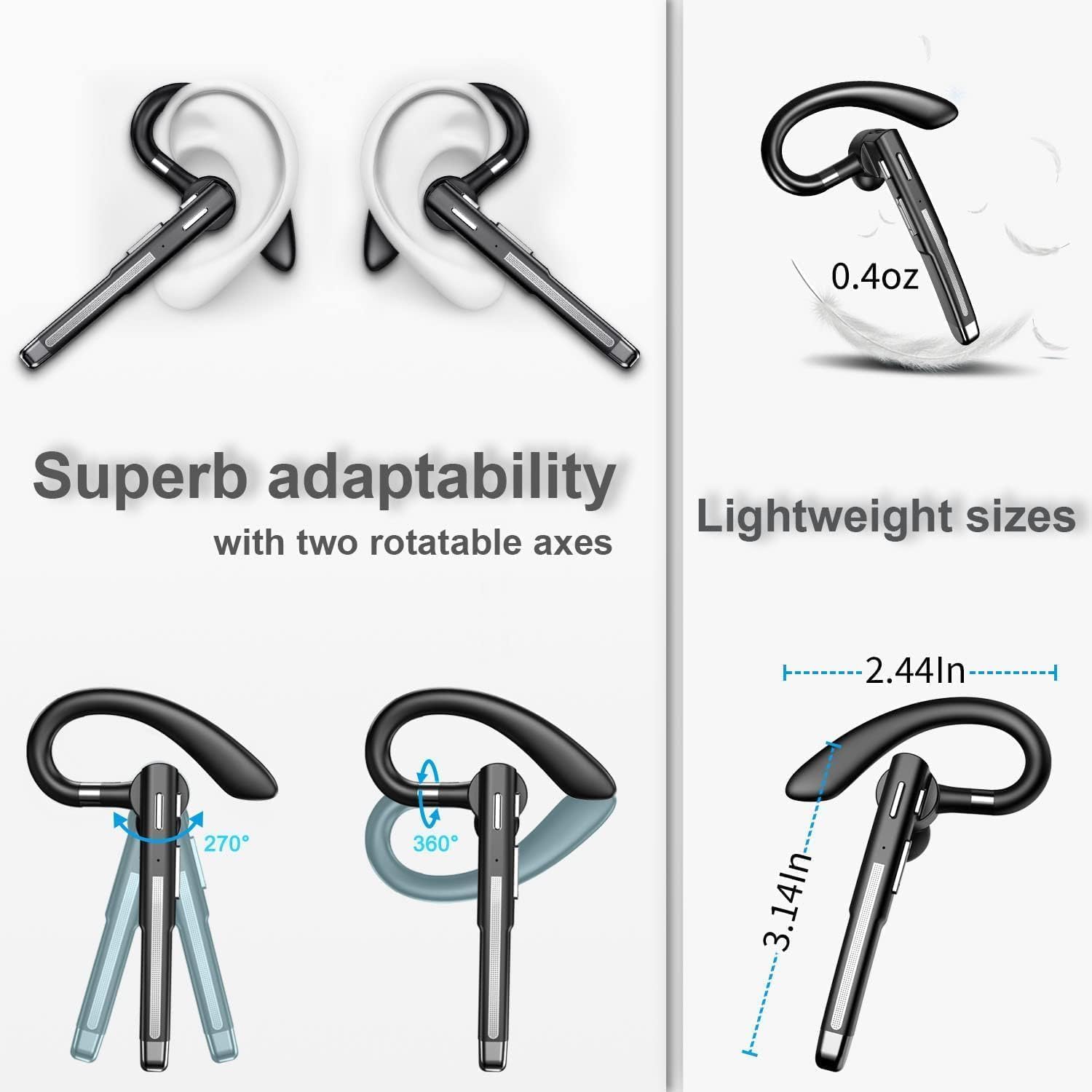
Figure 6.1: This image illustrates the headset's superb adaptability with two rotatable axes (270° ear hook rotation and 360° microphone arm swivel), ensuring a comfortable and secure fit for various users and ear orientations. It also highlights the lightweight design at 0.4oz.
7. Maintenance
To ensure the longevity and optimal performance of your EUQQ Bluetooth Headset, follow these maintenance guidelines:
- Cleaning: Use a soft, dry cloth to wipe the headset and charging case. Avoid using harsh chemicals or abrasive materials.
- Storage: When not in use, store the headset in its charging case to protect it from dust and damage. Store in a cool, dry place away from extreme temperatures.
- Battery Care: Avoid fully discharging the battery frequently. Charge the headset regularly, even if not in constant use, to maintain battery health.
- Water Resistance: The headset has a waterproof rating. However, avoid prolonged exposure to water or submersion. Dry thoroughly if it gets wet.
8. Troubleshooting
If you encounter issues with your EUQQ Bluetooth Headset, refer to the following common problems and solutions:
| Problem | Possible Cause | Solution |
|---|---|---|
| Headset does not power on. | Low battery. | Charge the headset and charging case fully. |
| Cannot pair with device. | Bluetooth is off on device; headset not in pairing mode; too far from device. | Ensure Bluetooth is enabled on your device. Put headset in pairing mode. Move headset closer to your device (within 33ft/10m). |
| No sound or low volume. | Volume too low; headset not selected as audio output; poor connection. | Increase volume on both headset and device. Check device's audio output settings. Re-pair the headset. |
| Microphone not working. | Microphone muted; incorrect audio input selection. | Unmute the microphone. Check device's audio input settings. |
| Intermittent connection. | Interference; too far from device; low battery. | Move away from sources of interference (e.g., Wi-Fi routers). Stay within 33ft/10m of your device. Charge the headset. |
9. Specifications
| Feature | Detail |
|---|---|
| Model Name | 520-2c |
| Connectivity Technology | Wireless (Bluetooth) |
| Bluetooth Version | 5.2 |
| Bluetooth Range | Up to 33 Feet (10m) |
| Noise Control | Environmental Noise Cancellation (CVC8.0) |
| Battery Life (Headset) | 8-10 Hours (Talk/Music Time) |
| Battery Life (with Charging Case) | Up to 60 Hours (Standby: 120 Hours) |
| Charging Time | Approx. 1.5 Hours |
| Charging Port | Type-C |
| Compatible Devices | iOS/Android phones, tablets, laptops, and all Bluetooth-enabled devices. |
| Material | Plastic |
| Item Weight | 0.4 oz (Headset) / 4.2 ounces (Package Weight) |
| Water Resistance Level | Waterproof |
| Ear Placement | In Ear (Hook style) |
| Control Type | Button Control |
10. Warranty and Support
Your EUQQ Bluetooth Headset is backed by a 30-Day No-Reason Return policy from the seller. For any product-related inquiries, technical support, or warranty claims, please contact the seller directly through your purchase platform. Please refer to your purchase receipt or order details for specific contact information.
For general assistance, you may also visit the EUQQ Store on Amazon: EUQQ Amazon Store.


