Introduction
This manual provides essential instructions for the safe and efficient use of your HONOR Choice Watch Smartwatch, Model BOT-WB01. Please read this manual thoroughly before using the device and retain it for future reference.
1. Setup
1.1 Package Contents
Ensure all items are present in the package:
- HONOR Choice Watch Smartwatch (BOT-WB01)
- Charging Cable
- User Manual (this document)
1.2 Initial Charging
Before first use, fully charge your smartwatch. Connect the charging cable to the watch's charging port and a compatible USB power adapter (not included). The watch display will indicate charging status. A full charge typically takes approximately 3 hours.
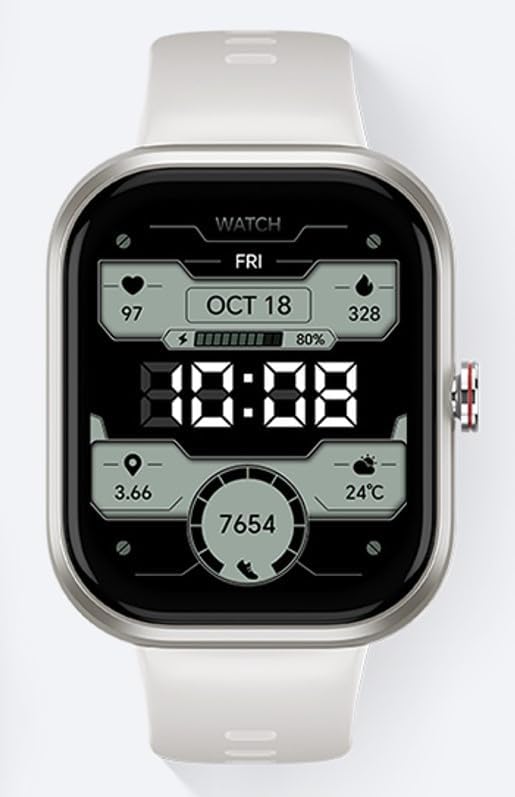
Image 1: Front view of the HONOR Choice Watch Smartwatch. The display shows the time, date, battery level, heart rate, oxygen saturation, steps, and temperature.
1.3 Powering On/Off
- To Power On: Press and hold the side button until the HONOR logo appears.
- To Power Off: Press and hold the side button, then select "Power Off" on the screen.
1.4 Pairing with a Smartphone
To unlock the full functionality of your smartwatch, pair it with your smartphone via Bluetooth. Ensure Bluetooth is enabled on your smartphone.
- Download and install the official HONOR Health app (or equivalent) from your smartphone's app store.
- Open the app and follow the on-screen instructions to create an account or log in.
- In the app, select "Add Device" and choose your HONOR Choice Watch from the list of available devices.
- Confirm the pairing request on both your smartphone and the watch.
2. Operating Instructions
2.1 Basic Navigation
- Touch Screen: Swipe left/right, up/down to navigate through menus and widgets. Tap to select an item.
- Side Button/Crown: Press to return to the home screen or access the app list. Rotate (if applicable) to scroll through lists.
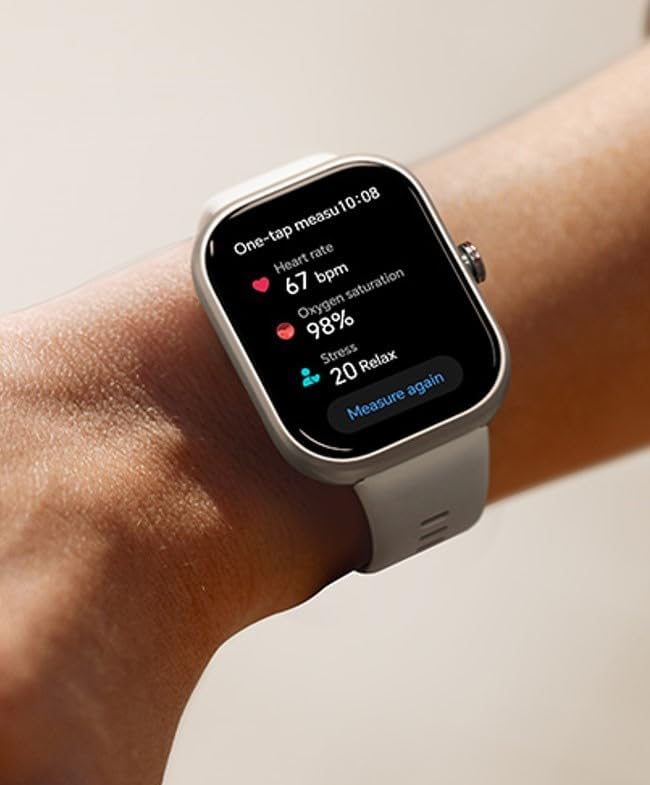
Image 2: Side view of the HONOR Choice Watch Smartwatch, showing the side button/crown used for navigation.
2.2 Health Monitoring
The watch can monitor various health metrics. Ensure the watch is worn snugly on your wrist for accurate readings.
- Heart Rate: Access the Heart Rate app to measure your current heart rate. Continuous monitoring can be enabled in the app settings.
- Oxygen Saturation (SpO2): Use the SpO2 app to measure your blood oxygen levels.
- Steps & Calories: The watch automatically tracks your daily steps, distance, and estimated calories burned.
- Stress Monitoring: The watch can monitor stress levels. Refer to the app for detailed insights and relaxation exercises.

Image 3: The HONOR Choice Watch on a user's wrist, displaying health data including heart rate, oxygen saturation, and stress level.
2.3 Notifications and Calls
Once paired, the watch can receive notifications from your smartphone. You can manage which app notifications appear on your watch through the companion app.
- View Notifications: Swipe down from the watch face to view recent notifications.
- Incoming Calls: The watch will display incoming call alerts. You can accept or reject calls directly from the watch.
2.4 Watch Faces
Customize your watch face by pressing and holding the current watch face, then swiping left or right to select a new one. More watch faces are available through the companion app.
3. Maintenance
3.1 Cleaning
Regularly clean your watch and strap to prevent skin irritation and maintain performance.
- Wipe the watch screen and body with a soft, lint-free cloth.
- For stubborn dirt, slightly dampen the cloth with water. Avoid using harsh chemicals or abrasive materials.
- Clean the strap with a damp cloth. Ensure the watch and strap are completely dry before wearing or charging.
3.2 Water Resistance
The HONOR Choice Watch is designed with a degree of water resistance. It is suitable for everyday use, such as hand washing or light rain. Avoid wearing it during showering, swimming, or diving, as prolonged exposure to water or high-pressure water may cause damage.
3.3 Storage
When not in use for extended periods, store the watch in a cool, dry place away from direct sunlight and extreme temperatures. Charge the watch periodically to maintain battery health.
4. Troubleshooting
4.1 Watch Not Powering On
- Ensure the watch is fully charged. Connect it to the charging cable and a power source for at least 10 minutes.
- Try pressing and holding the side button for 15 seconds to force a restart.
4.2 Unable to Pair with Smartphone
- Ensure Bluetooth is enabled on your smartphone and the watch.
- Make sure the watch is within the Bluetooth range of your smartphone.
- Restart both your smartphone and the watch.
- Clear the Bluetooth cache on your smartphone (if applicable) and try pairing again.
- Ensure the HONOR Health app is updated to the latest version.
4.3 Inaccurate Health Readings
- Ensure the watch is worn snugly on your wrist, not too tight or too loose.
- Avoid excessive movement during measurements.
- Clean the sensors on the back of the watch.
- Note that environmental factors and individual physiology can affect accuracy.
4.4 Factory Reset
If issues persist, a factory reset may resolve them. Warning: This will erase all data on your watch and restore it to its original settings. Navigate to Settings > System > Reset on your watch and confirm the action.
5. Specifications
| Brand | HONOR |
| Model | BOT-WB01 |
| Operating System | Standard |
| Display Type | Digital |
| Screen Size | 15 Inches (Note: This value seems unusually large for a smartwatch and might be a data entry error. Please refer to product packaging for actual screen size.) |
| Memory Storage Capacity | 128 GB |
| RAM Memory Installed Size | 256 GB |
| Battery Capacity | 10000 Milliamp Hours (Note: This value seems unusually large for a smartwatch and might be a data entry error. Please refer to product packaging for actual battery capacity.) |
| Battery Average Life | 12 Hours |
| Charging Time | 3 Hours |
| Connectivity Technology | Bluetooth |
| Wireless Standard | 802.11n |
| Material Type | Plastic |
| Compatible Devices | Smartphone |
| Special Feature | Safe |
Note: Some specifications, such as screen size and battery capacity, appear unusually high for a typical smartwatch. Please verify these details with the product packaging or official HONOR documentation.
6. Warranty and Support
6.1 Product Warranty
Your HONOR Choice Watch Smartwatch is covered by a limited manufacturer's warranty. For detailed warranty terms and conditions, please refer to the warranty card included with your product or visit the official HONOR website. This warranty typically covers defects in materials and workmanship under normal use.
6.2 Customer Support
If you encounter any issues not covered in this manual or require further assistance, please contact HONOR customer support. You can usually find contact information (phone, email, or support portal) on the official HONOR website or in your product documentation.
For the latest information, FAQs, and software updates, please visit the official HONOR support page.


