
Introduction
Thank you for choosing the YHO 40800mAh Wireless Portable Charger. This manual provides essential information for the safe and efficient operation of your device. Please read it thoroughly before use and retain it for future reference.
Product Overview
The YHO 40800mAh Wireless Portable Charger is a versatile power solution designed to charge multiple devices simultaneously. It features a high-capacity battery, built-in charging cables, wireless charging capability, and fast charging ports.
Components and Features
- High Capacity Battery: 40800mAh Lithium Polymer battery.
- Built-in Cables: Integrated Lightning cable and USB-C cable for convenient charging.
- Wireless Charging Pad: 15W wireless output for compatible devices.
- Multiple Output Ports: 1x USB-A output, 1x USB-C input/output port.
- Input Options: Built-in USB-C cable input and dedicated USB-C port input for recharging the power bank.
- LCD Digital Display: Shows remaining battery percentage and charging status.
- Fast Charging: 25W Power Delivery (PD) fast charging capability.

Figure 1: Overview of the YHO Portable Charger showing its 7 outputs and 2 inputs, including built-in cables, USB ports, wireless charging pad, and LCD display.
Setup
Initial Charging of the Power Bank
Before first use, fully charge your YHO Portable Charger. This ensures optimal battery performance and accuracy of the LCD display.
- Connect the built-in USB-C input cable or a separate USB-C cable to the USB-C input port on the power bank.
- Connect the other end of the cable to a compatible USB wall adapter (not included).
- The LCD display will show the charging progress, indicating 100% when fully charged.
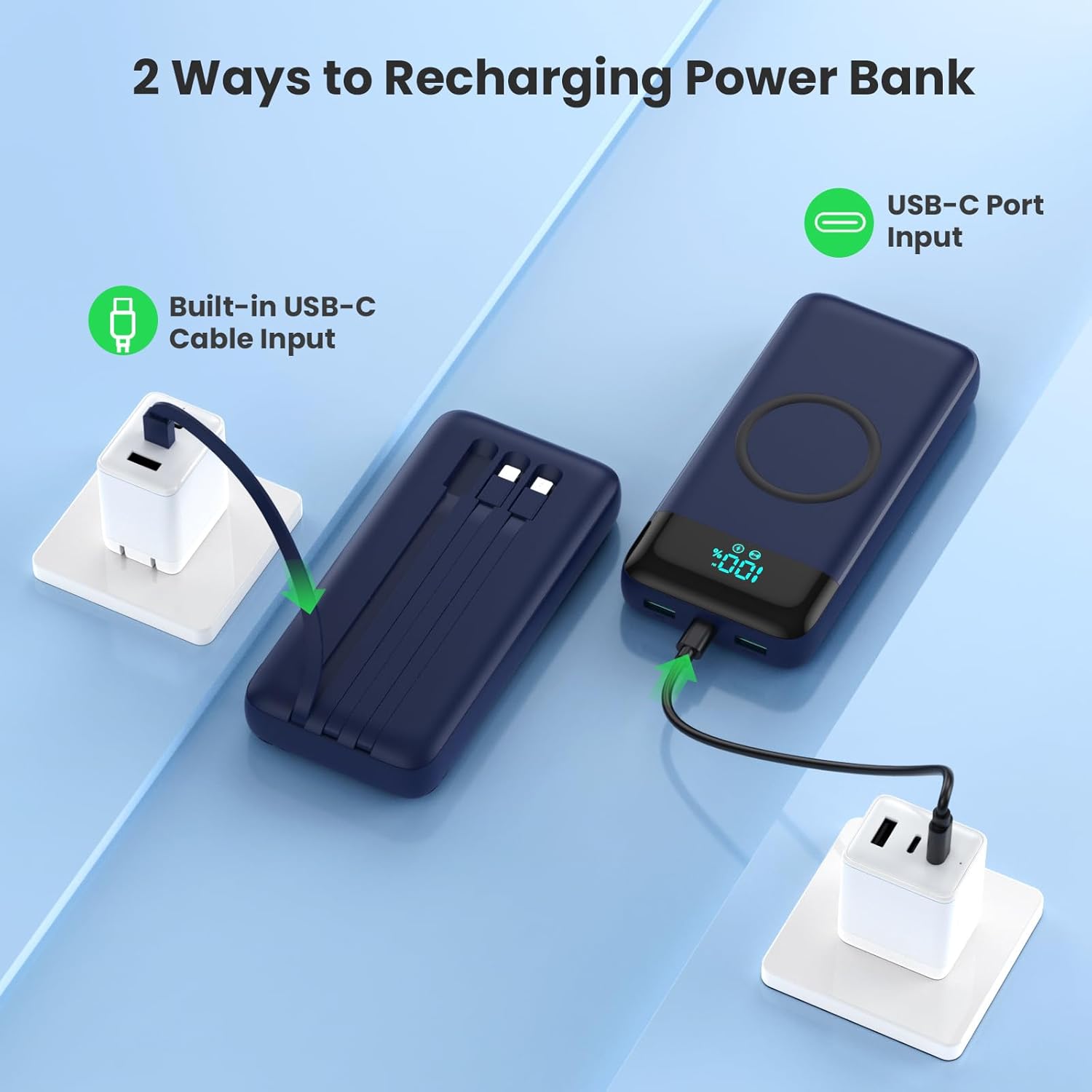
Figure 2: The power bank can be recharged using its built-in USB-C cable or the dedicated USB-C input port.
Operating Instructions
Charging Your Devices (Wired)
The power bank offers multiple wired charging options:
- Using Built-in Cables: Pull out the integrated Lightning cable for Apple devices or the USB-C cable for Android and other USB-C devices. Connect the appropriate cable directly to your device.
- Using USB-A Output: Connect your device's USB-A charging cable to the USB-A output port on the power bank.
- Using USB-C Output: Connect your device's USB-C charging cable to the USB-C input/output port on the power bank. This port supports 25W Power Delivery (PD) for fast charging compatible devices.
The power bank will automatically begin charging your device. The LCD display will show the charging status.

Figure 3: The 25W output ensures faster charging for compatible devices, significantly reducing charging time.
Charging Your Devices (Wireless)
For devices with wireless charging capability:
- Place your wireless-enabled device (e.g., smartphone) directly onto the wireless charging pad located on the top surface of the power bank.
- Ensure the device is centered on the pad for optimal connection.
- Press the power button on the side of the power bank to activate wireless charging if it does not start automatically.
- The LCD display will indicate wireless charging is active.
The power bank supports 15W wireless charging for compatible devices.

Figure 4: The power bank supports fast wireless charging for all compatible devices, indicated by the charging icon on the device screen.
Simultaneous Charging
The YHO Portable Charger can charge up to 7 devices simultaneously using a combination of its built-in cables, USB output ports, and wireless charging pad.

Figure 5: Illustrates the capability of the power bank to charge up to 7 devices concurrently using its various outputs.
Maintenance
- Cleaning: Use a soft, dry cloth to clean the surface of the power bank. Avoid using harsh chemicals or abrasive materials.
- Storage: Store the power bank in a cool, dry place away from direct sunlight and extreme temperatures.
- Battery Care: To prolong battery life, fully charge the power bank at least once every three months if not in regular use. Avoid completely draining the battery frequently.
- Handling: Do not drop, puncture, or disassemble the device.
Troubleshooting
| Problem | Possible Cause | Solution |
|---|---|---|
| Power bank not charging | Loose cable connection; faulty wall adapter; power bank fully discharged. | Ensure all cables are securely connected. Try a different wall adapter. Allow the power bank to charge for an extended period if deeply discharged. |
| Device not charging from power bank | Loose cable connection; incompatible cable; device fully charged; power bank battery low. | Check cable connections. Use the correct cable for your device. Ensure the power bank has sufficient charge. |
| Wireless charging stops or does not start | Device not properly aligned; power button not pressed; phone case too thick; foreign objects on pad. | Ensure your device is centered on the wireless charging pad. Press the power button to activate wireless charging. Remove thick phone cases or metallic objects. |
| LCD display shows confusing battery indicator | The power bank uses a color-coded system for battery levels, which may not be immediately intuitive. | Refer to the product packaging or manufacturer's website for a detailed explanation of the color codes. Generally, a red indicator signifies low battery. |
Specifications
| Model Name | Wireless Portable Charger |
| Model Number | HX160Q2 |
| Battery Capacity | 40800 Milliamp Hours (mAh) |
| Battery Cell Type | Lithium Polymer |
| Input (USB-C Port) | 5V/3A, 9V/2A, 12V/1.5A (Max 18W) |
| Output (Built-in Lightning Cable) | 5V/2.4A |
| Output (Built-in USB-C Cable) | 5V/3A, 9V/2.22A, 12V/1.67A (Max 20W PD) |
| Output (USB-A Port) | 5V/3A, 9V/2A, 12V/1.5A (Max 18W QC) |
| Output (USB-C Port) | 5V/3A, 9V/2.22A, 12V/1.67A (Max 20W PD) |
| Wireless Output | 5W/7.5W/10W/15W |
| Total Output | 25W Max |
| Dimensions (L x W x T) | 6.26 x 2.99 x 1.29 inches (15.9 x 7.6 x 3.3 cm) |
| Weight | 475g (16.75 oz) |
| Compatible Devices | iPhone 17/16/15/14/13/12 Series, Samsung Galaxy S24/S23/S22/S21 Series, Google Pixel, LG, Tablets, Smartwatches, Bluetooth Headsets, and other USB-charged electronic devices. |
Safety Information
Please observe the following safety precautions to prevent damage to the product or injury to yourself:
- Do not expose the power bank to water, moisture, or high humidity.
- Avoid exposing the device to extreme temperatures (above 45°C or below 0°C).
- Do not disassemble, modify, or attempt to repair the power bank. This will void the warranty and may cause safety hazards.
- Keep out of reach of children.
- Avoid dropping or subjecting the power bank to strong impacts.
- The power bank includes built-in safety features such as overcharge, over-voltage, over-current, and short-circuit protection. However, always use the device responsibly.
Warranty and Support
Warranty
The YHO 40800mAh Wireless Portable Charger comes with a 3-year warranty from the date of purchase. This warranty covers manufacturing defects and ensures the product meets its stated specifications under normal use. Please retain your proof of purchase for warranty claims.
Customer Support
For any questions, technical assistance, or warranty inquiries, please contact YHO customer support. Refer to the contact information provided with your product packaging or visit the official YHO website for support details.
