
AXIL XCOR-SE
AXIL XCOR PRO SE Earbuds User Manual
Your guide to setting up, operating, and maintaining your AXIL XCOR PRO SE Earbuds.
1. Product Overview
The AXIL XCOR PRO SE Earbuds are advanced 4-in-1 Bluetooth digital ear protection devices designed for various environments. They offer hearing protection, hearing enhancement, Bluetooth 5.2 audio connectivity, and hands-free communication.

Image 1.1: The AXIL XCOR PRO SE Earbuds, showcasing their compact design.
Key Features:
- 4-in-1 Bluetooth Digital Ear Protection
- Digital Hearing Control and Enhancement (up to 6X)
- Advanced Noise Isolation with 26dB SNR
- Bluetooth 5.2 Connectivity for audio and calls
- Easy On-Board Touch and Tap Controls
- Dynamic Audio Drivers for studio-quality sound
- Protective Case with USB-C charging
2. What's Included
Your AXIL XCOR PRO SE Earbuds package contains the following items:
- AXIL XCOR PRO SE Earbuds (Left and Right)
- Charging Case
- USB-C Charging Cord
- Carry Case
- 6 Ear Tips (3 Foam, 3 Silicone)
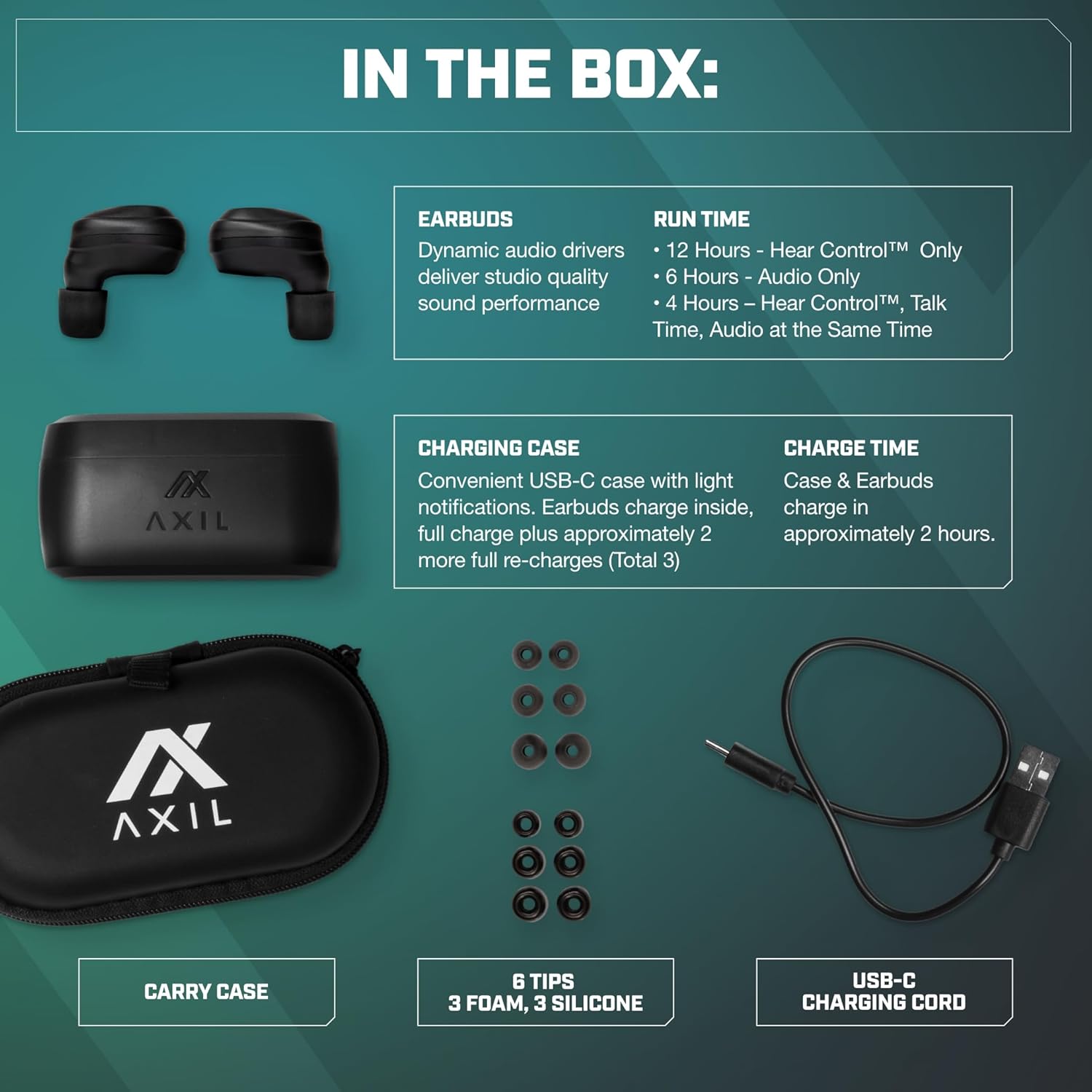
Image 2.1: All items included in the AXIL XCOR PRO SE Earbuds package.
3. Setup
3.1. Charging the Earbuds and Case
- Place the earbuds into the charging case. Ensure they are seated correctly.
- Connect the USB-C charging cord to the charging port on the case and plug the other end into a compatible USB power source.
- The charging case has light notifications to indicate charging status. A full charge for both the case and earbuds takes approximately 2 hours.
- The fully charged case provides approximately 2 additional full re-charges for the earbuds.
3.2. Selecting and Installing Ear Tips
Choose the ear tips (foam or silicone) that provide the best seal and comfort for your ears. A proper seal is crucial for effective noise reduction and sound quality.
- Gently remove the pre-installed ear tips.
- Select a pair of foam or silicone tips that fit snugly in your ear canal.
- Carefully push the new ear tips onto the earbud nozzle until securely attached.

Image 3.1: Illustration of the physical seal provided by the foam ear tip for noise reduction.
3.3. Bluetooth Pairing
- Ensure the earbuds are charged and removed from the charging case. They will automatically enter pairing mode.
- On your device (smartphone, laptop, tablet), navigate to the Bluetooth settings.
- Search for available devices and select "AXIL XCOR" from the list.
- Once connected, your device will indicate successful pairing.

Image 3.2: Example of Bluetooth pairing on a smartphone, showing 'AXIL XCOR' as a connected device.
4. Operating Instructions
4.1. Power On/Off
- Power On: Remove the earbuds from the charging case. They will automatically power on.
- Power Off: Place the earbuds back into the charging case. They will automatically power off and begin charging.
4.2. Hearing Protection and Enhancement
The XCOR PRO SE Earbuds feature both hearing protection and enhancement modes.

Image 4.1: Detailed view of the earbud's touch control area and volume button for hearing control.
- Activating/Deactivating Hearing Protection: Long press the Touch Control Area on either earbud to turn Hearing Protection ON or OFF. When ON, sounds above 85dB will be compressed by Advanced AutoBlocker™ technology.
- Adjusting Hearing Enhancement: Use the 'HEAR CONTROL™ & PROTECTION MODE' volume button on the earbud to adjust the level of hearing enhancement. The digital microphone provides up to 6X hearing enhancement.

Image 4.2: Visual representation of how the earbuds simultaneously provide hearing enhancement and protection.
4.3. Audio Playback and Calls
Once connected via Bluetooth, you can control audio playback and manage calls using the earbud's touch controls.
- Play/Pause: Single tap the Touch Control Area on either earbud.
- Next Track: Double tap the right earbud.
- Previous Track: Double tap the left earbud.
- Answer/End Call: Single tap the Touch Control Area on either earbud.
- Reject Call: Long press the Touch Control Area on either earbud.
5. Maintenance
5.1. Cleaning
Regular cleaning helps maintain performance and hygiene.
- Gently wipe the earbuds and charging case with a soft, dry, lint-free cloth.
- Remove ear tips and clean them separately with mild soap and water if necessary. Ensure they are completely dry before reattaching.
- Do not use abrasive cleaners or solvents.
- The earbuds are water-resistant, but avoid submerging them in water.

Image 5.1: The earbud demonstrating its water-resistant properties, suitable for various activities.
5.2. Storage
When not in use, store the earbuds in their charging case to protect them and ensure they remain charged.
6. Troubleshooting
If you encounter issues with your AXIL XCOR PRO SE Earbuds, refer to the following common solutions:
| Problem | Solution |
|---|---|
| Earbuds not powering on | Ensure earbuds are charged. Place them in the charging case for at least 30 minutes. |
| Cannot pair with device | Make sure Bluetooth is enabled on your device. Ensure earbuds are in pairing mode (out of case). Forget previous pairings on your device and try again. |
| No sound or poor audio quality | Check device volume. Ensure earbuds are properly seated in your ears with a good seal. Re-pair the earbuds with your device. |
| Hearing protection/enhancement not working | Ensure the feature is activated via the touch controls. Check earbud battery level. |
| One earbud not working | Place both earbuds back in the charging case, close the lid, wait a few seconds, then remove them. Ensure both are charged. |
7. Specifications
Detailed technical specifications for the AXIL XCOR PRO SE Earbuds:
| Feature | Detail |
|---|---|
| Model Name | XCOR-SE |
| Connectivity Technology | Wireless (Bluetooth) |
| Wireless Communication Technology | Bluetooth 5.2 |
| Noise Control | Electronic Protection (compresses sounds above 85dB) |
| Noise Reduction Rating (SNR) | Up to 26 dB (with proper ear tips) |
| Audio Driver Type | Dynamic Driver |
| Frequency Range | 20Hz - 20,000Hz |
| Impedance | 30 Ohm |
| Ear Placement | In Ear |
| Item Weight | 6 Ounces (total package) |
| Earbud Run Time (Hear Control™ Only) | 12 Hours |
| Earbud Run Time (Audio Only) | 6 Hours |
| Earbud Run Time (Hear Control™, Talk Time, Audio) | 4 Hours |
| Case & Earbuds Charge Time | Approximately 2 Hours |
| UPC | 734690473522 |
8. Warranty and Support
For warranty information and customer support, please refer to the official AXIL website or contact their customer service directly. Keep your proof of purchase for any warranty claims.
Manufacturer: AXIL
Contact: Please visit the AXIL Store on Amazon or the official AXIL website for support resources.
Ask a question about this manual
Ask about setup, troubleshooting, compatibility, parts, safety, or missing instructions. Manuals+ will review the question and use this page’s manual context to help answer it.