
1. Introduction
This manual provides essential instructions for the safe and efficient operation of your PECRON E3600LFP Portable Power Station System with 240V Double Voltage Hub. This system is designed to provide reliable power for various applications, including home backup, RV use, and outdoor activities. Please read this manual thoroughly before using the product and retain it for future reference.
2. Safety Information
Always observe the following safety precautions to prevent injury or damage to the product:
- Do not disassemble, repair, or modify the unit. Incorrect reassembly may cause fire or electric shock.
- Do not place the unit near fire or expose it to high temperatures.
- Do not store or use the unit in direct sunlight or in hot environments.
- Do not use or store the unit in a bathroom or in areas exposed to water or moisture.
- Use only original or certified cables and accessories.
- Keep the unit away from children and pets.
- Ensure proper ventilation during use to prevent overheating.
- The built-in Battery Management System (BMS) protects against short circuits, overloads, and overheating. Do not attempt to bypass these safety features.
3. Package Contents
Verify that all items are included in your package:
- 2 x PECRON E3600LFP Portable Power Station
- 1 x 240V Double Voltage Hub
- 2 x 15A AC Cable
- 2 x 30A AC Cable
- 2 x Single Port XT60 to MC4 Solar Charging Cable
- 2 x Parallel Dual Port XT60 to MC4 Solar Charging Cable
- 2 x Car Charging Cable
- 2 x Slotted Screwdriver
- 2 x Accessory Pouch
- 2 x User Instruction Manual (this document)

Image: Two PECRON E3600LFP units connected via the 240V Double Voltage Hub, demonstrating the system setup.
4. Setup
4.1 Initial Inspection
Upon receiving your PECRON E3600LFP system, carefully unpack all components and inspect them for any signs of damage. If any items are missing or damaged, contact customer support immediately.
4.2 Connecting the 240V Double Voltage Hub
To achieve 240V output and combine the power of two E3600LFP units, use the 240V Double Voltage Hub:
- Ensure both E3600LFP units are powered off.
- Connect the provided 15A AC cables from each E3600LFP unit to the 240V Double Voltage Hub.
- Connect your 240V appliance to the appropriate outlet on the 240V Double Voltage Hub.
- Power on both E3600LFP units. The system will automatically configure for 240V output.
Image: Visual representation of two E3600LFP units connected to the 240V Double Voltage Hub.
5. Operating Instructions
5.1 Powering On/Off
To power on the unit, press and hold the main power button until the display illuminates. To power off, press and hold the main power button again until the display turns off.
5.2 Using AC/DC Outputs
Each output section (AC, DC, USB) has its own ON/OFF button. Press the corresponding button to activate or deactivate the desired output. The display will show the active outputs and power consumption.

Image: Overview of the 16 available output ports on the E3600LFP unit.
5.3 UPS Functionality
The E3600LFP features an Uninterruptible Power Supply (UPS) function. When connected to an AC wall outlet, the unit can pass through power to connected devices while simultaneously charging. In the event of a power outage, the unit will automatically switch to battery power within 8-20 milliseconds, providing seamless power to sensitive electronics.
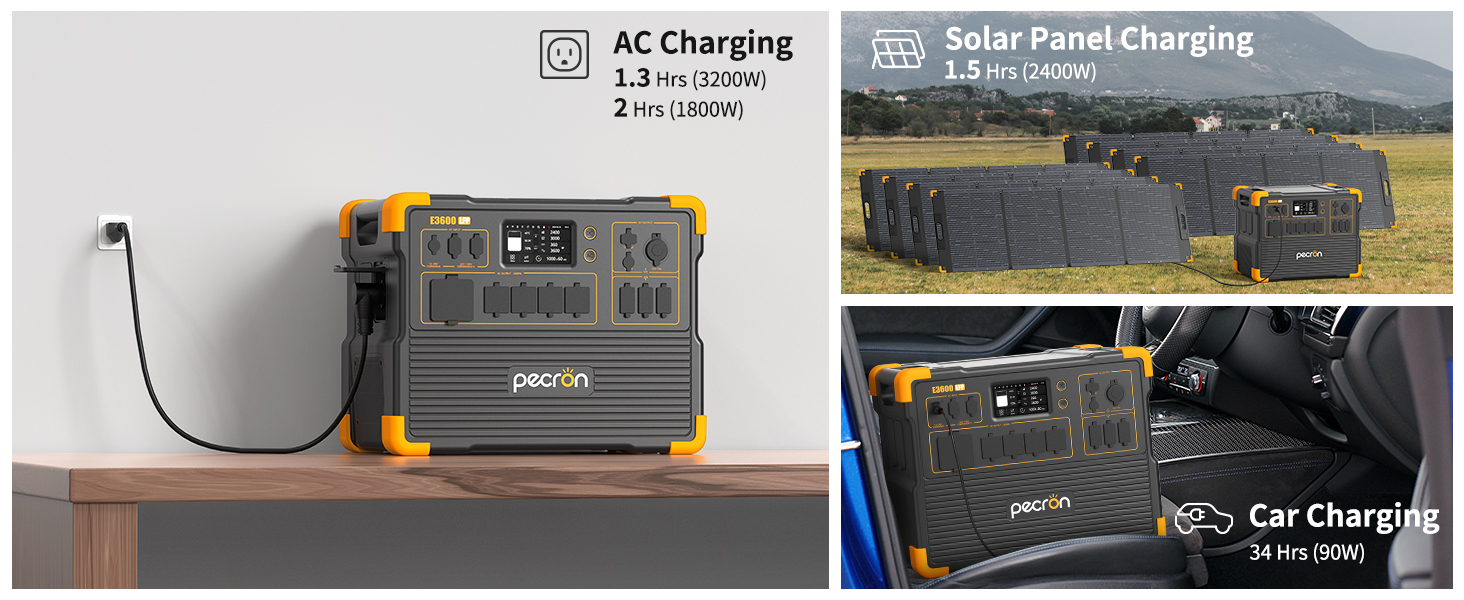
Image: The UPS function in action, providing backup power to a computer.
6. Charging the Power Station
The PECRON E3600LFP offers multiple charging methods:

Image: Visual guide to AC, Solar, and Car charging methods.
6.1 AC Charging
Connect the provided AC charging cable to the AC input port on the E3600LFP and then to a standard wall outlet. The unit supports fast charging:
- Full charge in approximately 1.3 hours with 3200W AC input.
- Full charge in approximately 2 hours with 1800W AC input.
6.2 Solar Panel Charging
Connect compatible solar panels (sold separately) to the DC input ports using the provided XT60 to MC4 solar charging cables. Ensure solar panels are placed in direct sunlight for optimal charging efficiency.
- Full charge in approximately 1.5 hours with 8x300W solar panels (2400W total).
6.3 Car Charging
Use the provided car charging cable to connect the E3600LFP to your vehicle's 12V cigarette lighter port. This method is suitable for charging on the go.
7. Output Ports
The E3600LFP offers a wide range of output options to power various devices:
- AC Output: 4 x 100V-120V Rated 3600W (Pure Sine Wave)
- TT30-R Output: 1 x TT30-R (RV Ready)
- USB-A Output: 4 x USB-A ports
- USB-C Output: 2 x 100W USB-C ports
- XT60-F Output: 1 x XT60-F port
- Cigar Port: 1 x 12V Cigar Lighter port
- DC5525 Output: 1 x DC5525 port
- Wireless Charger: 2 x Wireless charging pads on top of the unit
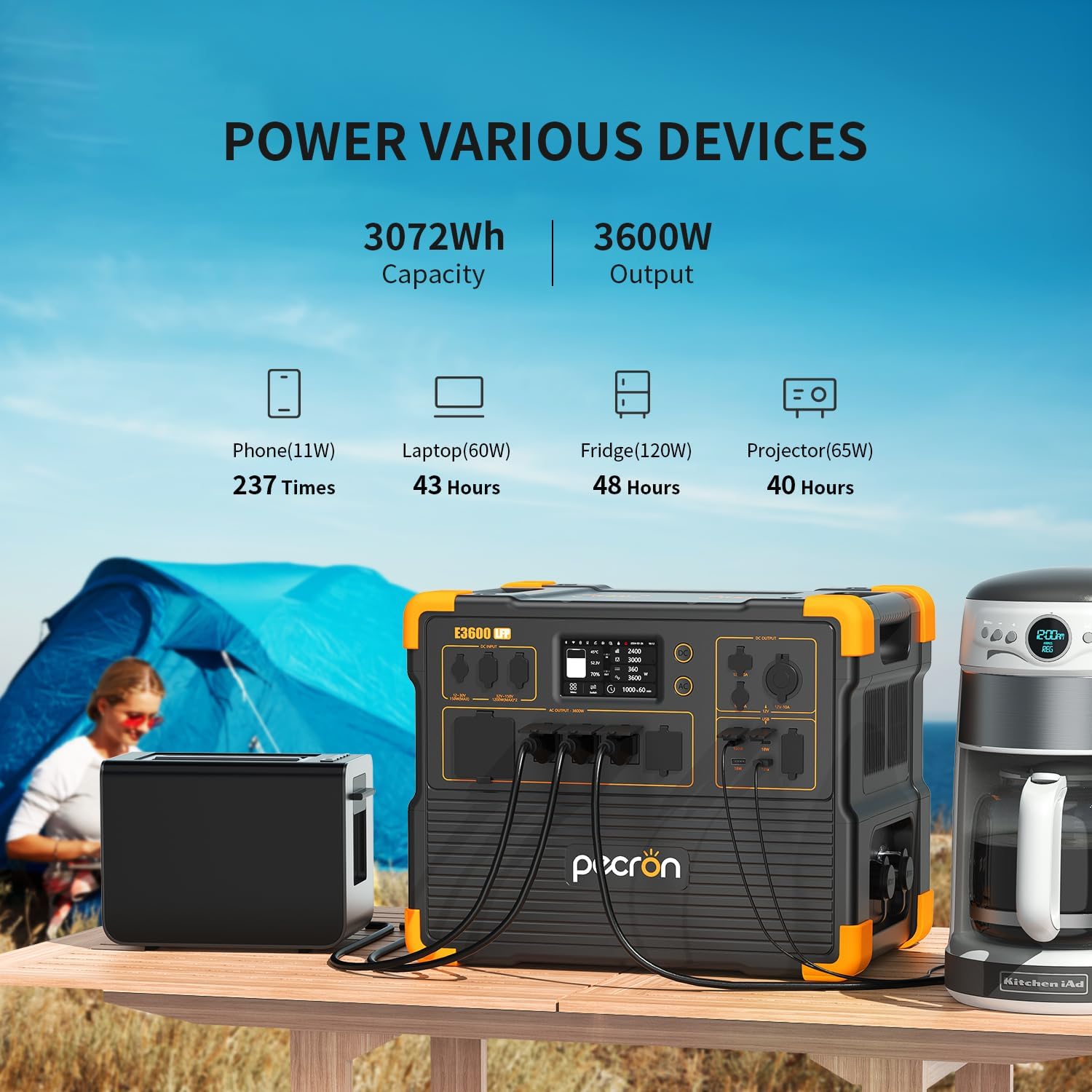
Image: Examples of devices powered by the E3600LFP and their estimated run times.
8. Expansion Options
The PECRON E3600LFP system is highly expandable to meet greater power demands:
- Capacity Expansion: The 3072Wh capacity of a single E3600LFP unit can be expanded up to 15360Wh using the EP3000-48V expansion batteries, or up to 18432Wh using 4 x EP3800 (3840Wh) expansion batteries.
- 240V Double Voltage Hub: Connect two E3600LFP units with the 240V Double Voltage Hub to achieve a combined output of up to 7200W at 240V.

Image: Various configurations for expanding the E3600LFP's battery capacity.
9. App Control
Manage and monitor your PECRON E3600LFP power station using the dedicated mobile application:
- Connectivity: Connect via Wi-Fi or Bluetooth.
- Real-time Monitoring: View current power levels, input/output wattage, and battery status.
- Customized Charging: Adjust charging power settings to optimize charging speed or prolong battery life.

Image: The PECRON mobile app interface for smart control and monitoring.
10. Maintenance
Proper maintenance ensures the longevity and optimal performance of your power station:
- Storage: Store the unit in a cool, dry place away from direct sunlight and extreme temperatures. For long-term storage, charge the unit to 50-80% every 3-6 months.
- Cleaning: Use a dry, soft cloth to clean the exterior of the unit. Do not use harsh chemicals or abrasive materials.
- Battery Life: The LiFePO4 battery is designed for over 3500 complete charge cycles while retaining 80% of its original capacity. Avoid consistently fully discharging the battery to prolong its lifespan.
- Ventilation: Ensure ventilation openings are clear of dust and debris to prevent overheating.

Image: Illustration of the durable LiFePO4 battery with over 3500 charge cycles.
11. Troubleshooting
If you encounter issues, refer to the following common problems and solutions:
| Problem | Possible Cause | Solution |
|---|---|---|
| Unit does not power on. | Battery is completely discharged; Power button not pressed correctly. | Charge the unit using an AC adapter. Press and hold the power button for 3 seconds. |
| AC output not working. | AC output not enabled; Overload protection activated. | Press the AC ON/OFF button. Reduce the load on the AC outlets. |
| Slow charging. | Low input power; Environmental factors (e.g., cloudy weather for solar). | Ensure the charging source provides sufficient power. Optimize solar panel placement. Check app for customized charging power settings. |
| 240V Hub not providing power. | Units not properly connected; One or both units are off. | Verify all cables are securely connected. Ensure both E3600LFP units are powered on. |
If the problem persists, please contact PECRON customer support.
12. Specifications
| Feature | Detail (Per E3600LFP Unit) |
|---|---|
| Model | E3600LFP |
| Capacity | 3072Wh |
| AC Output (Rated) | 3600W (Pure Sine Wave, 100V-120V) |
| AC Output (Peak) | 7200W (with 240V Double Voltage Hub) |
| Battery Type | LiFePO4 |
| Cycle Life | 3500+ cycles to 80% capacity |
| AC Charging Time (3200W) | Approx. 1.3 hours |
| Solar Charging Time (2400W) | Approx. 1.5 hours |
| Output Ports | 4x AC, 1x TT30-R, 4x USB-A, 2x 100W USB-C, 1x XT60-F, 1x Cigar Port, 1x DC5525, 2x Wireless Charger |
| Expandable Capacity | Up to 18432Wh (with additional batteries) |
| Dimensions (L x W x H) | 17.5"L x 12.1"W x 13.8"H |
| Weight | 79 Pounds |
| Special Features | Portable, Fast Charging, Large Capacity, Long Last, Safety (BMS), Smart Control (App), UPS |
13. Warranty and Support
PECRON provides a 2+3 years worry-free warranty for the E3600LFP Portable Power Station System. This includes a standard 2-year warranty, with an additional 3 years upon product registration or specific conditions. For warranty claims, technical assistance, or any inquiries, please contact PECRON customer service.
Customer Service: Available 24 hours a day, 7 days a week.
Please refer to your purchase documentation or the official PECRON website for the most up-to-date contact information and detailed warranty terms.


