
Introduction
Welcome to your Cherub WSM-305 Mechanical Metronome. This manual provides essential information for the proper setup, operation, and maintenance of your device, ensuring you get the most out of its features for your musical practice.
Product Overview
Familiarize yourself with the Cherub WSM-305 Mechanical Metronome and its components.
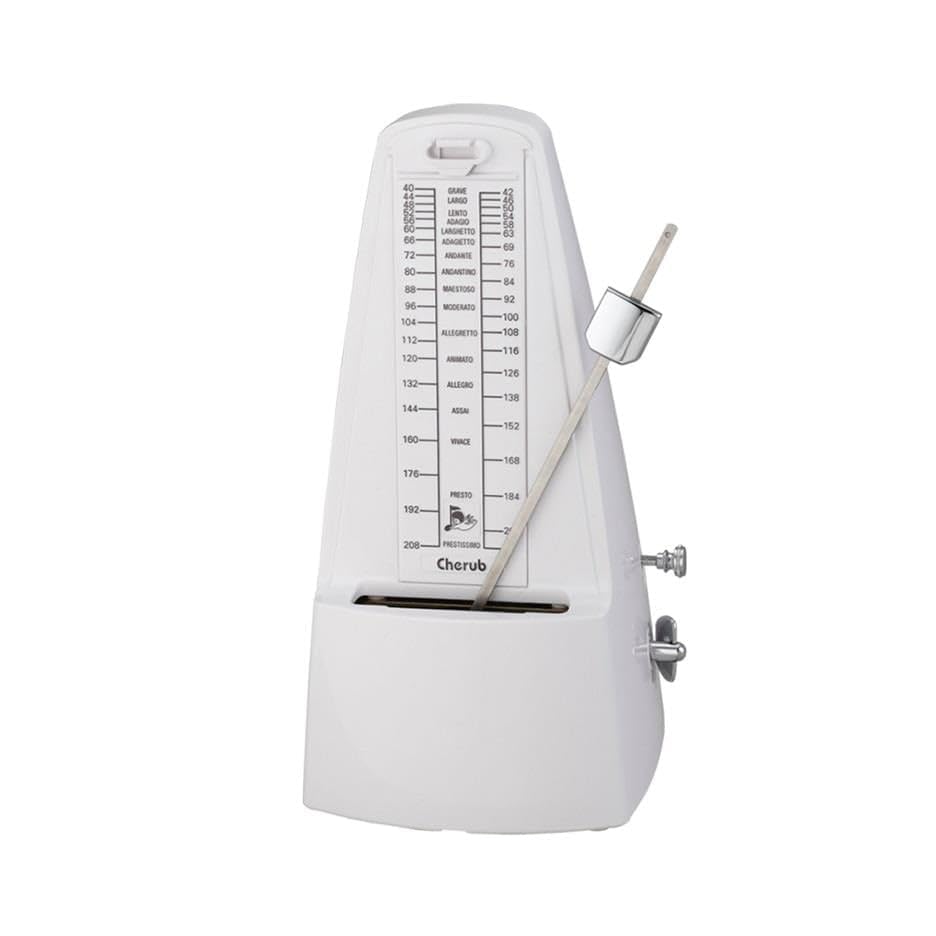
Image: Front view of the Cherub WSM-305 Mechanical Metronome, showcasing its classic pyramid shape and pendulum.

Image: Detailed diagram illustrating the key parts of the Cherub WSM-305 Mechanical Metronome, including the pendulum, tempo dial, and winding key.
- Pendulum Hook: The point from which the pendulum is suspended.
- Tempo Dial Plate: The scale on the metronome body indicating beats per minute (BPM).
- Pendulum with Weight: The swinging arm with an adjustable weight to set the tempo.
- Beat Select Slider: A control to choose the desired beat accent (bell sound).
- Winding Key: Used to wind the internal spring mechanism.
- Pendulum Stopper: A mechanism to secure the pendulum during transport or when not in use.
Setup
- Unpack and Place: Carefully remove the metronome from its packaging. Place it on a flat, stable surface to ensure accurate tempo.
- Remove Front Cover: Gently slide or lift off the front cover of the metronome.
- Disengage Pendulum Stopper: Locate the pendulum stopper, typically near the base of the pendulum. Gently slide it to the side or upward to release the pendulum. Ensure the pendulum can swing freely.
- Wind the Metronome: Insert the winding key into the keyhole on the side of the metronome. Turn the key clockwise until you feel a firm resistance. Do not force or overwind, as this can damage the internal mechanism.
Operating Instructions
- Setting the Tempo (BPM): Adjust the tempo by sliding the pendulum weight up or down the pendulum rod. Align the top edge of the weight with the desired beats per minute (BPM) marking on the tempo dial plate. Moving the weight up decreases the tempo, and moving it down increases the tempo.
- Setting the Beat Accent: Use the beat select slider, usually located on the side or front, to choose the desired beat accent. Options typically include 0 (no bell), 2, 3, 4, or 6 beats. The bell will sound on the first beat of each measure according to your selection.
- Starting the Metronome: Once the tempo and beat are set, gently push the pendulum to one side to initiate its swinging motion.
- Stopping the Metronome: To stop the metronome, allow the pendulum to come to a natural stop, or gently hold the pendulum until it ceases movement.
Maintenance
- Cleaning: Keep the metronome clean and free from dust. Use a soft, dry cloth to wipe the exterior. Avoid using liquid cleaners or abrasive materials.
- Storage: When not in use, store the metronome in a cool, dry place, away from direct sunlight, extreme temperatures, and high humidity.
- Transport: Always engage the pendulum stopper before moving or transporting the metronome to prevent damage to the pendulum and internal mechanism.
- Internal Mechanism: Do not attempt to lubricate, repair, or disassemble the internal mechanism. This should only be performed by qualified service personnel.
Troubleshooting
| Problem | Solution |
|---|---|
| Metronome does not start. | Ensure the metronome is fully wound. Check that the pendulum stopper is disengaged, allowing the pendulum to swing freely. |
| Tempo is inconsistent or inaccurate. | Verify the metronome is placed on a flat, stable surface. Ensure the pendulum weight is securely set at the desired BPM and has not shifted. |
| Bell does not sound. | Check that the beat select slider is not set to '0' (which disables the bell). Adjust the slider to 2, 3, 4, or 6 for a bell accent. |
Specifications
- Model: WSM-305
- Tempo Range: 40-208 beats per minute (BPM)
- Beat Settings: 0, 2, 3, 4, 6
- Tolerance: <1%
- Dimensions (W x D x H): 103mm x 118mm x 208mm
- Weight: 405g
Warranty and Support
For detailed warranty information, service inquiries, or technical support, please refer to the documentation included with your purchase or visit the official Cherub website. This manual focuses solely on product operation and maintenance and does not contain specific warranty terms.

