
Introduction
This manual provides essential information for setting up, operating, and maintaining your TCL 32S5K 32-inch QLED Smart TV. Please read these instructions carefully before using your television to ensure proper functionality and safety. Keep this manual for future reference.

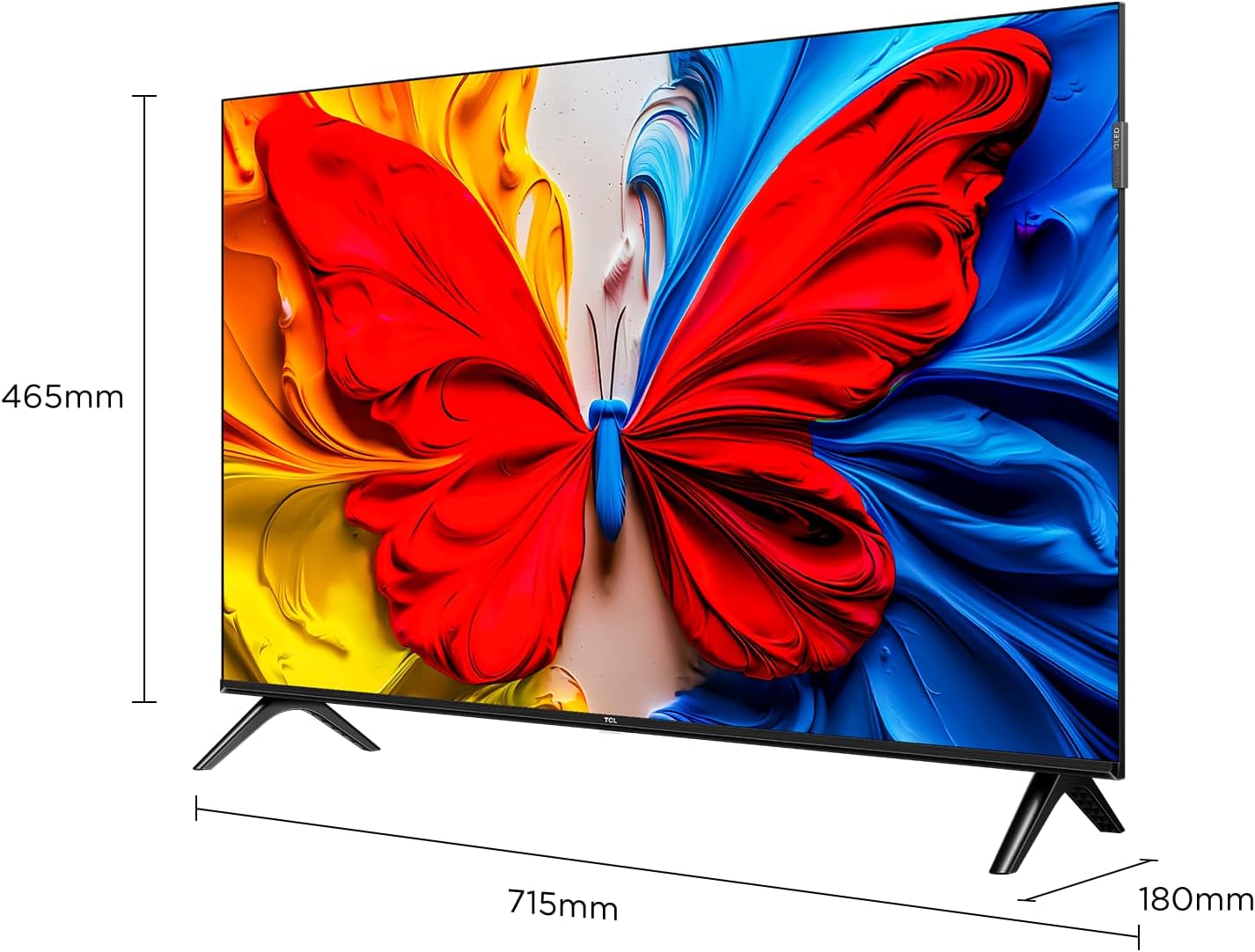
Front view of the TCL 32S5K 32-inch QLED Smart TV. This image shows the television screen displaying vibrant colors, supported by two sleek stands.
What's in the Box
Verify that all components are present in the packaging:
- TCL 32S5K Television
- Power Adapter
- Power Cable
- Remote Control
- TV Stand (2 pieces)
- User Manual (this document)
Setup
1. Attaching the TV Stand
- Carefully place the TV screen-down on a soft, flat surface to prevent damage.
- Align each stand with the corresponding slots on the bottom of the TV.
- Secure the stands using the provided screws. Ensure they are firmly attached.

Image illustrating the dimensions of the TCL 32S5K TV and how the stands are attached to the bottom of the unit. The image shows measurements for width (715mm) and height (465mm).
2. Wall Mounting (Optional)
If you choose to wall mount your TV, refer to the instructions provided with your wall mount kit. Ensure the wall mount is compatible with the VESA mounting pattern of the TCL 32S5K TV. Professional installation is recommended for wall mounting.
Rear view of the TCL 32S5K TV, showing the VESA mounting points and various input ports. This view is useful for understanding wall mount compatibility and cable management.
3. Connecting External Devices
The TV features multiple ports for connecting external devices:
- HDMI Ports: Connect Blu-ray players, game consoles, cable/satellite boxes, etc. (Total 2 HDMI ports).
- USB Ports: Connect USB drives for media playback.
- Wi-Fi: Connect to your home network for internet access and streaming.
- Bluetooth: Connect compatible wireless accessories.

Side view of the TCL 32S5K TV, highlighting the accessible input ports including HDMI and USB. This image helps users locate the connectivity options.
4. Power Connection
Connect the power cable to the TV's power input, then plug the other end into a suitable electrical outlet.
5. Initial Setup
Upon first power-on, the TV will guide you through the initial setup process, including:
- Language selection.
- Network connection (Wi-Fi).
- Google Account sign-in (for Google TV features).
- Channel scanning (if connecting an antenna).
Operating Instructions
Remote Control
The included remote control allows you to navigate the TV's interface and control various functions. Insert two AAA batteries (not included) into the remote control, observing polarity.
- Power Button: Turns the TV on or off.
- Input Button: Selects input sources (HDMI 1, HDMI 2, USB, etc.).
- Navigation Buttons: Up, Down, Left, Right arrows to move through menus.
- OK Button: Confirms selections.
- Back Button: Returns to the previous screen.
- Home Button: Accesses the Google TV home screen.
- Volume Buttons: Adjusts the volume level.
- Channel Buttons: Changes TV channels (if applicable).
- Google Assistant Button: Activates voice control.
Google TV Interface
Your TCL 32S5K TV runs on the Google TV operating system, providing access to a wide range of streaming apps, movies, and shows. Navigate using the remote control to browse content, search, and manage settings.
- Home Screen: Displays personalized content recommendations, installed apps, and quick access to inputs.
- Apps: Download and manage applications from the Google Play Store.
- Settings: Access TV settings for picture, sound, network, system, and more.
Key Features
QLED Display Technology
The TCL 32S5K features QLED (Quantum Dot LED) technology, which enhances color volume and accuracy, delivering a more vibrant and lifelike viewing experience compared to conventional LED TVs.

Diagram explaining the difference between Colorful Quantum Crystal (TCL QLED) and Conventional Quantum Crystal, highlighting the layers and efficiency.
HDR 10 Support
With HDR 10 support, the TV can display a wider range of brightness and contrast, revealing more detail in both the darkest and brightest areas of the picture. This results in a more dynamic and immersive visual experience.

Comparison image showing a scene with HDR (left) and without HDR (right), demonstrating the enhanced detail and dynamic range provided by HDR 10.
Dolby Audio
Experience rich, clear, and powerful sound with Dolby Audio. This technology optimizes the TV's audio output for an immersive listening experience, whether you're watching movies, sports, or playing games.

Image depicting a TV screen displaying a dynamic ocean wave, with visual elements suggesting enhanced audio quality, representing Dolby Audio.
Game Mode
Game Mode automatically optimizes display settings for gaming, reducing input lag and improving responsiveness. This provides a smoother and more enjoyable gaming experience.

Split-screen image comparing "Game Mode Off" (left) and "Game Mode On" (right) during a video game scene, illustrating the visual improvements and reduced lag.
Slim Design
The TCL 32S5K features a modern, slim design with a metallic bezel-less display, allowing the screen to blend seamlessly into your living space and providing a more immersive viewing experience.

Image showcasing the slim profile and metallic bezel-less design of the TCL 32S5K TV, emphasizing its modern aesthetic.
Maintenance
- Cleaning the Screen: Gently wipe the screen with a soft, lint-free cloth. For stubborn marks, use a screen cleaner specifically designed for TVs, applied to the cloth, not directly to the screen.
- Cleaning the Cabinet: Use a soft, dry cloth to wipe the TV cabinet. Avoid using abrasive cleaners or solvents.
- Ventilation: Ensure the TV's ventilation openings are not blocked to prevent overheating.
- Power Cord: Regularly check the power cord for any damage. If damaged, contact customer support for replacement.
Troubleshooting
Before contacting customer support, try the following solutions for common issues:
| Problem | Possible Solution |
|---|---|
| No power / TV does not turn on. |
|
| No picture, but sound is present. |
|
| No sound, but picture is present. |
|
| Remote control not working. |
|
| TV turns on for a few seconds then shuts off. |
|
Specifications
| Feature | Detail |
|---|---|
| Model Name | 32S5K |
| Screen Size | 32 Inches |
| Display Technology | QLED |
| Resolution | 1920 x 1080 (FHD) |
| Refresh Rate | 60 Hz |
| HDR Format Supported | HDR10 |
| Audio Technology | Dolby Audio, DTS, Dolby Atmos |
| Operating System | Google TV |
| Connectivity | Wi-Fi, Bluetooth, 2x HDMI, USB |
| Product Dimensions (D x W x H) | 2.95"D x 28.15"W x 16.61"H |
| Item Weight | 4.42 Kilograms |
| Mounting Type | Table Mount, Wall Mount |
| Included Components | Power Adapter, Power Cable, Remote Control, Stand, User Manual |
Warranty and Support
For warranty information, please refer to the warranty card included with your product or visit the official TCL website. For technical support or service inquiries, please contact TCL customer service through their official channels. Keep your purchase receipt as proof of purchase for warranty claims.
You can find more information and support on the TCL Store on Amazon.


