1. Product Overview
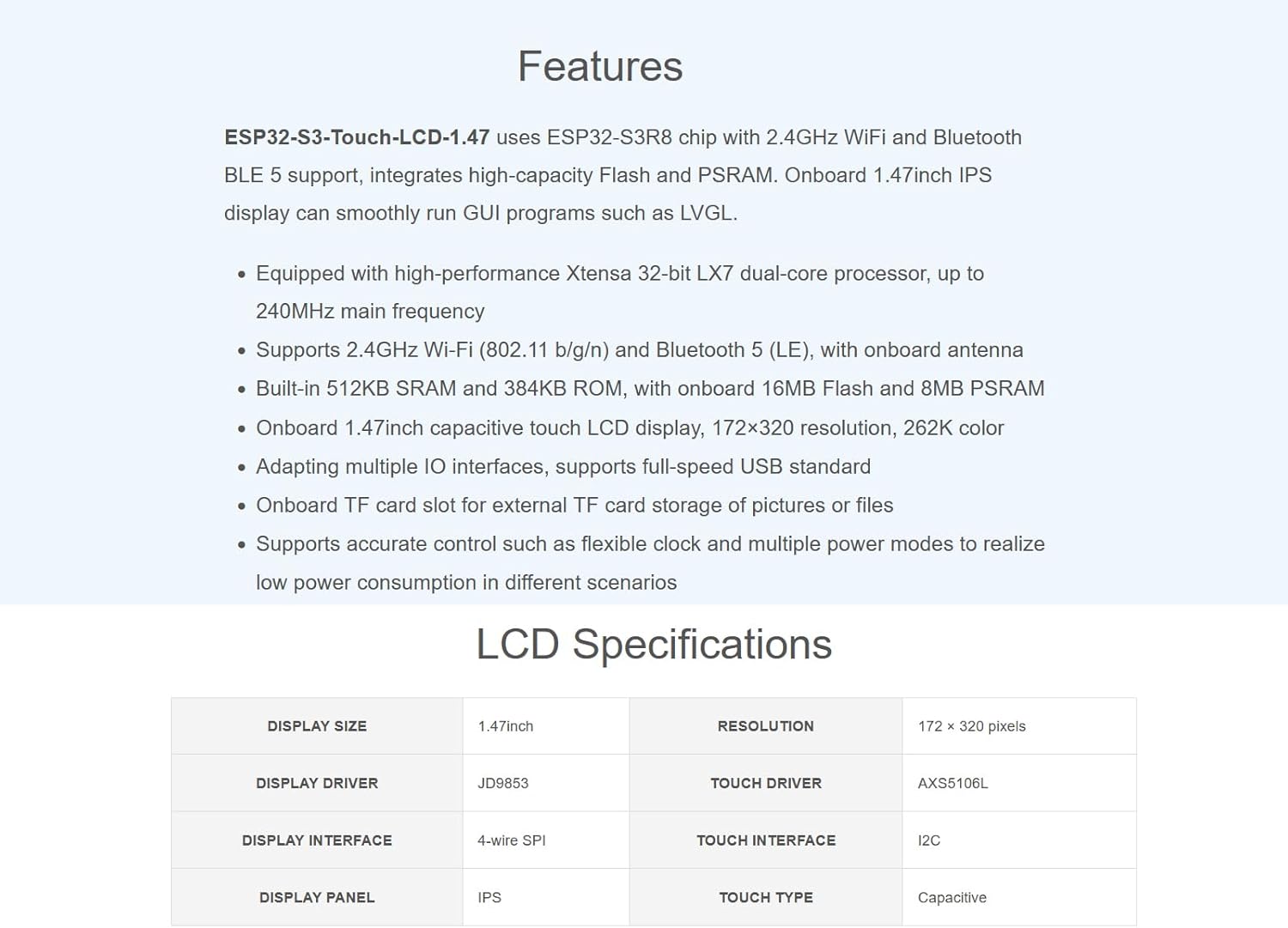
The Waveshare ESP32-S3 Development Board with 1.47-inch Touch LCD Display is a versatile microcontroller board designed for various embedded applications. It integrates a high-performance ESP32-S3R8 chip, offering 2.4GHz Wi-Fi and Bluetooth BLE 5 connectivity. The onboard 1.47-inch IPS display features capacitive touch, 172×320 resolution, and 262K colors, making it suitable for running graphical user interface (GUI) programs like LVGL.
Key features include:
- Processor: High-performance 32-bit LX7 dual-core processor, operating at up to 240MHz.
- Wireless Connectivity: Supports 2.4GHz Wi-Fi (802.11 b/g/n) and Bluetooth 5 (LE) with an onboard antenna.
- Memory: Built-in 512KB SRAM and 384KB ROM, with onboard 16MB Flash and 8MB PSRAM.
- Display: 1.47-inch capacitive touch IPS LCD display with 172×320 resolution and 262K colors.
- Interfaces: Multiple IO interfaces, full-speed USB standard support.
- Storage: Onboard TF card slot for external storage of pictures or files.
- Power Management: Supports flexible clock and multiple power modes for low power consumption.


2. Setup
2.1. Initial Connection
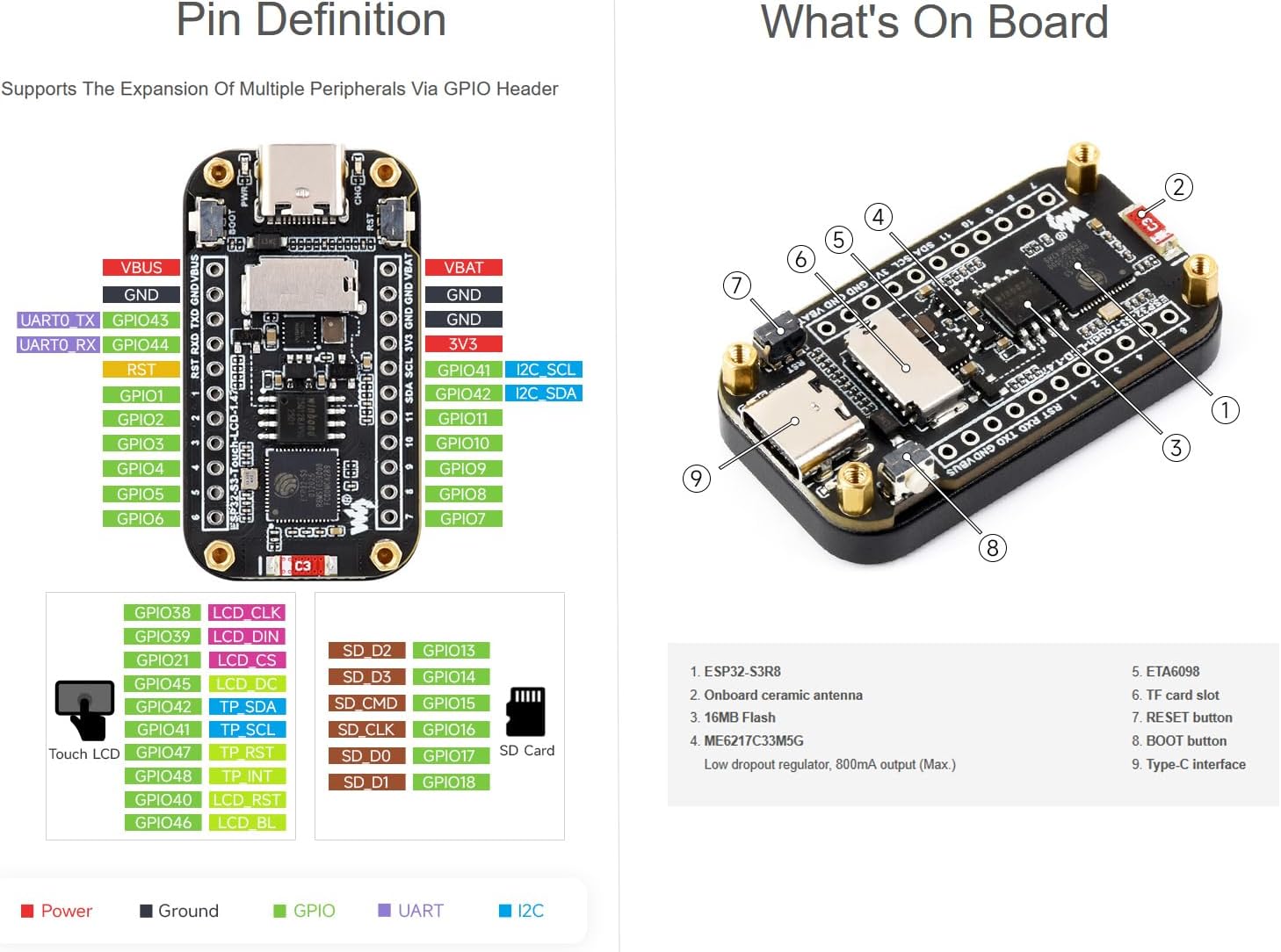
- Power Supply: Connect the development board to a power source using a USB-C cable. The board supports full-speed USB standard for power and data transfer.
- Optional Battery: For portable applications, an external lithium battery can be connected to the designated battery interface.
- TF Card Insertion: If external storage is required, insert a TF card into the onboard TF card slot.
2.2. Development Environment Setup
To begin development, set up your preferred integrated development environment (IDE). The ESP32-S3 is compatible with various development tools and frameworks, including Arduino IDE and ESP-IDF. Waveshare provides detailed access tutorials and demo codes to facilitate quick setup and usage.

3. Operating Instructions
3.1. Basic Operation
Once powered, the 1.47-inch capacitive touch LCD display will activate. The board is designed to smoothly run GUI programs, enabling interactive applications. Utilize the touch screen for direct interaction with your developed interfaces.
3.2. Wireless Communication
The ESP32-S3 supports 2.4GHz Wi-Fi and Bluetooth 5 (LE). These features allow for wireless data transfer, network connectivity, and communication with other Bluetooth-enabled devices. Refer to the provided demo codes and tutorials for examples on implementing wireless functionalities in your projects.

3.3. Expanding Functionality
The board features multiple IO interfaces and GPIO headers, allowing for the expansion of peripherals. The onboard TF card slot can be used for additional storage, such as logging data or storing display assets. The dual-core processor and flexible clock management enable efficient execution of complex tasks and low-power applications.

4. Maintenance
- Cleaning: Gently wipe the display and board with a soft, dry cloth. Avoid using harsh chemicals or abrasive materials.
- Storage: Store the development board in a cool, dry environment, away from direct sunlight and extreme temperatures.
- Handling: Handle the board by its edges to avoid touching sensitive electronic components.
5. Troubleshooting
- No Power: Ensure the USB-C cable is securely connected to a functional power source. If using a battery, verify it is charged and correctly connected.
- Display Issues: Check all connections to the display. If programming a custom GUI, ensure the code is correctly uploaded and compatible with the display driver.
- Connectivity Problems (Wi-Fi/Bluetooth): Verify antenna connection and ensure your code correctly initializes and manages the wireless modules. Check for interference from other devices.
- Software/Firmware Upload Failure: Ensure the correct drivers are installed for your operating system and the development environment is properly configured.
6. Specifications
6.1. General Specifications
| Feature | Detail |
|---|---|
| Brand | Waveshare |
| Series | ESP32-S3-1.47inch-Touch-LCD |
| Model Name | ESP32-S3-1.47inch-Touch-LCD |
| Item Weight | 0.704 ounces |
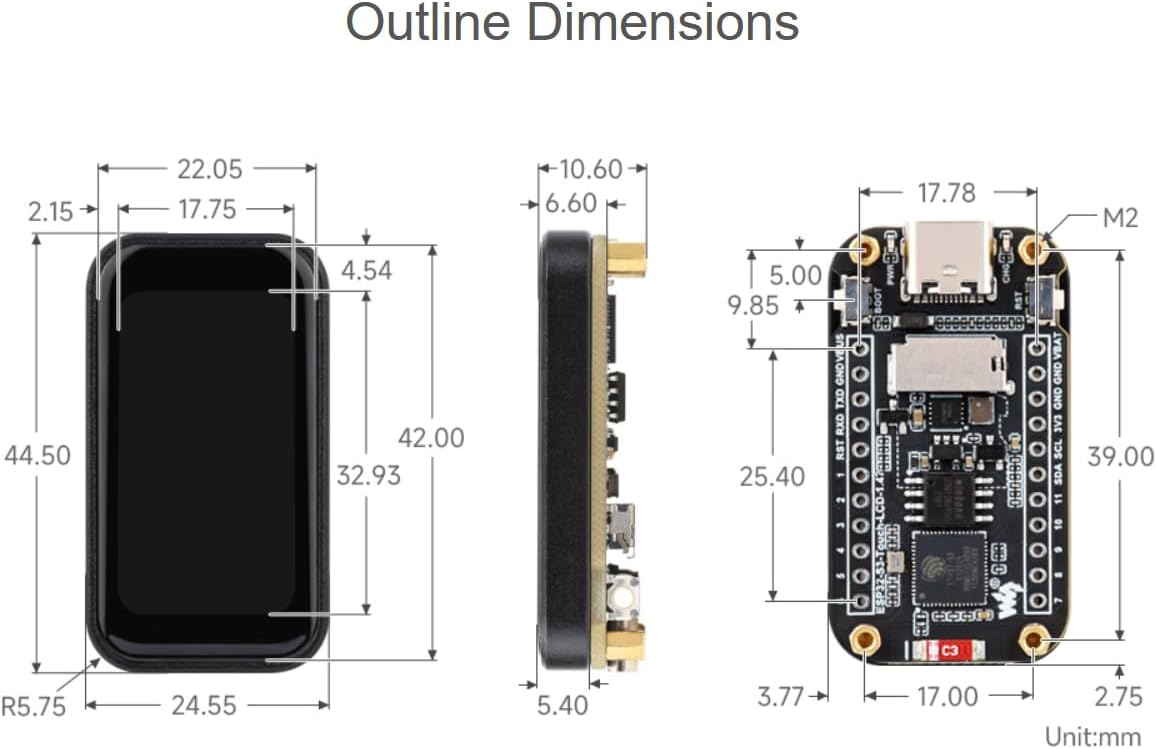
| Product Dimensions (LxWxH) | 1.75 x 0.96 x 0.42 inches |
| Number of Processors | 2 (Dual-core LX7) |
| Memory Storage Capacity | 16 MB Flash, 8 MB PSRAM, 512KB SRAM, 384KB ROM |
| UPC | 790885236433 |
6.2. LCD Specifications
| Feature | Detail |
|---|---|
| Display Size | 1.47 inch |
| Resolution | 172 × 320 pixels |
| Display Driver | JD9853 |
| Touch Driver | AXS5106L |
| Display Interface | 4-wire SPI |
| Touch Interface | I2C |
| Display Panel | IPS |
| Touch Type | Capacitive |
7. Warranty
For information regarding product warranty, please refer to the official Waveshare website or contact their customer support directly. Warranty terms and conditions may vary based on region and purchase date.
8. Support
Waveshare provides online development resources and technical support. If you encounter any issues or have questions regarding the ESP32-S3 Development Board, please visit the official Waveshare website for documentation, forums, and contact information.
Official Waveshare Website: www.waveshare.com


