
1. Introduction
Thank you for choosing the COWSAR 20 Bar Espresso Machine, Model CM8011. This manual provides essential information for the safe operation, maintenance, and troubleshooting of your new espresso machine. Please read all instructions carefully before first use and retain this manual for future reference.

Image 1.1: COWSAR 20 Bar Espresso Machine overview, showcasing its ability to prepare various coffee types from ground coffee or capsules.
2. Important Safety Instructions
When using electrical appliances, basic safety precautions should always be followed to reduce the risk of fire, electric shock, and injury to persons, including the following:
- Read all instructions.
- Do not touch hot surfaces. Use handles or knobs.
- To protect against fire, electric shock, and injury to persons, do not immerse cord, plugs, or appliance in water or other liquid.
- Close supervision is necessary when any appliance is used by or near children.
- Unplug from outlet when not in use and before cleaning. Allow to cool before putting on or taking off parts, and before cleaning the appliance.
- Do not operate any appliance with a damaged cord or plug or after the appliance malfunctions, or has been damaged in any manner.
- The use of accessory attachments not recommended by the appliance manufacturer may result in fire, electric shock, or injury to persons.
- Do not use outdoors.
- Do not let cord hang over edge of table or counter, or touch hot surfaces.
- Do not place on or near a hot gas or electric burner, or in a heated oven.
- Always attach plug to appliance first, then plug cord into the wall outlet. To disconnect, turn any control to "off", then remove plug from wall outlet.
- Do not use appliance for other than intended use.
- Scalding may occur if the water tank lid is removed during the brewing cycle.
3. Product Overview
3.1 Components

Image 3.1: Labeled diagram of the COWSAR Espresso Machine and its accessories.
- Cup Storage / Cup Warmer Plate
- Measuring Scoop/Tamper
- Pressurized Portafilter
- Portafilter Handle
- Capsule Portafilter
- Single-Cup Filter Basket
- Double-Cup Filter Basket
- Cup Height Adjusting Holder
- Drip Plate
- Drip Tray
- Power Button (I/O)
- Water Tank
- Water Tank Lid
- Frothing Tube
- Frothing Knob
- Milk Tank Lid
- Milk Tank
3.2 Key Features
- 20 Bar Pressure System: Ensures optimal extraction for rich espresso.
- Automatic Milk Frother: Creates silky foam for cappuccinos and lattes with ease.
- Dual Boiler System: Separate heating elements for brewing and frothing ensure precise temperature control.
- Cup Warmer: Integrated plate on top to preheat cups.
- Versatile Brewing: Compatible with both ground coffee and coffee capsules.
- Large Capacity Tanks: 57oz (1.7L) removable water tank and 16.9oz (500ml) detachable milk tank.
- Easy Cleaning: Detachable water tank, milk tank, and drip tray for convenient maintenance.

Image 3.2: Overview of the machine's 3-in-1 capabilities and protective features.
3.3 Technical Specifications
| Specification | Value |
|---|---|
| Brand | COWSAR |
| Model Name | CM8011 |
| Product Dimensions (D x W x H) | 13.98" x 9.02" x 16.14" |
| Item Weight | 10.58 pounds |
| Voltage | 120 Volts |
| Water Tank Capacity | 57 oz (1.7 L) |
| Milk Tank Capacity | 16.9 oz (500 ml) |
| Coffee Input Type | Capsule, Ground Coffee |
| Operation Mode | Fully Automatic |
4. Setup
4.1 Unpacking and Initial Cleaning
- Carefully remove all packaging materials and ensure all components listed in Section 3.1 are present.
- Wash the water tank, milk tank, portafilters, filter baskets, and drip tray with warm, soapy water. Rinse thoroughly and dry.
- Wipe the exterior of the machine with a damp cloth.
4.2 Filling the Water Tank
- Remove the water tank from the back of the machine.
- Fill the tank with fresh, cold water up to the MAX line. Do not exceed the MAX line.
- Place the water tank back onto the machine, ensuring it is securely seated.
4.3 Filling the Milk Tank (for milk-based drinks)
- Remove the milk tank from the front of the machine.
- Fill the tank with cold milk (dairy or non-dairy) up to the MAX line.
- Attach the milk tank back to the machine, ensuring the frothing tube is properly inserted.

Image 4.1: Detachable water tank and milk container for easy filling and cleaning.
4.4 Initial Rinse Cycle (First Use)
Before brewing coffee for the first time, perform a rinse cycle to clean the internal components:
- Ensure the water tank is filled. Do not add coffee or milk.
- Place a large cup or container under the coffee spout and milk frothing nozzle.
- Press the power button to turn on the machine. It will preheat.
- Once preheated, press the Espresso button. Water will dispense. Repeat this step 2-3 times.
- Press the Cappuccino or Latte button to run water through the milk frothing system. Repeat 2-3 times.
- Discard the water. Your machine is now ready for use.
5. Operating Instructions
5.1 Preheating and Cup Warming
- Plug in the machine and press the power button. The machine will begin preheating.
- The indicator lights will stop flashing when the machine is ready.
- Place your cups on the cup warmer plate on top of the machine to preheat them.

Image 5.1: The integrated cup warmer plate helps maintain coffee temperature.
5.2 Brewing Espresso (Ground Coffee)
- Insert the desired filter basket (single or double shot) into the standard portafilter.
- Add ground coffee to the filter basket. Use the measuring scoop/tamper to level and tamp the coffee firmly.
- Attach the portafilter to the brewing head by aligning it and twisting it to the right until secure.
- Place your preheated cup(s) under the portafilter spouts.
- Press the Espresso button on the control panel. The machine will brew the espresso.
- The machine will automatically stop when the programmed volume is reached.
5.3 Brewing Espresso (Coffee Capsules)
- Insert a coffee capsule into the capsule portafilter.
- Attach the capsule portafilter to the brewing head by aligning it and twisting it to the right until secure.
- Place your preheated cup(s) under the portafilter spouts.
- Press the Espresso button on the control panel. The machine will brew the espresso.
- The machine will automatically stop when the programmed volume is reached.

Image 5.2: Portafilters for both ground coffee and coffee capsules.
5.4 Making Cappuccino or Latte
Ensure the milk tank is filled with cold milk and properly attached.
- Prepare your espresso shot as described in Section 5.2 or 5.3.
- Place a suitable cup under both the coffee spout and the milk frothing nozzle.
- Adjust the frothing knob on the milk tank to your desired foam level.
- Press the Cappuccino or Latte button on the control panel.
- The machine will first dispense espresso, then automatically froth and dispense milk into your cup.
- The machine will stop automatically.

Image 5.3: One-touch brewing for Espresso, Cappuccino, and Latte.
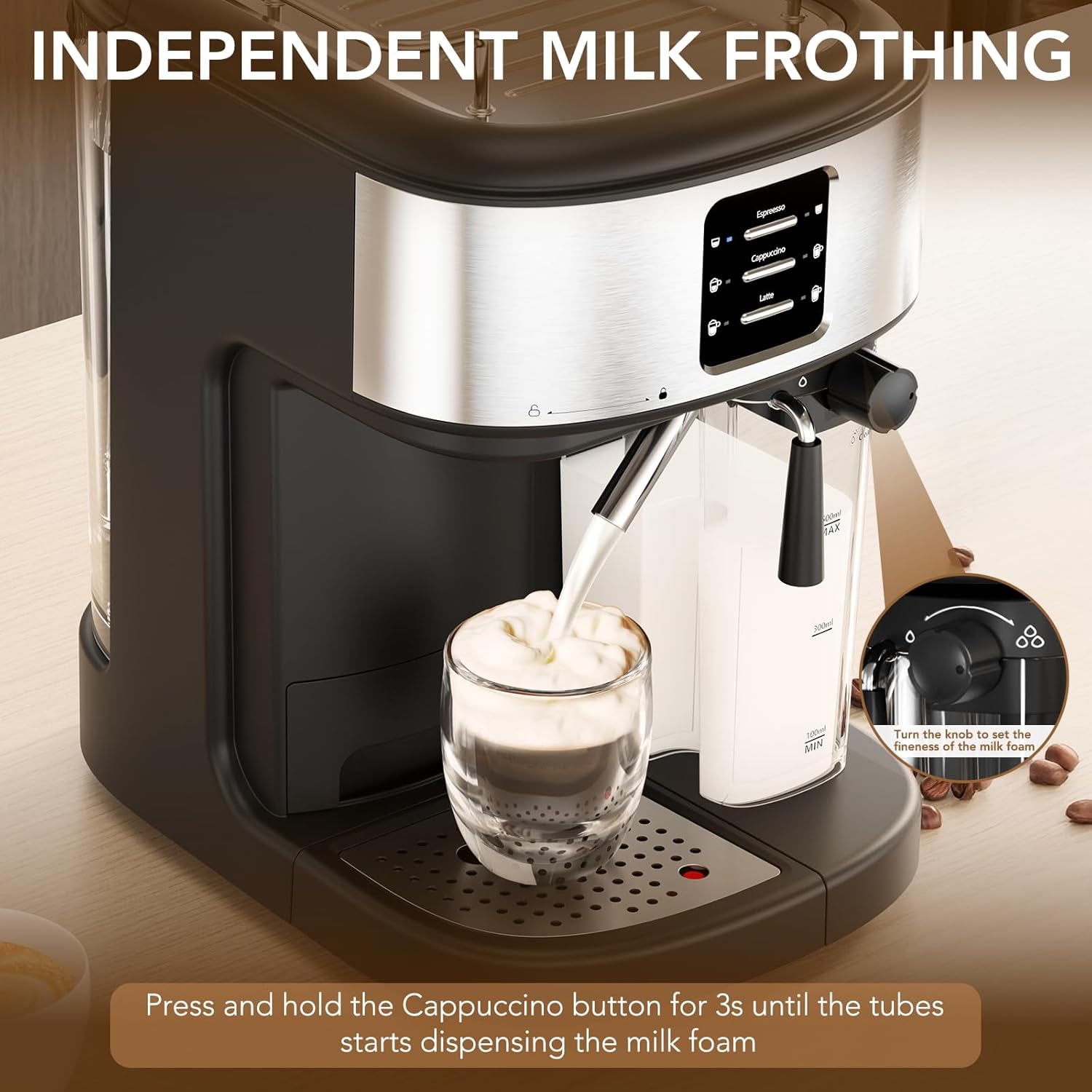
Image 5.4: Automatic milk frothing for creamy beverages.
5.5 Independent Milk Frothing
To froth milk without brewing coffee:
- Ensure the milk tank is filled with cold milk and properly attached.
- Place a cup under the milk frothing nozzle.
- Adjust the frothing knob to your desired foam level.
- Press and hold the Cappuccino button for approximately 3 seconds until the milk frothing process begins.
- Press the Cappuccino button again to stop frothing when desired volume or consistency is reached.

Image 5.5: Adjusting the frothing knob for desired milk foam.
6. Cleaning and Maintenance
Regular cleaning ensures optimal performance and extends the lifespan of your espresso machine.
6.1 Daily Cleaning
- Drip Tray: Empty and rinse the drip tray and drip plate after each use or when the indicator floats up.
- Milk Tank and Frothing Tube: After preparing milk-based drinks, remove the milk tank. Disassemble the frothing tube and rinse all milk contact parts thoroughly with warm water. The milk tank can be stored in the refrigerator with leftover milk.
- Portafilter and Filter Baskets: Remove the used coffee grounds/capsule and rinse the portafilter and filter basket under warm water.
- Brewing Head: Wipe the brewing head with a damp cloth to remove any coffee residue.
Image 6.1: Detachable components like the drip tray, water tank, and milk tank facilitate easy cleaning.
6.2 Descaling
Over time, mineral deposits (limescale) can build up in the machine, affecting performance and taste. Descale your machine every 2-3 months, or more frequently if you have hard water.
- Empty the water tank and fill it with a descaling solution mixed according to the manufacturer's instructions, or a mixture of white vinegar and water (1:1 ratio).
- Place a large container under the coffee spout and milk frothing nozzle.
- Turn on the machine and allow it to preheat.
- Run several cycles of espresso and milk frothing until the water tank is nearly empty.
- Rinse the water tank thoroughly and fill it with fresh water.
- Run several cycles with fresh water to flush out any remaining descaling solution.
7. Troubleshooting
If you encounter issues with your COWSAR Espresso Machine, refer to the table below for common problems and solutions.
| Problem | Possible Cause | Solution |
|---|---|---|
| No coffee dispenses | Water tank empty; machine not preheated; portafilter clogged. | Fill water tank; wait for preheat; clean portafilter/filter basket. |
| Coffee is too weak or watery | Coffee grounds too coarse; insufficient coffee; tamping too light. | Use finer grind; increase coffee amount; tamp more firmly. |
| Coffee drips slowly | Coffee grounds too fine; too much coffee; tamping too hard; machine needs descaling. | Use coarser grind; reduce coffee amount; tamp lighter; descale machine. |
| Milk not frothing properly | Milk tank empty; frothing tube clogged; milk not cold enough; frothing knob setting. | Fill milk tank; clean frothing tube; use cold milk; adjust frothing knob. |
| Machine leaks water | Water tank not seated correctly; drip tray full; seal issues. | Reseat water tank; empty drip tray; contact customer support if issue persists. |
8. Warranty and Support
The COWSAR 20 Bar Espresso Machine is covered by a manufacturer's warranty. For detailed warranty information, please refer to the warranty card included with your product or contact COWSAR customer support.
If you require assistance, have questions, or need to report a problem, please contact COWSAR customer service through the retailer where the product was purchased or visit the official COWSAR website for support contact information.


