
1. Introduction
Thank you for purchasing the SIMREX RC Helicopter Model Z16. This manual provides essential information for safe operation, setup, and maintenance of your new remote control helicopter. Please read it thoroughly before use and retain it for future reference.
Safety Information
WARNING: Choking Hazard - Small Parts. Not for children under 3 years.
For optimal safety, this helicopter should only be played indoors, or in an open and windless outdoor environment with an appropriate remote control distance. It features anti-jamming and low-voltage protection for enhanced safety.
2. Package Contents
Ensure all items listed below are present in your package:
- Remote Control Helicopter (with built-in battery) x 1
- 2.4GHz Remote Control x 1
- Rechargeable Modular Batteries x 2
- USB Charging Cable x 1
- Spare Trail Blade x 2
- Product Manual x 1

Image: The SIMREX RC Helicopter, its remote control, two modular batteries, a USB charging cable, and spare blades are displayed on a flat surface.
3. Product Overview
The SIMREX RC Helicopter Model Z16 is designed for ease of use and stable flight, making it suitable for beginners. Key features include:
- One Key Take-Off/Landing: Simplifies initial flight and landing procedures.
- Altitude Hold: Maintains a stable hovering height automatically.
- 2 Speeds: Offers both slow and fast flight modes for varying skill levels.
- Gyroscope Technology: Provides enhanced stability and control.
- 2.4GHz Remote Control System: Ensures stable signal and prevents interference.

Image: A SIMREX RC Helicopter in flight, with a child and an adult observing, highlighting its remote control capabilities.
4. Setup
4.1 Charging the Helicopter Battery
- Ensure the helicopter is powered OFF.
- Connect the USB charging cable to the helicopter's charging port.
- Plug the other end of the USB cable into a USB power adapter (not included) or a computer's USB port.
- The indicator light on the USB cable will illuminate during charging and turn off when fully charged.
- A full charge typically takes approximately 60-90 minutes and provides up to 15 minutes of flight time per battery. Two batteries are included for extended play.

Image: A SIMREX RC Helicopter connected to a laptop via a USB cable for charging, illustrating the charging process.
4.2 Installing Remote Control Batteries
- Open the battery compartment on the back of the remote control.
- Insert 2 AA batteries (included) into the compartment, ensuring correct polarity.
- Close the battery compartment securely.
5. Operating Instructions
5.1 Pairing the Helicopter with the Remote Control
- Ensure both the helicopter and the remote control are fully charged.
- Place the helicopter on a flat, level surface.
- Turn on the helicopter's power switch. The helicopter's lights will flash.
- Turn on the remote control's power switch. The remote's indicator light will flash.
- Push the left joystick (throttle) all the way up, then all the way down. The remote control will beep, and the helicopter's lights will become solid, indicating successful pairing.
5.2 Basic Flight Controls
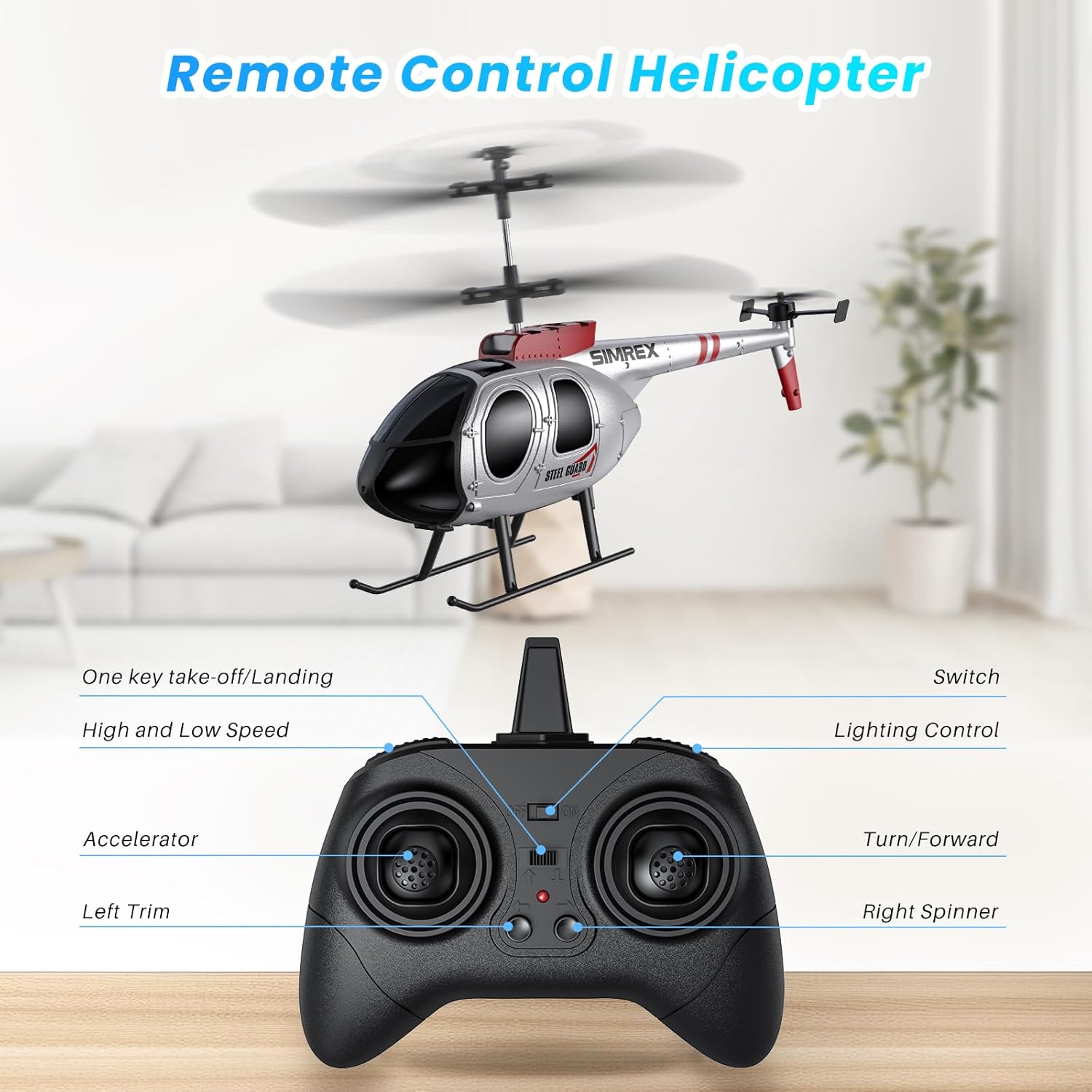
Image: A detailed diagram of the remote control, labeling the accelerator, left trim, one-key take-off/landing, high/low speed, lighting control, and turn/forward/right spinner functions.
- One Key Take-Off/Landing: Press the dedicated button for automatic take-off or landing.
- Altitude Hold: The helicopter will automatically maintain its current altitude after take-off, allowing for easier control.
- Throttle (Left Joystick): Push up to ascend, pull down to descend.
- Directional Control (Right Joystick): Push forward to fly forward, pull back to fly backward, push left to turn left, push right to turn right.
- Speed Modes: Use the speed button to switch between low and high-speed settings. Low speed is recommended for beginners.
- Trim Control: If the helicopter drifts, use the trim buttons on the remote to adjust its stability.

Image: A SIMREX RC Helicopter hovering steadily indoors, illustrating its altitude hold feature.
5.3 Flight Environment
This helicopter is primarily designed for indoor use. When flying outdoors, choose a calm, windless environment to ensure stable flight and prevent loss of control.
6. Maintenance
- Clean the helicopter with a soft, dry cloth after each use.
- Inspect propellers for any damage before and after each flight. Replace damaged blades using the provided spare parts.
- Store the helicopter and remote control in a cool, dry place away from direct sunlight.
- Remove batteries from the remote control if not used for an extended period.
7. Troubleshooting
| Problem | Possible Cause | Solution |
|---|---|---|
| Helicopter does not respond to remote. | Not paired; low battery on helicopter or remote. | Re-pair the devices (Section 5.1); charge helicopter battery; replace remote batteries. |
| Helicopter drifts during flight. | Needs trim adjustment; windy conditions. | Use trim buttons on remote; fly in a calm environment. |
| Short flight time. | Battery not fully charged; old battery. | Ensure full charge; consider replacing battery if performance degrades significantly. |
8. Specifications
- Model Number: Z16
- Product Dimensions: 9.6 x 5.3 x 1.77 inches
- Item Weight: 8 ounces
- Recommended Age: 14 years and up
- Helicopter Battery: Built-in rechargeable (2 included)
- Remote Control Batteries: 2 AA batteries (included)
- Flight Time: Up to 15 minutes per battery
- Charging Time: 60-90 minutes
9. Official Product Videos
Product Presentation Video
Video: An official product presentation showcasing the SIMREX RC Helicopter's features and flight capabilities.
Remote Control Helicopter for Kids (Preview)
Video: A short preview video demonstrating the SIMREX RC Helicopter in action, suitable for children.
10. Warranty and Support
For warranty information and customer support, please refer to the contact details provided in the packaging or visit the official SIMREX website.

