1. Introduction
This manual provides essential information for the safe and efficient operation of your Telefunken 40DTFV735 40-inch Full HD Smart TV. Please read it thoroughly before using the television and retain it for future reference.

Figure 1.1: Telefunken 40DTFV735 Smart TV in a typical home environment. This image illustrates the television's design and how it might appear when set up.
2. Safety Information
To ensure safe operation and prevent damage, observe the following precautions:
- Do not expose the TV to rain or moisture.
- Do not block ventilation openings. Ensure adequate space around the TV for proper airflow.
- Use only attachments/accessories specified by the manufacturer.
- Protect the power cord from being walked on or pinched.
- Unplug the TV during lightning storms or when unused for long periods.
- Refer all servicing to qualified service personnel.
3. Package Contents
Verify that all items are present in the packaging:
- Telefunken 40DTFV735 Smart TV
- Remote control
- Batteries for remote control
- User Manual (this document)
4. Product Overview
The Telefunken 40DTFV735 features a frameless design, enhancing the visual experience. Below are views of the television.

Figure 4.1: Angled view of the Telefunken 40DTFV735 Smart TV. This perspective highlights the slim profile and frameless display.

Figure 4.2: Front view of the Telefunken 40DTFV735 Smart TV. This shows the full display area and the brand logo at the bottom center.
5. Setup
5.1 Stand Assembly
Carefully place the TV screen-down on a soft, flat surface. Attach the included stands to the designated slots on the bottom of the TV using the provided screws. Ensure they are securely fastened.
5.2 Wall Mounting (Optional)
The TV supports VESA wall mounting. Refer to the wall mount kit instructions for proper installation. Ensure the wall mount is compatible with the TV's VESA pattern and weight.
5.3 Connecting Devices
Your TV offers various connectivity options:
- HDMI: Connect external devices such as Blu-ray players, game consoles, or set-top boxes using HDMI cables. The TV has 2 HDMI ports.
- USB: Insert USB storage devices for media playback or recording. The TV has 1 USB port.
- Antenna/Cable: Connect an antenna or cable TV feed to the RF input for terrestrial or cable broadcasts.
- Satellite: Connect a satellite dish to the satellite input for satellite broadcasts.
- Ethernet: For a stable wired internet connection, connect an Ethernet cable to the LAN port.
- Wi-Fi: For wireless internet access, connect to your home Wi-Fi network during initial setup or via the settings menu.
After connecting all desired devices, plug the TV's power cord into a wall outlet.
6. Operating the TV
6.1 First-Time Setup
Upon first power-on, the TV will guide you through the initial setup process, including language selection, network connection (Wi-Fi or Ethernet), and channel scanning for DVB-T, Cable, or Satellite tuners.
6.2 Smart TV Features
Your Telefunken 40DTFV735 is a Smart TV, providing access to various online services and applications. Navigate the Smart TV interface using the remote control to access platforms such as YouTube, Netflix, Movistar+, DAZN, MAX, and Prime Video.
6.3 Remote Control
The included remote control allows you to power on/off, change channels, adjust volume, access Smart TV functions, and navigate menus. Insert the provided batteries into the remote control before use.
6.4 USB Recording
Connect a USB storage device to the TV's USB port to record live television broadcasts. Refer to the on-screen menu for recording options and scheduling.
6.5 Alexa Compatibility
The TV is compatible with Alexa. Follow the instructions in the TV's settings menu to link your Alexa device for voice control functionalities.
6.6 Hotel Mode
This TV includes a Hotel Mode feature, which allows for restricted access to certain settings and functions, often used in hospitality environments. Consult the advanced settings menu for Hotel Mode activation and configuration.
7. Maintenance
To maintain your TV in optimal condition:
- Cleaning the Screen: Gently wipe the screen with a soft, lint-free cloth. For stubborn marks, use a screen-specific cleaning solution applied to the cloth, not directly to the screen.
- Cleaning the Cabinet: Use a soft, dry cloth to wipe the TV cabinet. Do not use abrasive cleaners or solvents.
- Power Cord: Regularly check the power cord for any damage.
- Ventilation: Ensure the ventilation openings are clear of dust and debris.
8. Troubleshooting
If you encounter issues with your TV, refer to the following common solutions:
- No Power: Check if the power cord is securely plugged into both the TV and the wall outlet. Test the outlet with another device.
- No Picture/Sound: Ensure the correct input source is selected. Check all cable connections (HDMI, antenna).
- Remote Control Not Working: Replace the batteries. Ensure there are no obstructions between the remote and the TV's IR sensor.
- Poor Picture Quality: Check antenna/cable connections. Adjust picture settings in the TV menu.
- No Internet Connection: For Wi-Fi, check your router and TV's network settings. For Ethernet, ensure the cable is connected and your router is working.
If problems persist, consult the full electronic manual or contact customer support.
9. Specifications
| Feature | Specification |
|---|---|
| Brand | Telefunken |
| Model Number | 40DTFV735 |
| Screen Size | 40 Inches (102 cm) |
| Display Technology | LED |
| Resolution | 1920 x 1080 (Full HD) |
| HDR Support | Yes (HDR - HLG) |
| Refresh Rate | 60 Hz |
| Aspect Ratio | 16:9 |
| Connectivity | 2x HDMI, 1x USB, Wi-Fi, Ethernet (LAN), RF (Antenna/Cable), Satellite |
| Special Features | Smart TV, Compatible with Alexa, VESA Wall Mountable, USB Recording, Hotel Mode |
| Audio | Dolby Audio |
| Dimensions (W x H x D) | 89.3 x 54.5 x 16.8 cm (with stand) |
| Weight | 4.45 kg |
| Energy Efficiency Class (SDR) | D |
| Energy Efficiency Class (HDR) | F |
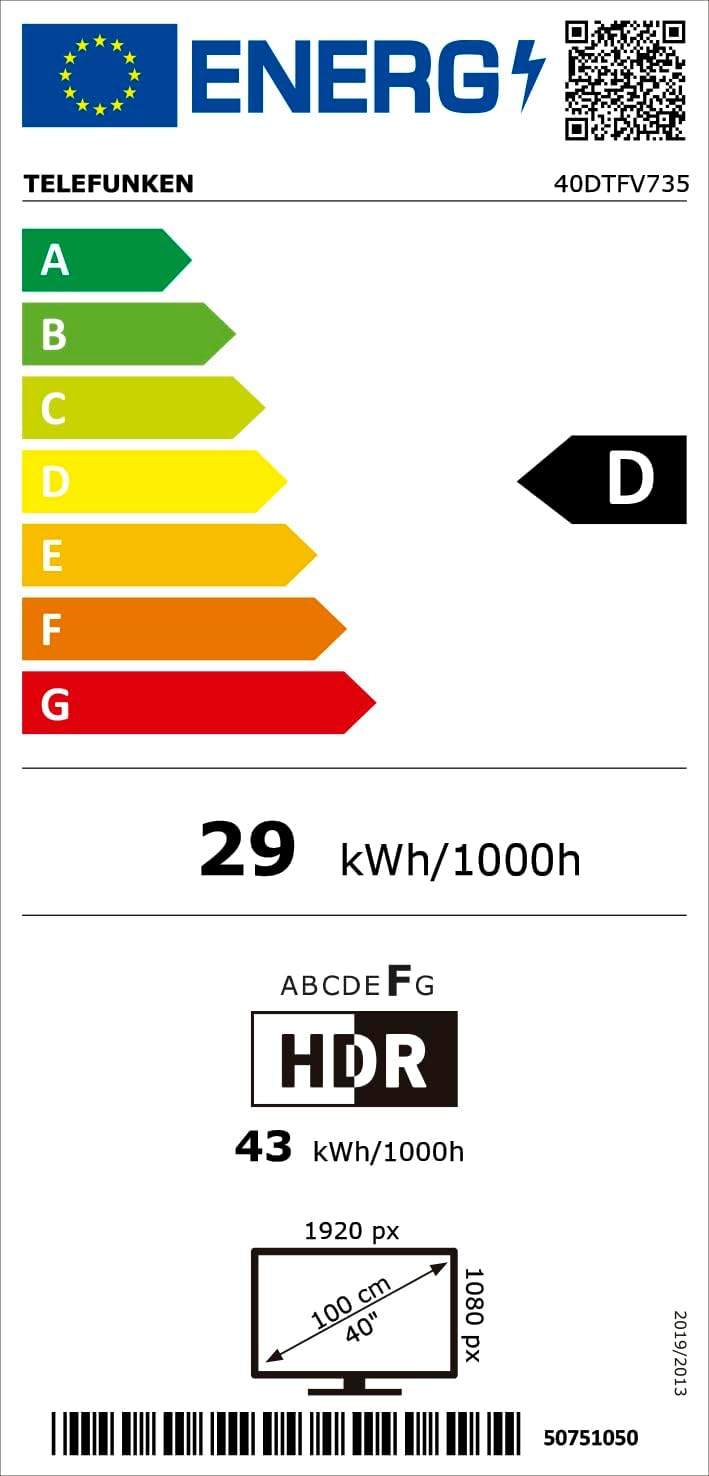
Figure 9.1: EU Energy Label for the Telefunken 40DTFV735. This label provides information on the television's energy consumption and efficiency ratings. For more details, visit the EPREL database.
10. Warranty and Support
Your Telefunken 40DTFV735 Smart TV comes with a standard manufacturer's warranty. Please refer to the warranty card included in your packaging for specific terms and conditions. For technical support, troubleshooting assistance, or service inquiries, please contact your retailer or the official Telefunken customer support channels.


