
GYMAX GM2200
GYMAX 4-in-1 Multi Game Table Instruction Manual
Model: GM2200
1. Introduction
Thank you for choosing the GYMAX 4-in-1 Multi Game Table. This versatile game table combines four popular games: foosball, billiards, table tennis, and air hockey, providing entertainment for various ages and skill levels. This manual provides essential information for assembly, operation, maintenance, and troubleshooting to ensure a safe and enjoyable experience with your new game table.
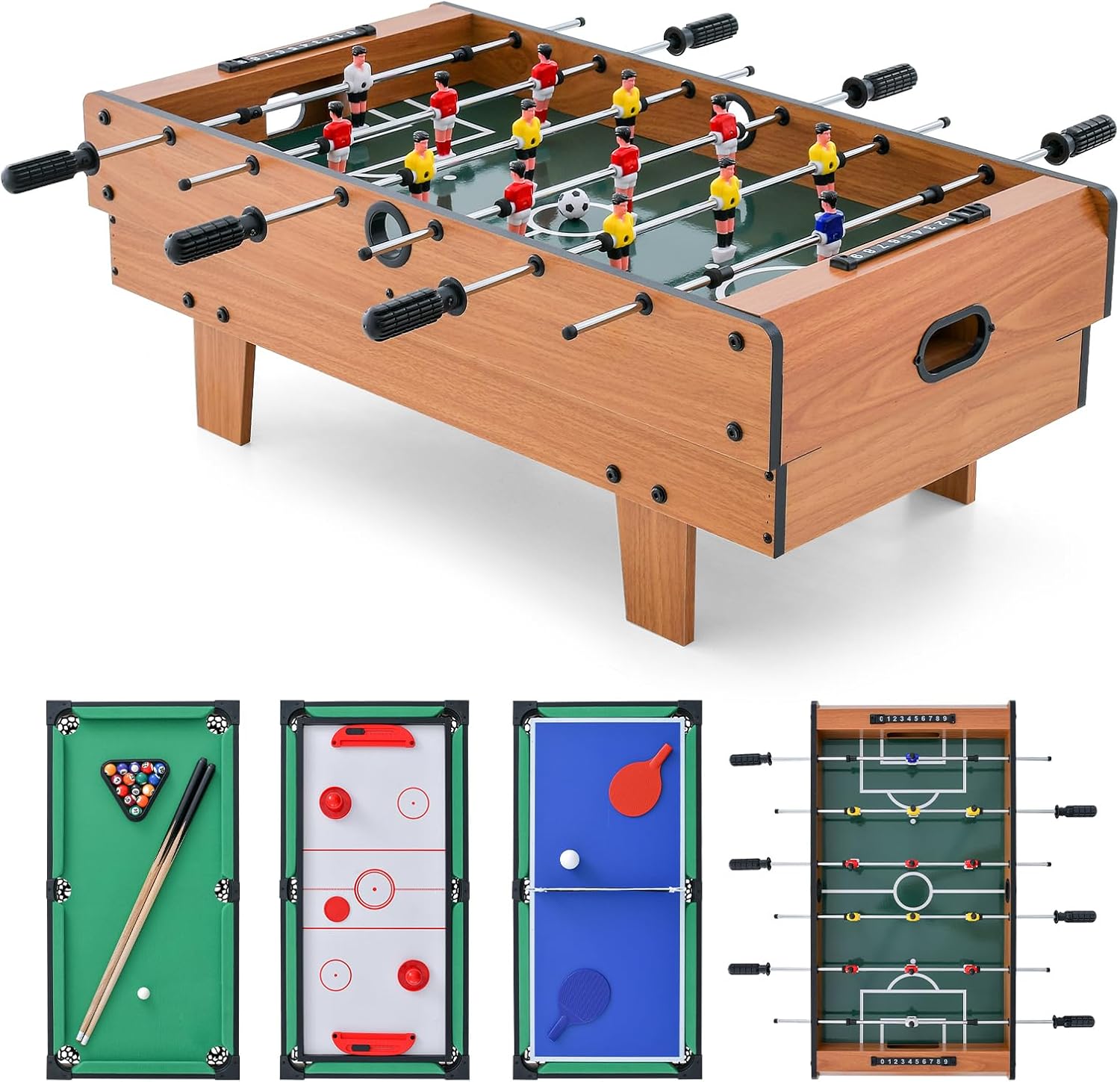
Image 1.1: The GYMAX 4-in-1 Multi Game Table, showcasing its foosball top and the underlying game boards for billiards, air hockey, and table tennis.
The compact and stackable design allows for easy transitions between games and efficient storage. Please read this manual thoroughly before assembly and use.
2. Package Contents
Verify that all components listed below are present and undamaged before proceeding with assembly. If any parts are missing or damaged, please contact customer support.

Image 2.1: A visual guide to all accessories included in the package for the GYMAX 4-in-1 Multi Game Table.
- 1 x Combo Game Table Set (main frame and game boards)
- 1 x Billiard Ball Set
- 2 x Cue Sticks
- 2 x Chalks
- 1 x Brush
- 2 x Soccer Balls
- 2 x Table Tennis Bats
- 2 x Table Tennis Balls
- 1 x Net and Post Set (for table tennis)
- 2 x Hockey Pucks
- 2 x Hockey Pushers
- 1 x User Guide
3. Assembly Instructions
Assembly is required for the GYMAX 4-in-1 Multi Game Table. Please follow these steps carefully. It is recommended to have two adults for assembly.
3.1 Unpacking and Preparation
- Carefully open the packaging and remove all components.
- Place all parts on a clean, flat, and soft surface (e.g., a carpet) to prevent scratches.
- Identify all parts against the package contents list.
3.2 Attaching the Legs
- Locate the main game table frame and the four legs.
- Align each leg with the designated mounting points on the underside of the main frame.
- Securely attach the legs using the provided screws and tools. Ensure all connections are tight to provide stability.
3.3 Game Board Placement
The game table features a stackable design, allowing you to switch between games easily.
- The billiard table is typically the base game board. Place it securely on the assembled frame.
- For other games, place the corresponding game board (e.g., air hockey, table tennis, foosball) on top of the billiard table or the previous game board. Ensure it sits flush and is stable.

Image 3.1: The stackable design of the game table, illustrating how different game boards are placed on top of each other.

Image 3.2: The game table can be used on a larger table or directly on the floor, depending on preference and space.
4. Operating Instructions
This section provides basic instructions for playing each of the four games included with your GYMAX Multi Game Table.
4.1 Foosball
The foosball game board features manual scoreboards, anti-slip handles, and kick-off holes for smooth gameplay.

Image 4.1: Close-up of the foosball table's features, including scoreboards, handles, and kick-off holes.
- Place the foosball game board on top of the table frame.
- Each player controls a set of rods with attached player figures.
- Use the anti-slip handles to rotate and slide the rods, moving your players to kick the soccer ball into the opponent's goal.
- Use the manual scoreboards to keep track of goals.
- Utilize the kick-off holes to re-introduce the ball into play after a goal or out-of-bounds situation.
4.2 Billiards (Pool)
The billiard game board comes with a full set of billiard balls, cue sticks, chalk, and a brush.

Image 4.2: Children enjoying a game of billiards on the GYMAX 4-in-1 Multi Game Table.
- Ensure the billiard game board is securely placed on the table frame.
- Arrange the billiard balls using the triangle rack.
- Apply chalk to the tip of the cue stick before each shot to improve grip and accuracy.
- Use the cue sticks to strike the cue ball, aiming to pocket the other balls according to standard billiard rules.
- Use the brush to clean the felt surface as needed.
4.3 Table Tennis (Ping Pong)
The table tennis game board includes bats, balls, and a net with posts.
- Place the table tennis game board on the table frame.
- Attach the net and post set to the center of the table tennis board.
- Players use the bats to hit the table tennis ball over the net, aiming to make it bounce on the opponent's side.
- Follow standard table tennis rules for serving and scoring.
4.4 Air Hockey
The air hockey game board comes with pushers and pucks.
- Place the air hockey game board on the table frame.
- Each player uses a pusher to strike the puck.
- The objective is to hit the puck into the opponent's goal.
- Note: This table is a manual air hockey version, meaning it does not feature an electric air blower.
5. Maintenance
Proper maintenance will extend the life of your GYMAX Multi Game Table and ensure continued enjoyment.
- Cleaning: Wipe down all surfaces with a soft, damp cloth. Avoid abrasive cleaners or solvents that could damage the finish. For the billiard felt, use the provided brush to remove dust and debris.
- Storage: When not in use, store the game table and accessories in a dry, cool place away from direct sunlight and extreme temperatures. The stackable design allows for compact storage of the game boards.
- Foosball Rods: Periodically check the foosball rods for smooth operation. If they become stiff, apply a small amount of silicone lubricant to the rods where they pass through the table.
- Tighten Fasteners: Regularly check and tighten all screws and bolts to ensure the table remains stable and secure.
6. Troubleshooting
This section addresses common issues you might encounter with your game table.
- Table Wobbles: Ensure all leg bolts are securely tightened. Check that the table is placed on a flat, even surface.
- Foosball Rods Stick: Apply a small amount of silicone-based lubricant to the rods. Ensure the rods are clean and free of debris.
- Game Boards Don't Sit Flat: Verify that the underlying game board or table frame is level. Ensure no debris is caught between the stacked game boards.
- Missing Accessories: Refer to the 'Package Contents' section. If items are missing upon initial unboxing, contact customer support immediately.
7. Specifications
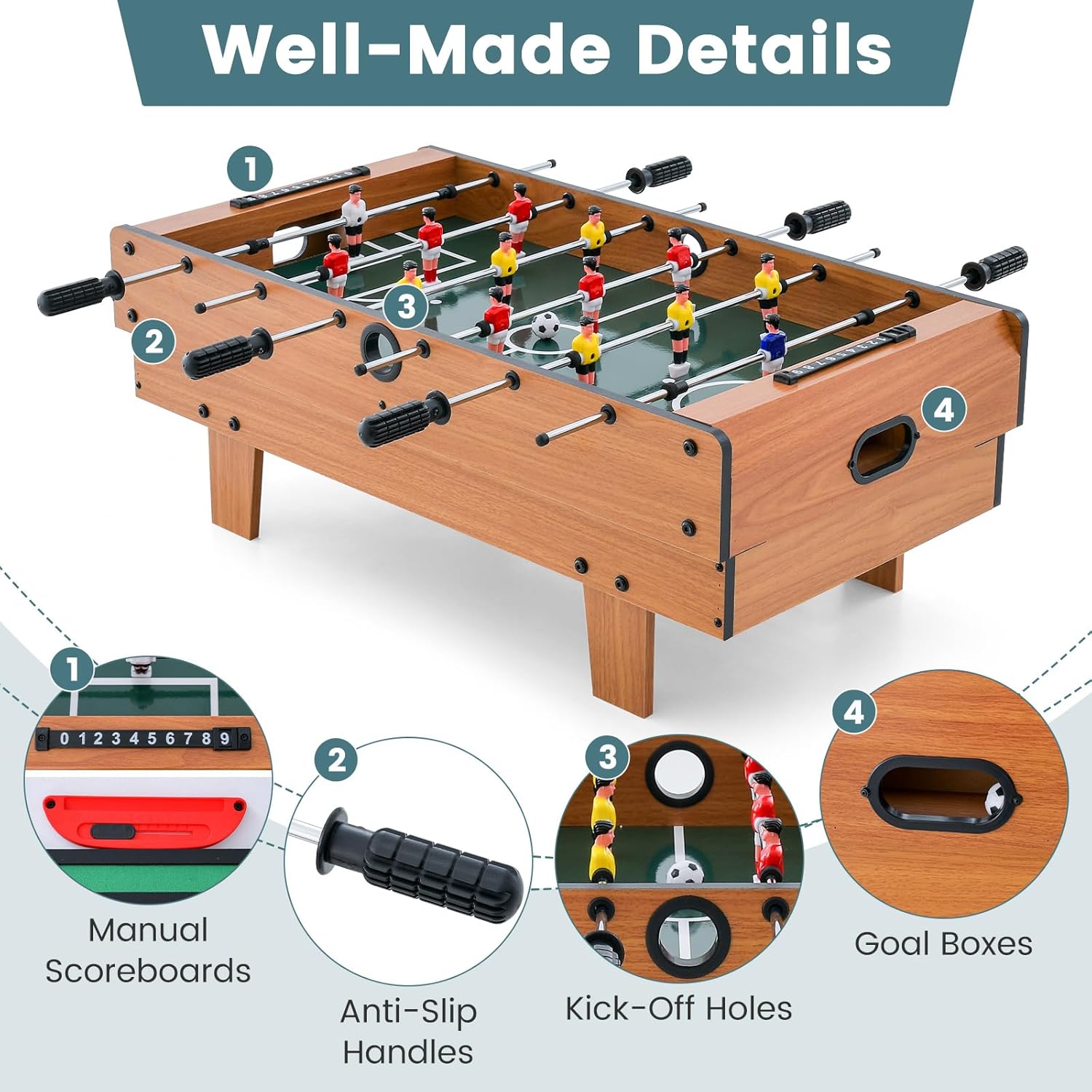
Image 7.1: Detailed dimensions and weight of the GYMAX 4-in-1 Multi Game Table.
| Feature | Detail |
|---|---|
| Model Name | Multi Game Table |
| Model Number | GM2200 |
| Brand | GYMAX |
| Overall Dimensions (L x W x H) | 32" x 17" x 12" (81cm x 43cm x 30.5cm) |
| Net Weight | 21 lbs (9.5 kg) |
| Material | Engineered Wood, Metal, Polypropylene |
| Color | Natural |
| Assembly Required | Yes |
| Number of Players | 2-4 |
8. Warranty Information
The GYMAX 4-in-1 Multi Game Table (Model GM2200) comes with a 90-day warranty from the date of purchase. This warranty covers manufacturing defects and workmanship under normal use. It does not cover damage resulting from misuse, accidents, unauthorized modifications, or normal wear and tear. Please retain your proof of purchase for warranty claims.
9. Customer Support
For any questions, concerns, or assistance with your GYMAX 4-in-1 Multi Game Table, please refer to the contact information provided with your purchase documentation or visit the official GYMAX website for support resources.
Related documentsGM2200

Ask a question about this manual
Ask about setup, troubleshooting, compatibility, parts, safety, or missing instructions. Manuals+ will review the question and use this page’s manual context to help answer it.