1. Introduction
The SainSmart BLM-393R Dual Laser Measuring Tool is a precision instrument designed for accurate distance and angle measurements. Featuring dual-laser technology, a backlit LCD, and multiple measurement modes, it is suitable for various professional and DIY applications. This manual provides comprehensive instructions for safe and effective use of the device.
2. Package Contents
Verify that all items are present in the package:
- SainSmart BLM-393R Dual Laser Measuring Tool
- USB Type-C Charging Cable
- User Manual
- Carrying Pouch
- Wrist Strap
3. Product Overview
The SainSmart BLM-393R is engineered for precision and durability, offering a range of features to enhance measurement tasks.

Figure 1: SainSmart BLM-393R Dual Laser Measuring Tool. This image displays the front view of the device, highlighting its compact design and user interface.

Figure 2: Key Features Overview. This graphic illustrates the device's electronic angle, automatic screen rotation, magnetic suction, ±2mm high accuracy, IP54 protection, 100 sets of data storage, unit switching, and Type-C charging.
3.1 Display and Interface

Figure 3: 2.4-inch Dual LCD Display. The image shows the device's screen in both day and night modes, demonstrating its clear readability in varying light conditions.

Figure 4: Color Backlit Display with Auto-Rotation. This image highlights the 360° flexible screen rotation and the option to long-press to lock the screen, ensuring optimal viewing angles.
3.2 Dual Laser Technology
The device features dual lasers for bilateral distance measurement, allowing for simultaneous measurement in two directions. This significantly improves efficiency and accuracy compared to single-laser or manual methods.
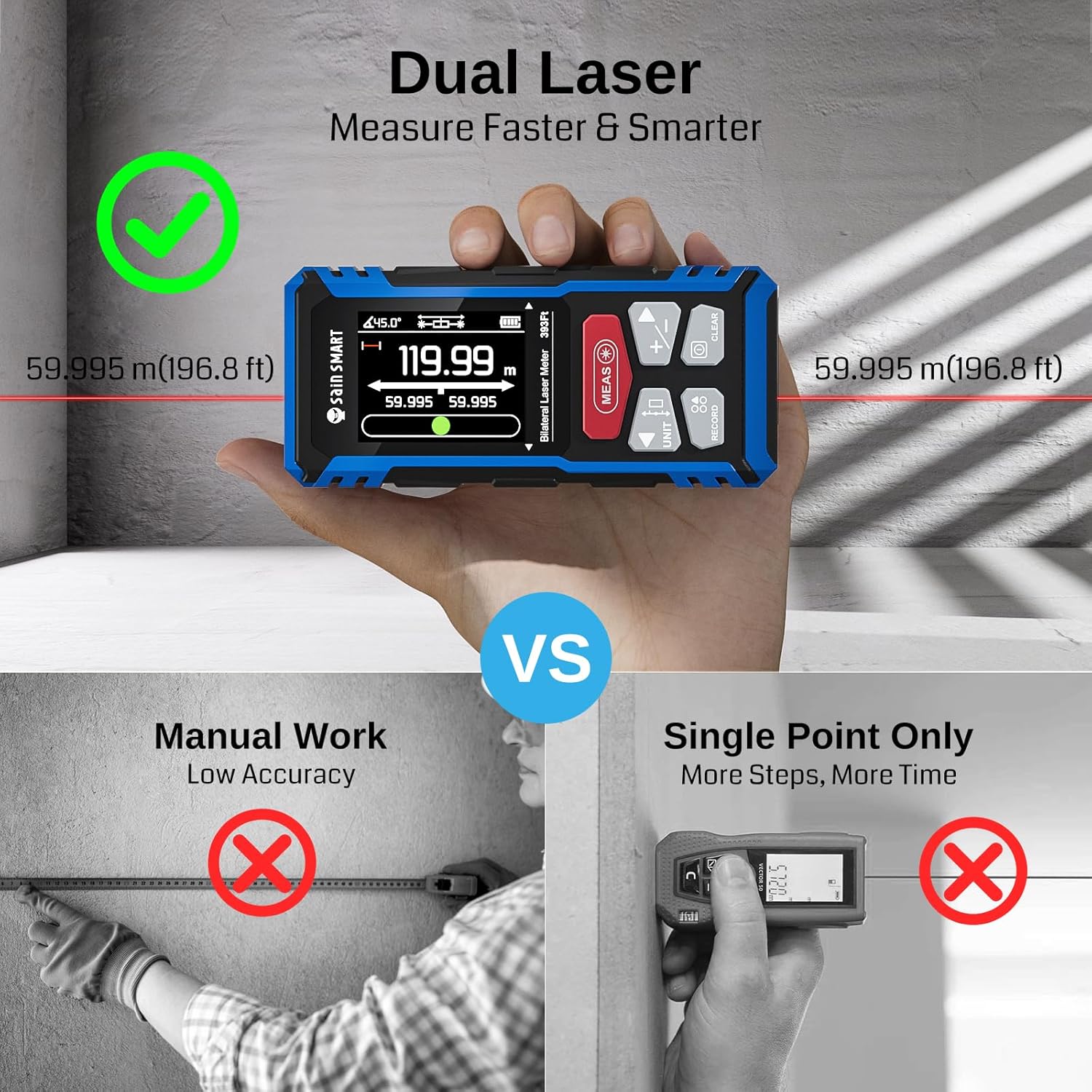
Figure 5: Dual Laser Precision. This graphic compares dual laser measurement with manual work and single-point measurement, illustrating the efficiency and accuracy benefits of the dual-laser system.
4. Getting Started
4.1 Battery Installation and Charging
The BLM-393R is equipped with a built-in 850mAh rechargeable Lithium-Ion Polymer battery.
- To charge the device, connect the provided USB Type-C cable to the charging port on the device and a compatible USB power source.
- A full charge supports up to 8000 dual measurements or 5000 single measurements.

Figure 6: Battery and Charging. This image shows the device being charged via its Type-C port, highlighting the 850mAh battery capacity and fast charging capability.
4.2 Power On/Off
- To power on: Press and hold the MEAS button.
- To power off: Press and hold the CLEAR button. The device will also automatically power off after a period of inactivity to conserve battery.
5. Basic Operation
5.1 Unit Switching
The device supports multiple units of measurement.
- Press the UNIT button to cycle through available units: meters (m), inches (in), and feet (ft).

Figure 7: Unit Switching and Device Features. This image demonstrates the unit switching functionality, along with other features like strong magnetic suction, IP54 protection, 1/4" copper nut for tripod mounting, and a belt buckle.
5.2 Reference Point Selection
Measurements can be taken from the front or rear of the device. This is crucial for accurate results depending on the measurement scenario.
- Press the REF button (often integrated with UNIT or MEAS button, refer to device markings) to switch the measurement reference point.
5.3 Single Measurement
- Point the laser at the target.
- Press the MEAS button once to emit the laser.
- Press the MEAS button again to take the measurement. The result will be displayed on the screen.
5.4 Continuous Measurement
- From standby mode, press and hold the MEAS button to activate continuous measurement.
- Move the device to measure minimum and maximum distances. The display will update in real-time.
- Press the MEAS button again to stop continuous measurement.
6. Advanced Measurement Modes
The BLM-393R offers 9 versatile measurement modes for various applications.

Figure 8: Multiple Measurement Modes. This image displays various measurement modes including Length, Area, Volume, Wall Area, Height Calculation by Measuring Angle, Height Calculation of Right Triangle, Hypotenuse Calculation of Right Triangle, Sum Calculation of Triangle Base Sides, and Auxiliary Height Calculation of Right Triangle.

Figure 9: Visual Guide to Measurement Functions. This graphic provides visual examples for Length, Area, Volume, Hypotenuse, Double Indirect Height, and Auxiliary Height measurements.
- To select a mode: Press the MODE button (often labeled with a square icon) repeatedly until the desired mode icon appears on the display.
- Follow the on-screen prompts to perform measurements for each specific mode.
6.1 Area Measurement
Measures the area of a rectangular surface.
- Select Area Mode.
- Measure the length of the first side.
- Measure the length of the second side. The device will automatically calculate and display the area.
6.2 Volume Measurement
Measures the volume of a space.
- Select Volume Mode.
- Measure length, width, and height sequentially. The device will calculate and display the volume.
6.3 Pythagorean Measurement (Indirect Height)
Calculates height indirectly using the Pythagorean theorem.
- Select Pythagorean Mode (e.g., single or double indirect height).
- Follow the on-screen instructions to take the required measurements (e.g., hypotenuse and base). The device will calculate the height.
6.4 Angle Measurement / Electronic Level
The integrated tilt sensor allows for fast and accurate angle and layout tasks, functioning as an electronic level.

Figure 10: Angle Measurement and Electronic Level. This image shows the device measuring an angle of 45 degrees, with an electronic horizontal bubble indicator.

Figure 11: Digital Bubble Level Mode. This graphic illustrates the digital bubble level, simulating a real bubble level to measure horizontal and vertical tilt, with color indicators for different angle ranges.
7. Data Management
7.1 Data Storage
The device can store up to 100 sets of measurement data.
- Press the RECORD button to view stored data.
- Use the arrow buttons to navigate through the records.

Figure 12: Data Storage. This image shows the device's display with multiple stored measurement data sets, indicating its capacity for 100 records.
7.2 PC Data Transfer
Measurements can be transferred to a PC for further analysis.
- Connect the device to a computer using the USB Type-C cable.
- The device will appear as a removable drive, allowing you to transfer data (e.g., to Excel or CAD software).
8. Care and Maintenance
- Keep the device dry and clean. Wipe with a soft, damp cloth. Do not use harsh chemicals or abrasive cleaners.
- Store the device in its carrying pouch when not in use to protect it from dust and impacts.
- Avoid exposing the device to extreme temperatures or direct sunlight for prolonged periods.
- The device has an IP54 rating, making it dustproof and splash-proof, but it is not waterproof. Do not immerse it in water.
9. Troubleshooting
If you encounter issues, refer to the following common solutions:
| Problem | Possible Cause | Solution |
|---|---|---|
| Device does not power on | Low battery; Device malfunction | Charge the battery; Contact support |
| Inaccurate measurements | Incorrect reference point; Obstruction in laser path; Unstable surface | Verify reference point; Clear laser path; Ensure stable measurement surface |
| Display not visible | Screen backlight off; Extreme lighting conditions | Adjust backlight settings; Move to a suitable lighting environment |
10. Specifications
- Measuring Range: Up to 393ft (120m)
- Accuracy: ±2mm
- Laser Type: Red Laser
- Battery: 850mAh Lithium-Ion Polymer (Rechargeable via USB Type-C)
- Display: 2.4-inch TFT LCD with Backlight and Auto-Rotation
- Measurement Modes: Length, Area, Volume, Pythagorean (various types), Angle, Wall Area, Continuous
- Data Storage: 100 sets
- Protection Class: IP54 (Dustproof, Splash-proof)
- Material: ABS+TPE
- Item Weight: 300 g
- Model Number: BLM-393R
- UPC: 810168141992

Figure 13: Low-Distortion Optical Lens. This image highlights the optical lens design, which greatly reduces environmental light interference, contributing to ±2mm precision accuracy and 99% measurement stability.
11. Warranty and Support
SainSmart products are backed by a manufacturer's warranty. For specific warranty details, please refer to the warranty card included in your package or visit the official SainSmart website.
For technical support, troubleshooting assistance, or to inquire about replacement parts, please contact SainSmart customer service through their official website or the contact information provided in your product documentation.


