
1. Introduction
Thank you for choosing the Spider Farmer SF-H5 5L Ultrasonic Humidifier. This device is designed to provide precise humidity control for various environments, including grow tents, bedrooms, and other indoor spaces. Featuring adjustable mist levels, a built-in humidistat, and smart control compatibility, the SF-H5 ensures optimal atmospheric conditions for your plants or personal comfort. Please read this manual thoroughly before operation to ensure proper use and maintenance.
2. Safety Instructions
- Always place the humidifier on a firm, flat, and waterproof surface.
- Do not immerse the humidifier base in water or other liquids.
- Unplug the unit from the power outlet before filling, cleaning, or performing any maintenance.
- Keep the humidifier out of reach of children and pets.
- Do not block the mist outlet.
- Use only clean, purified, or distilled water to prevent mineral buildup and ensure optimal mist quality.
- Do not add essential oils or other additives directly into the water tank, as this may damage the unit.
- If the power cord is damaged, it must be replaced by the manufacturer, its service agent, or similarly qualified persons to avoid a hazard.
3. Package Contents
Carefully unpack the box and ensure all items are present and in good condition. If any items are missing or damaged, please contact customer support.
- SF-H5 Humidifier Unit
- Dual Outlet Nozzle
- Telescopic Hose 1 (Retracted: 450mm / Extended: 1800mm)
- Telescopic Hose 2 (Retracted: 180mm / Extended: 820mm)
- Waterproof Joint
- Temperature & Humidity Sensor
- RJ12 Cable (3m) x1
- Straps x3
- Tool Bags
- Power Cord

4. Product Overview
The Spider Farmer SF-H5 is a 5-liter ultrasonic humidifier designed for precise environmental control. It features a digital display, touch controls, and compatibility with Spider Farmer's GGS controllers for smart operation.
4.1. Control Panel Features

- HUMIDITY: Adjustable humidity range from 35% to 95% Relative Humidity (RH).
- TIMER: Set operation time from 1 to 24 hours.
- MIST: Four adjustable mist levels.
- ON/OFF: Power button for the unit.
- Low Water Icon: Flashes for 15 seconds with 3 beeps, then automatically shuts down when water level is low.
4.2. Mist Output Levels

| Mode | Mist Output |
|---|---|
| Level 1 | 180 mL/h |
| Level 2 | 270 mL/h |
| Level 3 | 360 mL/h |
| Level 4 | 450 mL/h |
5. Setup
Follow these steps to set up your SF-H5 humidifier.
5.1. Placement
The SF-H5 humidifier offers flexible placement options. It can be installed inside or outside your grow tent or other desired environment.
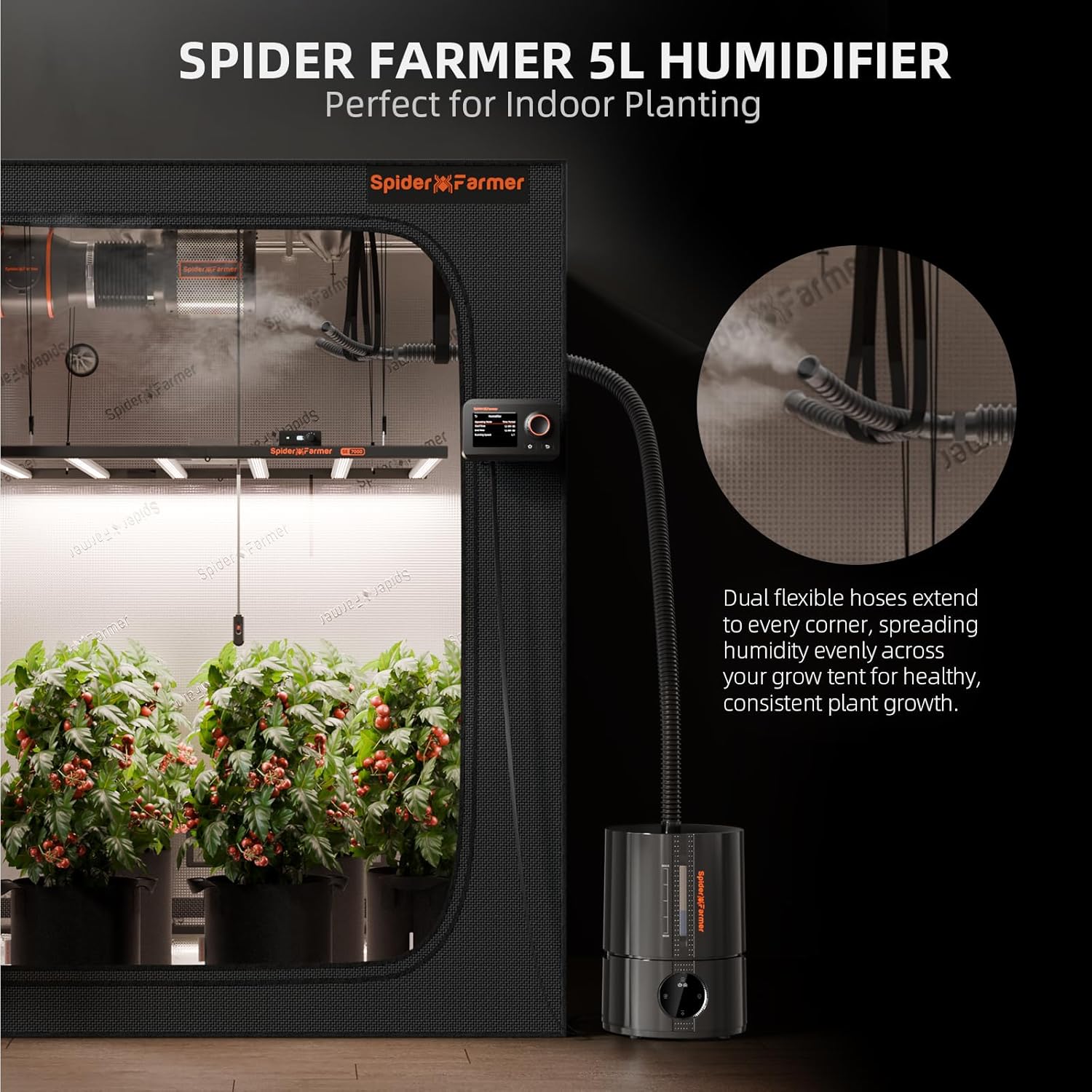
When placing the humidifier outside a grow tent, ensure the hoses are properly routed and secured to prevent kinks or blockages.
5.2. Filling the Water Tank
- Ensure the humidifier is unplugged from the power outlet.
- Remove the top cover of the humidifier.
- Fill the water tank with clean, purified, or distilled water up to the 'MAX' line. Do not overfill.
- Replace the top cover securely.
5.3. Connecting Hoses and Sensor
- Attach the dual outlet nozzle to the mist outlet on the humidifier.
- Connect the telescopic hoses to the dual outlet nozzle. Extend the hoses to the desired length and position them to distribute mist evenly.
- Connect the temperature and humidity sensor to the designated port on the humidifier. Place the sensor in the area where humidity needs to be measured accurately.
- If using with a GGS Controller, connect the RJ12 cable from the humidifier to the controller.
6. Operating Instructions
Once set up, you can begin operating your SF-H5 humidifier.
6.1. Power On/Off
- Plug the power cord into a suitable electrical outlet.
- Press the ON/OFF button on the control panel to turn the unit on or off.
6.2. Adjusting Humidity
- Press the HUMIDITY button to enter humidity setting mode.
- Use the +/- buttons to adjust the desired humidity level from 35% to 95% RH in 5% increments.
- The humidifier will automatically maintain the set humidity level.
6.3. Setting Mist Levels
- Press the MIST button to cycle through the four available mist output levels (Level 1 to Level 4).
- Select the mist level appropriate for your environment's needs.
6.4. Using the Timer
- Press the TIMER button to set the operating duration.
- Use the +/- buttons to select a time from 1 to 24 hours. The humidifier will automatically turn off after the set time.
6.5. Smart Control (Optional)
The SF-H5 humidifier is compatible with Spider Farmer GGS Controllers and smart apps for remote monitoring and control.

- Connect the humidifier to a compatible GGS Controller or smart power strip (e.g., AC5/AC10).
- Download the Spider Farmer app on your smartphone.
- Follow the app's instructions to pair your humidifier and GGS devices.
- Once connected, you can monitor humidity, adjust settings, and schedule operations remotely.
6.6. Product Overview Video
For a visual guide on the product's features and basic operation, please watch the video below.
7. Maintenance
Regular maintenance ensures the longevity and efficient operation of your humidifier.
7.1. Cleaning the Water Tank
- Unplug the humidifier and empty any remaining water from the tank.
- Wipe the inside of the tank with a soft cloth. For mineral buildup, use a solution of white vinegar and water (1:1 ratio). Let it sit for 30 minutes, then rinse thoroughly.
- Do not use abrasive cleaners or harsh chemicals.
7.2. Cleaning the Transducer/Atomizer
- The transducer (the small disc that produces mist) should be cleaned regularly to prevent mineral buildup.
- Use a soft brush or cotton swab dipped in white vinegar to gently clean the surface of the transducer.
- Rinse with clean water, ensuring no vinegar residue remains.
7.3. Water Quality
To maintain optimal mist quality and prevent mineral buildup, it is highly recommended to use purified or bottled water when adding water to the humidifier.
8. Troubleshooting
If you encounter issues with your humidifier, refer to the following common problems and solutions:
- No Mist Output:
- Check if the unit is plugged in and powered on.
- Ensure there is enough water in the tank. The low water indicator will flash if the tank is empty.
- Clean the transducer/atomizer for mineral buildup.
- Ensure the mist outlet is not blocked.
- Incorrect Humidity Reading:
- Ensure the temperature and humidity sensor is properly connected and placed in an open area, away from direct mist.
- Calibrate the sensor if necessary (refer to GGS Controller manual if applicable).
- Unit Leaking:
- Ensure the water tank is properly seated and the top cover is securely closed.
- Check for cracks or damage to the water tank or base.
- Do not overfill the water tank.
- Unusual Noise:
- Ensure the unit is on a flat, stable surface.
- Check for foreign objects in the water tank or mist outlet.
- Clean the transducer for mineral buildup.
If the problem persists after trying these solutions, please contact Spider Farmer customer support.
9. Specifications
| Feature | Specification |
|---|---|
| Brand | SPIDER FARMER |
| Model | SF-H5 |
| Color | Black |
| Product Dimensions | 20.57 x 20.57 x 30.23 cm |
| Weight | 2.43 kg |
| Wattage | 30 watts |
| Voltage | 100 Volt |
| Automatic Shut-off | Yes |
| Noise Level | 30 Decibel |
| Operating Time (Autonomy) | Up to 48 hours |
| Special Features | Adjustable humidity control, Quiet operation, Auto shut-off, Digital display, Humidistat, 24-hour timer, Water level window, Low water indicator |
| Capacity | 5 Liters |
| Operating Mode | Automatic |
10. Warranty and Support
Spider Farmer is committed to customer satisfaction and product quality.
- Warranty: This product comes with a 2-year warranty from the date of purchase.
- Replacement Policy: We offer a 3-month free replacement policy for products found to be damaged or used upon receipt.
- Customer Service: If you encounter any issues with your product, please contact our support team. We aim to respond within 24 hours to resolve your concerns.
For further assistance, please visit the official Spider Farmer website or contact our customer support directly.