
1. Introduction
This manual provides detailed instructions for the setup, operation, maintenance, and troubleshooting of your FUNYET Mini PC FY3. This compact desktop computer is equipped with an Intel 12th Gen Alder Lake N95 processor, 16GB DDR4 RAM, and a 512GB SSD, running on Windows 11 Pro. It supports 4K displays and offers versatile connectivity for various applications.
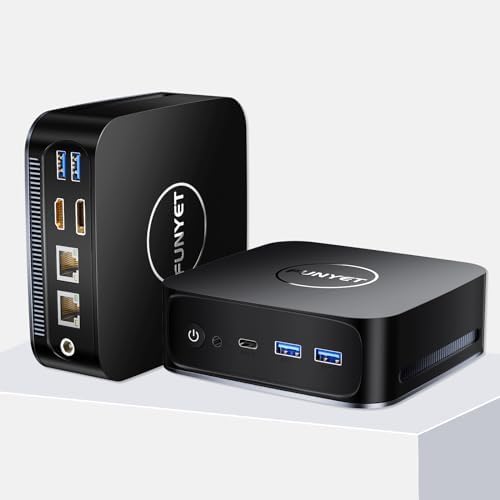
Image 1.1: Front and rear view of the FUNYET Mini PC FY3, showcasing its compact design and various ports.
2. Product Features
The FUNYET Mini PC FY3 is designed for efficiency and performance in a small form factor. Key features include:
- Powerful Processor: Intel Alder Lake N95 with 4 cores and 4 threads, up to 3.4GHz.
- Integrated Graphics: Intel UHD Graphics (max 1200MHz) supporting 4K 60Hz ultra-high-definition output.
- Memory: 16GB DDR4 RAM, expandable up to 32GB.
- Storage: 512GB M.2 SATA SSD, expandable up to 2TB, supporting PCIe4.0 and SATA3.0 SSD memory settings.
- Operating System: Pre-installed Windows 11 Pro for enhanced speed and security.
- Connectivity: Dual RJ45 Ethernet ports (1x 2.5Gbps, 1x Gigabit), 5G Wi-Fi, and Bluetooth 4.2.
- Display Support: Dual-screen display capability via HDMI and DisplayPort (DP).
- Efficient Cooling: Built-in cooling fan for reliable performance.

Image 2.1: Overview of the FUNYET Mini PC FY3's core specifications, including processor speed, core count, graphics, and connectivity options.

Image 2.2: Detailed view of the Intel Alder Lake N95 processor, highlighting its base and turbo frequencies, memory speed, and power consumption.

Image 2.3: Illustration of the SO-DIMM RAM slot and M.2 SSD, demonstrating the upgrade potential for memory and storage.
3. Ports and Connections
The FUNYET Mini PC FY3 offers a comprehensive set of ports for connecting various peripherals and displays:
- Front Panel:
- 1 x Power Button
- 1 x Earphone Jack
- 1 x Type-C Port
- 2 x USB 3.2 Ports
- Rear Panel:
- 2 x USB 3.2 Ports
- 1 x HDMI 2.0 Port
- 1 x DisplayPort (DP 1.4)
- 2 x RJ45 Ethernet Ports (1x 2.5Gbps, 1x Gigabit)
- 1 x DC 5.5 Power Input

Image 3.1: Diagram illustrating all available ports on the front and rear panels of the Mini PC, with labels for each connection type.

Image 3.2: Close-up of the dual RJ45 Ethernet ports, emphasizing stable network connectivity with Wi-Fi 5 and Bluetooth 4.2.
4. Setup Guide
Follow these steps to set up your FUNYET Mini PC FY3:
- Connect to a Display: Connect your monitor or TV to the Mini PC using an HDMI or DisplayPort cable. The Mini PC supports dual-screen display.
- Connect Peripherals: Plug in your USB keyboard and mouse into the available USB 3.2 ports.
- Network Connection: For wired internet, connect an Ethernet cable to one of the RJ45 ports. For wireless internet, ensure your Wi-Fi network is available during initial setup.
- Power On: Connect the power adapter to the DC 5.5 port on the Mini PC, then plug the adapter into a power outlet. Press the power button on the front panel to turn on the device.
- Initial Setup: Follow the on-screen instructions to complete the Windows 11 Pro setup, including language, region, network, and user account creation.

Image 4.1: Example of a dual-screen display setup using the HDMI and DisplayPort outputs of the Mini PC.
5. Operating Instructions
Once your Mini PC is set up, you can begin using it:
- Power On/Off: Press the power button to turn on the PC. To shut down, click the Start button in Windows, then select Power > Shut down.
- Windows 11 Pro: Explore the features of Windows 11 Pro for productivity, entertainment, and security.
- Connectivity: Utilize the multiple USB ports for external devices, the Ethernet ports for stable wired connections, and Wi-Fi/Bluetooth for wireless peripherals and internet access.
- Dual Display: Configure your display settings in Windows to extend or duplicate your desktop across two monitors.
6. Maintenance
Regular maintenance helps ensure the longevity and optimal performance of your Mini PC:
- Keep Clean: Regularly clean the exterior of the Mini PC with a soft, dry cloth. Use compressed air to clear dust from ventilation openings to ensure proper airflow and cooling.
- Software Updates: Keep your Windows 11 Pro operating system and drivers updated to the latest versions for security and performance improvements.
- Avoid Obstructions: Ensure the Mini PC is placed in a well-ventilated area, free from obstructions that could block airflow to the cooling fan.
- Safe Shutdown: Always shut down the PC properly through the operating system to prevent data corruption.
7. Troubleshooting
If you encounter issues with your FUNYET Mini PC FY3, refer to the following common solutions:
| Problem | Possible Cause | Solution |
|---|---|---|
| No power | Power cable not connected, power outlet issue, faulty adapter. | Check power cable connections. Try a different power outlet. Ensure the power adapter is functioning. |
| No display on monitor | Display cable loose, incorrect input source on monitor, monitor off. | Ensure HDMI/DP cable is securely connected. Select the correct input source on your monitor. Turn on the monitor. |
| No internet connection | Ethernet cable disconnected, Wi-Fi disabled, router issue. | Check Ethernet cable. Ensure Wi-Fi is enabled in Windows settings. Restart your router/modem. |
| Peripherals not working | Loose USB connection, driver issue. | Reconnect USB devices. Try a different USB port. Check device manager for driver issues. |
8. Specifications
Detailed technical specifications for the FUNYET Mini PC FY3:
| Feature | Specification |
|---|---|
| Processor | Intel 12th Gen Alder Lake N95 (3.4 GHz Max Turbo Frequency) |
| RAM | 16GB DDR4 SDRAM (Expandable to 32GB) |
| Storage | 512GB M.2 SSD (Supports PCIe4.0 and SATA3.0, Expandable to 2TB) |
| Graphics Coprocessor | Intel UHD Graphics (Integrated) |
| Operating System | Windows 11 Pro |
| Wireless Type | 802.11ac (Wi-Fi 5), Bluetooth 4.2 |
| Ethernet Ports | 2 x RJ45 (1x 2.5Gbps, 1x Gigabit) |
| USB Ports | 4 x USB 3.2, 1 x Type-C |
| Video Output | 1 x HDMI 2.0, 1 x DisplayPort (DP 1.4) |
| Audio | 1 x Earphone Jack |
| Power Input | DC 5.5 |
| Item Weight | 1.72 pounds |
| Product Dimensions | 5.11 x 1.67 x 5.15 inches |
| Color | Black |
9. Warranty and Support
FUNYET is committed to providing quality products and customer satisfaction:
- Warranty: The FUNYET Mini PC FY3 comes with a one-year warranty.
- Returns & Repairs: We offer 30 days free exchange and 1 year free repair for all our products.
- Customer Support: If you have any questions or require assistance with your product, please contact FUNYET support. We aim to reply within 24 hours.
