
OUBOTEK TP3000W
OUBOTEK 3000 Watt Pure Sine Wave Power Inverter User Manual
Model: TP3000W
1. Introduction
This user manual provides essential information for the safe and efficient operation of your OUBOTEK 3000 Watt Pure Sine Wave Power Inverter. This device converts 12V DC battery power into 120V AC household power, suitable for a wide range of applications including RVs, trucks, homes, and off-grid solar systems. Please read this manual thoroughly before installation and use to ensure optimal performance and safety.
2. Safety Information
Adhering to these safety guidelines is crucial to prevent personal injury and damage to the inverter or connected devices.
- Electrical Shock Hazard: Do not open the inverter casing. There are no user-serviceable parts inside. Refer all servicing to qualified personnel.
- Ventilation: Ensure adequate ventilation around the inverter. Do not block ventilation openings. Overheating can cause damage or fire.
- Dry Environment: This inverter is designed for indoor use or in a dry, protected environment. Do not expose it to rain, moisture, or water.
- Battery Connection: Always connect the inverter to a 12V DC battery. Ensure correct polarity (RED to Positive, BLACK to Negative). Reverse connection is strictly prohibited and will cause severe damage.
- Grounding: Properly ground the inverter as instructed in the setup section to prevent electrical hazards.
- Load Capacity: Do not exceed the inverter's continuous power rating of 3000 Watts or peak power rating of 6000 Watts. Overloading can damage the inverter and connected appliances.
- Children and Pets: Keep the inverter out of reach of children and pets.
- Flammable Materials: Do not operate the inverter near flammable liquids, gases, or other combustible materials.
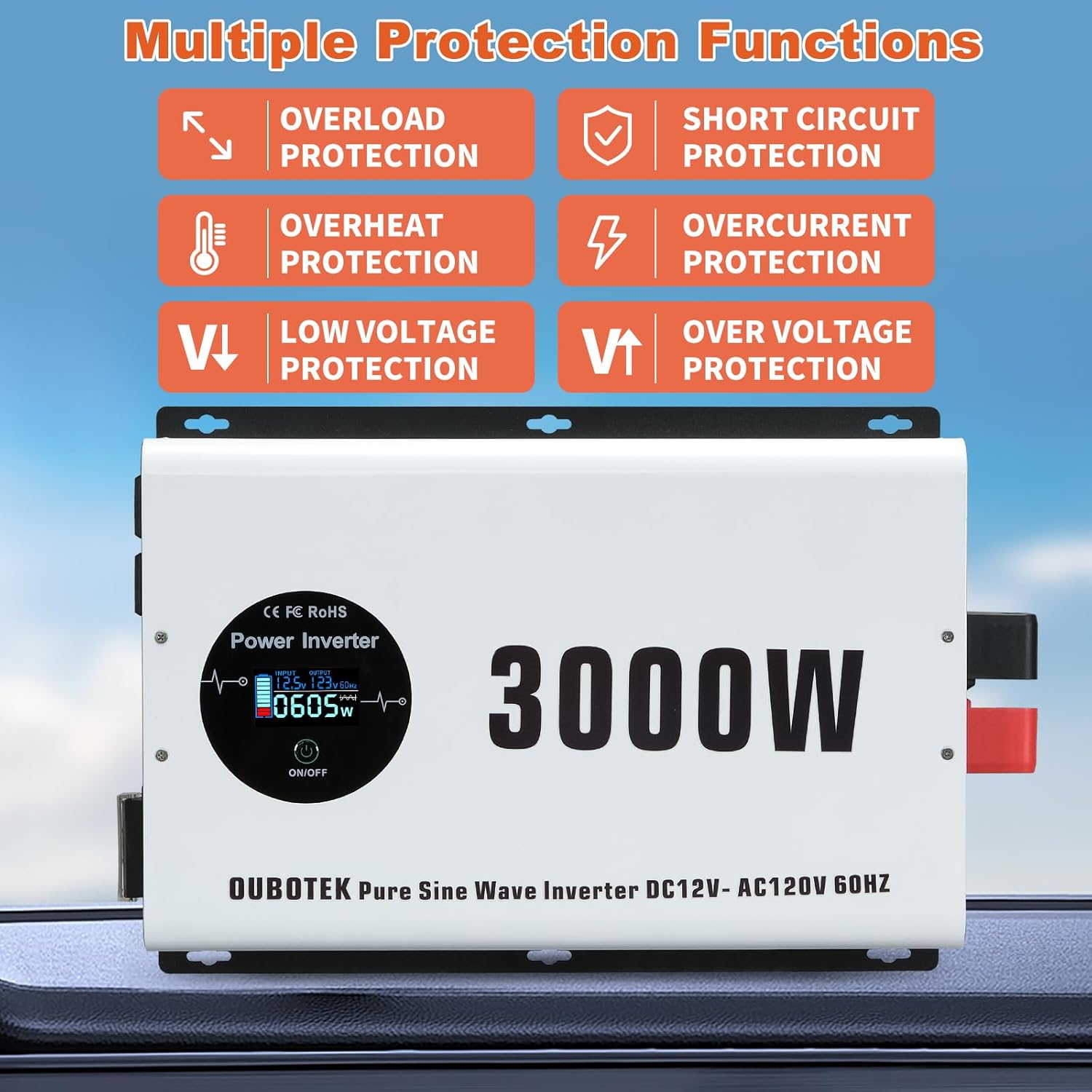
Figure 2.1: The inverter features multiple protection functions including overload, short circuit, overheat, overcurrent, low voltage, and over voltage protection.
3. Package Contents
Verify that all items are present in the package:
- 1 x OUBOTEK 3000 Watt Pure Sine Wave Inverter
- 1 x 2AWG Battery Cable Set (Red & Black) - 1.64ft
- 1 x Grounding Wire
- 8 x 50A Spare Fuses
- 1 x Wrench
- 1 x User Manual

Figure 3.1: OUBOTEK 3000W Pure Sine Wave Inverter and included accessories.
4. Product Features
- Powerful DC to AC Conversion: Provides 3000 Watts continuous power and 6000 Watts peak power, converting 12V DC to 110V/120V AC.
- Pure Sine Wave Technology: Ensures stable and efficient power output, suitable for sensitive electronics.
- LCD Digital Display: Monitor real-time status including battery voltage, battery level, AC output voltage, output frequency, output waveform, AC loading power, and protection error codes (OV, LV, OT, OL, SC).
- Multi-Protection System: Built-in 8 x 50A fuses and integrated quiet smart cooling fan for protection against over voltage, low voltage, over temperature, over load, and short circuit.
- Versatile Outputs: Equipped with 4 AC outlets, 1 hardwire port, dual USB QC3.0 18W ports, and a Type C PD30W port for various charging needs.
5. Product Diagram and Components
Familiarize yourself with the different parts of your OUBOTEK Power Inverter.
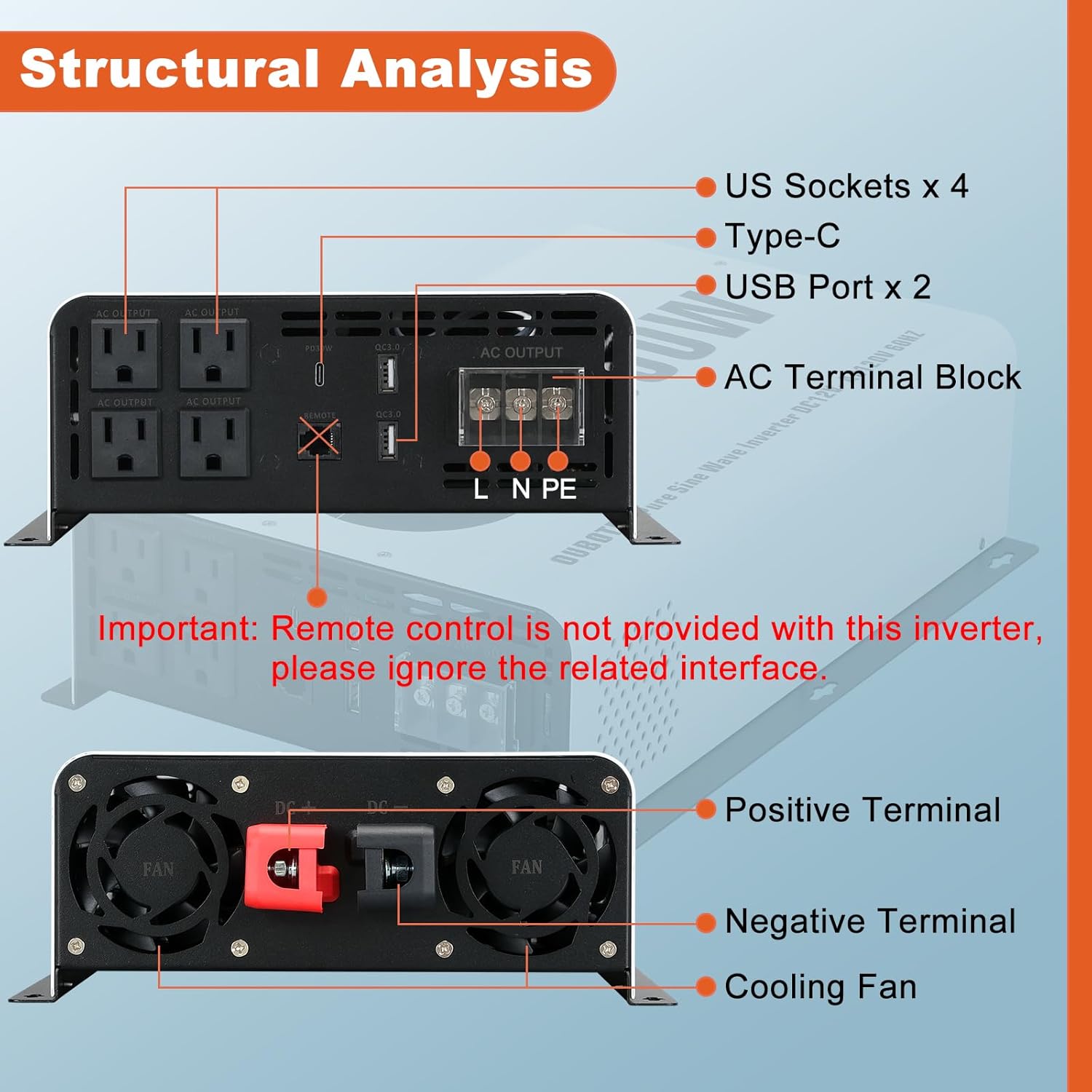
Figure 5.1: Front and Rear Panel Components. Note: Remote control interface is present but remote control is not included with this model.
- Front Panel:
- AC Outlets (x4): Standard 120V AC outlets for connecting appliances.
- USB Ports (x2): QC3.0 18W for fast charging compatible devices.
- Type-C Port (x1): PD30W for fast charging compatible devices.
- LCD Display: Shows operational status and error codes.
- ON/OFF Button: Power control for the inverter.
- Rear Panel:
- Positive Terminal (Red): For connecting the positive battery cable.
- Negative Terminal (Black): For connecting the negative battery cable.
- Cooling Fans: Integrated smart cooling fans for temperature regulation.
- AC Terminal Block: Hardwire port for direct AC output connection.
6. Setup and Installation
Follow these steps for proper installation of your inverter.
- Choose a Location: Select a cool, dry, and well-ventilated area for the inverter. Avoid direct sunlight, heat sources, and moisture. Ensure there is enough space around the inverter for air circulation.
- Mounting: The inverter has mounting brackets for secure installation. Use appropriate screws and anchors for your mounting surface.
- Grounding the Inverter:
- Locate the grounding terminal on the inverter chassis.
- Connect one end of the provided grounding wire to this terminal.
- Connect the other end of the grounding wire to a proper earth ground (e.g., vehicle chassis, ground rod, or electrical system ground).
- Connecting to the Battery:
WARNING: Ensure the inverter is OFF before connecting to the battery. Connect positive to positive and negative to negative. Reverse polarity will damage the inverter.
- Connect the RED battery cable to the Positive (+) terminal of the inverter.
- Connect the other end of the RED cable to the Positive (+) terminal of your 12V DC battery.
- Connect the BLACK battery cable to the Negative (-) terminal of the inverter.
- Connect the other end of the BLACK cable to the Negative (-) terminal of your 12V DC battery.
- Ensure all connections are tight and secure to prevent loose connections and arcing.
Video 6.1: Demonstrates how to connect the OUBOTEK 3000W inverter to a 12V battery, emphasizing correct polarity.
7. Operating Instructions
- Turning On/Off:
Press and hold the ON/OFF button on the inverter for approximately 2 seconds to power it on or off. The LCD display will illuminate when the inverter is active.

Figure 7.1: Powering on the inverter by holding the ON/OFF button.
- Understanding the LCD Display:
The LCD provides real-time operational data:
- Input (Battery Voltage): Displays the current DC voltage from your battery.
- Output (AC Output Voltage): Shows the AC voltage being supplied by the inverter.
- Output Frequency: Indicates the frequency of the AC output (e.g., 60Hz).
- Output Waveform: Confirms the pure sine wave output.
- Battery Capacity: A visual indicator of the battery's charge level.
- AC Loading Power: Displays the current power consumption of connected devices in Watts.
- Error Codes: Alerts for protection triggers (OV: Over Voltage, LV: Low Voltage, OT: Over Temperature, OL: Over Load, SC: Short Circuit).

Figure 7.2: Detailed view of the Smart LCD display and its indicators.
- Connecting Appliances:
Once the inverter is on, plug your AC appliances into the AC outlets or connect to the hardwire port. For USB and Type-C charging, use the dedicated ports. Ensure the total wattage of all connected devices does not exceed the inverter's continuous power rating.
Video 7.3: Demonstrates the inverter powering various appliances like an induction cooker, hair dryer, microwave oven, electric fan, and charging mobile devices.
8. Applications
The OUBOTEK 3000W Pure Sine Wave Inverter is highly versatile and suitable for powering a wide range of electronics and appliances in various settings:
- Recreational Vehicles (RVs) & Camping: Powering lights, small kitchen appliances, and entertainment systems on the go.
- Trucks & Commercial Vehicles: Running power tools, laptops, and other equipment for mobile work.
- Home Backup Power: Providing essential power during outages for lights, fans, and communication devices.
- Off-Grid Solar Systems: Converting solar battery power into usable AC electricity for remote cabins or homes.
- Boats & Marine Applications: Powering onboard electronics and comforts.
- Outdoor Work: Operating power tools where grid power is unavailable.

Figure 8.1: Examples of appliances and scenarios where the inverter can be used.
9. Maintenance
Regular maintenance ensures the longevity and reliable operation of your inverter.
- Keep Clean: Periodically wipe the exterior of the inverter with a dry, soft cloth. Do not use harsh chemicals or abrasive cleaners.
- Check Connections: Regularly inspect battery cables and terminal connections for tightness. Loose connections can cause overheating and power loss.
- Ventilation: Ensure the cooling fans and ventilation openings are free from dust and debris. Clean with compressed air if necessary.
- Storage: If storing the inverter for an extended period, disconnect it from the battery and store it in a cool, dry place.
10. Troubleshooting
The LCD display will show error codes to help diagnose issues. Refer to the table below for common problems and solutions.
| Error Code / Symptom | Possible Cause | Solution |
|---|---|---|
| OV (Over Voltage) | Input DC voltage is too high. | Check battery voltage. Ensure it is a 12V battery system. Disconnect and reconnect. |
| LV (Low Voltage) | Input DC voltage is too low (battery discharged). | Recharge or replace the battery. Check battery connections for looseness. |
| OT (Over Temperature) | Inverter is overheating. | Ensure proper ventilation. Reduce load. Allow inverter to cool down. Check if cooling fans are obstructed. |
| OL (Over Load) | Connected load exceeds inverter's capacity. | Reduce the total wattage of connected appliances. Disconnect and reconnect. |
| SC (Short Circuit) | Short circuit detected in the output. | Disconnect all AC loads. Check for faulty appliances or wiring. |
| No Power / No Display | No DC input power; loose connections; blown fuse. | Check battery connections. Verify battery charge. Inspect internal fuses (if accessible by qualified personnel) or external fuses. |
11. Specifications
Key technical specifications for the OUBOTEK 3000W Pure Sine Wave Inverter:
| Specification | Value |
|---|---|
| Model Name | TP3000W |
| Continuous Power | 3000 Watts |
| Peak Power | 6000 Watts |
| Input Voltage | DC 12V |
| Output Voltage | AC 120V |
| Output Waveform | Pure Sine Wave |
| Product Dimensions | 15.75 x 10.04 x 3.74 inches (400 x 255 x 95 mm) |
| Item Weight | 13.22 pounds |
| AC Outlets | 4 |
| USB Ports | Dual QC3.0 18W |
| Type-C Port | PD30W |

Figure 11.1: Product dimensions of the OUBOTEK 3000W Inverter.
12. Warranty and Support
OUBOTEK is committed to customer satisfaction. For any questions, concerns, or technical assistance, please contact our customer service team. We are delighted to provide 24-hour customer service support for your complete satisfaction.
Please refer to your purchase documentation for specific warranty terms and conditions.
Contact Information: Refer to the contact details provided with your product packaging or on the official OUBOTEK website.
Related documentsTP3000W


Ask a question about this manual
Ask about setup, troubleshooting, compatibility, parts, safety, or missing instructions. Manuals+ will review the question and use this page’s manual context to help answer it.