
1. Introduction
The SainSmart Dual Laser Measuring Tool BLM-393G is a high-precision device designed for efficient and accurate distance measurements. Featuring dual green lasers, a backlit TFT LCD, and multiple measurement modes, it is suitable for various professional and DIY applications. This manual provides comprehensive instructions for safe and effective use of the device.

Image 1.1: Overview of the SainSmart Dual Laser Measuring Tool BLM-393G, showcasing its electronic angle, automatic screen rotation, magnetic suction, ±2mm high accuracy, IP54 protection, 100 sets of data storage, unit switching, Type-C charging, and dual LCD display.
2. Safety Information
WARNING: Laser Radiation
This device emits Class II laser radiation. Do not stare directly into the laser beam. Direct eye exposure can cause injury. Avoid pointing the laser at people or animals. Use caution when operating the device around reflective surfaces.
- Do not attempt to modify or disassemble the device.
- Keep the device out of reach of children.
- Use only as described in this manual.
- Ensure the device is clean and free from obstructions before use.
3. Package Contents
Verify that all items are present in the package:
- SainSmart Dual Laser Measuring Tool BLM-393G
- Hand Strap
- Type-C Charging Cable
- User Manual (this document)
- Carrying Bag
4. Device Overview
Familiarize yourself with the components of your SainSmart Dual Laser Measuring Tool.

Image 4.1: Front view of the SainSmart Dual Laser Measuring Tool, highlighting the dual laser emitters and the main display.
4.1 Key Features
- Dual Green Lasers: Measures from two directions simultaneously, offering 4x brighter visibility than red lasers.
- Measurement Range: Up to 393ft (120m) with ±2mm accuracy.
- TFT LCD Display: Rotatable, backlit display with day/night modes for clear readings.
- Multiple Measurement Modes: Includes length, area, volume, Pythagorean, angle, and continuous measurement.
- Data Storage: Stores up to 100 sets of data.
- PC Data Transfer: Connects via USB for data export to Excel, CAD, etc.
- Electronic Level: Integrated digital level for angle measurement.
- Durable Design: IP54 waterproof, dustproof, and shock-resistant.
- Rechargeable Battery: Built-in 850mAh battery, Type-C charging.
- Magnetic Base & Belt Clip: For convenient handling and attachment.
4.2 Display and Buttons
The device features a 2.4-inch TFT LCD display that automatically rotates for optimal viewing. It supports both day and night modes for visibility in various lighting conditions.

Image 4.2: The 2.4-inch dual LCD display of the measuring tool, illustrating its appearance in both bright (day) and dark (night) environments for enhanced readability.

Image 4.3: The color backlit display demonstrating its 360° flexible screen rotating capability and the option to long-press to lock the screen orientation.
The control panel includes buttons for measurement (MEAS), unit selection (UNIT), record (RECORD), clear (CLEAR), and navigation.
5. Setup
5.1 Charging the Device
The device comes with a built-in 850mAh rechargeable Li-ion battery. Before first use, fully charge the device.
- Connect the provided Type-C charging cable to the device's charging port.
- Connect the other end of the cable to a standard USB power adapter (not included) or a computer USB port.
- The battery indicator on the display will show charging status.
- A full charge supports approximately 5500 dual measurements or 3500 single measurements.

Image 5.1: The device connected to a Type-C charging cable, illustrating its rechargeable battery and charging capabilities.
5.2 Powering On/Off
- To power on: Press the MEAS button.
- To power off: Press and hold the CLEAR button for a few seconds, or the device will automatically power off after a period of inactivity.
5.3 Unit Selection
The device supports multiple units of measurement.
- Press the UNIT button to cycle through available units: meters (m), feet (ft), inches (in), and fractional inches.

Image 5.2: Demonstrates unit switching on the display, the strong magnetic base, IP54 protection, and the integrated belt buckle for portability.
6. Operating Instructions
6.1 Basic Measurement (Single/Dual Laser)
The BLM-393G offers both single and dual laser measurement capabilities.
- Single Laser Measurement: Press the MEAS button once to activate one laser. Press again to take a measurement from the device's base to the target.
- Dual Laser Measurement: This mode measures from both ends of the device simultaneously, providing a total distance. This is ideal for measuring distances between two points where the device can be placed in the middle.

Image 6.1: Comparison illustrating the efficiency and accuracy of dual laser measurement versus traditional manual methods and single-point laser measurements.
6.2 Measurement Modes
The device supports 9 different measurement functions. Press the mode button (often integrated with MEAS or a dedicated button) to cycle through them.

Image 6.2: Visual representation of the multiple measurement modes available, including length, area, volume, wall area, height calculation by angle, height calculation of right triangle, hypotenuse calculation, sum calculation of triangle base sides, and auxiliary height calculation.

Image 6.3: Illustrative diagrams explaining how to perform Length, Area, Volume, Hypotenuse, Double Indirect Height, and Auxiliary Height measurements.
- Length Measurement: Standard distance measurement.
- Area Measurement: Measures length and width to calculate area.
- Volume Measurement: Measures length, width, and height to calculate volume.
- Pythagorean Measurement: Calculates indirect distances using the Pythagorean theorem.
- Angle Measurement: Measures angles using the integrated electronic level.
- Continuous Measurement: Provides real-time distance updates as the device is moved.
- Wall Area Measurement: Calculates the total area of multiple walls.
6.3 Electronic Level Function
The integrated electronic level provides real-time angle readings and indicates horizontal alignment.
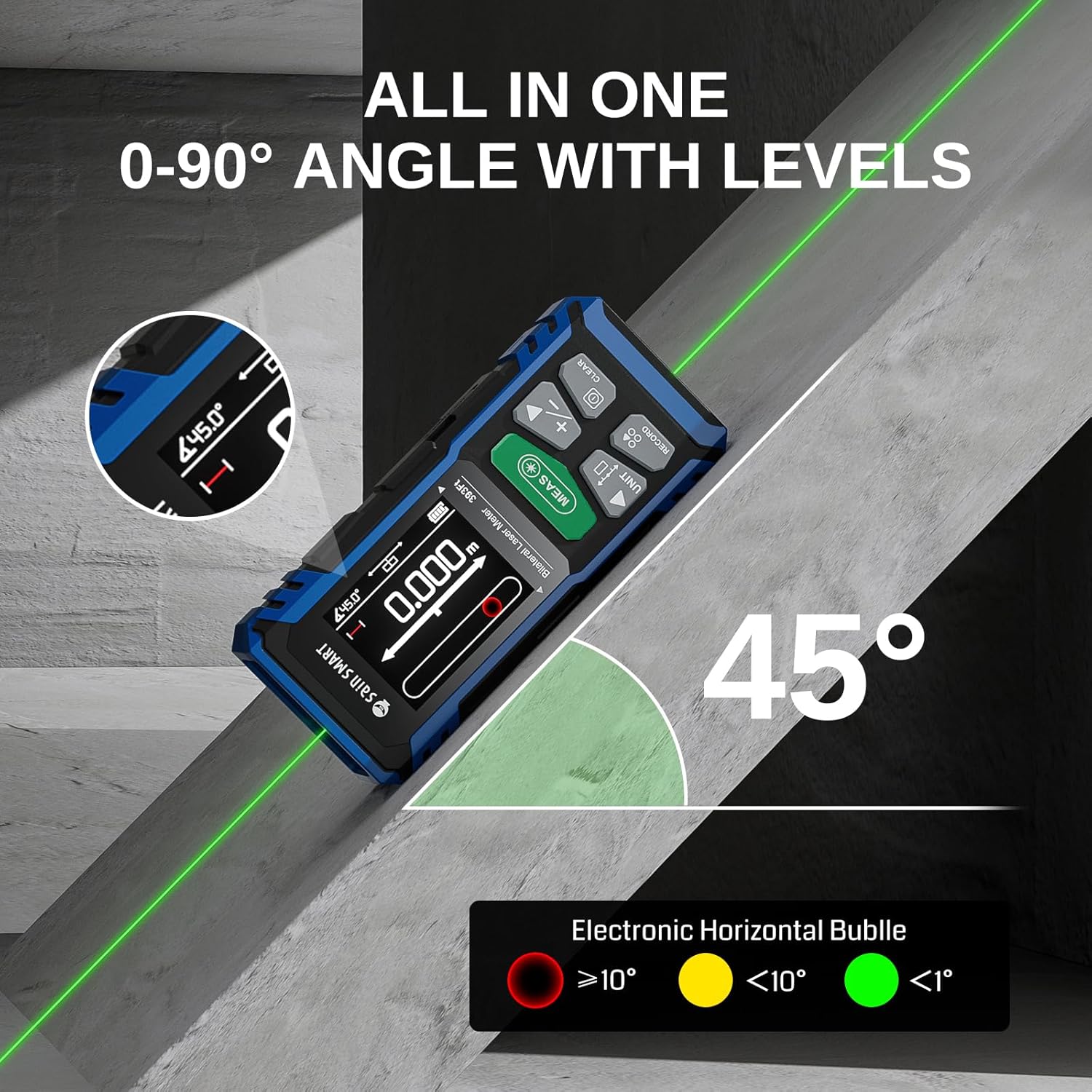
Image 6.4: The device displaying an angle of 45 degrees, with an electronic horizontal bubble indicator showing green for less than 1 degree tilt, yellow for less than 10 degrees, and red for greater than 10 degrees.

Image 6.5: The digital bubble level mode simulating a real bubble level to measure horizontal and vertical tilt, with color-coded indicators for different angle ranges.
6.4 Data Storage and Transfer
The device can store up to 100 sets of measurement data and allows for PC data transfer.
- Storing Data: After a measurement, press the RECORD button to save the result.
- Viewing Stored Data: Press the RECORD button repeatedly to scroll through saved measurements.
- PC Data Transfer: Connect the device to a computer using the Type-C cable. The device will appear as a storage device, allowing you to export data to Excel, CAD, or other applications.

Image 6.6: The display showing 100 sets of data storage, indicating quick export and easy PC viewing capabilities.
7. Maintenance
7.1 Cleaning
- Wipe the device with a soft, damp cloth. Do not use abrasive cleaners or solvents.
- Keep the laser apertures clean and free from dust or debris to ensure accurate measurements.
7.2 Battery Care
- Recharge the battery regularly, even if the device is not used frequently, to maintain battery health.
- Avoid fully discharging the battery for extended periods.
7.3 Storage
- Store the device in its carrying bag in a cool, dry place, away from direct sunlight and extreme temperatures.
- Ensure the device is powered off before storage.
8. Troubleshooting
| Problem | Possible Cause | Solution |
|---|---|---|
| Device does not power on. | Low battery. | Charge the device using the provided Type-C cable. |
| Inaccurate measurements. | Laser aperture obstructed; unstable surface; measuring range exceeded. | Clean laser apertures; ensure stable measurement surface; verify target is within range (393ft/120m). |
| Display is dim or unreadable. | Low battery; incorrect display mode (day/night). | Charge the device; adjust display brightness or switch between day/night modes. |
| Cannot transfer data to PC. | Incorrect cable; driver issue; device not recognized. | Ensure using the correct Type-C cable; try a different USB port; restart computer and device. |
9. Specifications
| Feature | Detail |
|---|---|
| Model | BLM-393G |
| Measurement Range | Up to 393ft (120m) |
| Measurement Accuracy | ±2mm |
| Laser Type | Class II Green Laser |
| Display | 2.4-inch Rotatable TFT LCD (Day/Night modes) |
| Battery | 850mAh Rechargeable Li-ion |
| Charging Port | Type-C |
| Data Storage | 100 sets |
| Protection Rating | IP54 (Dustproof, Splashproof) |
| Material | Acrylonitrile Butadiene Styrene |
| Item Weight | 13.1 ounces |
| Package Dimensions | 7.01 x 4.8 x 2.24 inches |

Image 9.1: An illustration of the low-distortion optical lens technology, designed to reduce environmental light interference and ensure high precision accuracy (±2mm) and 99% measurement stability.
10. Warranty and Support
SainSmart products are designed for reliability and performance. For warranty information, technical support, or service inquiries, please refer to the official SainSmart website or contact their customer service directly. Keep your purchase receipt as proof of purchase for warranty claims.
Online Support: Visit the official SainSmart website for FAQs, product registration, and contact information.