
Introduction
Thank you for choosing the Mobiclinic Mobimax 20 Kg Adjustable 4-in-1 Dumbbell Set. This versatile fitness equipment is designed to provide a comprehensive workout experience, allowing you to transition between dumbbells, a barbell, kettlebells, and a push-up stand. This manual provides essential information for safe assembly, operation, maintenance, and troubleshooting to ensure optimal performance and longevity of your product.
Safety Information
- Always consult with a healthcare professional before starting any new exercise program.
- Inspect all components for damage or wear before each use. Do not use if any part is damaged.
- Ensure all security nuts are tightened securely before lifting to prevent weight plates from slipping.
- Use the equipment on a flat, stable surface.
- Keep children and pets away from the equipment during use.
- Do not drop the weights, as this can cause injury or damage to the equipment and flooring.
- Store the equipment in a safe, dry place when not in use.
Package Contents
Please verify that all components are present in your package:
- 2 x Dumbbell Bars
- 1 x Connection Bar (for Barbell)
- 4 x Security Nuts
- 1 x Push-up Grip
- 1 x Kettlebell Conversion Bar with Handle
- Weight Plates (various sizes: 1.25 kg, 1.5 kg, 2 kg) - Total weight 20 kg
Setup Instructions
1. Dumbbell Configuration
- Take one dumbbell bar.
- Slide the desired weight plates onto each end of the bar.
- Secure the weight plates by screwing a security nut onto each end of the bar until tight.
- Repeat for the second dumbbell bar.
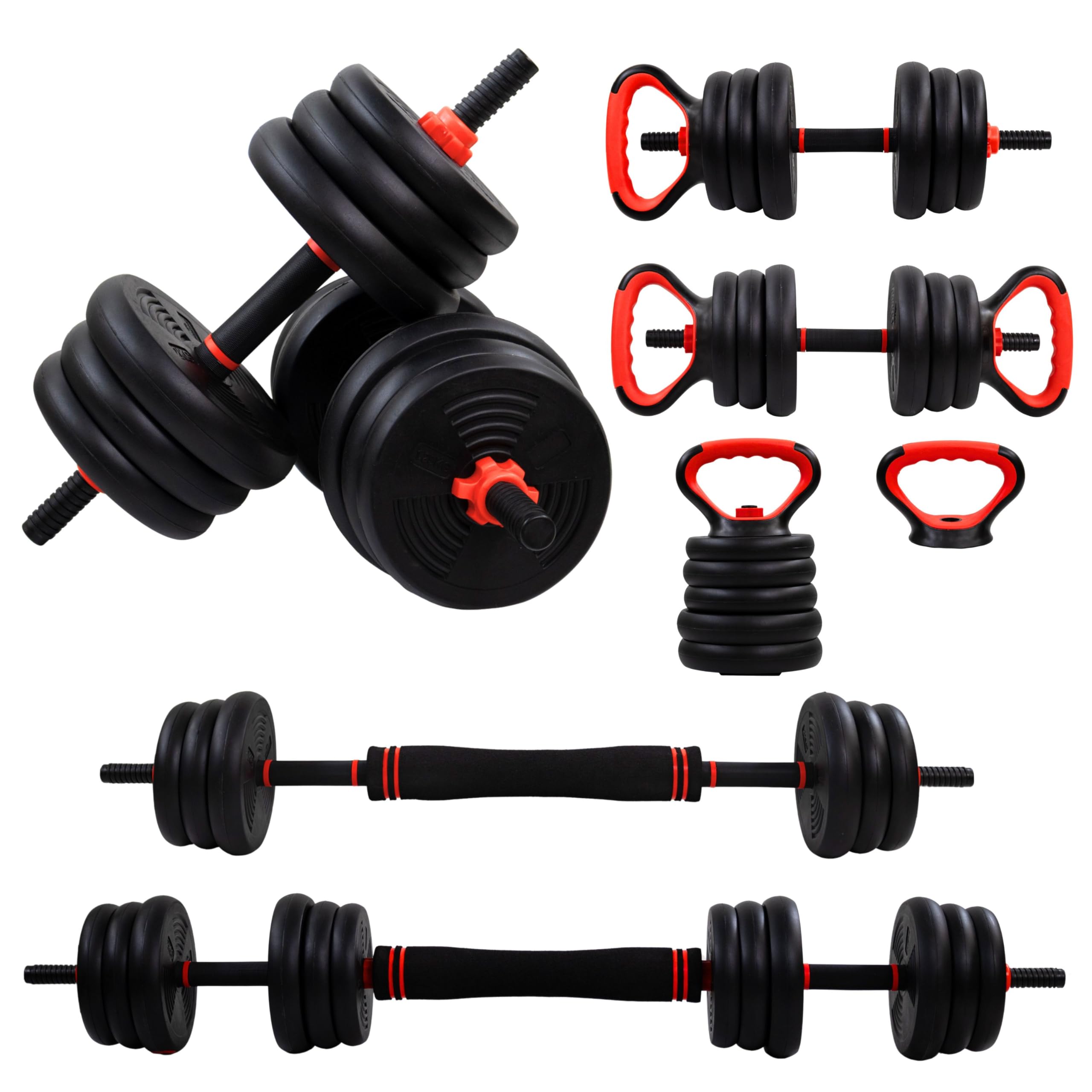
Image: Two assembled dumbbells, ready for use. Each dumbbell consists of a bar, multiple black weight plates, and red security nuts.
2. Barbell Configuration
- Take the connection bar.
- Attach one dumbbell bar (with or without plates) to each end of the connection bar by screwing them together securely.
- Slide the desired weight plates onto the ends of the assembled barbell.
- Secure the weight plates by screwing a security nut onto each end until tight.

Image: The dumbbell set configured as a barbell, featuring a central foam grip and weight plates secured at both ends.
3. Kettlebell Configuration
- Take the kettlebell conversion bar with handle.
- Attach one dumbbell bar (with or without plates) to each end of the kettlebell conversion bar by screwing them together securely.
- Slide the desired weight plates onto the ends of the assembled kettlebell.
- Secure the weight plates by screwing a security nut onto each end until tight.

Image: The dumbbell set configured as a kettlebell, showing the ergonomic handle and weight plates.
4. Push-up Stand Configuration
The push-up grip can be used independently or in conjunction with other components. Ensure it is placed on a stable, non-slip surface before use.
Operating Instructions
Weight Adjustment
To adjust the weight, simply unscrew the security nuts, add or remove weight plates, and then re-tighten the security nuts firmly. Always ensure the nuts are fully tightened before beginning your exercise.
General Use
- Always maintain proper form during exercises to prevent injury.
- Start with lighter weights and gradually increase as your strength improves.
- Perform controlled movements; avoid swinging the weights.
- Breathe properly throughout your workout.

Image: A person demonstrating an exercise with a dumbbell, highlighting proper form for muscle engagement.
Maintenance
- Cleaning: Wipe down the bars and plates with a damp cloth after each use to remove sweat and dirt. Do not use abrasive cleaners.
- Storage: Store the dumbbell set in a cool, dry place away from direct sunlight and extreme temperatures. Ensure all components are securely stored to prevent tripping hazards.
- Inspection: Periodically check all nuts and connections to ensure they remain tight. Inspect weight plates and bars for any signs of cracks or damage.

Image: Two dumbbells stored upright, illustrating proper and safe storage practices for the equipment.
Troubleshooting
- Issue: Weight plates feel loose during exercise.
Solution: Immediately stop exercising. Re-tighten all security nuts firmly. Always check tightness before starting a workout. - Issue: Difficulty screwing on security nuts.
Solution: Ensure the threads on the bar and nut are clean and free of debris. Do not force the nut; if resistance is met, check for misalignment or damage. - Issue: Equipment feels unstable.
Solution: Verify that all components are correctly assembled according to the setup instructions and that the equipment is on a flat, stable surface.
Specifications
| Brand | Mobiclinic |
| Model Number | QA-00396/28 |
| Item Weight | 20 Kilograms (total) |
| Material | Polyethylene (PE) plates, Rubber handle |
| Color | Black |
| Special Feature | Adjustable, Non-Slip |
| Included Components | 2 Dumbbell bars, 1 Connection bar, 4 Security nuts, 1 Push-up grip, 1 Kettlebell conversion bar with handle, Weight plates |
Warranty and Support
For warranty information or technical support, please refer to the Mobiclinic official website or contact your retailer. Keep your purchase receipt as proof of purchase.
Mobiclinic Contact Information:
Visit: Mobiclinic Store on Amazon