1. Introduction
Thank you for choosing the Cygnett Thumboost Power Bank. This compact and powerful device is designed to provide portable charging for your electronic devices. This manual provides essential information for the safe and efficient use of your power bank. Please read it thoroughly before use and retain it for future reference.
2. Safety Information
- Do not expose the power bank to extreme temperatures, direct sunlight, or fire.
- Avoid dropping, impacting, or disassembling the device.
- Keep the power bank away from water and other liquids.
- Do not use the power bank if it is damaged or appears swollen.
- Keep out of reach of children.
- Dispose of the power bank responsibly according to local regulations.
3. Package Contents
- Cygnett Thumboost 5000mAh Power Bank (with built-in USB-C cable)
- User Manual
4. Product Overview
The Cygnett Thumboost Power Bank features a compact design with a built-in USB-C cable for convenience. It includes LED indicators to display battery status and additional USB-C ports for versatile charging.

Image 1: Front view of the Cygnett Thumboost Power Bank, highlighting its compact size and the integrated USB-C cable neatly stored.
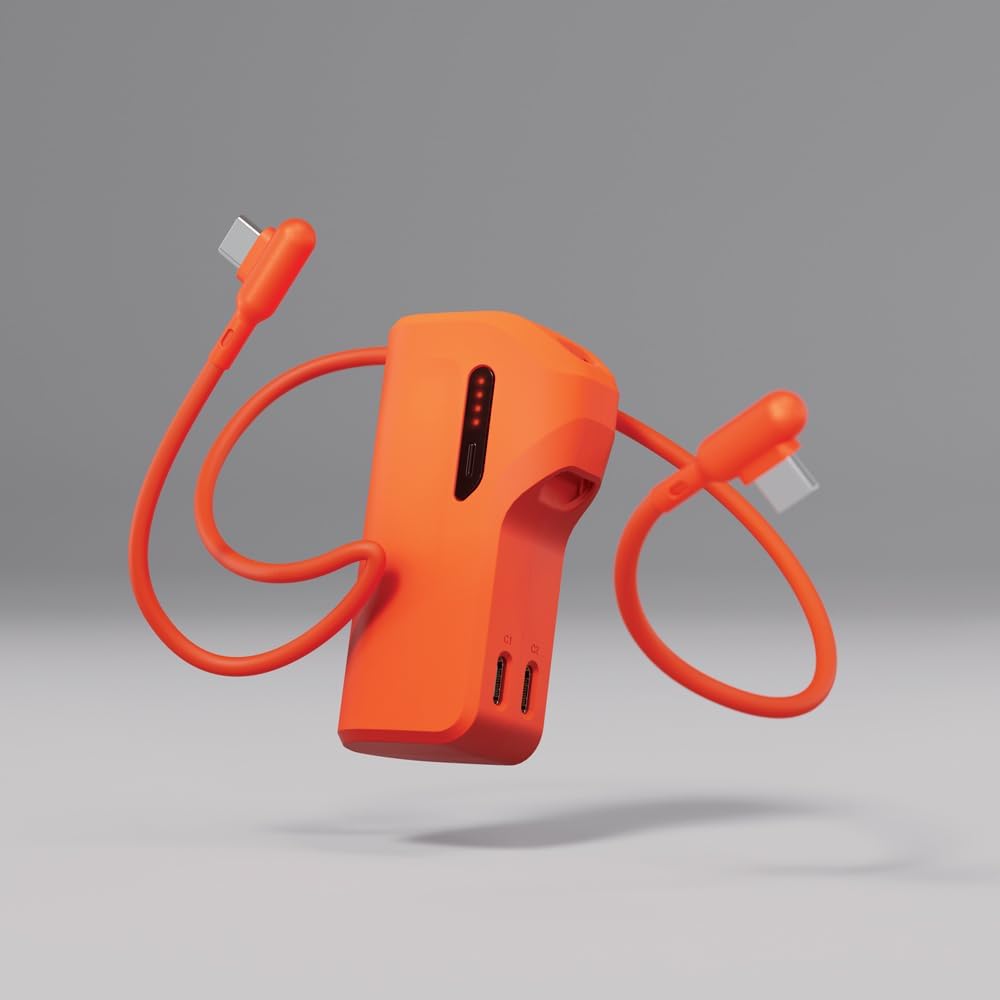
Image 2: The power bank with its flexible, built-in USB-C cable extended, ready for use.

Image 3: A detailed view of the two USB-C input/output ports labeled C1 and C2 on the power bank.
5. Setup
5.1 Initial Charge
Before first use, fully charge your Cygnett Thumboost Power Bank. Connect the built-in USB-C cable or a separate USB-C cable to one of the power bank's USB-C ports (C1 or C2) and plug the other end into a compatible USB wall charger (not included). The LED indicators will illuminate to show charging progress.
6. Operating Instructions
6.1 Charging the Power Bank
- Connect the built-in USB-C cable or a separate USB-C cable to either USB-C port (C1 or C2) on the power bank.
- Plug the other end of the cable into a USB wall charger or a powered USB port.
- The LED indicators will show the charging status. All four LEDs will be solid when fully charged.
6.2 Charging Your Devices
The Thumboost Power Bank can charge devices using its built-in USB-C cable or the additional USB-C port.
- Using the Built-in Cable: Extend the built-in USB-C cable and connect it directly to your compatible device's USB-C charging port.
- Using an External Cable: Connect your device's charging cable to the other USB-C port (C1 or C2) on the power bank, then connect the other end to your device.
- The power bank will automatically begin charging your device. The LED indicators will show the remaining battery level.

Image 4: The power bank actively charging a smartphone via its built-in USB-C cable.
6.3 Pass-Through Charging
The power bank supports pass-through charging, allowing you to charge your device while the power bank itself is being recharged. Simply connect the power bank to a power source and then connect your device to the power bank.
7. LED Indicator Guide
The Cygnett Thumboost Power Bank features a 4-dot LED display to indicate its battery status:
- 4 Solid LEDs: 75% - 100% charged
- 3 Solid LEDs: 50% - 75% charged
- 2 Solid LEDs: 25% - 50% charged
- 1 Solid LED: 0% - 25% charged (recharge soon)
- Flashing LEDs: Indicates the power bank is currently charging.
8. Maintenance and Care
- Clean the power bank with a soft, dry cloth. Do not use harsh chemicals or abrasive materials.
- Store the power bank in a cool, dry place when not in use.
- To prolong battery life, fully charge the power bank at least once every three months if not used regularly.
- Ensure the built-in cable is neatly tucked into its organizer when not in use to prevent damage.
9. Troubleshooting
- Power bank not charging: Ensure the charging cable is securely connected to both the power bank and the power source. Verify the power source is active.
- Device not charging from power bank: Check that the cable connecting your device to the power bank is secure and undamaged. Ensure the power bank has sufficient charge.
- Slow charging: Ensure you are using a compatible fast-charging wall adapter for optimal charging speeds. Some devices may limit charging speed based on their battery level or temperature.
10. Specifications
| Model Number | CY5358PBCHE |
| Battery Capacity | 5000 mAh |
| Charging Output | 20W Fast Charging |
| Connector Type | USB Type C (Built-in cable and additional port) |
| Item Weight | 150 g |
| Package Dimensions | 13.4 x 9 x 3 cm |
| Special Features | Built-in USB Cable, Compact Design, LED Battery Indicator, Portable, Pass-through Charging |
11. Warranty and Support
Cygnett products are designed with quality and reliability in mind. For information regarding warranty coverage, technical support, or to register your product, please visit the official Cygnett website or contact their customer service directly. Please retain your proof of purchase for warranty claims.


