1. Introduction
Thank you for purchasing the Hisense 40E4QT Full HD Smart TV. This manual provides essential information for setting up, operating, and maintaining your television. Please read it thoroughly before using the product to ensure safe and correct operation. Keep this manual for future reference.
2. Safety Information
Always follow basic safety precautions when using this product to reduce the risk of fire, electric shock, and injury.
- Do not expose the TV to rain or moisture.
- Do not open the TV casing; refer all servicing to qualified personnel.
- Ensure proper ventilation around the TV.
- Use only the power cord supplied with the TV.
- Keep the TV away from direct sunlight, heat sources, and strong magnetic fields.
- Clean the TV only with a dry, soft cloth.
3. Package Contents
Verify that all items are present in the package:
- Hisense 40E4QT Full HD Smart TV
- Remote Control
- Quick Start Guide
- Power Cable
- TV Stands (2x) and Screws
4. Setup
4.1 Attaching the TV Stands
Place the TV face down on a soft, clean surface. Align each stand with the corresponding slots on the bottom of the TV and secure them with the provided screws.

Image: Close-up view of the TV stand, illustrating how it connects to the television base.
4.2 Connecting Power
Connect the power cable to the TV's power input and then to a wall outlet. Ensure the connection is secure.
4.3 Connecting External Devices
Your Hisense 40E4QT TV offers various connection ports:
- HDMI Ports: For connecting devices like Blu-ray players, game consoles, or set-top boxes.
- USB Port: For connecting USB storage devices to play media files.
- Ethernet Port: For a wired internet connection.
- Antenna/Cable Input: For connecting an antenna or cable TV signal.

Image: The back panel of the Hisense 40E4QT TV, displaying the arrangement of HDMI, USB, Ethernet, and other input ports.

Image: A side profile of the Hisense 40E4QT TV, highlighting the conveniently located side-mounted input ports.
4.4 Initial Setup
After connecting power and external devices, turn on the TV. The first-time setup wizard will guide you through:
- Language selection
- Network connection (Wi-Fi or Ethernet)
- Channel scanning (Antenna/Cable)
- Time zone and other basic settings
5. Operating Instructions
5.1 Remote Control Functions
The remote control allows you to navigate the TV's features. Key functions include:
- Power: Turns the TV on or off.
- Input: Selects the input source (HDMI, AV, TV).
- Navigation Buttons: Up, Down, Left, Right to move through menus.
- OK/Enter: Confirms selections.
- Volume +/-: Adjusts the volume level.
- Channel +/-: Changes TV channels.
- Home/Smart Hub: Accesses the VIDAA Smart TV interface.
- Back/Exit: Returns to the previous screen or exits a menu.
5.2 Smart TV Features (VIDAA OS)
Your Hisense 40E4QT runs on the intuitive VIDAA operating system, providing access to a variety of applications and streaming services. Use the Home button on your remote to access the Smart TV interface, where you can browse apps, customize your home screen, and manage user accounts.
5.3 Picture and Sound Enhancements
- Natural Color Enhancer: Optimizes color reproduction for vibrant and accurate visuals.
- Dynamic Contrast Enhancer: Adjusts contrast levels in real-time to deliver deeper blacks and brighter whites, enhancing image depth.
- Depth Enhancer: Creates a more dimensional viewing experience by enhancing the perception of depth in images.
- Noise Reduction: Digitally scans and filters each frame to reduce visual noise, resulting in clearer images, especially in fast-action or low-light scenes.
- Dolby Audio & DTS Virtual:X: Provides clear dialogue, detailed sound fidelity, and realistic surround sound effects for an immersive audio experience.
5.4 Special Modes
- Game Mode: Reduces input lag to as low as 16ms, providing a more responsive gaming experience. Activate this mode when connecting a game console.
- AI Sports Mode: Optimizes picture and sound settings specifically for sports content, enhancing motion clarity and audio immersion.
6. Maintenance
6.1 Cleaning the TV
To clean the screen, gently wipe it with a soft, lint-free cloth. For stubborn marks, slightly dampen the cloth with water or a screen-specific cleaning solution. Never spray liquid directly onto the screen. For the TV body, use a dry, soft cloth.
6.2 Software Updates
Your Hisense TV may receive software updates to improve performance and add new features. Ensure your TV is connected to the internet. You can usually check for updates manually through the TV's settings menu (e.g., Settings > System > About TV > Software Update).
7. Troubleshooting
If you encounter issues with your TV, refer to the following common problems and solutions:
| Problem | Possible Solution |
|---|---|
| No power | Check if the power cable is securely connected to the TV and the wall outlet. Ensure the outlet is functional. |
| No picture, but sound is present | Verify the correct input source is selected. Check external device connections. |
| No sound, but picture is present | Check the volume level and mute status. Ensure external audio devices are properly connected and powered on. |
| Remote control not working | Replace the batteries. Ensure there are no obstructions between the remote and the TV's IR sensor. |
| Cannot connect to Wi-Fi | Restart your router. Check Wi-Fi password. Ensure the TV is within range of the Wi-Fi signal. |
| Picture is grainy or distorted | Check antenna/cable connections. If using an external device, check its output settings and cable. Activate Noise Reduction feature. |
7.1 Factory Reset
If problems persist, a factory reset may resolve them. This will erase all your settings and installed apps. Navigate to Settings > System > Advanced Settings > Factory Reset (or similar path depending on VIDAA version).
8. Specifications
| Feature | Detail |
|---|---|
| Model Number | 40E4QT |
| Screen Size | 40 Inches |
| Display Technology | DLED |
| Resolution | Full HD (1920 x 1080 pixels) |
| Refresh Rate | 60 Hz |
| Operating System | VIDAA |
| Audio Technology | Dolby Audio, DTS Virtual:X |
| Special Features | Dynamic Contrast Enhancer, Game Mode, AI Sports Mode, Noise Reduction, Depth Enhancer, Browser |
| Connectivity | Bluetooth, Ethernet, HDMI (multiple ports), USB (1 port) |
| Dimensions (with stand) | 90 cm (Length) x 18.6 cm (Depth) x 56.5 cm (Height) |
| Dimensions (without stand) | 90 cm (Length) x 8.5 cm (Depth) x 51.5 cm (Height) |
| Energy Efficiency Rating | F |
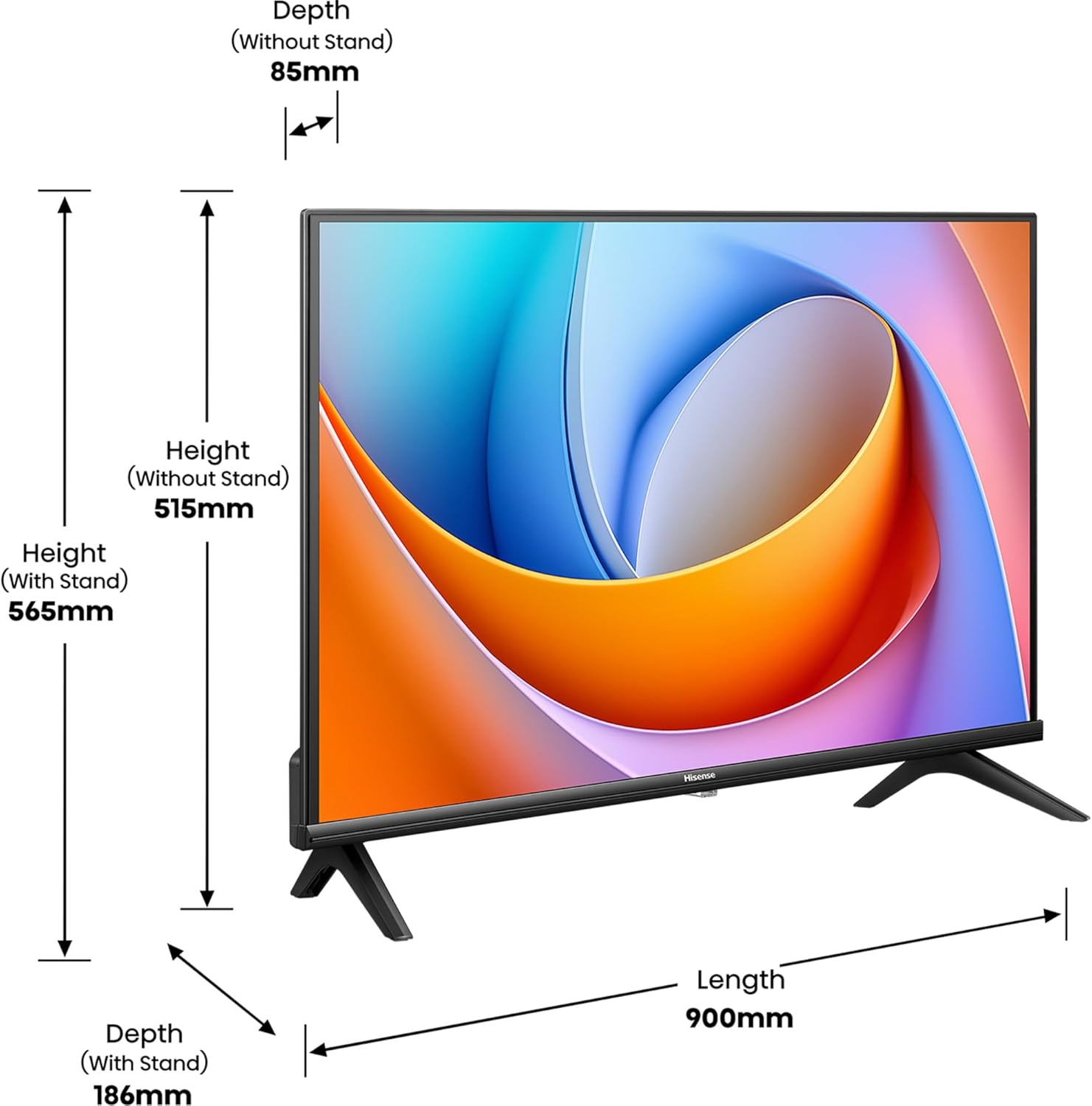
Image: Technical diagram illustrating the length, height, and depth measurements of the Hisense 40E4QT television, both with and without its stand.
Image: The EU energy efficiency label for the Hisense 40E4QT TV, indicating its energy consumption and rating.
9. Warranty & Support
9.1 Warranty Information
Hisense products are covered by a limited warranty. The specific terms and duration of your warranty may vary by region and purchase date. Please refer to the warranty card included with your product or visit the official Hisense website for detailed information.
9.2 Customer Support
For technical assistance, troubleshooting beyond this manual, or warranty claims, please contact Hisense customer support. You can typically find contact information (phone numbers, email, or online chat) on the official Hisense website for your region.
Official Hisense Website: www.hisense.com


