
1. Introduction
The Denon DJ SC LIVE 4 WHITE is a comprehensive 4-channel standalone DJ controller designed for professional and aspiring DJs. It features an intuitive 7-inch HD touchscreen, built-in speakers, and Wi-Fi connectivity, enabling direct access to popular music streaming services. This all-in-one system supports standalone performance without a laptop, and is also compatible with leading DJ software such as Serato DJ Pro and Virtual DJ. Its robust design and advanced features, including standalone Stems and smart lighting integration, make it suitable for various performance environments, from home studios to clubs.

Image 1.1: The Denon DJ SC LIVE 4 WHITE controller, showcasing its sleek design and central touchscreen display.
2. Safety Information
- Power Source: Use only the power adapter supplied with the unit. Ensure the power outlet matches the voltage requirements.
- Water and Moisture: Do not expose the unit to rain, moisture, or spills. Keep liquids away from the device.
- Ventilation: Ensure proper ventilation around the unit. Do not block ventilation openings.
- Heat: Avoid placing the unit near heat sources such as radiators, heat registers, stoves, or other heat-producing appliances.
- Cleaning: Disconnect power before cleaning. Use a soft, dry cloth. Avoid liquid cleaners or aerosols.
- Servicing: Refer all servicing to qualified service personnel. Do not attempt to service the unit yourself.
- Placement: Place the unit on a stable, level surface to prevent accidental falls.
3. Package Contents
Verify that all items listed below are included in your package:
- Denon DJ SC LIVE 4 WHITE Controller
- Power Adapter
- USB Cable
- Software Download Card / Information
- Quickstart Guide
- Safety & Warranty Manual
4. Product Overview
4.1 Front Panel Controls
The front panel of the SC LIVE 4 WHITE features a comprehensive layout for intuitive DJ performance. Key components include:
- 7-inch HD Touchscreen: Central display for waveform visualization, track browsing, and settings adjustment.
- Jog Wheels: Large, responsive 6-inch jog wheels for scratching, nudging, and track navigation. Each jog wheel includes a central display for track information.
- Performance Pads: 16 multi-function performance pads (8 per deck) for hot cues, loops, rolls, and slicer functions.
- 4-Channel Mixer: Dedicated mixer section with 3-band EQ, gain control, and channel faders for each of the four channels.
- Crossfader: Adjustable crossfader for smooth transitions between channels.
- FX Section: Built-in effects with dedicated controls for applying various audio effects to your mix.
- Navigation Controls: Buttons and knobs for browsing music libraries, loading tracks, and adjusting settings.
- Built-in Speakers: Integrated speakers with independent volume control for convenient monitoring and practice.
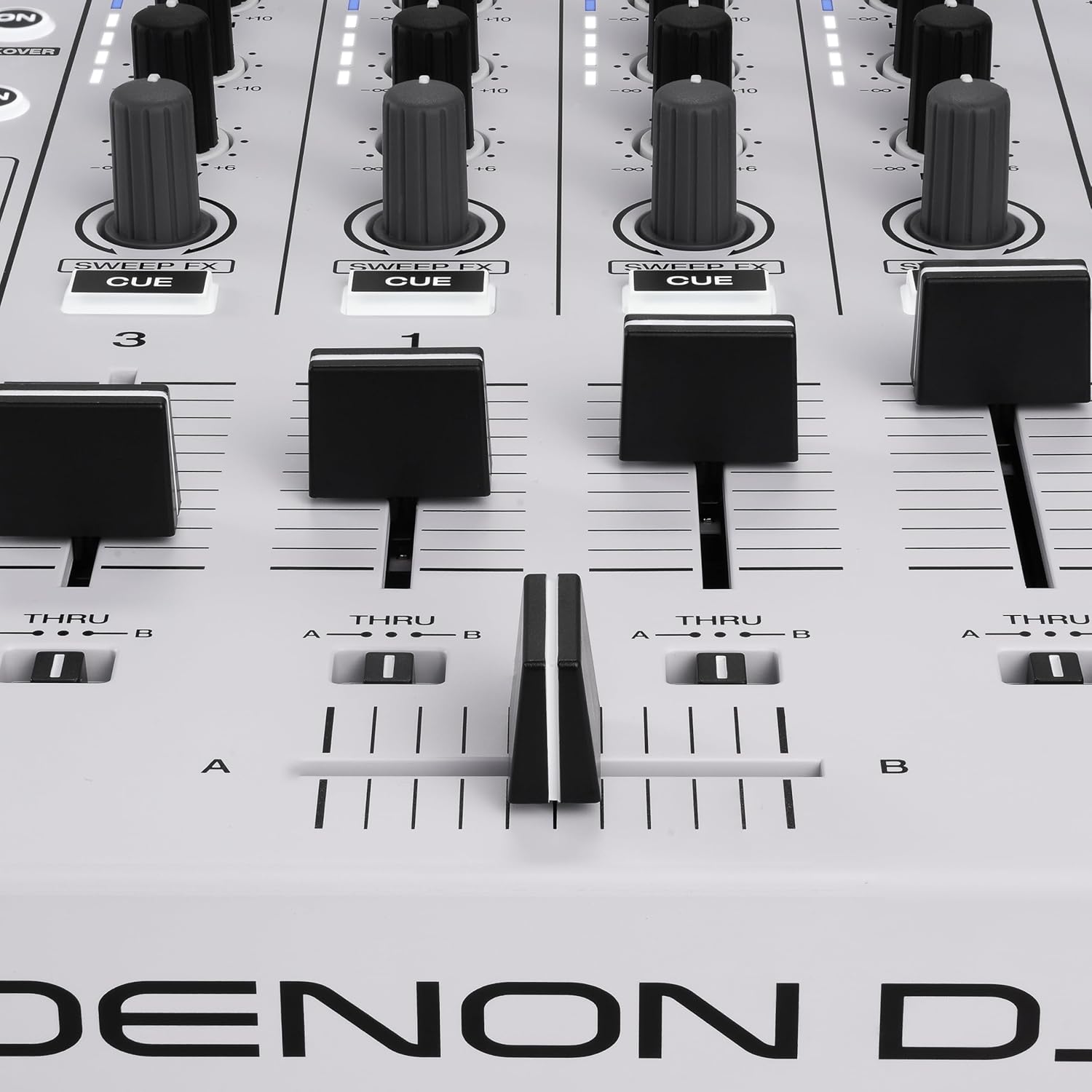
Image 4.1: Top-down view of the SC LIVE 4 WHITE, highlighting the central touchscreen and deck controls.
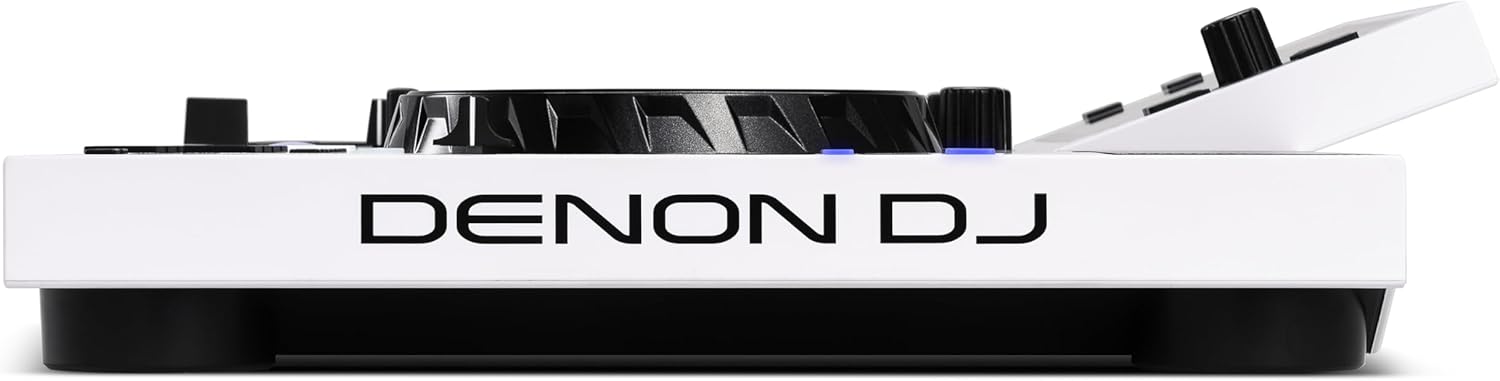
Image 4.2: Detail of a jog wheel and the multi-colored performance pads.

Image 4.3: View of the mixer section, showing channel faders and the crossfader.
4.2 Rear Panel Connections
The rear panel provides all necessary inputs and outputs for connecting the SC LIVE 4 WHITE to external audio systems and media devices:
- XLR Main Output: Professional balanced outputs for connecting to a PA system or studio monitors.
- RCA Main Output: Unbalanced outputs for connecting to consumer audio equipment.
- 1/4" Booth Output: Dedicated output for connecting to booth monitors.
- Microphone Inputs (2x): Combo XLR/TRS inputs for connecting microphones.
- Auxiliary Input: RCA input for connecting external audio sources.
- USB Media Inputs (2x): USB-A ports for connecting USB drives for music playback.
- SD Card Slot: Slot for inserting an SD card for music playback.
- USB-B Port: For connecting the controller to a computer for software control.
- Power Input: For connecting the included power adapter.
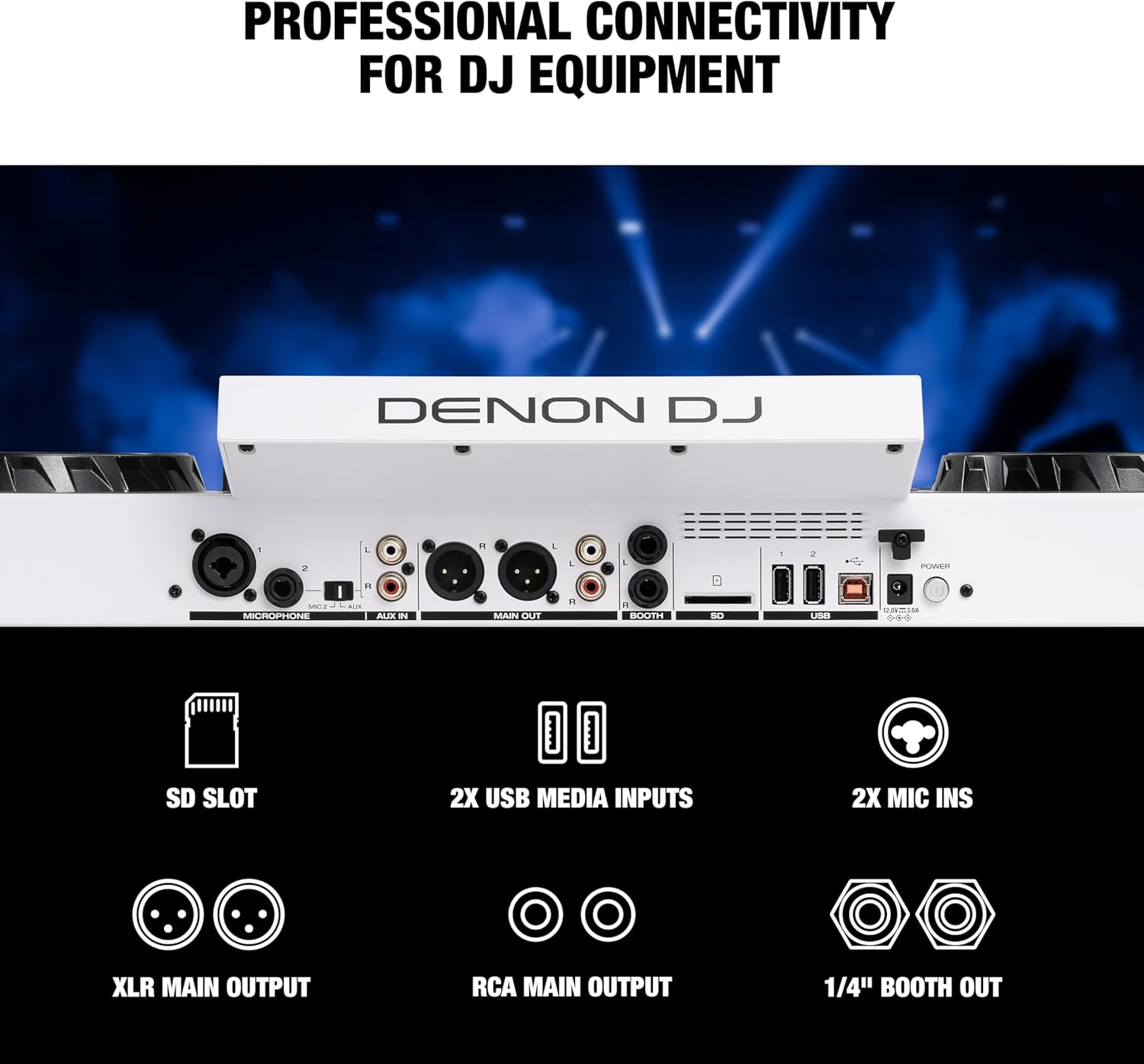
Image 4.4: Rear view of the SC LIVE 4 WHITE, showing all input and output ports.

Image 4.5: Detailed view of the media inputs (SD card slot and USB ports) on the rear panel.
5. Setup
- Power Connection: Connect the included power adapter to the SC LIVE 4 WHITE's power input and then to a suitable power outlet.
- Audio Output Connection:
- For professional setups, connect the XLR Main Outputs to your PA system or active studio monitors.
- For home audio systems, use the RCA Main Outputs.
- Connect booth monitors to the 1/4" Booth Output if desired.
- Microphone Connection: If using microphones, connect them to the Microphone Inputs on the rear panel.
- External Audio Source: Connect any external audio devices (e.g., a smartphone or media player) to the Auxiliary Input.
- Media Storage: Insert your USB drives into the USB Media Inputs or an SD card into the SD Card Slot for local music playback.
- Wi-Fi Setup: Power on the unit. On the 7-inch touchscreen, navigate to the settings menu to connect to a Wi-Fi network. This is essential for accessing streaming services.
- Software Installation (Optional): If you plan to use the SC LIVE 4 WHITE as a controller with Serato DJ Pro or Virtual DJ, connect the unit to your computer via the USB-B port and install the necessary drivers and software as per the instructions provided with your software download card.
6. Operating Instructions
6.1 Basic Operation
- Power On: Press the Power button on the rear panel. The unit will boot up into Engine DJ OS.
- Browse and Load Tracks: Use the touchscreen or dedicated navigation controls to browse your music library from connected USB drives, SD cards, or streaming services. Tap or press the 'Load' button to load a track to a deck.
- Playback: Press the Play/Pause button to start or stop track playback.
- Mixing: Use the channel faders and crossfader to mix between tracks. Adjust the 3-band EQ and gain for each channel to shape the sound.
- Cueing: Use the Cue button to set a temporary cue point. Press the Play/Cue button to play from the cue point.
- Jog Wheel Functions: Use the jog wheels for scratching, nudging, or fast-forwarding/rewinding tracks.

Image 6.1: The SC LIVE 4 WHITE operating in standalone mode (left) and connected to a laptop for controller mode (right).
6.2 Advanced Features
6.2.1 Music Streaming
The SC LIVE 4 WHITE supports direct streaming from various services via its built-in Wi-Fi. After connecting to Wi-Fi (Section 5), you can log in to your accounts for:
- Amazon Music Unlimited
- Apple Music
- TIDAL
- Beatport
- Beatsource
- SoundCloud Go+
- Dropbox
Access these services through the source selection menu on the touchscreen. A subscription may be required for some services.

Image 6.2: The controller's screen displaying integration with Amazon Music Unlimited.

Image 6.3: The controller's screen displaying integration with Apple Music.
6.2.2 Standalone Stems
The SC LIVE 4 WHITE features standalone Stems capability, allowing you to isolate or remove vocal, melody, bass, and drum elements from tracks in real-time. This feature requires tracks to be pre-rendered using Engine DJ Desktop software. Once rendered, these Stems can be accessed directly on the controller for creative mixing and mashups. A one-time software license purchase may apply for this feature.

Image 6.4: Visual representation of the standalone Stems feature powered by Engine DJ.
6.2.3 Engine Lighting Enhancements
Integrate your DJ performance with smart lighting systems. The SC LIVE 4 WHITE can wirelessly sync with Philips Hue and Nanoleaf lights, providing automated, beat-synced light shows. For full DMX lighting control, a SoundSwitch Micro DMX Interface or Control One (sold separately) can be connected. Use the on-screen controls to select colors and lighting modes.

Image 6.5: The SC LIVE 4 WHITE integrated with Philips Hue and Nanoleaf smart home lighting for dynamic light shows.
6.2.4 Engine OS Features
The SC LIVE 4 WHITE runs on Engine DJ OS, which receives continuous updates, adding new functionalities and improvements. Notable features include:
- Day Mode: Optimized display for bright environments.
- Bluetooth I/O: For audio input.
- Touch FX: Control effects directly from the touchscreen.
- BPM FX: Effects synchronized to the track's BPM.
- Active Loops: Increased autoloop count to 128 with visual feedback.
- Drop Sampler: For triggering samples.
- Match: Receive song suggestions.
- Fader Echo FX: Automated echo effects for transitions.
- Engine DJ Profile: Use one login for multiple streaming providers and get pre-analyzed songs.

Image 6.6: The Engine DJ OS interface on the SC LIVE 4 WHITE, showcasing various features and effects.

Image 6.7: Screen displaying a QR code for Engine DJ Profile login. For more information, visit device.enginedj.com.
7. Maintenance
- Cleaning: Regularly wipe the unit with a soft, dry, lint-free cloth. For the touchscreen, use a screen-specific cleaner and a microfiber cloth. Avoid abrasive cleaners or solvents.
- Dust Protection: When not in use, cover the unit with a dust cover to prevent dust accumulation, especially on faders and buttons.
- Storage: Store the unit in a cool, dry place away from direct sunlight and extreme temperatures.
- Cable Management: Ensure cables are not tangled or stressed to prevent damage to ports and connectors.
8. Troubleshooting
| Problem | Possible Cause | Solution |
|---|---|---|
| Unit does not power on. | Power cable not connected; power outlet issue. | Ensure power cable is securely connected. Try a different power outlet. |
| No audio output. | Incorrect cable connection; volume levels too low; output selection error. | Check all audio cable connections. Increase Master, Channel, and Speaker volumes. Ensure correct output is selected on external audio system. |
| Touchscreen unresponsive. | Temporary software glitch; environmental factors. | Restart the unit by holding the power button until it shuts down, then power it back on. Ensure the unit is in a suitable operating environment (avoid extreme cold). If persistent, contact Denon DJ support. |
| Cannot connect to Wi-Fi or streaming services. | Incorrect Wi-Fi password; network issues; service outage. | Double-check Wi-Fi password. Restart your router. Verify that the streaming service is operational. |
| USB drive or SD card not recognized. | Improper formatting; corrupted files; drive not fully inserted. | Ensure media is formatted to a compatible file system (e.g., FAT32, exFAT). Reinsert the drive/card. Try a different drive/card. |
9. Specifications
| Feature | Detail |
|---|---|
| Model Number | SCLIVE4WHITE |
| Dimensions (W x D x H) | 28.3 x 15.9 x 3.9 inches (71.9 x 40.4 x 9.9 cm) |
| Weight | 13.6 pounds (6.17 kg) |
| Display | 7-inch HD Multi-touch Display |
| Channels | 4-Channel Mixer |
| Connectivity | Wi-Fi, Bluetooth, 2x USB-A, 1x USB-B, SD Card Slot |
| Audio Outputs | XLR Main, RCA Main, 1/4" Booth |
| Audio Inputs | 2x Mic (XLR/TRS Combo), RCA Aux |
| Software Compatibility | Engine DJ OS (Standalone), Serato DJ Pro, Virtual DJ |
| Built-in Speakers | Yes, with independent volume control |
10. Warranty and Support
The Denon DJ SC LIVE 4 WHITE comes with a manufacturer's warranty. For detailed warranty terms and conditions, please refer to the warranty card included in your package or visit the official Denon DJ website. For technical support, software updates, and additional resources, please visit the Denon DJ support portal:
You can also find FAQs, troubleshooting guides, and community forums on their website.


