
1. Introduction
Thank you for choosing the LID LIRDDY J6 Mini Wireless Lavalier Microphone. This manual provides detailed instructions for setting up, operating, and maintaining your microphone system to ensure optimal performance for all your audio recording needs.
Package Contents:
- 2 x Wireless Microphones (Transmitters)
- 1 x Charging Case
- 1 x Lightning Receiver (for iPhone)
- 1 x USB Type-C Receiver (for Android/iPad/MacBook)
- 1 x User Manual
- 1 x Charging Cable

This image displays the complete LID LIRDDY J6 Mini Wireless Lavalier Microphone system. It includes a portable charging case, two compact wireless microphones, and two receivers: one with a Lightning connector for Apple devices and one with a USB-C connector for Android and other compatible devices.
2. Setup Instructions
The LID LIRDDY J6 microphone system is designed for easy plug-and-play operation, requiring no Bluetooth pairing or additional applications.
Quick Start Guide:
- Charge the Microphones and Receiver: Ensure both microphones and the receiver are sufficiently charged before first use. The charging case provides multiple charges for the microphones.
- Connect the Receiver: Plug the appropriate receiver (Lightning for iPhone or USB-C for Android/other devices) into your recording device's charging port. The receiver's indicator light will illuminate.
- Power On the Microphone: Press and hold the power button on the microphone (transmitter) until its indicator light turns on.
- Automatic Pairing: The microphone and receiver will automatically pair within approximately 3 seconds. A solid indicator light on both units confirms a successful connection.
- Begin Recording: Once paired, open your preferred recording application (camera app, voice recorder, social media app) and start recording.
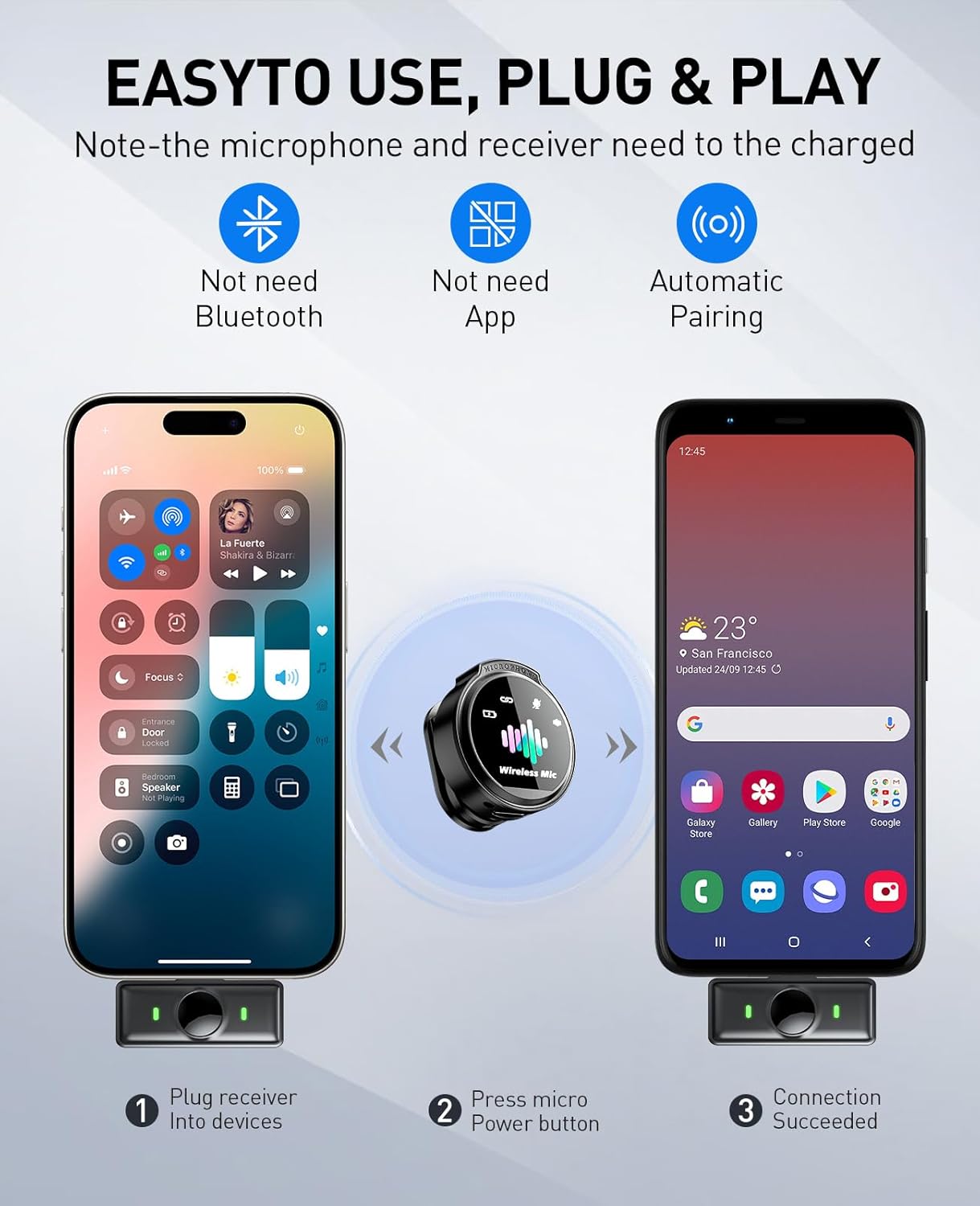
This diagram demonstrates the simple three-step setup: 1. Plug the receiver into your device (phone). 2. Press the microphone power button. 3. Connection is successful. It highlights that no Bluetooth or app is required for pairing.
3. Operating Instructions
Microphone Transmitter Functions:
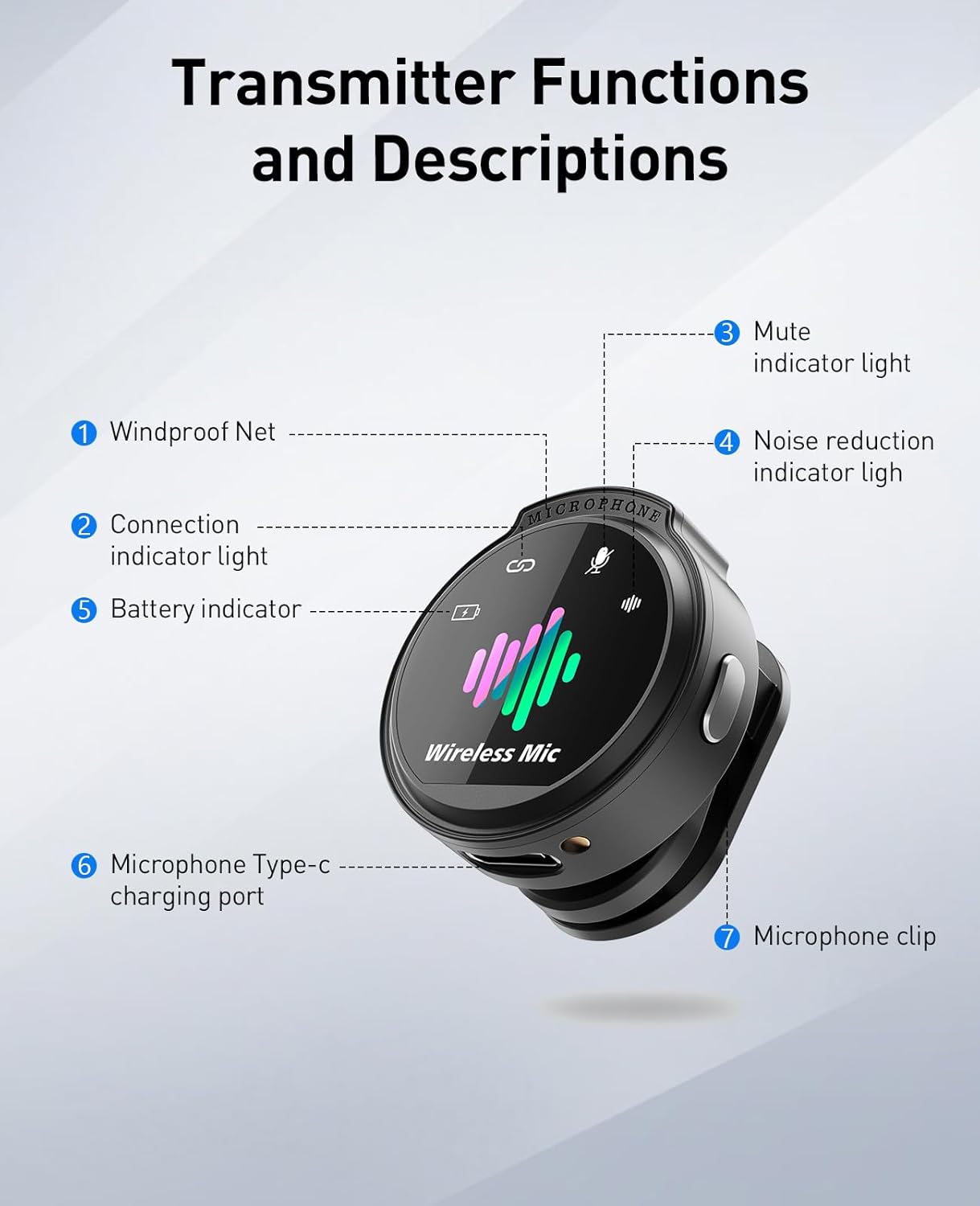
This detailed diagram labels the key components and indicators of the microphone transmitter: 1. Windproof Net, 2. Connection indicator light, 3. Mute indicator light, 4. Noise reduction indicator light, 5. Battery indicator, 6. Microphone Type-C charging port, 7. Microphone clip.
- Power On/Off: Press and hold the power button on the side of the microphone.
- Mute Function: During recording or a call, a single press of the power button will mute the microphone. The mute indicator light (3) will change to confirm. Press again to unmute.
- Noise Reduction: The microphone features automatic Level 3 noise reduction. A dedicated noise reduction indicator light (4) will show when active.
- Battery Indicator: The battery indicator (5) displays the current charge level of the microphone.
- Connection Indicator: The connection indicator light (2) shows the pairing status with the receiver.
Wearing the Microphone:
The microphone offers versatile wearing options:
- Lapel Clip: Use the integrated clip (7) to attach the microphone securely to your clothing, such as a lapel or collar.
- Magnetic Attachment: The microphone can be magnetically attached to metal surfaces for discreet placement.
- Necklace Style: While not supplied with chains, the design allows for use as a necklace accessory if desired.

This image presents two usage scenarios: The top panel shows a person using the microphone in 'Mute Mode' during a video call, indicating the ability to instantly silence the microphone. The bottom panel shows a person recording a video with 'Noise Cancellation' active, highlighting the microphone's capability to deliver clear audio in various environments.
4. Key Features
- Studio-Quality Sound: Experience crystal-clear audio with professional-grade sound reproduction, ensuring rich bass and crisp highs for studio-level recordings.
- Intelligent Noise Reduction: Features Level 3 noise reduction (-30dB wind noise reduction) to effectively eliminate ambient sounds like keyboards, air conditioning, and traffic. Built-in DSP chip level algorithm processing ensures studio-quality audio.
- 150ft Stable Wireless Range: Utilizes 2.4GHz anti-interference technology for uninterrupted audio transmission up to 150 feet (45 meters) in open environments without obstructions or interference. Ideal for outdoor shoots and live streams.
- 80-Hour Extended Battery Life: The charging case can power two microphones five times, providing a total of 80 hours of use. Each microphone offers approximately 8 hours of use with ENC (Environmental Noise Cancellation) off. The charging case recharges in less than 2 hours.
- Universal Compatibility: Dual USB-C and Lightning receivers simultaneously recognize and automatically switch between iPhone and Android devices. Auto-pairs in 3 seconds, significantly faster than Bluetooth connections.
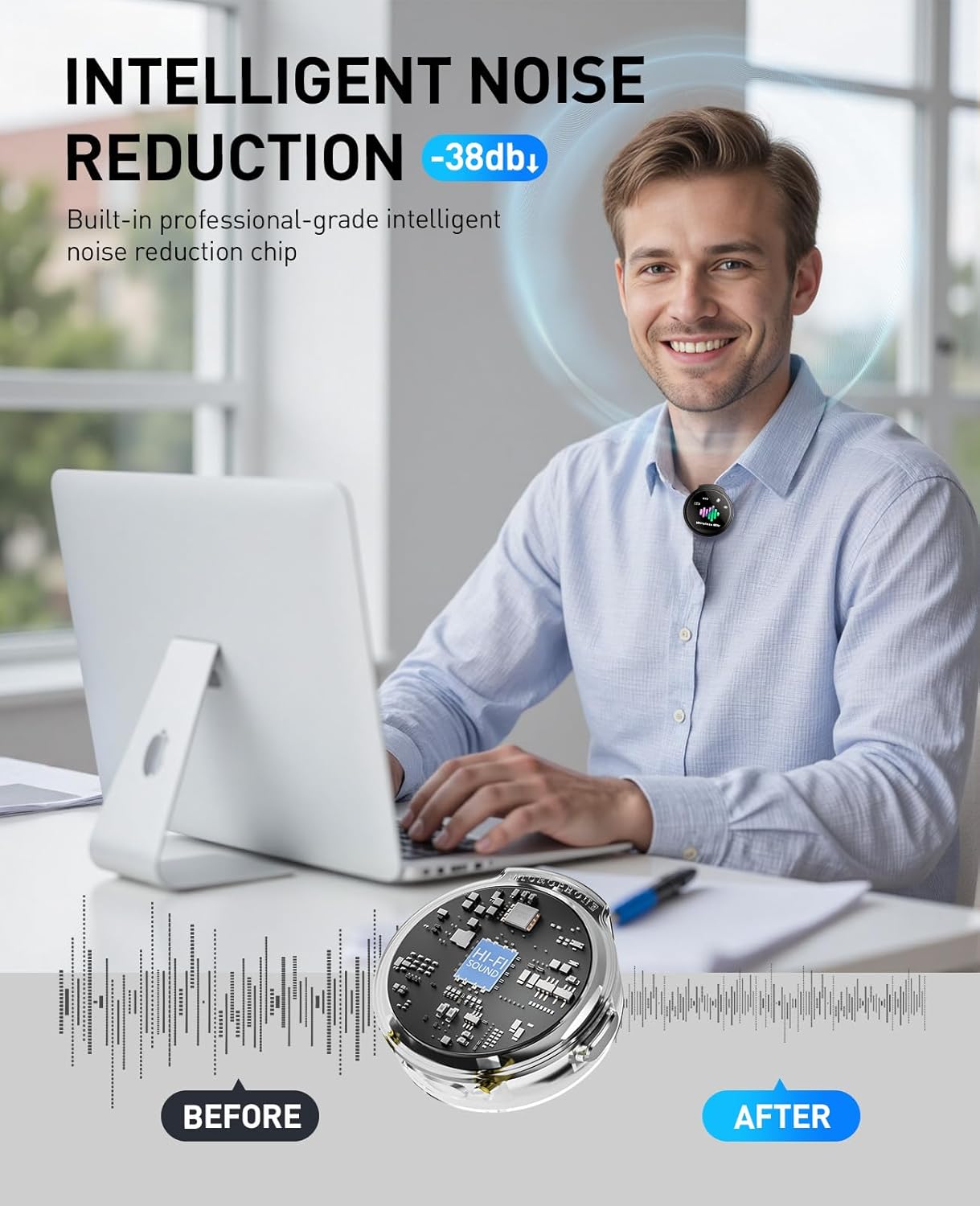
This image shows a user wearing the LID LIRDDY wireless microphone while working on a laptop, emphasizing the intelligent noise reduction feature. A waveform graphic below illustrates the 'before' (noisy) and 'after' (clear) audio, indicating a significant reduction in background noise.

This image depicts a person skateboarding being recorded by a smartphone equipped with the LID LIRDDY wireless microphone receiver, showcasing the microphone's stable wireless transmission range of up to 150 feet (45 meters) in open environments.

This graphic explains the extended battery life provided by the charging case. It shows that the case can fully charge two microphones five times, offering a total of 80 hours of use. Each microphone provides 8 hours of use with ENC (Environmental Noise Cancellation) off, and the charging case itself recharges in less than 2 hours.
5. Compatibility
The LID LIRDDY J6 microphone system is designed for wide compatibility with various recording devices and platforms.
- iPhone: Compatible with iPhone 14, 13, 12, 11, XR, X, 8, 6 series via the Lightning receiver.
- Android: Compatible with iPhone 16, 15, Samsung, OnePlus, and other Android devices via the USB Type-C receiver.
- Other Devices: Also compatible with iPads and MacBooks that feature a USB Type-C port.
- Applications: Supports audio recording on various social media platforms and recording applications, including Facebook, Messenger, Instagram, WhatsApp, Twitter, TikTok, Line, and YouTube.

This image illustrates the broad compatibility of the LID LIRDDY wireless microphone. It shows the Lightning receiver for iPhone models (14/13/12/11/XR/X/8/6) and the USB Type-C receiver for Android phones (Samsung/OnePlus), iPads, and MacBooks. It also indicates support for popular social media platforms like Facebook, Messenger, Instagram, WhatsApp, Twitter, TikTok, Line, and YouTube.
6. Maintenance
Proper care and maintenance will extend the life of your LID LIRDDY J6 microphone system.
- Cleaning: Use a soft, dry cloth to clean the microphones, receivers, and charging case. Avoid using liquids or abrasive cleaners.
- Storage: Store the microphone system in its charging case when not in use to protect it from dust and damage. Keep it in a cool, dry place away from direct sunlight and extreme temperatures.
- Charging: Always use the provided charging cable and a compatible power adapter. Do not overcharge the devices.
- Avoid Water: The devices are not waterproof. Avoid exposure to water or high humidity.
7. Troubleshooting
If you encounter issues with your microphone system, refer to the following common solutions:
- No Sound/Poor Audio Quality:
- Ensure both the microphone and receiver are fully charged.
- Verify that the receiver is securely plugged into your recording device.
- Check if the microphone is powered on and successfully paired (solid indicator light).
- Confirm that the microphone is not muted.
- Test with a different recording application or device to rule out software issues.
- Ensure there are no significant obstructions or strong interference sources between the microphone and receiver.
- Microphone Not Pairing:
- Make sure both units are charged.
- Power off and then power on both the microphone and receiver.
- Ensure the receiver is correctly inserted into the device.
- Keep the microphone and receiver close to each other during the pairing process.
- Short Battery Life:
- Ensure the charging case is fully charged.
- Verify that the microphones are properly seated in the charging case for charging.
- Battery life can vary based on usage and environmental factors.
8. Specifications
| Feature | Specification |
|---|---|
| Brand | LID LIRDDY |
| Model Name | J6 |
| Microphone Form Factor | Lavalier |
| Connectivity Technology | USB (2.4GHz Wireless) |
| Connector Type | USB Type-C, Lightning |
| Power Source | Battery Powered (Lithium Ion) |
| Wireless Range | Up to 150 feet (45 meters) in open environments |
| Noise Reduction | Level 3 (-30dB wind noise reduction) |
| Battery Life (Microphone) | Approx. 8 hours (ENC off) |
| Total Battery Life (with Charging Case) | Up to 80 hours |
| Charging Case Recharge Time | Less than 2 hours |
| Item Weight | 6.4 ounces (0.18 Kilograms) |
| Package Dimensions | 4.41 x 4.02 x 1.93 inches |
| UPC | 684646929224 |
9. Warranty and Support
LID LIRDDY products are designed for reliability and performance. For warranty information, technical support, or customer service inquiries, please refer to the contact information provided with your purchase or visit the official LID LIRDDY website.
Please retain your proof of purchase for warranty claims.