
Dreo AC515S
DREO AC515S Portable Air Conditioner User Manual
Model: AC515S
Important Safety Information
Please read all instructions carefully before using this appliance. Failure to follow these instructions may result in electric shock, fire, or serious injury. Keep this manual for future reference.
- Always ensure the unit is unplugged before cleaning or servicing.
- Do not operate the unit with a damaged cord or plug.
- Do not block air inlets or outlets.
- Use only with a properly grounded electrical outlet.
- Keep at least 20 inches (50 cm) clearance from walls and other objects.
- This appliance is for indoor use only.
Product Overview
The DREO AC515S is a versatile portable air conditioner designed to provide cooling, fan, and dehumidification functions. It features smart control capabilities via an app and voice commands, along with a quiet operation for enhanced comfort.
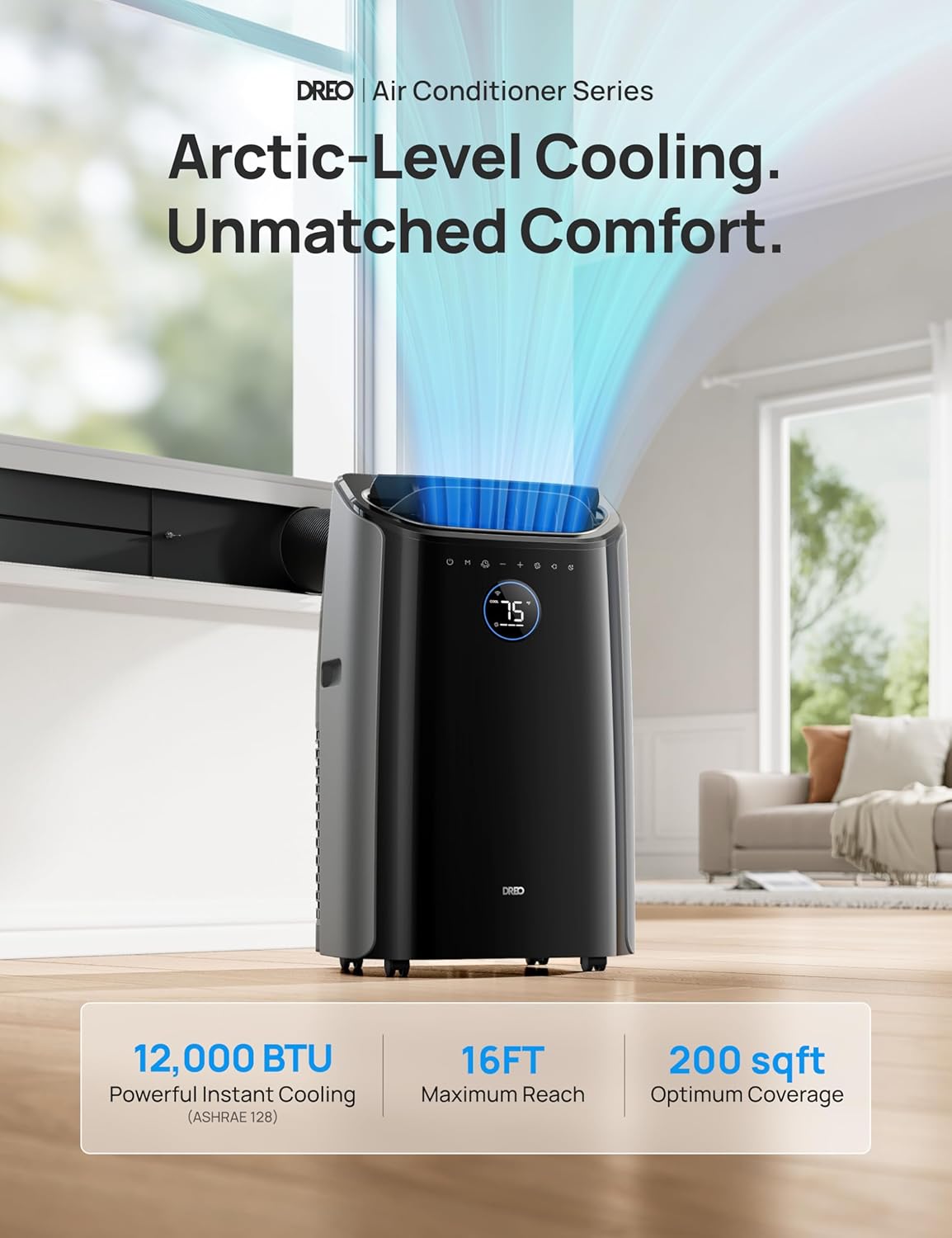
Image: The DREO AC515S portable air conditioner, showcasing its sleek design and digital display.
Setup and Installation
Proper installation is crucial for the efficient operation of your portable air conditioner. Follow these steps to set up your unit.
1. Unpacking and Preparation
- Carefully remove the unit and all accessories from the packaging.
- Verify all components are present: Air Conditioner unit, Exhaust Hose, Window Panel Kit (A, B, C, D), Adhesive Foam Seal, Non-Adhesive Foam Seal, Drain Hose, Remote Control, Batteries, Locking Plate and Screws.
- Tools required: Gloves, Box Cutter, Phillips Screwdriver, Measuring Tape.
Video: This video demonstrates the unpacking process and identifies all included components for the DREO Portable Air Conditioner.
2. Window Kit Installation
Install the window panel kit to properly vent the exhaust hose. The kit supports window openings from 18.1 to 53 inches.
- Apply the non-adhesive foam seal to the bottom of the window frame.
- Cut the adhesive foam seals to match the length of the window panels.
- Peel the backing from the adhesive foam seals and attach them to the window frame.
- Measure the distance between the window frames to determine the required panel combination (A+B for 18.1"-24.8", A+C for 24.8"-33", A+C+D for 33"-46.5", A+B+C+D for 46.5"-53").
- Unscrew the butterfly bolt from the locking plate.
- Insert the extension guide with the bolt and washer into the designated slot on the panel and fasten them.
- Align the tabs and bolt to the extension panel.
- Place the assembled window panel on the window and adjust to fit. Ensure the hose hole is not obstructed and the panel faces the interior of the house.
- Secure the panel by tightening the butterfly bolt.
- Close the window against the panel.
- Use non-adhesive foam to seal any remaining window gaps.
- For wooden windows, optional security brackets can be installed by drilling pilot holes and screwing the brackets into the window frame. This is not recommended for metal-framed windows.
Video: This video illustrates the step-by-step process of installing the window panel kit and securing the exhaust hose for the DREO Portable Air Conditioner.
3. Exhaust Hose Connection
- Align the hose inlets with the slots over the air exhaust housing outlet on the back of the unit.
- Push the hose into the panel until it clicks securely into place.
- Ensure at least 20 inches (50 cm) of clearance between the air conditioner and walls or other objects for optimal airflow.

Image: The DREO AC515S portable air conditioner with its exhaust hose properly connected to the window panel kit, venting hot air outside.
Operating Your DREO AC515S
Your DREO AC515S offers multiple modes and control options for personalized comfort.
1. Powering On/Off
- Plug the unit into a grounded electrical outlet.
- Press the power button on the control panel or remote control to turn the unit on or off.
- Ensure the power plug's reset button is pressed after plugging in.
Video: This video demonstrates how to power on the DREO Portable Air Conditioner and activate its cooling function.
2. Operating Modes
The AC515S offers three primary operating modes:
- Cool Mode: Provides powerful cooling with adjustable temperature settings (61°F to 86°F).
- Fan Mode: Circulates air without cooling, offering multiple fan speeds.
- Dry Mode (Dehumidifier): Reduces humidity in the room (30%-80% humidity setting).
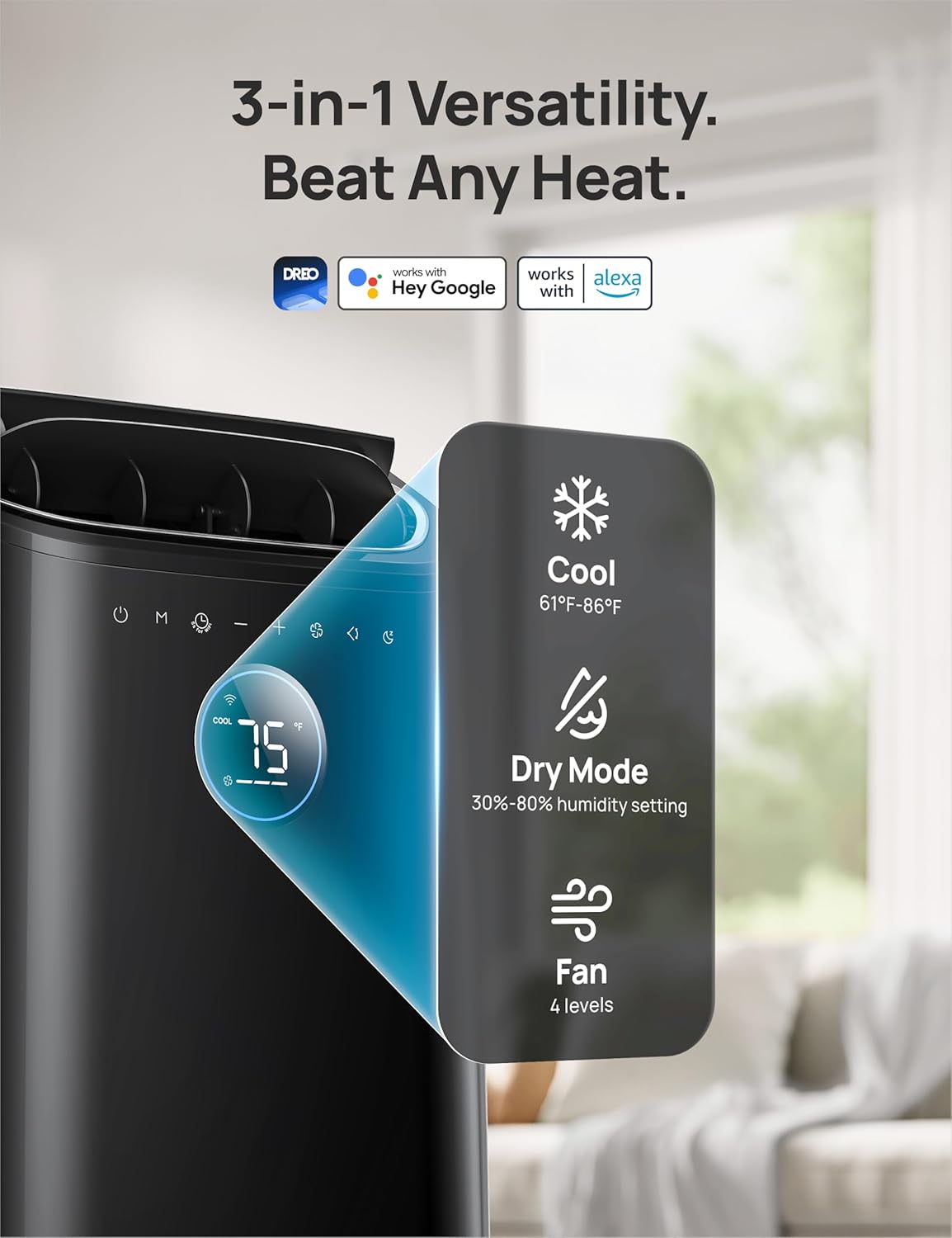
Image: The DREO AC515S control panel and remote control, highlighting the various mode and setting options.
3. Smart Control (App & Voice)
Control your AC515S remotely using the DREO app or voice commands with Amazon Alexa and Google Home.
- Download DREO App: Search for "DREO" in your device's app store (App Store for iOS, Play Store for Android).
- Create Account: Follow the in-app instructions to create a DREO account. This secures your device connection.
- Add Device: Once logged in, select "Add Device" and follow the pairing instructions for your AC515S.
- Voice Control: Link your DREO account with Amazon Alexa or Google Home through their respective apps to enable voice commands.
Video: This video guides you through downloading the DREO app and creating a new account for smart control of your device.
Image: A smartphone screen displaying the DREO app interface, showing temperature control and mode selection for the air conditioner.
Maintenance
Regular maintenance ensures optimal performance and longevity of your DREO AC515S. WARNING: Always unplug the unit before cleaning or servicing.
1. Water Drainage
The AC515S features a self-evaporating system, reducing the need for frequent drainage. However, in high humidity (above 90%) or during Dry Mode, manual drainage may be required. The unit will display a "P1" error when the water reservoir is full.
- Continuous Drainage (Recommended for Dry Mode or high humidity):
- Unscrew the main drain outlet cap located at the bottom rear of the unit.
- Connect the provided drain hose to the main outlet.
- Lead the other end of the hose into a drain or container positioned lower than the unit to allow gravity drainage.
- Intermittent Drainage ("P1" Error):
- Turn off and unplug the unit.
- Move the unit to a drain area or place a drip pan underneath the bottom drain cap.
- Remove the bottom drain cap.
- Let the water drain completely until the reservoir is empty.
- Replace the drain cap securely.
Video: This video demonstrates how to perform continuous drainage and address the "P1" error for water drainage on the DREO Portable Air Conditioner.
2. Air Filter Cleaning
Clean the air filters at least once every two weeks to maintain air quality and unit efficiency.
- Turn off and unplug the unit.
- Remove both air filter grills from the back of the unit.
- Rinse the filters under running water to remove dust and debris.
- Allow the filters to dry completely before re-attaching them to the main unit.
Video: This video demonstrates how to remove, clean, and re-install the air filters of the DREO Portable Air Conditioner.
3. Storage
If not using the appliance for a long time, you can wrap around the power cord using the plastic strip for neat storage.
Troubleshooting
Refer to this section for common issues and their solutions.
| Problem | Possible Cause | Solution |
|---|---|---|
| Unit does not turn on | No power, power cord not fully plugged in, "P1" error (full water tank). | Check power connection, ensure plug is fully inserted, drain water if "P1" error is displayed. |
| Unit is not cooling effectively | Dirty air filter, blocked air intake/exhaust, room too large, windows/doors open, high ambient temperature. | Clean air filter, clear obstructions, ensure room size is within unit capacity (300 sq ft), close windows/doors, check exhaust hose for proper sealing. |
| "P1" error code displayed | Water tank is full. | Drain the water from the unit as described in the Maintenance section. |
| Unit is noisy | Unit not on a flat surface, fan speed too high, internal components vibrating. | Place unit on a flat, stable surface. Reduce fan speed. If noise persists, contact customer support. |
Specifications
| Feature | Detail |
|---|---|
| Model Number | AC515S |
| Cooling Power (ASHRAE) | 12000 BTU |
| Cooling Power (DOE) | 8000 BTU |
| Recommended Floor Area | Up to 300 Square Feet |
| Item Weight | 62.9 pounds |
| Product Dimensions | 14.37"D x 17.32"W x 28.13"H |
| Voltage | 115 Volts |
| Wattage | 1500 watts |
| Sound Level | 45 Decibels |
| Special Features | 45 dB Quiet Working Noise Level, Drainage-free in cool mode, Large LED Display, Powerful Fast Cooling, Work with Alexa & Google Assistant |
| Included Components | Window Mount Kit & Drain Hose, Remote Control |
| Refrigerant | R32 |

Image: The DREO AC515S portable air conditioner with key specifications and features highlighted.
Warranty and Support
Your DREO AC515S Portable Air Conditioner comes with a standard 1-year warranty. For any questions, technical support, or warranty claims, please contact DREO Customer Service.
- Warranty Period: 1-year standard warranty.
- Customer Service: Available 24 hours. Refer to your product packaging or the official DREO website for contact details.
Related documentsAC515S


Ask a question about this manual
Ask about setup, troubleshooting, compatibility, parts, safety, or missing instructions. Manuals+ will review the question and use this page’s manual context to help answer it.