
1. Introduction
This manual provides essential information for the safe and efficient operation of your Luminous NXG 2350 Solar Inverter. The NXG 2350 is designed to provide reliable power backup for homes, offices, and shops, featuring a 2000VA pure sinewave output and ISOT Technology for intelligent load sharing. Please read this manual thoroughly before installation and use to ensure optimal performance and longevity of your inverter.

Figure 1: Front view of the Luminous NXG 2350 Solar Inverter, showing the LCD display and control buttons.
2. Safety Information
Always observe the following safety precautions to prevent injury or damage to the inverter and connected equipment:
- Electrical Hazard: Installation and servicing should only be performed by qualified personnel.
- Ventilation: Ensure adequate ventilation around the inverter to prevent overheating. Do not block air vents.
- Environment: Install the inverter in a dry, cool, and dust-free environment, away from direct sunlight, flammable materials, and corrosive substances.
- Battery Safety: Batteries contain corrosive acid. Wear protective gear (gloves, eye protection) when handling batteries. Do not short-circuit battery terminals.
- Grounding: The inverter must be properly grounded to prevent electric shock.
- Water Exposure: Do not expose the inverter to water or excessive humidity.
- Children and Pets: Keep the inverter out of reach of children and pets.
- Disconnection: Before performing any maintenance or cleaning, disconnect the inverter from all power sources (AC input, solar panels, and battery).
3. Product Overview
The Luminous NXG 2350 Solar Inverter is a high-efficiency power solution designed for reliability and energy savings. Key features include:
- Pure Sinewave Output: Ensures safe and stable power for sensitive electronic devices.
- ISOT Technology: Intelligent Solar Optimization Technique for efficient load sharing between solar and grid power, maximizing solar energy utilization and extending battery life.
- LCD Display: Provides real-time information on inverter status, battery charge, load, and solar power generation.
- High Efficiency: Optimized design for reduced energy consumption and lower electricity bills.
- Reliable Power Backup: Ensures uninterrupted power supply during outages.
- Low Maintenance: Engineered for minimal upkeep, offering a hassle-free experience.
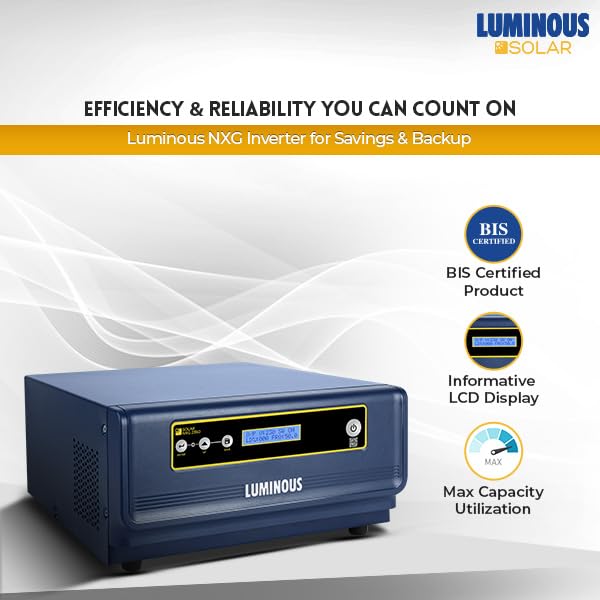
Figure 2: The Luminous NXG 2350 Inverter, illustrating its BIS certification, informative LCD display, and maximum capacity utilization.
4. Installation and Setup
Proper installation is crucial for the inverter's performance and safety. It is highly recommended that installation be performed by a certified electrician or Luminous service technician.
4.1 Unpacking
Carefully unpack the inverter and inspect it for any shipping damage. Retain the packaging materials for future transport or servicing.
4.2 Site Selection
- Choose a location that is cool, dry, well-ventilated, and free from direct sunlight.
- Ensure sufficient clearance around the inverter for airflow (at least 15 cm on all sides).
- The mounting surface must be sturdy enough to support the inverter's weight (approximately 18.5 kg).
4.3 Wiring Connections
All wiring must comply with local electrical codes and standards. Ensure all connections are secure and properly insulated.
- Battery Connection: Connect the battery terminals to the inverter's battery input. Observe correct polarity (+ to + and - to -).
- Solar Panel Connection: Connect the solar panel array to the inverter's solar input terminals. Ensure the solar panel voltage and current are within the inverter's specifications.
- AC Input Connection: Connect the grid power supply to the inverter's AC input.
- AC Output Connection: Connect your home/office load to the inverter's AC output.
- Grounding: Connect the inverter's grounding terminal to a reliable earth ground.
4.4 Initial Power-Up
After all connections are made and verified, switch on the inverter. The LCD display will illuminate, indicating the system status.
5. Operating Instructions
The Luminous NXG 2350 operates largely automatically, managing power flow between solar, battery, and grid. The LCD display provides key operational information.
5.1 LCD Display
The LCD screen displays various parameters, including:
- Input Voltage: AC grid voltage.
- Output Voltage: Inverter output voltage.
- Battery Voltage/Charge: Current battery status.
- Load Percentage: Percentage of connected load.
- Solar Charging Current: Current being drawn from solar panels.
- Operating Mode: Indicates whether the inverter is running on solar, battery, or grid power.
5.2 Operating Modes (ISOT Technology)
The ISOT (Intelligent Solar Optimization Technique) allows the inverter to prioritize solar power. When solar energy is sufficient, it powers the load and charges the battery. If solar power is insufficient, the inverter intelligently draws power from the grid or battery to meet the load requirements.
5.3 Power On/Off
- To Power On: Press and hold the power button on the front panel until the LCD illuminates.
- To Power Off: Press and hold the power button until the LCD turns off. Ensure all connected loads are disconnected before powering off for an extended period.
6. Maintenance
Regular maintenance ensures the longevity and optimal performance of your Luminous NXG 2350 Solar Inverter.
- Cleaning: Periodically clean the inverter's exterior with a dry, soft cloth. Ensure vents are free from dust and debris. Do not use liquid cleaners.
- Connection Check: Annually, or as needed, inspect all wiring connections for tightness and corrosion. Ensure no loose wires.
- Battery Inspection: For lead-acid batteries, check electrolyte levels regularly and top up with distilled water if necessary. Keep battery terminals clean and free of corrosion.
- Ventilation: Ensure the area around the inverter remains clear for proper airflow.
- Professional Check: Consider an annual inspection by a qualified technician to ensure all components are functioning correctly.
7. Troubleshooting
This section provides solutions to common issues. For problems not listed here, contact Luminous customer support.
| Problem | Possible Cause | Solution |
|---|---|---|
| Inverter not turning on | No AC input; Low battery voltage; Loose battery connection. | Check AC input supply; Charge battery; Secure battery connections. |
| No output power | Overload; Short circuit; Inverter in fault mode. | Reduce load; Check for short circuits in wiring; Restart inverter. |
| Battery not charging | No AC input; Solar panels not connected/faulty; Battery fault. | Check AC supply; Inspect solar panel connections and output; Test battery. |
| Inverter beeping continuously | Overload; Low battery; Over-temperature. | Reduce load; Charge battery; Ensure proper ventilation. |
8. Specifications
Detailed technical specifications for the Luminous NXG 2350 Solar Inverter:
- Model: NXG 2350
- Capacity: 2000 VA
- Output Waveform: Pure Sinewave
- Technology: ISOT (Intelligent Solar Optimization Technique)
- Product Dimensions (LxWxH): 27 x 15 x 32 cm
- Item Weight: 18.5 kg
- Manufacturer: Luminous Power Technologies Private Limited
- Generic Name: Inverter
9. Warranty and Support
Your Luminous NXG 2350 Solar Inverter comes with a comprehensive warranty and dedicated customer support.
9.1 Warranty Information
The product is covered by a 36-month warranty from the date of purchase. This warranty covers manufacturing defects and ensures long-term assurance and support for your solar power needs. Please retain your purchase receipt for warranty claims.
9.2 Customer Support
For technical assistance, service requests, or warranty claims, please contact Luminous customer support. You can find contact details on the official Luminous website or through your authorized dealer.
Manufacturer: Luminous Power Technologies Private Limited
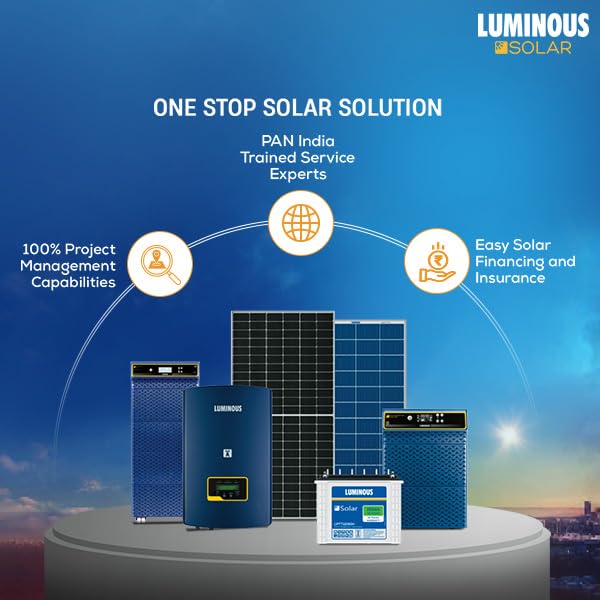
Figure 3: Luminous's "One Stop Solar Solution" illustrating comprehensive support from project management to trained service experts and financing.


