
1. Introduction
1.1 Product Overview
The Kobalt MF-133 Analog Multimeter (Model 2545068) is a versatile electrical testing instrument designed for measuring DC current, AC/DC voltage, and resistance. It also includes functions for testing 1.5V and 9V batteries. Featuring a clear analog display with a mirrored scale, this multimeter offers 5 functions and 16 ranges for various electrical measurements. It is rated for CAT II 500V safety.
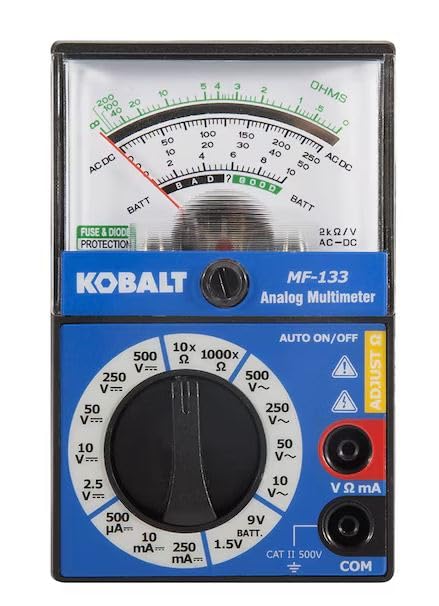
Figure 1: Front view of the Kobalt MF-133 Analog Multimeter, showing the analog display, function dial, and input jacks.
1.2 Key Features
- Measures DC Current, AC/DC Voltage, and Resistance.
- Tests common 1.5V and 9V batteries.
- Analog display with mirrored scale for accurate readings.
- 5 functions and 16 measurement ranges.
- Safety rating: CAT II 500V.
1.3 What's in the Box
- Kobalt MF-133 Analog Multimeter
- Test Leads (Red and Black)
- AA Battery (for operation)
2. Safety Information
WARNING: To avoid electric shock or damage to the meter, observe the following safety rules:
- Always ensure the multimeter is in good working condition before use.
- Do not apply more than the rated voltage, as marked on the meter, between the terminals or between any terminal and ground.
- Use extreme caution when working with voltages above 25V AC RMS or 35V DC. These voltages pose a shock hazard.
- Always disconnect the test leads from the circuit before changing functions or ranges.
- Do not use the meter if the test leads are damaged or if the meter itself appears damaged.
- Ensure the battery cover is securely closed before operating the meter.
- Replace the battery when the low battery indicator appears to ensure accurate readings.
- Adhere to the CAT II 500V safety rating. Do not use this meter for measurements in higher category installations.

Figure 2: Rear view of the multimeter, displaying battery compartment details and important safety warnings regarding battery replacement and fuse specifications.
3. Setup
3.1 Battery Installation
- Ensure the multimeter is turned off (function dial set to OFF).
- Locate the battery compartment on the back of the multimeter (refer to Figure 2).
- Use a screwdriver to remove the screw securing the battery cover.
- Carefully remove the battery cover.
- Insert the provided AA battery, observing the correct polarity (+ and - markings).
- Replace the battery cover and secure it with the screw.
3.2 Test Lead Connection
- Insert the black test lead into the "COM" (Common) input jack.
- Insert the red test lead into the "VΩmA" input jack for voltage, resistance, and current measurements.
- Ensure the connections are firm and secure.
4. Operating Instructions
Before taking any measurement, ensure the test leads are correctly connected and the function dial is set to the appropriate range. Always start with a higher range if the expected value is unknown to prevent damage to the meter.

Figure 3: The Kobalt MF-133 Analog Multimeter being used to take a measurement, illustrating proper test lead connection and handling.
4.1 Measuring DC Voltage (V DC)
- Set the function dial to the desired DC Voltage (V DC) range (e.g., 2.5V, 10V, 50V, 250V, 500V).
- Connect the red test lead to the positive (+) side of the circuit and the black test lead to the negative (-) side.
- Read the voltage value from the DCV scale on the analog display.
4.2 Measuring AC Voltage (V AC)
- Set the function dial to the desired AC Voltage (V AC) range (e.g., 10V, 50V, 250V, 500V).
- Connect the test leads across the AC voltage source.
- Read the voltage value from the ACV scale on the analog display.
4.3 Measuring DC Current (mA DC)
CAUTION: Never connect the multimeter in parallel with a voltage source when measuring current. This can damage the meter and the circuit.
- Set the function dial to the desired DC Current (mA DC) range (e.g., 10mA, 250mA, 500mA).
- Open the circuit where current is to be measured.
- Connect the multimeter in series with the circuit, ensuring the current flows through the meter.
- Read the current value from the DCmA scale on the analog display.
4.4 Measuring Resistance (Ω)
CAUTION: Ensure the circuit or component under test is completely de-energized before measuring resistance. Measuring resistance on a live circuit can damage the meter.
- Set the function dial to the desired Resistance (Ω) range (e.g., 10x, 1000x).
- Before measuring, short the test leads together and use the "ADJUST Ω" knob to zero the meter.
- Connect the test leads across the component to be measured.
- Read the resistance value from the OHMS scale on the analog display.
4.5 Testing Batteries (1.5V and 9V)
- Set the function dial to the "1.5V BATT" or "9V BATT" position, corresponding to the battery type.
- Connect the red test lead to the positive (+) terminal of the battery and the black test lead to the negative (-) terminal.
- Read the battery condition from the "BATT" scale on the analog display.
5. Maintenance
5.1 Cleaning
Wipe the meter with a damp cloth and mild detergent. Do not use abrasives or solvents. Ensure the meter is dry before storage or use.
5.2 Fuse Replacement
The multimeter is equipped with fuse and diode protection. If the current measurement function stops working, the fuse may need replacement. Refer to the back of the meter (Figure 2) for fuse specifications (F500mA/250V).
- Ensure the multimeter is turned off and test leads are disconnected.
- Locate the fuse compartment, typically accessible by removing the back cover (similar to battery replacement).
- Carefully remove the old fuse.
- Replace with a fuse of the exact same type and rating (F500mA/250V). Using an incorrect fuse can compromise safety and damage the meter.
- Securely close the cover.
6. Troubleshooting
- No reading or erratic reading:
- Check battery charge. Replace if low.
- Ensure test leads are securely connected to the meter and the circuit.
- Verify the function dial is set to the correct measurement type and range.
- Check for damaged test leads.
- Current measurement not working:
- Check the fuse. Replace if blown (refer to Section 5.2).
- Ensure the meter is connected in series with the circuit.
- Resistance measurement inaccurate:
- Ensure the circuit under test is de-energized.
- Perform zero adjustment by shorting test leads and using the "ADJUST Ω" knob.
7. Specifications
| Parameter | Value |
|---|---|
| Model | MF-133 (2545068) |
| Display Type | Analog |
| DC Voltage Ranges | 2.5V, 10V, 50V, 250V, 500V |
| AC Voltage Ranges | 10V, 50V, 250V, 500V |
| DC Current Ranges | 10mA, 250mA, 500mA |
| Resistance Ranges | 10x, 1000x (Ohms) |
| Battery Test | 1.5V, 9V |
| Safety Rating | CAT II 500V |
| Power Source | AA Battery |
| Dimensions | Approximately 8 x 4 x 2 inches |
| Weight | Approximately 1 Pound |
8. Warranty and Support
This product is manufactured by Kobalt. For warranty information or technical support, please refer to the retailer's return policy or contact Kobalt customer service directly. Please retain your proof of purchase for any warranty claims.