
1. Introduction
Thank you for choosing the LUOTWO V1-900 Global 5G Walkie Talkies. This device utilizes advanced 5G POC radio technology to provide reliable, long-range two-way communication. Designed for ease of use and durability, it is suitable for various applications including family coordination, logistics, event management, and outdoor activities. This manual will guide you through the setup, operation, and maintenance of your new walkie talkies.
2. Package Contents
Please verify that all items are present in your package:
- 2x LUOTWO V1-900 National Intercom Walkie Talkie
- 2x Battery
- 2x Back Clip
- 2x Charger
- 2x Lanyard
- 2x Manual
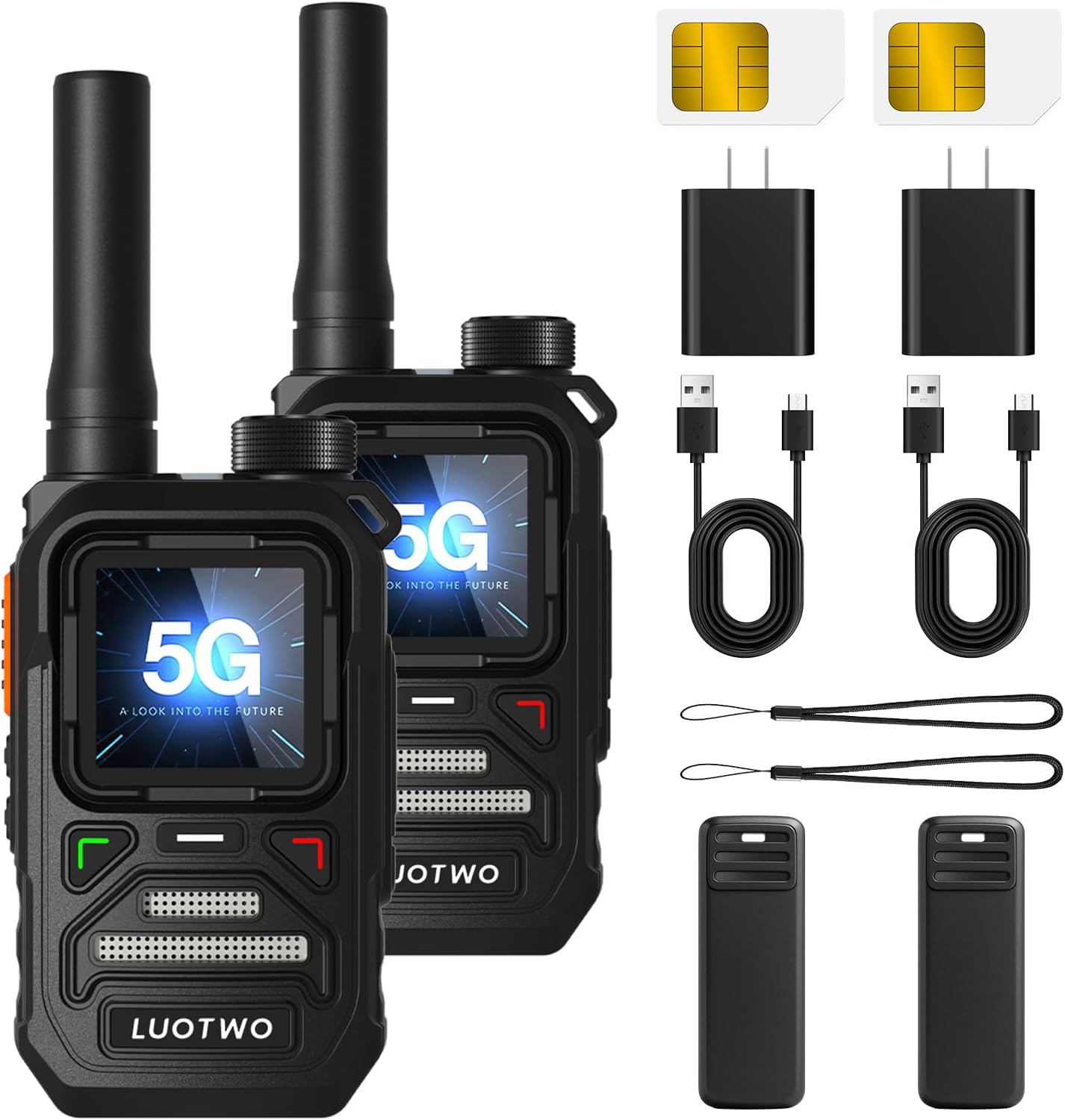
Image: The package includes two LUOTWO V1-900 walkie talkies, two batteries, two back clips, two chargers, two USB cables, two lanyards, and two user manuals. Two SIM cards are also shown.
3. Product Features
- Global 5G Connectivity: Leverages advanced 5G POC radio technology for reliable two-way communication across extensive distances, offering unlimited range.
- Long-Lasting Performance: Equipped with a built-in rechargeable battery and Type-C charging port for convenient power replenishment and extended usage.
- Durable and Portable: Compact, lightweight design with a sturdy build, ensuring consistent performance for outdoor activities and daily use.
- User-Friendly Operation: Easy to set up and use, enhancing communication efficiency for users of all experience levels.
- Versatile Communication: Supports individual, group, and mass calls, suitable for diverse scenarios.
4. Setup Guide
4.1. SIM Card Installation
The LUOTWO V1-900 walkie talkies require a SIM card for 5G POC network connectivity. While some units may come with pre-installed SIM cards, it is essential to verify and install them if necessary. The SIM card slot is located behind the battery.
- Carefully remove the battery cover and the battery.
- Locate the SIM card slot.
- Insert the provided SIM card into the slot, ensuring correct orientation. Note that the SIM card may need to be carefully detached from a larger card frame to fit the small slot.
- Reinsert the battery and secure the battery cover.

Image: A close-up view of the walkie talkie with the battery removed, clearly showing the small SIM card slot where the network card needs to be inserted.
4.2. Charging the Battery
Before first use, fully charge the walkie talkie battery.
- Connect the provided Type-C USB cable to the charging port on the walkie talkie.
- Plug the other end of the USB cable into the charger adapter, then into a power outlet.
- The charging indicator light will illuminate. Allow the device to charge completely.

Image: A LUOTWO walkie talkie connected to a Type-C charging cable, illustrating the charging process.
4.3. Power On/Off
To power on the device, press and hold the red power button located on the side or front panel until the screen illuminates. To power off, press and hold the same button until the device shuts down.
4.4. App Integration (Optional)
For advanced features like group management and calling from a mobile device, download the official LUOTWO app. Scan the QR code provided in the packaging or manual to download the app. Follow the in-app instructions to register your device(s) and manage groups.
Video: This video demonstrates the process of pairing and managing walkie talkies using a mobile application, including scanning QR codes and setting up groups for communication.
5. Operating Instructions
5.1. Push-to-Talk (PTT) Function
To transmit your voice, press and hold the PTT button located on the side of the walkie talkie. Speak clearly into the microphone. Release the PTT button to listen for incoming transmissions. It is recommended to pause briefly after pressing the PTT button before speaking to ensure the beginning of your message is not cut off.
5.2. Call Types
- Individual Call: Direct one-on-one communication with a specific user.
- Group Call: Communication within a pre-defined group of users.
- Mass Call: Broadcasts to all members within a larger network or all connected devices.

Image: The walkie talkie screen showing icons for individual, group, and mass call options, illustrating its versatile communication capabilities.
5.3. Volume Control
Adjust the volume using the dedicated up/down buttons or the rotary knob, if present, on the device. The current volume level will be displayed on the screen.
6. Maintenance and Care
- Keep the device clean by wiping it with a soft, dry cloth.
- Avoid exposing the device to extreme temperatures or direct sunlight for prolonged periods.
- The device is water-resistant (IPX4 rating), but it is not fully waterproof. Avoid submerging it in water.
- Ensure the Type-C charging port cover is securely closed when not charging to maintain water resistance.
- Store the walkie talkie in a cool, dry place when not in use.

Image: The walkie talkie is depicted in a dynamic outdoor setting, highlighting its robust construction designed to withstand impacts and drops.
7. Troubleshooting
- No Signal/Connectivity Issues: Ensure the SIM card is correctly installed and activated. Check for 5G network coverage in your area. Move to an open area if indoors or in a location with poor signal.
- Cannot Communicate: Verify that both devices are powered on and set to the same group or channel. Check volume levels. Ensure the PTT button is pressed correctly.
- Battery Not Charging: Ensure the Type-C cable and charger are properly connected. Check if the power outlet is functional.
- Audio Quality Issues: Ensure the microphone is not obstructed. Adjust volume levels. Move closer to the transmitting device if communication is unclear.
- App Connection Problems: Ensure your mobile device has internet access and Bluetooth (if applicable) is enabled. Re-scan the QR code to re-register the device if necessary.
8. Specifications
| Item Weight | 10.6 ounces (300 Grams) |
| Product Dimensions | 1.37 x 1.77 x 4.01 inches |
| Item Model Number | LUOTWO V1-900 |
| Batteries | 1 LR44 battery required (included) |
| Number of Channels | 1 |
| Special Feature | Long Range |
| Talking Range Maximum | 5000 Kilometer |
| Water Resistance Level | Water Resistant (IPX4) |
| Manufacturer | LUOTWO |
9. Warranty and Support
The LUOTWO V1-900 Walkie Talkies come with a 1-year manufacturer's warranty. For any technical support, warranty claims, or inquiries, please contact LUOTWO customer service through the retailer where the product was purchased.