
Introduction
This manual provides essential instructions for the safe and effective operation of your LaluceNatz 150W RGBW Battery Stage Light Bar. This versatile lighting unit combines vibrant LEDs with an intelligently designed housing to create a powerful and adaptable system for various events and installations. It features dynamic RGBW stage wash lighting for vibrant displays, powered by 12x5W Warm White, 156x0.5W White LED, and 72x0.2W 5050 RGB LEDs, delivering an extensive range of colors and effects.
What's in the Box
Upon unpacking, please verify that all components listed below are present and in good condition:
- 1 x 150W Battery Wash Light
- 1 x Remote Controller
- 1 x User Manual
- 1 x Charger

Image: Contents of the product package, including the light bar, remote, charger, and user manual.
Specifications
| Model Number | LA-101-12WLB |
| Color | RGBW Battery Stage Light Bar |
| Shape | Rectangular |
| Material | Aluminum |
| Light Source Type | Light Emitting Diode (LED) |
| Power Source | Battery Powered |
| Number of Batteries | 12 Nonstandard Battery (included) |
| Voltage | 110 Volts |
| Light Output Maximum | 150 Lumens |
| Light Source Wattage | 150 Watts |
| Mounting Type | Bar Mount |
| Special Features | Color Changing, Wall Wash, Beam Effect |
| Item Dimensions (L x W x H) | 39.37"L x 2.76"W x 3.94"H |

Image: Detailed view of the light bar, showing dimensions, DMX ports, charging port, battery indicator, and wireless DMX receiver.
Setup
Initial Charging
Before first use, fully charge the light bar. Connect the provided charger to the charging port on the unit and plug it into a standard 110V power outlet. The battery life indicator will show charging progress. A full charge typically takes approximately 6 hours.

Image: Illustration of the light bar being charged, indicating 8 hours of single color use, 6 hours of full color use, and a 6-hour charging time for the 8800mAh battery.
Mounting
The light bar can be mounted using the included metal brackets and screw knobs. Ensure the mounting surface is stable and capable of supporting the weight of the fixture. For optimal wireless DMX performance, ensure the receiver cap is not removed before use and the remote is pointed towards the front of the fixture.

Image: Overview of the light bar's control panel and remote, highlighting auto, sound, beam, and strobe modes, along with wireless DMX, DMX, and remote control options.
Operating Modes
The LaluceNatz 150W RGBW Battery Stage Light Bar offers 7 distinct lighting modes for versatile control:
- Auto Effects: Features 21 pre-programmed automatic lighting sequences.
- Sound Activated: Responds to music and ambient sound with 21 sound-activated effects.
- Strobe Mode: Creates a flashing light effect.
- Master-Slave: Allows multiple units to synchronize and operate together.
- DMX512: Professional control via a DMX512 controller (not included).
- Wireless 2.4G: Wireless DMX control for cable-free operation.
- Remote Control: Convenient control using the included IR remote.
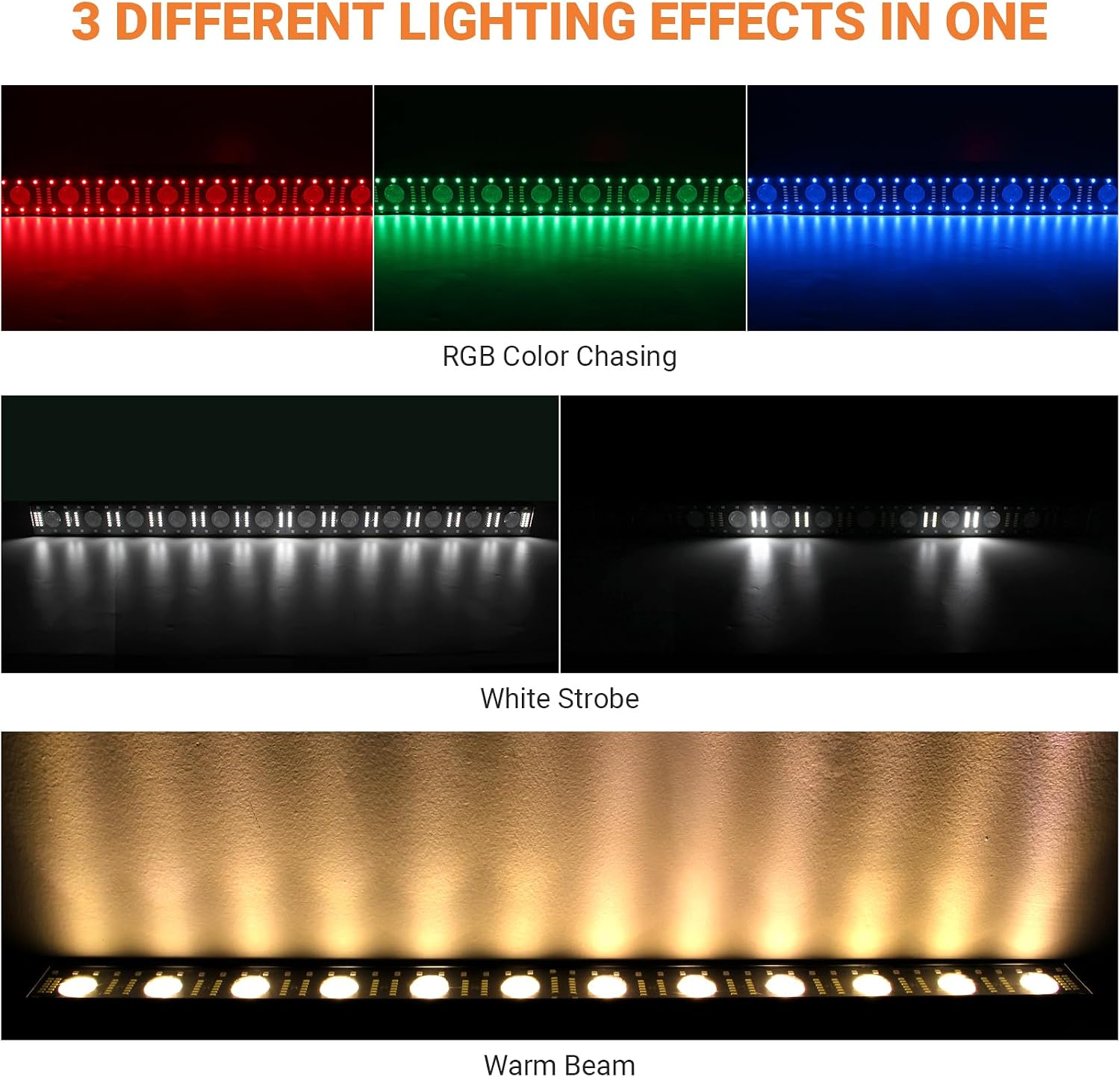
Image: Examples of the light bar's capabilities, showing RGB color chasing, white strobe, and warm beam effects.

Image: Breakdown of the light bar's LED components, including RGB, white strobe, and warm beam LEDs.
Remote Control Operation
The included IR remote allows for easy control of various functions:
- ON/OFF: Power the unit on or off.
- Brightness +/-: Adjust light intensity.
- Dimmer: Switch to brightness mode; auto sets brightness to maximum.
- Color Buttons (R, G, B, W, A, P): Select specific colors (Red, Green, Blue, White, Amber, Purple).
- Full Color: Turn on all lights.
- Fade: Activate fade mode; use +/- to adjust speed.
- Sound Mode (1-9): Select sound-activated programs; use SP/SEN to adjust sensitivity.
- Auto Mode (1-9): Select automatic programs; use SP/SEN to adjust speed.
- Strobe Mode: Activate strobe; press again to turn off.
- Preset: Static color mode.
- +/-: Adjust strobe, static, auto, fade, sound, sound sensitivity, or brightness.

Image: Detailed diagram of the remote control, showing buttons for power, brightness, color selection, mode selection (sound, auto, strobe), and adjustment controls.
DMX and Wireless DMX Control
For advanced control, the light bar supports DMX512 protocol. Connect a DMX controller (not included) to the DMX IN port. The unit also features 2.4G wireless DMX for seamless integration into existing wireless DMX systems, eliminating the need for DMX cables between fixtures.
Video: A demonstration of the LaluceNatz stage light bar in a DJ setup, showcasing its various lighting effects and wireless capabilities.
Battery Information
The light bar is equipped with a total 8800mAh rechargeable lithium battery. A full single charge provides up to 8 hours of operation in single color mode and 6 hours in auto play mode. The charging time is approximately 6 hours. Monitor the battery life indicator on the unit to check the current charge level.
Maintenance
To ensure the longevity and optimal performance of your light bar, follow these maintenance guidelines:
- Cleaning: Regularly clean the exterior of the unit with a soft, dry cloth. Avoid using abrasive cleaners or solvents.
- Lens Care: Keep the LED lenses free from dust and debris to maintain light output clarity.
- Storage: When not in use for extended periods, store the light bar in a cool, dry place, away from direct sunlight and extreme temperatures. Ensure the battery is partially charged (around 50%) before storage to prolong battery life.
- Inspection: Periodically check cables and connections for any signs of wear or damage.
Troubleshooting
If you encounter issues with your light bar, refer to the following common troubleshooting steps:
| Problem | Possible Cause | Solution |
| Light bar does not turn on | Battery is depleted or not charged. Power cable not connected. | Charge the battery fully. Ensure the power cable is securely connected. |
| Remote control not responding | Remote battery is low. Obstruction between remote and sensor. Receiver cap not removed. | Replace remote battery. Ensure clear line of sight to the light bar's sensor. Confirm receiver cap is removed. |
| Inconsistent DMX control | Incorrect DMX address setting. Faulty DMX cable or connection. Interference with wireless DMX. | Verify DMX address settings. Check DMX cables and connections. Ensure no strong interference sources for wireless DMX. |
| Lights are dim or flickering | Low battery charge. Power supply issue. | Recharge the battery. Check power connections. |
If the problem persists after attempting these solutions, please contact customer support.
Warranty and Support
The LaluceNatz 150W RGBW Battery Stage Light Bar comes with a 1-year manufacturer's warranty. This warranty covers defects in materials and workmanship under normal use. For warranty claims, technical support, or any issues such as broken or missing accessories, please do not hesitate to contact LaluceNatz customer service. Refer to the contact information provided in your product packaging or on the official LaluceNatz website.
For further assistance, you may visit the official LaluceNatz store: LaluceNatz Store