
1. Package Contents
Please verify that all items are present in the package:
- 1 x Kepwam Temperature Control Self-Heating Travel Mug (20oz)
- 1 x Charging Base with 6ft Cable
- 1 x Leakproof 2-in-1 Screw Lid
- 1 x User Manual

Image: The Kepwam Self-Heating Travel Mug with its charging base and lid.
2. Setup and Initial Use
- Charge the Mug: Thoroughly dry the mug and charging coaster. Place the mug on the charging base and connect the base to a power source. Fully charge the mug before its first use.
- Power On: Press the power button located at the bottom of the mug to turn it on. The LED indicators will illuminate.
- Set Temperature: Press the control button to cycle through the three preset temperature settings:
- Warm: 113°F (45°C)
- Hot: 131°F (55°C)
- Piping Hot: 149°F (65°C)
- App Activation (Optional): For precise temperature control and customization, download the Kepwam App from the App Store or Google Play. Follow the in-app instructions to pair your mug via Bluetooth. You can then monitor real-time temperature and set your preferred temperature range (113°F to 149°F in 1°F increments).

Image: Visual guide for charging, powering on, and setting the temperature of the mug.

Image: Illustration of dual control methods: manual button and smartphone app.
3. Operating Instructions
3.1 Temperature Control
The mug offers both manual and app-based temperature control. Use the physical button on the mug for quick adjustments or the Kepwam App for precise, 1-degree increment control.
- Manual Control: Press the power button to cycle through the three preset temperature levels. Long press to power off.
- App Control: Connect to the Kepwam App via Bluetooth to set custom temperatures between 113°F and 149°F. The app also allows monitoring of real-time temperature.
3.2 Battery Life and Heating
The mug features a 4000mAh battery, providing up to 10 hours of heating when fully charged and used independently. For continuous heating, place the mug on its charging dock.

Image: The Kepwam mug highlighting its 4000mAh battery capacity and 2-10 hours of lasting heat.
3.3 Lid Usage
The 2-in-1 leakproof screw lid offers two drinking options:
- Sip with Straw: Recommended for beverages below 122°F (50°C) for safety.
- Flip-Tab: Ideal for enjoying hot drinks directly.
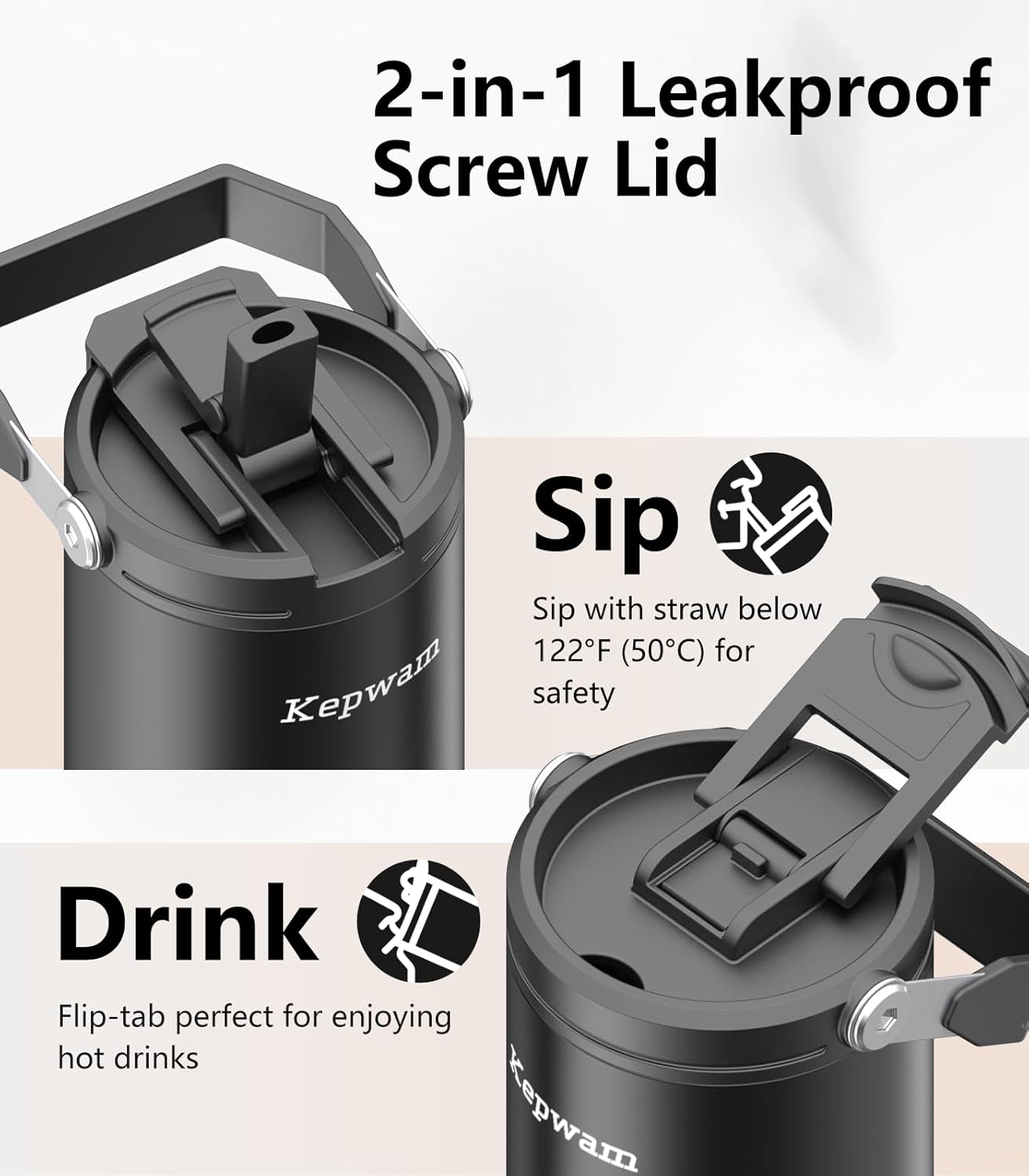
Image: Detailed view of the mug's versatile 2-in-1 lid.
3.4 Safety Features
The mug is designed with safety and energy efficiency in mind:
- Automatically stops heating when empty.
- Automatically stops heating after 3 hours of no use.
4. Maintenance and Care
Proper care ensures the longevity and performance of your Kepwam Self-Heating Travel Mug.
- Hand Wash Only: For best care, hand wash the mug.
- Avoid Hot Water: Do not clean with hot water.
- No Dishwasher or Microwave: Never place the mug in a dishwasher or microwave. Doing so may damage the internal battery and shorten the lifespan of the temperature-control system.

Image: Important safety instructions regarding cleaning and use.
5. Troubleshooting
If you encounter any issues with your Kepwam Self-Heating Travel Mug, please refer to the following common solutions:
- Mug Not Heating: Ensure the mug is fully charged. If using the charging base, verify it is properly connected to a power source and the mug is correctly seated. Check that the desired temperature setting is selected.
- App Connectivity Issues: Ensure Bluetooth is enabled on your device and the mug is within range. Try restarting both the mug and your device. If issues persist, reinstall the Kepwam App.
- Leakage: Confirm the 2-in-1 screw lid is securely fastened and the flip-tab or straw opening is properly closed.
- Short Battery Life: Battery performance can vary based on ambient temperature and selected heat setting. For extended heating, use the mug on its charging base. Ensure the mug is fully charged before independent use.
If these steps do not resolve the issue, please contact Kepwam customer support for further assistance.
6. Specifications
| Feature | Detail |
|---|---|
| Brand | Kepwam |
| Model | Self-Heating Travel Mug 20oz |
| Capacity | 20oz (approximately 1.3 Pounds) |
| Material | Ceramic, Stainless Steel (18/8 stainless steel with food-grade ceramic coating) |
| Maximum Temperature | 149°F (65°C) |
| Temperature Settings | 113°F (Warm), 131°F (Hot), 149°F (Piping Hot) |
| Battery | 1 x 12V (4000mAh) Lithium-Ion Battery (included) |
| Power Source | Battery Powered |
| Product Dimensions | 4.8 x 4.8 x 8.54 inches |
| Item Weight | 2.23 pounds (1.01 Kilograms) |
| Auto Shut-off | When empty or after 3 hours of no use |
6.1 Estimated Use Time
Actual heating duration may vary depending on the initial temperature of your beverage and environmental conditions.
| Temperature Setting | OFF Coaster | ON Coaster | ||
|---|---|---|---|---|
| With Lid | Without Lid | With Lid | Without Lid | |
| Warm (113°F/45°C) | 10h | 4.5h | Indefinite | Indefinite |
| Hot (131°F/55°C) | 6.5h | 3h | Indefinite | Indefinite |
| Piping (149°F/65°C) | 5h | 2h | Indefinite | Indefinite |
7. Warranty and Support
For warranty information or technical support, please refer to the contact details provided with your purchase documentation or visit the official Kepwam website. Keep your purchase receipt for warranty claims.
You can also find additional support and FAQs within the Kepwam App.