
1. Introduction
Welcome to the comprehensive user manual for your new bella-PRO 10.5-qt Touchscreen 5-in-1 Indoor Grill & Air Fryer. This versatile kitchen appliance is designed to air fry, grill, roast, bake, toast, and dehydrate your favorite foods with precision and efficiency. Featuring a robust 1700W power system and a wide temperature range, it offers a healthier alternative to traditional frying, reducing fat by up to 80%. The intuitive touchscreen control panel and included accessories enhance your cooking experience, making meal preparation simple and enjoyable.
2. Important Safety Information
Please read all instructions carefully before using the appliance. Failure to follow these instructions may result in electric shock, fire, or serious injury.
- Always place the appliance on a stable, heat-resistant surface.
- Do not immerse the main unit, cord, or plug in water or other liquids.
- Ensure the appliance is unplugged when not in use and before cleaning.
- Keep children and pets away from the appliance during operation.
- Do not block any ventilation openings.
- Use only accessories recommended by the manufacturer.
- Exercise extreme caution when removing hot oil or other hot liquids.
- The appliance is built with BPA-Free materials and ETL Listed safety certifications.
3. Product Components
Your bella-PRO 5-in-1 Indoor Grill & Air Fryer comes with the following components:
- 10.5-qt. Touchscreen 5-in-1 Indoor Grill & Air Fryer (Stainless Steel Unit)
- Removable Basket with Ever-Good Ceramic Nonstick Coating
- Crisping Tray
- Pizza Pan
- Grill Pan
- Instruction Manual

Figure 1: The bella-PRO 5-in-1 Indoor Grill and Air Fryer unit shown with its removable basket, crisping tray, pizza pan, and grill pan.
4. Setup and First Use
- Unpacking: Carefully remove all components from the packaging. Remove any stickers or labels.
- Initial Cleaning: Before first use, wash the removable basket, crisping tray, pizza pan, and grill pan in hot, soapy water. Rinse thoroughly and dry completely. Wipe the main unit with a damp cloth. Do not immerse the main unit in water.
- Placement: Place the appliance on a flat, stable, heat-resistant surface, ensuring adequate clearance (at least 6 inches) from walls or other appliances for proper ventilation.
- Power Connection: Plug the power cord into a grounded electrical outlet.
5. Operating Instructions
The bella-PRO 5-in-1 Indoor Grill & Air Fryer features an intuitive touchscreen control panel for easy operation.

Figure 2: The main unit displaying the touchscreen control panel with various preset icons.
5.1 Powering On and Menu Selection
- Power On: Press the power button (⑂) on the touchscreen. The display will illuminate.
- Preset Functions: The touchscreen will display various preset icons for common foods: Pizza, Fish, Bread, Shrimp, Chicken, Steak, Fries, and Dehydrate.
- Selecting a Preset: Tap the desired food icon. The display will show a default time and temperature for that preset.
- Adjusting Time/Temperature: Use the up (▲) and down (▼) arrows to manually adjust the cooking time and temperature as needed.
- Start Cooking: Once settings are confirmed, press the power button (⑂) again to start the cooking cycle.
5.2 Preheat Function
The appliance features an automatic preheat function. After pressing the start button, the display will show "PrE" indicating it is preheating. Once the desired temperature is reached, the unit will beep and display "Add Food", prompting you to place your food inside.
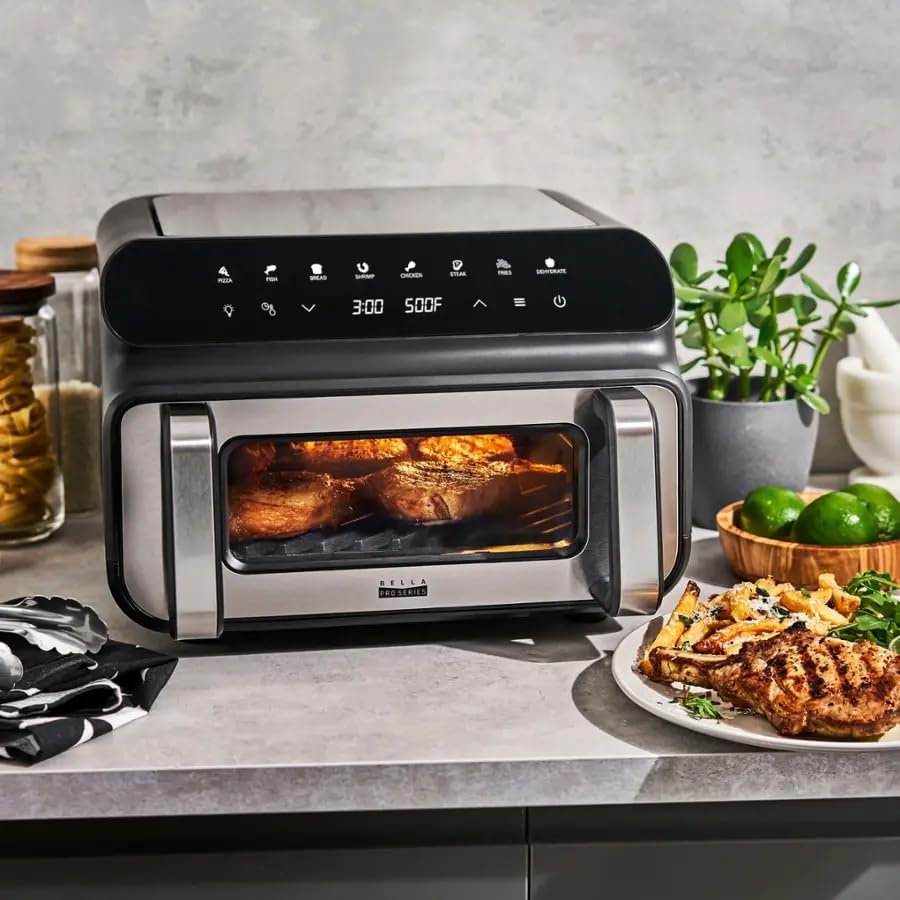
Figure 3: The appliance actively grilling, showcasing the interior light and viewing window.
5.3 Interior Light
To monitor your food without interrupting the cooking cycle, press the light bulb icon (💡) on the touchscreen to turn the interior light on or off.
5.4 Pause/Resume
During operation, you can pause the cooking cycle by pressing the power button (⑂) once. Press it again to resume. Opening the drawer will also automatically pause the cooking cycle.

Figure 4: The removable basket pulled out, showing air-fried french fries, demonstrating the appliance's capacity.
6. Cooking Functions Overview
Your bella-PRO 5-in-1 Indoor Grill & Air Fryer offers multiple cooking modes:
- Air Fry: Circulates hot air to cook food with little to no oil, achieving crispy results. Ideal for fries, chicken wings, and vegetables.
- Grill: Utilizes the grill pan to create authentic grill marks and flavors indoors. Perfect for steaks, burgers, and fish.
- Roast: Great for cooking meats and vegetables to tender perfection.
- Bake: Suitable for baking small cakes, pastries, or even reheating leftovers.
- Dehydrate: Slowly removes moisture from food, preserving fruits, vegetables, and making jerky.

Figure 5: A dish being roasted inside the appliance, highlighting its versatility beyond just air frying.
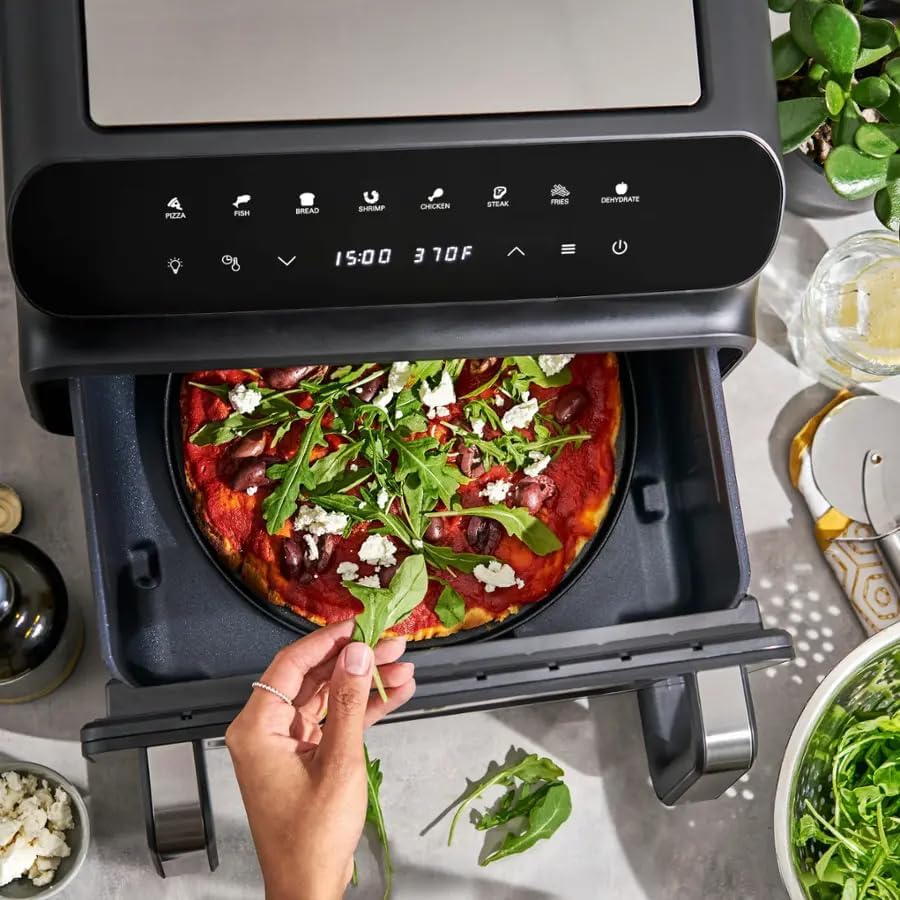
Figure 6: A pizza being prepared in the appliance, demonstrating the use of the pizza pan accessory.
7. Maintenance and Cleaning
Regular cleaning ensures optimal performance and longevity of your appliance.
- Main Unit: Always unplug the unit and allow it to cool completely before cleaning. Wipe the exterior with a damp cloth. Do not use abrasive cleaners or immerse the main unit in water.
- Removable Basket, Pans, and Trays: The removable basket, crisping tray, pizza pan, and grill pan feature Ever-Good Ceramic Nonstick Coating for easy food release and cleanup. These components are dishwasher-safe. For best results and to prolong the life of the nonstick coating, hand wash with hot, soapy water and a non-abrasive sponge.
- Interior: After removing the basket, wipe the interior of the appliance with a damp cloth. Ensure no food debris remains.
8. Troubleshooting
| Problem | Possible Cause | Solution |
|---|---|---|
| Appliance does not turn on. | Not plugged in or power outlet issue. | Ensure the power cord is securely plugged into a working electrical outlet. Check the circuit breaker. |
| "No Pot" message on display. | Removable basket not fully inserted. | Push the removable basket firmly into the main unit until it clicks into place. |
| Food is not cooking evenly. | Overcrowding the basket or insufficient shaking/flipping. | Cook food in smaller batches. Shake or flip food halfway through the cooking process. |
| Appliance emits a loud beeping sound. | This is a normal operational sound, often indicating a change in cycle or completion. | This is normal. There is no known way to quiet the beep. |
9. Specifications
- Brand: bella-PRO
- Model Name: PRO Touchscreen 5-in-1 Indoor Grill & Air Fryer
- Model Number: 90243
- Color: Stainless Steel
- Product Dimensions: 14.76"D x 17.4"W x 10.23"H
- Item Weight: 15.43 pounds
- Capacity: 10.5 Quarts
- Power: 1700W
- Temperature Range: 180°F to 500°F
- Control Type: Touchscreen
- Special Features: 5-in-1 Functions (Air Fry, Grill, Roast, Bake, Dehydrate), Preheat & Timer, Interior Light
- Door Material Type: Glass
- Safety Certifications: ETL Listed, BPA-Free materials
10. Warranty and Support
For warranty information or technical support, please refer to the warranty card included with your purchase or contact bella-PRO customer service directly. Keep your purchase receipt as proof of purchase for any warranty claims.
For additional recipe inspiration and product information, visit the official bella-PRO website.


