
EVKRUN EU07
Contents
EVKRUN Walking Pad Treadmill User Manual
Model: EU07
1. Introduction
Thank you for choosing the EVKRUN Walking Pad Treadmill. This compact and versatile fitness equipment is designed for home and office use, offering a convenient way to incorporate walking or light jogging into your daily routine. With its 12% incline capability, smart app connectivity, and robust design, it provides an effective workout experience. Please read this manual thoroughly before operation to ensure proper use, maintenance, and safety.

Image 1.1: The EVKRUN Walking Pad Treadmill in a home setting, demonstrating its use with a fitness application on a smartphone.
2. Safety Information
To prevent injury or damage to the product, please adhere to the following safety guidelines:
- Always place the treadmill on a flat, stable surface.
- Ensure adequate clear space around the treadmill during operation.
- Do not allow children or pets near the treadmill while it is in use.
- Consult a physician before starting any new exercise program.
- Wear appropriate athletic footwear during use.
- Do not exceed the maximum weight capacity of 340 pounds.
- Unplug the treadmill from the power outlet when not in use or before cleaning/maintenance.
- Keep hands and feet clear of moving parts.
3. Package Contents
Please verify that all components are present in the package:
- EVKRUN Walking Pad Treadmill (Main Unit)
- Remote Control
- Power Cord
- Tool Kit (for assembly and maintenance)
- User Manual (this document)
- Lubricant (for belt maintenance)
4. Setup
4.1 Unpacking
- Carefully remove the treadmill from its packaging.
- Place the treadmill on a flat, level surface.
4.2 Attaching Incline Footpads (Optional)
The EVKRUN Walking Pad Treadmill features a removable 12% incline slope. To utilize this feature, attach the provided incline footpads to the designated points on the treadmill's underside. Refer to the diagrams in the tool kit for precise attachment points.
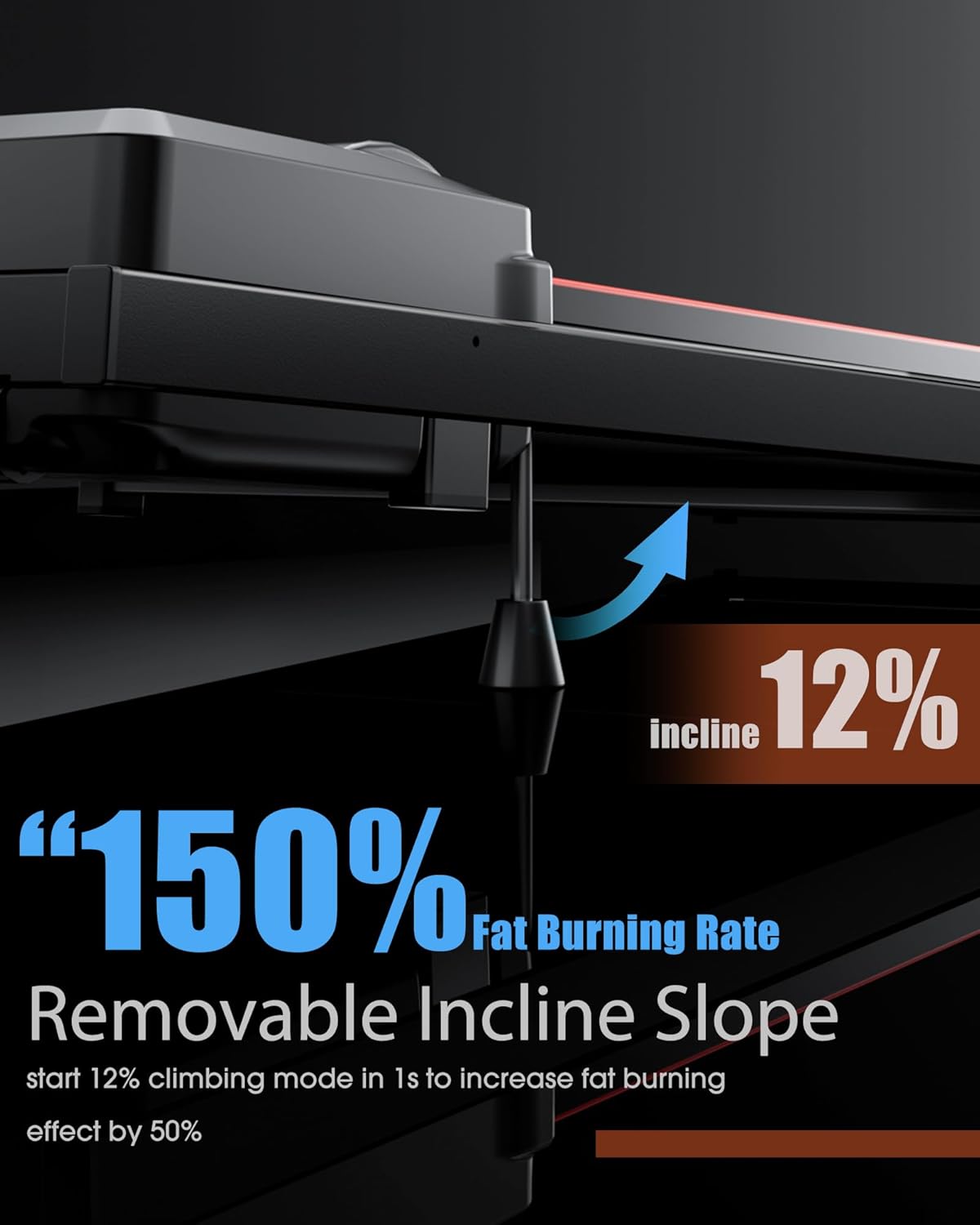
Image 4.1: Detail of the treadmill's underside, highlighting the attachment point for the removable incline footpad.
4.3 Power Connection
Connect the power cord to the treadmill's power input and then plug it into a standard electrical outlet. Ensure the power switch is in the 'OFF' position before plugging in.
5. Operating Instructions
5.1 Control Methods
The treadmill can be controlled via the included remote control or through compatible smart fitness applications.
- Remote Control: Use the remote to start/stop the treadmill, adjust speed, and select preset modes.
- Smart Apps: Connect the treadmill to smart fitness apps (e.g., Kinomap, Zwift) for advanced tracking, customized goals, virtual scenes, and data sharing. The treadmill also supports Apple Health integration.

Image 5.1: Illustration of the remote control and smart app connectivity options for the treadmill.
5.2 Speed Adjustment
The treadmill features a 2.5 HP motor, providing a speed range of 0.6 to 4.0 MPH. Speed can be adjusted incrementally using the remote control or the connected smart app. The LED display on the treadmill will show the current speed, time, distance, and calories burned.

Image 5.2: Internal view of the treadmill's 2.5 HP motor, highlighting its quiet operation (less than 45 dB).
5.3 Incline Feature
The treadmill includes a 12% removable incline footpad. Engaging this incline can significantly increase the intensity of your workout, enhancing calorie burn and muscle engagement. Attach the footpads as described in the Setup section to activate the incline.
5.4 Preset Modes
The treadmill offers 3 preset modes that allow you to select time, distance, or calorie countdown programs directly from the remote control, even without connecting to a smart app. These modes provide structured workout options for various fitness goals.
6. Maintenance
6.1 Lubrication
Regular lubrication of the running belt is crucial for optimal performance and longevity. Apply the provided lubricant under the belt every 3-6 months, depending on usage frequency. Refer to the specific instructions in the tool kit for the lubrication process.
6.2 Cleaning
Wipe down the treadmill's surfaces with a damp cloth after each use to remove sweat and dust. Do not use abrasive cleaners or solvents. Ensure the treadmill is unplugged before cleaning.
6.3 Storage
The EVKRUN Walking Pad Treadmill is designed to be compact and lightweight (approximately 35.3 lbs), making it easy to store. It can be slid under a desk, bed, or sofa. Transport wheels are integrated for convenient movement.

Image 6.1: The treadmill's lightweight design allows for easy portability and storage.

Image 6.2: The treadmill's compact design (40.94 inches length, 18.5 inches width) facilitates storage in small spaces.
7. Troubleshooting
Refer to the table below for common issues and their solutions:
| Problem | Possible Cause | Solution |
|---|---|---|
| Treadmill does not power on | Power cord not connected; Power switch off; Outlet issue | Check power cord connection; Ensure power switch is ON; Test outlet with another device |
| Belt slips or hesitates | Belt needs lubrication; Belt tension is incorrect | Lubricate the running belt; Adjust belt tension according to manual |
| Unusual noise during operation | Loose components; Motor issue | Check for loose screws and tighten; If noise persists, contact customer support |
| Remote control not responding | Battery low; Remote not paired | Replace remote control battery; Refer to manual for remote pairing instructions |
8. Specifications
| Feature | Detail |
|---|---|
| Brand | EVKRUN |
| Model Name | EU07 |
| Product Dimensions | 41"D x 19"W x 4"H |
| Item Weight | 35.3 Pounds |
| Material | Alloy Steel |
| Maximum Speed | 4 Miles per Hour |
| Minimum Speed | 0.6 Miles per Hour |
| Maximum Horsepower | 2.5 Horsepower |
| Maximum Incline Percentage | 12.0% (Removable Slope Footpad) |
| Maximum Weight Recommendation | 340 Pounds |
| Display Type | LED |
| Metrics Measured | Calories Burned, Distance, Speed, Time |
| Assembly Required | No (minimal setup) |
| Special Features | Manual Incline, Under Desk Design, Compact Size, Smart APP Control, 3 Preset Modes |
9. Warranty and Support
The EVKRUN Walking Pad Treadmill comes with a 60-day warranty from the date of purchase. This warranty covers manufacturing defects and issues arising from normal use. For warranty claims, technical support, or any questions regarding your product, please contact EVKRUN customer service through the retailer's platform or the official EVKRUN website.
Please retain your proof of purchase for warranty validation.
Ask a question about this manual
Ask about setup, troubleshooting, compatibility, parts, safety, or missing instructions. Manuals+ will review the question and use this page’s manual context to help answer it.