
1. Introduction
Thank you for purchasing the EMERIO AF-132833 Dual Digital Air Fryer. This appliance is designed to prepare a variety of meals using hot air circulation, offering a healthier alternative to traditional frying with little to no added oil. Its dual-zone design and SYNC FINISH function allow for efficient and simultaneous cooking of different dishes.
Please read this instruction manual thoroughly before first use to ensure safe operation, optimal performance, and proper maintenance of your appliance. Keep this manual for future reference.
2. Important Safety Instructions
When using electrical appliances, basic safety precautions should always be followed to reduce the risk of fire, electric shock, and injury to persons, including the following:
- Read all instructions before using the appliance.
- Do not touch hot surfaces. Use handles or knobs.
- To protect against electric shock, do not immerse cord, plugs, or the appliance in water or other liquid.
- Close supervision is necessary when any appliance is used by or near children.
- Unplug from outlet when not in use and before cleaning. Allow to cool before putting on or taking off parts.
- Do not operate any appliance with a damaged cord or plug, or after the appliance malfunctions or has been damaged in any manner.
- The use of accessory attachments not recommended by the appliance manufacturer may cause injuries.
- Do not use outdoors.
- Do not let cord hang over edge of table or counter, or touch hot surfaces.
- Do not place on or near a hot gas or electric burner, or in a heated oven.
- Extreme caution must be used when moving an appliance containing hot oil or other hot liquids.
- Always attach plug to appliance first, then plug cord into the wall outlet. To disconnect, turn any control to "off", then remove plug from wall outlet.
- Do not use appliance for other than intended use.
- Ensure the appliance is placed on a stable, heat-resistant surface, away from walls and other appliances to allow for proper air circulation.
- Never fill the baskets with oil.
3. Product Overview
Familiarize yourself with the components of your EMERIO AF-132833 Air Fryer.
3.1 Main Unit and Components

Image: Front view of the EMERIO AF-132833 Dual Digital Air Fryer, showcasing the digital control panel and the two independent cooking baskets.
- Main Unit: Houses the heating element, fan, and control panel.
- Cooking Baskets (x2): Removable drawers for holding food during cooking. Each has a 4.5L capacity.
- Crisper Plates (x2): Non-stick plates inserted into the cooking baskets to allow air circulation around food and drain excess fat.
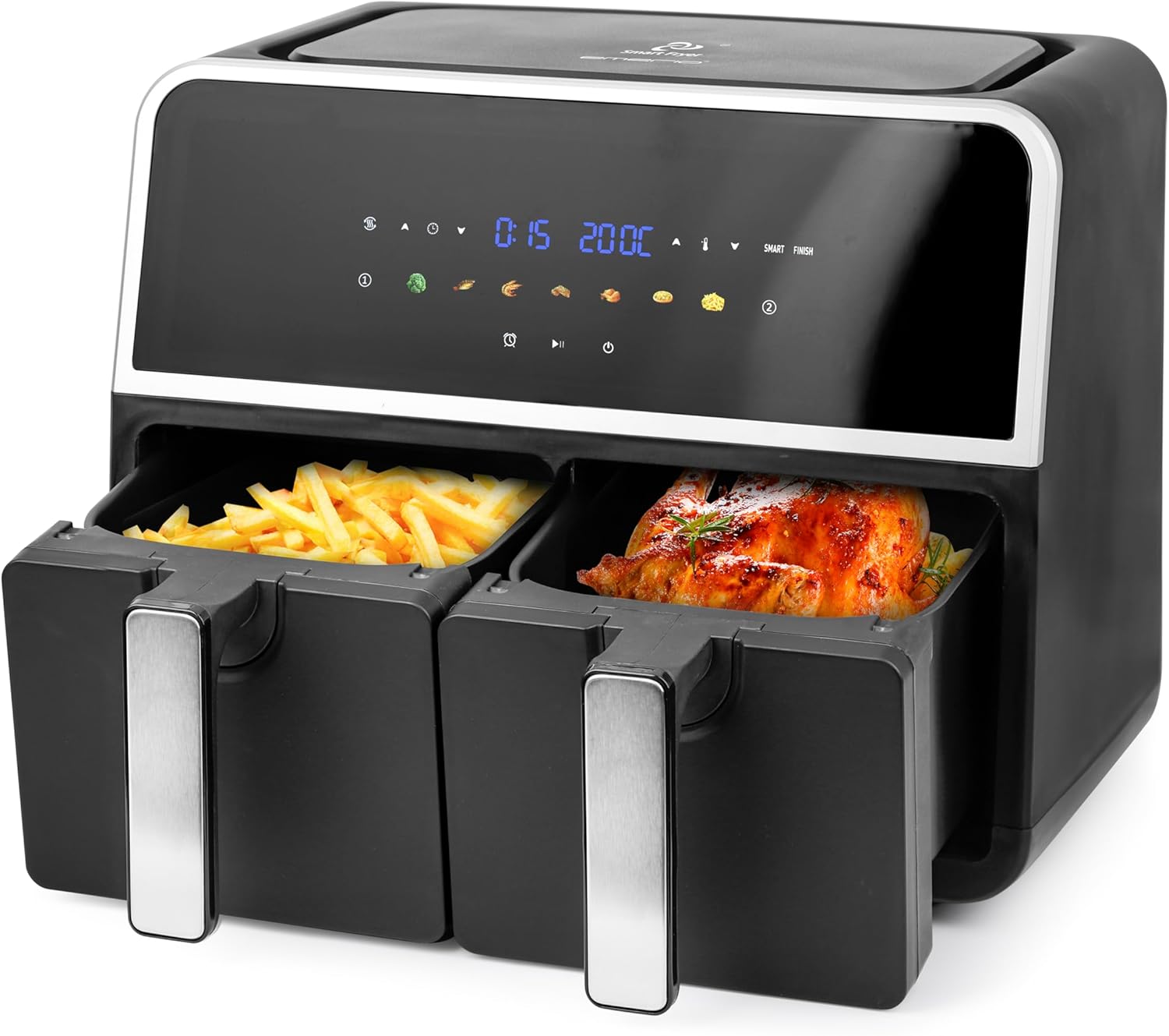
Image: The EMERIO AF-132833 Air Fryer with both cooking baskets partially pulled out, one containing french fries and the other a roasted chicken, demonstrating its dual cooking capability.

Image: Two empty cooking baskets of the EMERIO AF-132833 Air Fryer, shown from an angle, highlighting their design and handles.

Image: Two black crisper plates with slotted designs, designed to fit into the cooking baskets of the EMERIO AF-132833 Air Fryer, allowing for optimal air circulation.
3.2 Control Panel
The digital control panel features an LED display and touch controls for easy operation.
- LED Display: Shows time, temperature, and selected program.
- Basket Indicators (1 & 2): Indicate which basket is currently selected or being programmed.
- Temperature Control Buttons (▲/▼): Adjust cooking temperature.
- Time Control Buttons (▲/▼): Adjust cooking time.
- Preset Program Icons: Seven pre-programmed settings for common foods (e.g., fries, chicken, fish, meat, vegetables, baking, reheating).
- SYNC FINISH Button: Synchronizes the cooking end times for both baskets.
- Start/Pause Button: Initiates or pauses the cooking cycle.
- Power Button: Turns the appliance on or off.
4. Setup
- Unpacking: Carefully remove the air fryer and all packaging materials. Ensure all components are present and undamaged.
- Initial Cleaning: Before first use, wash the cooking baskets and crisper plates with warm, soapy water. Rinse thoroughly and dry completely. Wipe the main unit with a damp cloth.
- Placement: Place the air fryer on a stable, level, and heat-resistant surface. Ensure there is adequate space (at least 10 cm) around the appliance for proper ventilation. Do not place it directly under cabinets or near flammable materials.
- Insert Crisper Plates: Place the crisper plates into the bottom of each cooking basket.
- Power Connection: Plug the power cord into a grounded wall outlet. The appliance will enter standby mode.
5. Operating Instructions
5.1 Basic Operation
- Power On: Press the Power button to turn on the appliance. The display will illuminate.
- Select Basket: Press the Basket 1 or Basket 2 icon to select the desired cooking zone.
- Set Temperature: Use the Temperature Control buttons (▲/▼) to adjust the cooking temperature (e.g., 80°C - 200°C).
- Set Time: Use the Time Control buttons (▲/▼) to adjust the cooking time (e.g., 1 - 60 minutes).
- Start Cooking: Press the Start/Pause button to begin the cooking cycle.
- Pause/Resume: During cooking, press the Start/Pause button to pause. Press again to resume.
- Stop Cooking: To stop cooking, press and hold the Power button for a few seconds.
5.2 Using Preset Programs
The air fryer comes with 7 preset programs for convenience. These programs have pre-set time and temperature settings that can be adjusted if needed.
- Power On: Press the Power button.
- Select Basket: Press the Basket 1 or Basket 2 icon.
- Select Program: Press the desired preset program icon (e.g., fries, chicken). The display will show the default time and temperature.
- Adjust (Optional): You can adjust the time and temperature using the respective control buttons if desired.
- Start Cooking: Press the Start/Pause button.
5.3 SYNC FINISH Function
The SYNC FINISH function ensures that both baskets complete their cooking cycles at the same time, even if they have different cooking times and temperatures.
- Program Basket 1: Select Basket 1, set its desired temperature and time (or choose a preset). Do NOT press Start.
- Program Basket 2: Select Basket 2, set its desired temperature and time (or choose a preset). Do NOT press Start.
- Activate SYNC FINISH: Press the SYNC FINISH button. The appliance will calculate and adjust the start times for each basket so they finish simultaneously.
- Start Cooking: Press the Start/Pause button. The air fryer will begin cooking, with the second basket starting later if necessary.
5.4 Dual Zone Cooking
You can cook two different foods simultaneously without using the SYNC FINISH function if their cooking times are similar or if you prefer to manage them independently.
- Program Basket 1: Select Basket 1, set temperature and time, then press Start/Pause.
- Program Basket 2: Select Basket 2, set temperature and time, then press Start/Pause.
- Both baskets will cook independently. Monitor each basket's progress.
5.5 General Cooking Tips
- For best results, preheat the air fryer for 3-5 minutes before adding food.
- Shake or toss smaller items (like fries) halfway through cooking to ensure even crisping.
- Do not overfill the baskets. Overfilling can prevent even cooking and crisping.
- Some foods may benefit from a light coating of oil for extra crispiness.
- Always check food for doneness, especially meat and poultry, using a food thermometer.
6. Cleaning and Maintenance
Regular cleaning ensures the longevity and optimal performance of your air fryer.
- Unplug and Cool: Always unplug the air fryer from the power outlet and allow it to cool completely before cleaning.
- Cleaning Baskets and Crisper Plates:
- Remove the cooking baskets and crisper plates.
- These parts are dishwasher safe. Alternatively, wash them in warm, soapy water using a non-abrasive sponge.
- Rinse thoroughly and dry completely before reassembling or storing.
- Cleaning the Main Unit:
- Wipe the exterior of the air fryer with a damp cloth. Do not use abrasive cleaners or scouring pads.
- Clean the interior of the appliance with a damp cloth. If necessary, use a mild detergent.
- Never immerse the main unit in water or any other liquid.
- Storage: Ensure the air fryer is clean and dry before storing. Store it in a cool, dry place.
7. Troubleshooting
Refer to this section for common issues and their solutions.
| Problem | Possible Cause | Solution |
|---|---|---|
| Air fryer does not turn on. | Appliance is not plugged in. Power outlet is not working. | Ensure the power cord is securely plugged into a grounded outlet. Test the outlet with another appliance. |
| Food is not cooked evenly. | Baskets are overfilled. Food was not shaken/tossed. | Do not overfill baskets. Shake or toss food halfway through cooking. Ensure crisper plates are correctly inserted. |
| Food is not crispy. | Too much moisture in food. Not enough oil (for some foods). Temperature too low. | Pat food dry before air frying. Lightly coat some foods with oil. Increase temperature slightly. |
| White smoke coming from appliance. | Grease residue from previous use. Fatty food being cooked. | Clean baskets and crisper plates thoroughly after each use. For fatty foods, drain excess fat during cooking. |
If the problem persists after checking the above, please contact customer support.
8. Specifications
| Feature | Detail |
|---|---|
| Model Number | AF-132833 |
| Brand | Emerio |
| Capacity | 2 x 4.5 Liters (Total 9 Liters) |
| Power/Wattage | 1700 Watts |
| Voltage | 230 Volts |
| Product Dimensions | 36.1 x 39.8 x 32.4 cm |
| Weight | 7.3 kg |
| Material | Plastic, Stainless Steel |
| Special Features | 7 Programs, Digital Control, Dual Chamber, LED Display, Oil-free Frying, Sync Finish, Temperature Control, Automatic Shut-off |
9. Warranty and Support
This product is covered by a manufacturer's warranty. Please refer to the warranty card included with your purchase for specific terms and conditions. For technical support, troubleshooting assistance, or to inquire about replacement parts, please contact Emerio customer service through their official website or the contact information provided in your product packaging.
Keep your proof of purchase for warranty claims.


