
Briloner 7708011
Briloner Wireless LED Table Lamp IP44 - Model 7708011 User Manual
Model: 7708011 | Brand: Briloner
1. Introduction
Thank you for choosing the Briloner Wireless LED Table Lamp, Model 7708011. This elegant and versatile lamp is designed to provide warm, ambient lighting for both indoor and sheltered outdoor environments. Featuring a rechargeable battery, touch dimming, and splash resistance, it offers convenience and flexibility. Please read this manual carefully before use to ensure proper operation and maintenance.

Image 1.1: The Briloner Wireless LED Table Lamp, Model 7708011.
2. Safety Instructions
To prevent injury or damage, please observe the following safety precautions:
- Do not immerse the lamp in water. The IP44 rating protects against splashing water, not submersion.
- Keep the lamp away from extreme temperatures, direct sunlight, and open flames.
- Do not attempt to disassemble or modify the lamp beyond the replaceable components specified in this manual.
- Use only the provided or a certified USB-C cable for charging.
- Ensure the charging port is dry before connecting the USB-C cable.
- Keep out of reach of children.

Image 2.1: The lamp features IP44 protection, making it resistant to splashing water.
3. Package Contents
Verify that all items are present in the package:
- Briloner Wireless LED Table Lamp (Shade, Upper Stem, Lower Stem, Base)
- USB-C Charging Cable (assumed, not explicitly listed but required for charging)
- Mounting Hardware (if any assembly is required beyond simple connection)
- User Manual (this document)
4. Setup
4.1 Assembly
The lamp may come in multiple parts for compact packaging. To assemble:
- Carefully unbox all components.
- Connect the upper stem to the lower stem by gently twisting until secure.
- Attach the assembled stem to the lamp base, ensuring it is firmly seated.
- Place the lamp shade onto the top of the upper stem.

Image 4.1: Assembly diagram showing the modular components of the lamp.
4.2 Initial Charging
Before first use, fully charge the lamp's battery.
- Locate the USB-C charging port on the underside of the lamp (refer to Image 4.2).
- Connect the provided USB-C cable to the lamp and a suitable USB power adapter (not included).
- The charging indicator (if present) will illuminate. Charge until the indicator shows a full charge (e.g., light changes color or turns off).
- A full charge provides up to 18 hours of autonomy, depending on brightness settings.

Image 4.2: The USB-C charging port and mechanical on/off switch are located on the underside of the lamp.
5. Operating Instructions
5.1 Power On/Off
The lamp features a mechanical on/off switch and a touch-sensitive power button.
- Mechanical Switch: On the underside of the lamp, there is a mechanical switch. Ensure this switch is in the 'ON' position for the lamp to operate. This switch also acts as an anti-discharge button to preserve battery life during storage.
- Touch Power Button: Gently touch the designated area on the top of the lamp shade to turn the lamp on or off.
5.2 Dimming Function
The lamp is equipped with a smooth touch dimmer with a memory function.
- When the lamp is on, press and hold the touch-sensitive area on the top of the shade. The brightness will gradually adjust between 10% and 100%.
- Release your finger when the desired brightness level is reached.
- The lamp will remember the last brightness setting when turned off and on again via the touch button.

Image 5.1: The touch-sensitive area on the lamp shade controls dimming.
6. Maintenance
6.1 Cleaning
To clean the lamp, ensure it is turned off and disconnected from any charging cable.
- Wipe the lamp with a soft, dry, or slightly damp cloth.
- Do not use abrasive cleaners, solvents, or harsh chemicals, as these may damage the finish.
6.2 Battery Replacement
The lamp's 1200mAh rechargeable battery is designed to be replaceable, extending the product's lifespan.
- When the battery's performance significantly degrades, contact Briloner customer support or an authorized service center for information on obtaining a replacement battery.
- Follow the instructions provided with the replacement battery for safe installation.
- Dispose of old batteries according to local regulations.
6.3 Light Source Replacement
The LED light source in this lamp is interchangeable.
- If the LED light source fails, contact Briloner customer support or an authorized service center for information on obtaining a compatible replacement.
- Do not attempt to replace the LED light source yourself unless specifically instructed by Briloner, as this may void the warranty or cause damage.

Image 6.1: The lamp is designed with sustainable engineering, featuring replaceable and repairable components.
7. Troubleshooting
If you encounter issues with your Briloner Wireless LED Table Lamp, refer to the following table:
| Problem | Possible Cause | Solution |
|---|---|---|
| Lamp does not turn on. | Battery is depleted. Mechanical switch is OFF. Touch sensor malfunction. | Charge the lamp fully. Ensure the mechanical switch on the underside is ON. Try touching the sensor firmly. |
| Lamp does not dim. | Incorrect operation. Touch sensor issue. | Press and hold the touch sensor to dim. Do not just tap. Ensure the touch sensor area is clean and dry. |
| Battery life is shorter than expected. | Not fully charged. Operating at maximum brightness. Battery degradation. | Ensure the lamp is fully charged before use. Lower brightness settings consume less power. Consider battery replacement if degradation is significant. |
| Lamp does not charge. | USB-C cable or adapter faulty. Charging port obstructed. Battery issue. | Try a different USB-C cable and power adapter. Check the charging port for debris. Contact customer support if the issue persists. |
If the problem persists after attempting these solutions, please contact Briloner customer support.
8. Specifications
| Feature | Detail |
|---|---|
| Brand | Briloner |
| Model Number | 7708011 |
| Dimensions (L x W x H) | 11 x 11 x 34.5 cm (Ø110 x 345mm) |
| Weight | 426 grams |
| Material | Plastic (Shade), Metal (Base) |
| Color | Beige |
| Light Source Type | Integrated LED (Interchangeable) |
| Power Consumption | 2.6 Watts (LED), 1.8 Watts (overall) |
| Luminous Flux | 120 Lumens |
| Color Temperature | 3000 Kelvin (Warm White) |
| Voltage | 3.7 Volts (DC) |
| Battery Type | 1200mAh Rechargeable (Replaceable) |
| Battery Autonomy | Up to 18 hours |
| Charging Port | USB-C |
| Protection Rating | IP44 (Splash-resistant) |
| Special Features | Dimmable, Touch Control, Memory Function, Mechanical Anti-Discharge Switch |
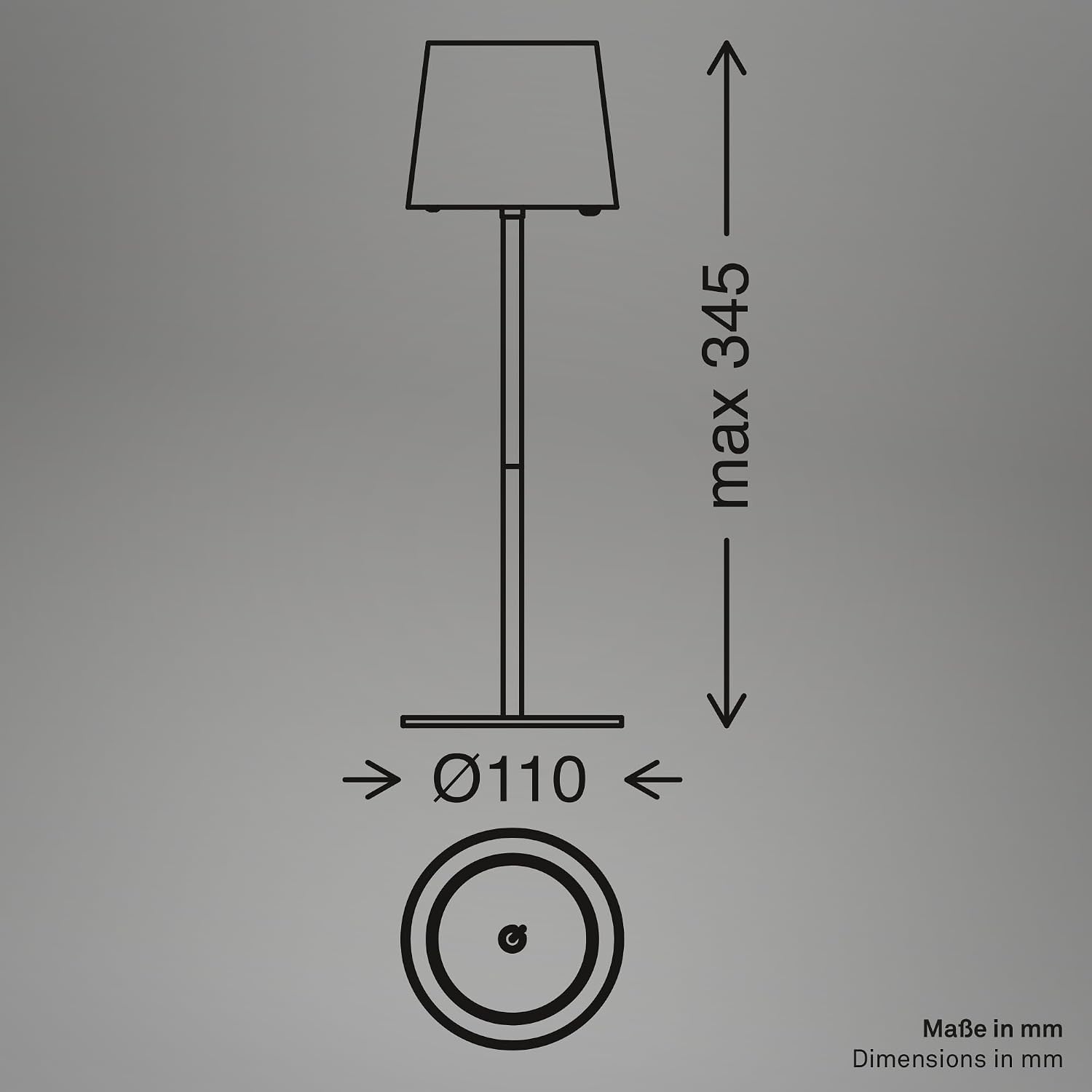
Image 8.1: Technical dimensions of the lamp.
9. Warranty and Support
Briloner products are manufactured to high-quality standards. For warranty information, technical support, or to inquire about replacement parts (battery, light source), please refer to the warranty card included with your product or visit the official Briloner website. Please retain your proof of purchase for warranty claims.
Ask a question about this manual
Ask about setup, troubleshooting, compatibility, parts, safety, or missing instructions. Manuals+ will review the question and use this page’s manual context to help answer it.