
Introduction
This manual provides detailed instructions for the installation, operation, and maintenance of your Roinvou 1 Din Android 15 Car Stereo. Please read this manual thoroughly before using the product to ensure proper functionality and safety. Keep this manual for future reference.
Setup
Package Contents
- Android 1 Din Car Radio
- Power Cable
- RCA Cable
- Rear Camera Input Cable
- 6-pin USB Cable
- Radio Antenna
- GPS Antenna
- Mounting Bracket
- External Microphone
- Rear Camera
- User Manual
Installation Overview
The Roinvou 1 Din Car Stereo is designed for a standard 1 Din slot. Professional installation is recommended. Ensure the vehicle's power is disconnected before beginning installation.
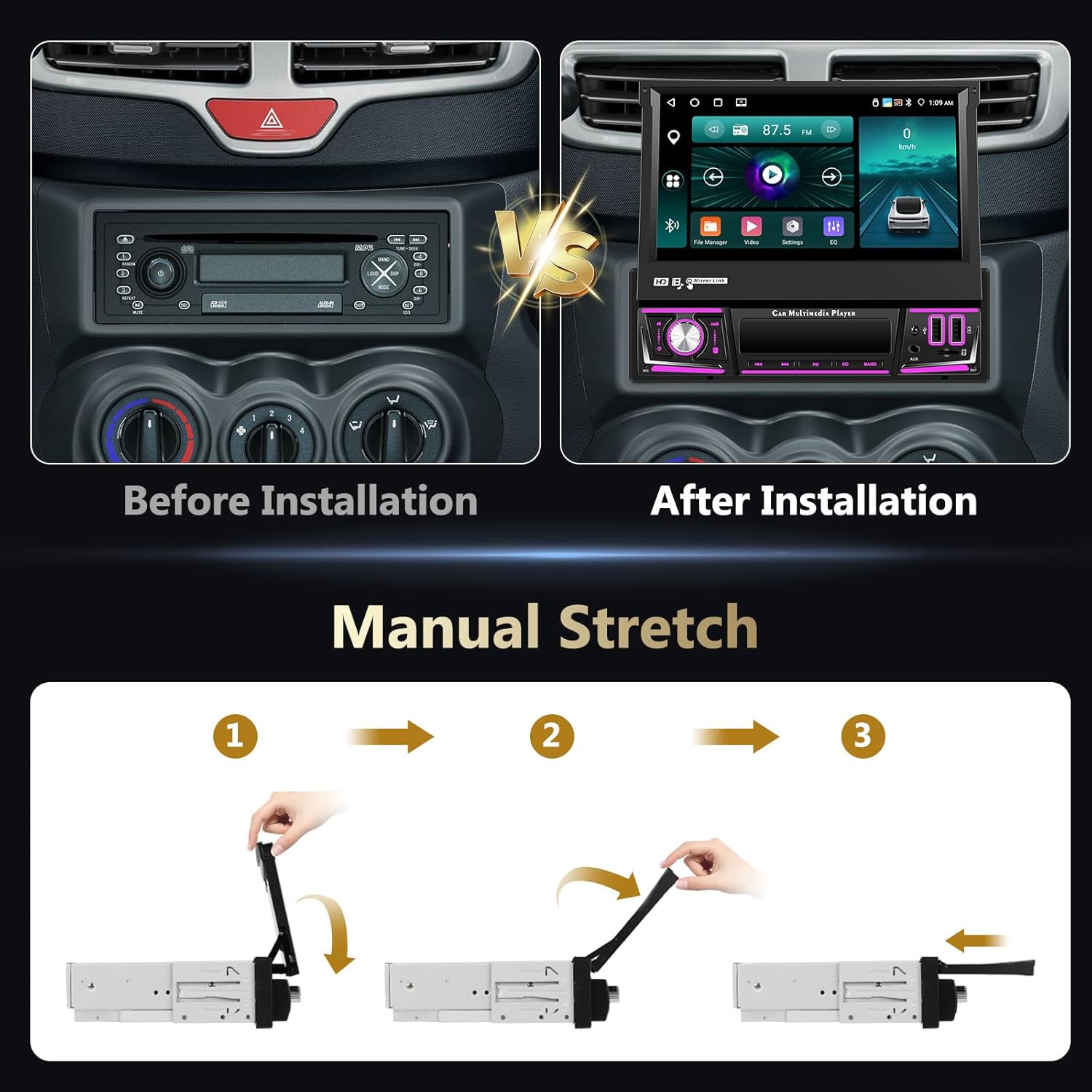
This image illustrates the visual transformation of a car's dashboard from a standard radio unit to the Roinvou 1 Din car stereo with its 7-inch retractable screen. It also demonstrates the three-step manual process for extending and retracting the screen.
Screen Retraction and Extension
The 7-inch screen is manually retractable. To extend the screen, gently pull it upwards until it locks into position. To retract, press the release mechanism (if present) or gently push it down until it is fully stored within the unit.
Operating Instructions
System Overview
The unit features a 7-inch HD touchscreen, 4GB RAM, 64GB ROM, and runs on Android 15. It supports USB charging, USB media playback, Aux audio input, and TF cards.

This image highlights the 7-inch HD touchscreen of the Roinvou car stereo, showcasing its Android 15 operating system, 4-core processor, 4GB RAM + 64GB ROM configuration, and 1024x600 resolution. A hand is shown interacting with the touch display.
Wireless CarPlay & Android Auto & Mirror Link
Connect your smartphone wirelessly or via USB for seamless integration. Access navigation, contacts, emails, and music directly from the car stereo display.
- Wireless CarPlay/Android Auto: Connect your compatible iPhone or Android phone for a streamlined in-car experience.
- Mirror Link: Project your smartphone screen onto the car stereo. iOS devices support one-way projection, while Android devices allow two-way control.

This image demonstrates the wireless connectivity features of the Roinvou car stereo, including Wireless CarPlay and Android Auto, showing a smartphone connecting via Bluetooth to the head unit. It also illustrates the iOS/Android Mirror Link function, depicting two smartphones mirroring their screens to the car stereo.
Bluetooth & FM/RDS Radio
- Bluetooth: Enable hands-free calling, import contacts, and stream audio wirelessly from your Bluetooth-enabled device.
- FM/RDS Radio: The high-quality FM tuner allows automatic station search and stores up to 18 preset stations for quick access to music, news, and weather.
- EQ Function: Adjust audio settings using the built-in equalizer for optimal sound quality.

This image illustrates three key audio features: Bluetooth for hands-free calls and music streaming, the Equalizer (EQ) interface for sound customization, and the FM/RDS radio interface showing station presets and frequency display. It also depicts people enjoying music in a car.
Wi-Fi & GPS Navigation
Connect to a Wi-Fi network to unlock a range of online features.
- Online Navigation: Access real-time navigation, precise positioning, and live road conditions.
- App Downloads: Download and use various applications from the app store.
- Voice Control: Use voice commands for safer and more convenient operation.
- Multi-Screen Function: Run multiple applications simultaneously on the display.

This image displays the GPS navigation capabilities of the Roinvou car stereo, showing both online and offline map options with real-time traffic. It also highlights the Wi-Fi connection feature, illustrating various popular apps accessible via Wi-Fi.
Backup Camera & Steering Wheel Control
- Backup Camera: When connected, the screen automatically switches to the rear view when the vehicle is in reverse. The included camera provides HD image quality, night vision, and is waterproof.
- Steering Wheel Control (SWC): Utilize the steering wheel learning function to map your vehicle's steering wheel buttons to control the car stereo, allowing you to manage functions without taking your hands off the wheel.

This image illustrates the backup camera functionality, showing a car reversing with the rear view displayed on the stereo screen, highlighting HD image, night vision, and waterproof features. It also depicts the steering wheel control learning interface, allowing users to customize button functions.
Colorful Lights & Split Screen
- Colorful Lights: Customize the unit's button backlighting with various color options.
- Split Screen: Enhance multitasking by displaying two applications simultaneously on the screen, such as navigation and music playback.

This image showcases the customizable colorful button lights on the Roinvou car stereo, displaying a spectrum of available colors. Below, it illustrates the split-screen functionality, showing two applications (e.g., navigation and media player) running concurrently on the display.
Maintenance
Cleaning
To clean the screen and unit, use a soft, dry cloth. For stubborn marks, slightly dampen the cloth with water. Avoid using harsh chemicals, abrasives, or solvents, as these can damage the surface.
Software Updates
Periodically check for available software updates to ensure optimal performance and access to new features. Updates can typically be downloaded via Wi-Fi or USB.
Troubleshooting
Common Issues and Solutions
- No Power: Check all power connections. Ensure the vehicle's ignition is on. Verify fuses.
- No Sound: Check speaker connections. Ensure volume is not muted or set to zero. Verify audio output settings.
- Bluetooth Connection Issues: Ensure Bluetooth is enabled on both the stereo and your device. Delete previous pairings and try reconnecting.
- GPS Signal Loss: Ensure the GPS antenna is properly installed and has a clear view of the sky.
- Touchscreen Unresponsive: Try restarting the unit. If the issue persists, a factory reset might be necessary (note: this will erase all user data).
- CarPlay/Android Auto Not Connecting: Ensure your phone is compatible and the connection (wired or wireless) is stable. Check phone settings for CarPlay/Android Auto permissions.
Specifications
| Feature | Detail |
|---|---|
| Brand | Roinvou |
| Model Number | 20df98ec-0bfd-4992-b3d8-b39aa0b3b434 |
| Operating System | Android 15 |
| RAM | 4 GB |
| ROM | 64 GB |
| Screen Size | 7 Inches |
| Display Resolution | 1024x600 (HD) |
| Connectivity Technology | USB, TF, AUX, Bluetooth, Wi-Fi |
| Special Features | CarPlay, Android Auto, Mirror Link, Bluetooth, FM, EQ, SWC, Touchscreen, GPS Navigation |
| Compatible Devices | Smartphone |
| Connector Type | RCA, AV, USB, FM/AM radio |
| Audio Output Mode | Stereo |
| Output Power | 45 Watts |
| Number of Channels | 4 |
| Country of Origin | China |
Warranty and Support
Manufacturer's Warranty
This product comes with a 24-month manufacturer's warranty. Please retain your proof of purchase for warranty claims.
Customer Support
For any inquiries or technical assistance, Roinvou offers lifetime online support. Expect a response within 24 hours for all support requests.


