
MtiolHig Cordless Compact Router
MtiolHig Cordless Compact Router User Manual
Model: Cordless Compact Router (Makita 18V Battery Compatible)
1. Introduction
Thank you for choosing the MtiolHig Cordless Compact Router. This manual provides essential information for the safe operation, setup, maintenance, and troubleshooting of your tool. Please read this manual thoroughly before use and retain it for future reference.
1.1 General Safety Instructions
- Always wear appropriate personal protective equipment (PPE), including safety glasses, hearing protection, and a dust mask.
- Ensure the workpiece is securely clamped before routing.
- Keep hands and body clear of the router bit during operation.
- Disconnect the battery pack before making any adjustments, changing accessories, or storing the tool.
- Do not operate the router in damp or wet conditions.
- Keep the work area clean and well-lit.
2. Product Features
- Powerful Brushless Motor (800W): Delivers up to 30,000 RPM for fast, clean cuts. Features low-voltage protection and auto-shutdown for safety. Offers quieter operation, longer motor life, and reduced maintenance.
- Makita 18V Battery Compatibility: Designed to be compatible with Makita 18V batteries, offering portability and convenience.
- 6-Speed Variable Control (12,000-30,000 RPM): Easily match speed to any material. The speed lock ensures consistent, precise cuts for various woodworking tasks like edging, grooving, or carving.
- Upgraded Aluminum Base: Features a high-quality ABS body and aluminum base for superior durability and stability, providing a more stable and precise cutting experience compared to plastic bases.
- Portable & Lightweight: Weighing approximately 2.86 kg (6.29 lbs), this compact router is designed for easy handling and maneuverability.

Image: Illustration of the 800W brushless motor within the router.

Image: User operating the portable and lightweight MtiolHig router.
3. Package Contents
Verify that all items are present upon unpacking:
- 1 x Cordless Compact Router
- 1 x 5.0Ah Rechargeable Battery (Makita 18V compatible)
- 1 x Battery Charger
- 6 x Router Bits for Woodworking
- 1 x Edge Guide
- 1 x Roller Guide
- 1 x Aluminum Guard
- 1 x Dust Port
- Necessary Wrenches for bit changes

Image: All components of the MtiolHig Cordless Compact Router kit, including the router, battery, charger, and various accessories.
4. Setup
4.1 Battery Installation
- Ensure the router is switched off.
- Align the battery pack with the battery port on top of the router.
- Slide the battery pack into the port until it clicks securely into place.
- To remove, press the battery release button and slide the battery out.
4.2 Router Bit Installation
- Disconnect the battery pack.
- Loosen the collet nut using the provided wrenches.
- Insert the shank of the desired router bit into the collet, ensuring it is inserted at least two-thirds of the way.
- Tighten the collet nut firmly with the wrenches. Do not overtighten.
4.3 Depth Adjustment
- Disconnect the battery pack.
- Loosen the depth adjustment lever or knob on the side of the router base.
- Adjust the router body up or down to achieve the desired cutting depth, using the depth scale for precision.
- Once the desired depth is set, firmly tighten the depth adjustment lever or knob to secure the setting.
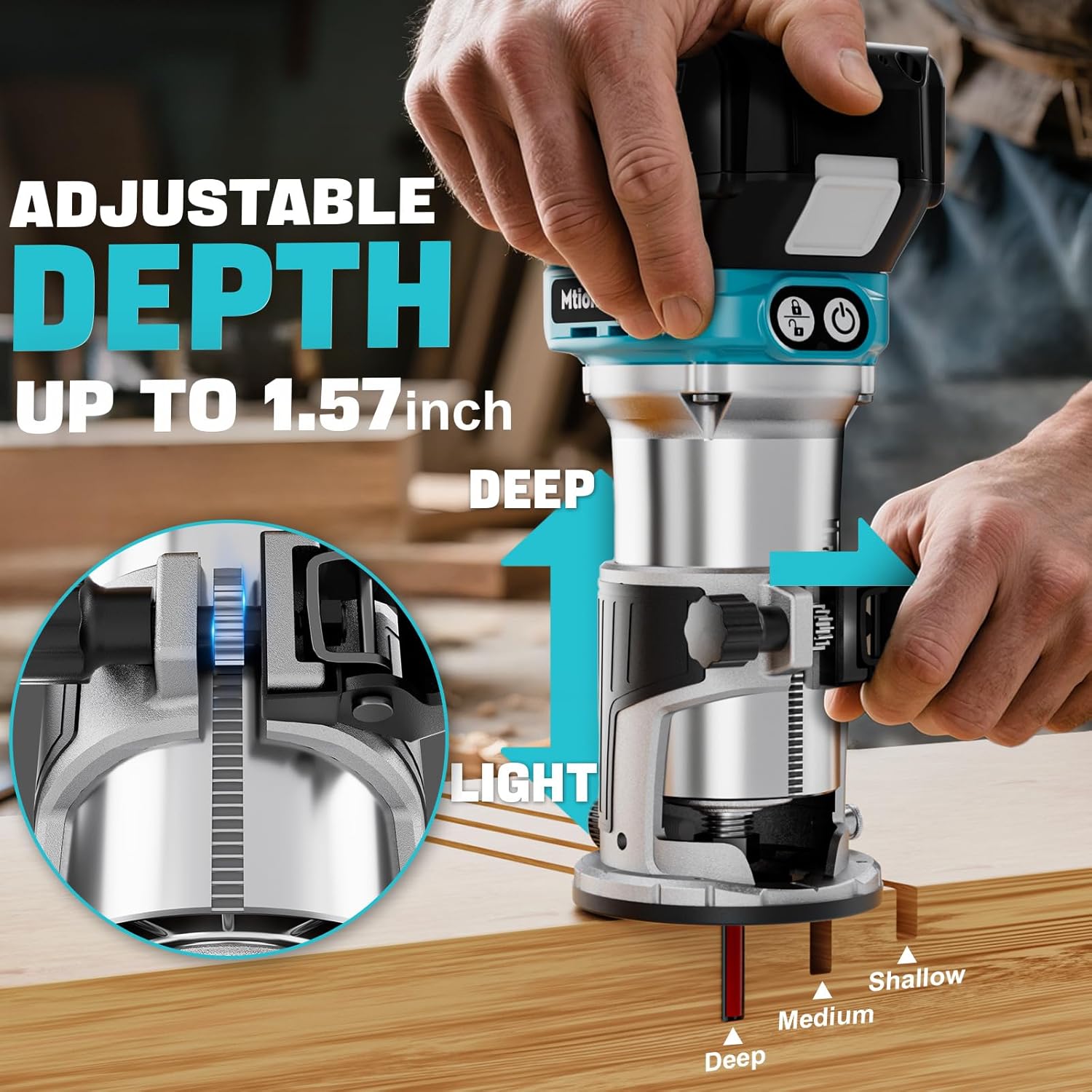
Image: Close-up of the router's adjustable depth mechanism, indicating a maximum depth of 1.57 inches.
4.4 Attaching Accessories (Edge Guide, Dust Port)
- Disconnect the battery pack.
- For the edge guide, slide its rods into the designated slots on the router base. Secure it with the provided screws or knobs to maintain the desired distance from the edge of the workpiece.
- For the dust port, attach it to the router base as per the design, typically by sliding it into place and securing it with a screw. Connect a vacuum hose to the dust port for efficient dust collection.
5. Operating Instructions
5.1 Power On/Off
- To turn on the router, press the power button. The tool may have a safety lock button that needs to be engaged first.
- To turn off, press the power button again.
5.2 Variable Speed Control
- The router features a 6-speed variable control dial (12,000-30,000 RPM).
- Rotate the dial to select the appropriate speed for your material and router bit. Lower speeds are generally used for larger bits, harder materials, or when more control is needed. Higher speeds are suitable for smaller bits and softer materials.

Image: Close-up of the router's variable speed dial, indicating settings from 1 to 6 (12,000-30,000 RPM).
5.3 Routing Techniques
- Always make a test cut on scrap material to ensure the correct depth and speed settings.
- Move the router smoothly and consistently across the workpiece. Avoid forcing the tool.
- For best results and to prevent kickback, always feed the router against the rotation of the bit.
- When using an edge guide, ensure it maintains constant contact with the edge of the workpiece.

Image: The router being used with an edge guide for precise trimming on a wooden board.
6. Maintenance
6.1 Cleaning
- After each use, disconnect the battery and clean the tool.
- Remove any sawdust or debris from the router base, collet, and motor vents using a brush or compressed air.
- Wipe the exterior of the tool with a soft, damp cloth. Do not use harsh chemicals or solvents.
6.2 Storage
- Store the router and its accessories in a clean, dry place, away from direct sunlight and extreme temperatures.
- Ensure the battery is removed from the tool before storage.
7. Troubleshooting
| Problem | Possible Cause | Solution |
|---|---|---|
| Router does not start | Battery not charged or improperly installed; Power button not pressed correctly; Tool malfunction. | Charge battery and ensure proper installation; Press power button firmly; Contact customer support. |
| Poor cut quality | Dull or damaged router bit; Incorrect speed setting; Improper feed rate. | Replace bit; Adjust speed according to material; Maintain consistent, appropriate feed rate. |
| Excessive vibration | Loose router bit; Damaged bit; Unbalanced bit. | Ensure bit is securely tightened; Replace damaged or unbalanced bits. |
8. Specifications
| Feature | Specification |
|---|---|
| Brand | MtiolHig |
| Model | Cordless Compact Router |
| Power Source | Battery Powered (Compatible with Makita 18V Lithium-Ion) |
| Motor Type | Brushless (800W) |
| Maximum Rotational Speed | 30,000 RPM |
| Variable Speed Control | 6 settings (12,000-30,000 RPM) |
| Base Type | Fixed (Aluminum) |
| Material | Acrylonitrile Butadiene Styrene (ABS), Aluminum |
| Item Weight | 2.86 Kilograms (6.29 pounds) |
| Package Dimensions | 12.87 x 10.98 x 4.41 inches |
| Batteries Included | 1 x 5.0Ah Lithium-Ion 18V battery |
9. Warranty and Support
MtiolHig is committed to providing high-quality products and excellent after-sales service. For any questions, technical assistance, or warranty claims, please contact our customer support team.
Customer Support Email: support@mtiolhig.com
Please refer to your purchase documentation for specific warranty terms and conditions.
Ask a question about this manual
Ask about setup, troubleshooting, compatibility, parts, safety, or missing instructions. Manuals+ will review the question and use this page’s manual context to help answer it.