
Kobalt 4913880
Contents
Kobalt 24-volt 1/4-inch Brushless Cordless Impact Driver User Manual
Model: 4913880
1. Introduction
Thank you for choosing the Kobalt 24-volt 1/4-inch Brushless Cordless Impact Driver. This tool is engineered with advanced electronics and motor technology to provide powerful performance for various fastening applications. Its compact design, comfortable grip, and intelligent features make it an essential tool for both professional and DIY projects. This manual provides important information for the safe operation, maintenance, and troubleshooting of your impact driver.

Figure 1: Kobalt 24-volt 1/4-inch Brushless Cordless Impact Driver with included accessories.
2. Safety Information
Always read and understand all safety warnings and instructions before operating this power tool. Failure to follow the warnings and instructions may result in electric shock, fire, and/or serious injury.
General Power Tool Safety Warnings:
- Work Area Safety: Keep work area clean and well lit. Cluttered or dark areas invite accidents. Do not operate power tools in explosive atmospheres, such as in the presence of flammable liquids, gases, or dust.
- Electrical Safety: Avoid body contact with earthed or grounded surfaces. Do not expose power tools to rain or wet conditions.
- Personal Safety: Always wear eye protection. Use hearing protection when operating for extended periods. Dress properly. Do not wear loose clothing or jewelry. Keep hair, clothing, and gloves away from moving parts.
- Tool Use and Care: Do not force the power tool. Use the correct power tool for your application. Disconnect the plug from the power source and/or remove the battery pack before making any adjustments, changing accessories, or storing power tools.
- Battery Tool Use and Care: Recharge only with the charger specified by the manufacturer. Use power tools only with specifically designated battery packs.
3. Package Contents
Verify that all items listed below are included in your package. If any items are missing or damaged, please contact customer service.
- Kobalt 24-volt 1/4-inch Brushless Cordless Impact Driver
- 24V Max 2.0 Ah Battery
- 85W Charger
- Soft Bag
- Belt Clip
- Bit Holder
4. Product Features
The Kobalt Impact Driver is designed with several innovative features to enhance performance and user experience:
- Brushless Motor: Delivers up to 2,000 in-lb of torque and 3,800 impacts per minute (IPM) for efficient fastening.
- Compact Design: Allows access to tighter spaces and reduces user fatigue during extended use.
- Ergonomic Grip: Newly designed grip with soft overmold provides superior comfort and improved balance.
- Quick-Insert Collet: Enables one-handed bit insertion and removal for faster bit changes.
- Electronic 3-Speed Settings: Easily selectable speeds for various applications.
- FINISH Mode: Designed for installing self-tapping or self-drilling screws into thin sheet metal, automatically stopping when the screw head hits the workpiece.
- Self-tap Mode: Optimized for installing self-tapping or self-drilling screws into thick sheet metal, operating at high RPM during drilling and slowing down during threading.
- Intelligent Impact Mechanism: Actively alters impact force based on trigger pressing for precise control.
- LED Work Light: Illuminates the work area for improved visibility.
- Belt Clip and Bit Holders: Included with mounting positions on both sides of the tool for convenience.
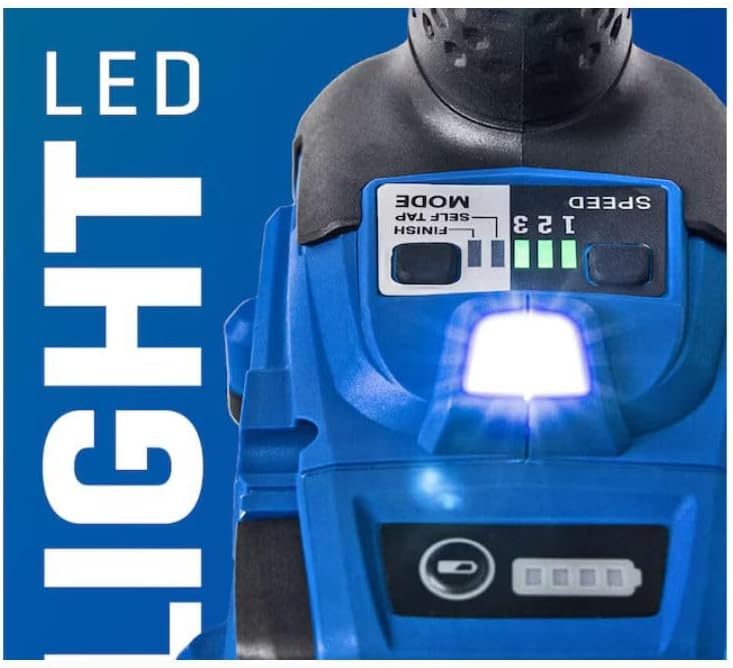
Figure 2: Integrated LED work light and battery charge indicator.

Figure 3: Ergonomic grip with soft overmold for comfort.
5. Components Overview
Familiarize yourself with the main components of your impact driver:
- 1/4-inch Quick-Insert Collet
- LED Work Light
- Speed/Mode Selector Buttons
- Battery Charge Indicator
- Forward/Reverse Selector
- Variable Speed Trigger
- Ergonomic Grip
- Battery Release Button
- Battery Pack
- Belt Clip Mounting Points
Note: Refer to Figure 1 for a visual representation of the overall tool.
6. Setup
6.1 Charging the Battery
Before first use, fully charge the battery pack. Connect the charger to a standard electrical outlet. Slide the battery pack onto the charger until it clicks into place. The charger indicator lights will show the charging status. An improved 85W charger is included for faster charge times.
6.2 Installing/Removing the Battery Pack
- To Install: Align the battery pack with the base of the tool and slide it in until it locks securely into place.
- To Remove: Press the battery release button located on the battery pack and slide the battery out of the tool.
6.3 Installing/Removing Bits
The impact driver features a quick-insert collet for easy bit changes.
- To Install: Simply push the 1/4-inch hex shank bit directly into the collet until it locks. No need to pull the collar forward.
- To Remove: Pull the collet collar forward and pull the bit out.

Figure 4: Quick-insert collet for one-handed bit changes.
7. Operating Instructions
7.1 Forward/Reverse Operation
The forward/reverse selector switch is located above the trigger. Push the switch to the left for forward rotation (tightening) and to the right for reverse rotation (loosening). Center the switch to lock the trigger and prevent accidental starting.
7.2 Variable Speed Trigger
The tool's speed is controlled by the amount of pressure applied to the trigger. Pressing the trigger further increases the speed. The intelligent impact mechanism adjusts impact force based on trigger pressure.
7.3 Speed and Mode Selection
The impact driver features electronic 3-speed settings and two special modes (FINISH and Self-tap), selectable via push buttons on the tool's base.
- Speed Settings (1, 2, 3): Press the "SPEED" button to cycle through the three speed levels. Higher numbers indicate higher speed and torque.
- FINISH Mode: Press the "MODE" button to select FINISH mode. Ideal for self-tapping/drilling screws into thin sheet metal. The tool automatically stops when the screw head contacts the workpiece, preventing over-tightening.
- Self-tap Mode: Press the "MODE" button again to select Self-tap mode. Designed for self-tapping/drilling screws into thick sheet metal. The tool operates at high RPM during drilling and automatically slows down during the threading process to prevent stripping.
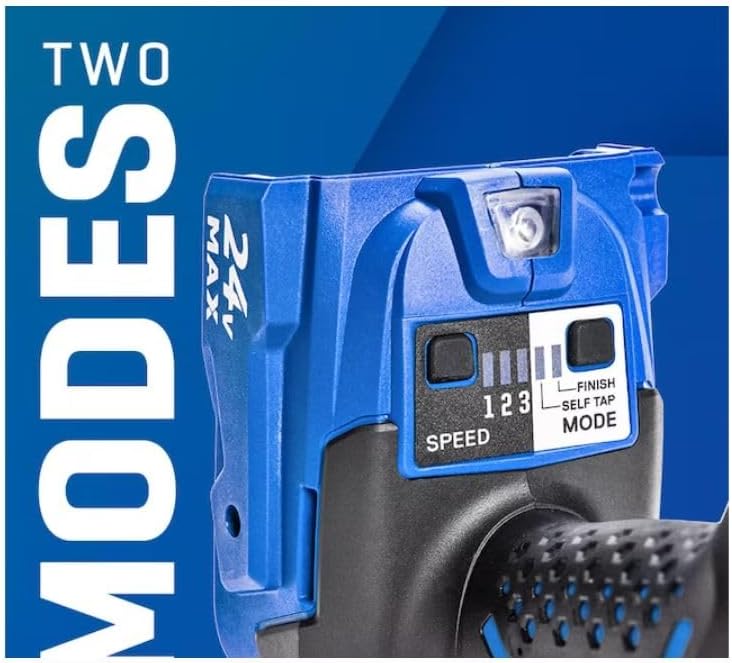
Figure 5: Speed and mode selection panel.
8. Maintenance
Regular maintenance ensures optimal performance and extends the life of your tool.
- Cleaning: Keep the tool's ventilation openings clean and free of debris. Use a soft, damp cloth to clean the exterior. Do not use harsh chemicals or abrasive cleaners.
- Battery Care: Store battery packs in a cool, dry place away from direct sunlight and extreme temperatures. Do not store battery packs in a discharged state for extended periods.
- Bit Maintenance: Ensure bits are clean and in good condition. Worn or damaged bits can affect performance and safety.
- Inspection: Periodically inspect the tool for any signs of damage, loose screws, or worn parts. If damage is found, have the tool serviced by a qualified repair technician.
9. Troubleshooting
If you encounter issues with your impact driver, refer to the following common problems and solutions:
| Problem | Possible Cause | Solution |
|---|---|---|
| Tool does not start. | Battery not charged or not properly inserted. Trigger lock engaged. | Ensure battery is fully charged and securely inserted. Disengage the trigger lock by centering the forward/reverse selector. |
| Reduced power or performance. | Low battery charge. Worn or incorrect bit. Overheating. | Recharge the battery. Use a sharp, appropriate bit for the task. Allow the tool to cool down if it feels hot. |
| Bit not holding securely. | Bit not fully inserted. Collet mechanism dirty. | Ensure bit is pushed fully into the quick-insert collet until it clicks. Clean the collet area of any debris. |
| Tool stops during operation. | Overload protection activated. Low battery. | Reduce pressure on the tool. Allow the tool to cool. Recharge or replace the battery. |
If the problem persists after trying these solutions, please contact Kobalt customer support.
10. Specifications
| Model Number | 4913880 |
| Brand | Kobalt |
| Voltage | 24V |
| Chuck Size | 1/4-inch Hex |
| Max Torque | Up to 2,000 in-lb |
| Impacts Per Minute (IPM) | Up to 3,800 IPM |
| Power Source | Battery Powered |
| Product Dimensions (L x W x H) | 5.23" x 2.5" x 8.5" |
| Item Weight | 4 pounds |
| Included Components | Impact Driver, Battery, Charger, Soft Bag |
11. Warranty and Support
Warranty Information:
This Kobalt 24-volt 1/4-inch Brushless Cordless Impact Driver is backed by a limited 5-year tool warranty and a 3-year battery warranty. Please retain your proof of purchase for warranty claims. For full warranty details, refer to the warranty card included with your product or visit the official Kobalt website.
Customer Support:
For technical assistance, replacement parts, or warranty inquiries, please contact Kobalt customer support. Contact information can typically be found on the product packaging or the official Kobalt website.
Documents and downloads
Ask a question about this manual
Ask about setup, troubleshooting, compatibility, parts, safety, or missing instructions. Manuals+ will review the question and use this page’s manual context to help answer it.