
1. Introduction and Overview
The Klarus E5 Plus is an ultra-slim, dual-switch, triple-light source Everyday Carry (EDC) flashlight designed for portability and versatility. It features a maximum output of 650 lumens, USB-C rechargeable capabilities, an IPX4 water resistance rating, a magnetic base, and a convenient clip for hands-free use. This manual provides detailed instructions for its setup, operation, and maintenance.
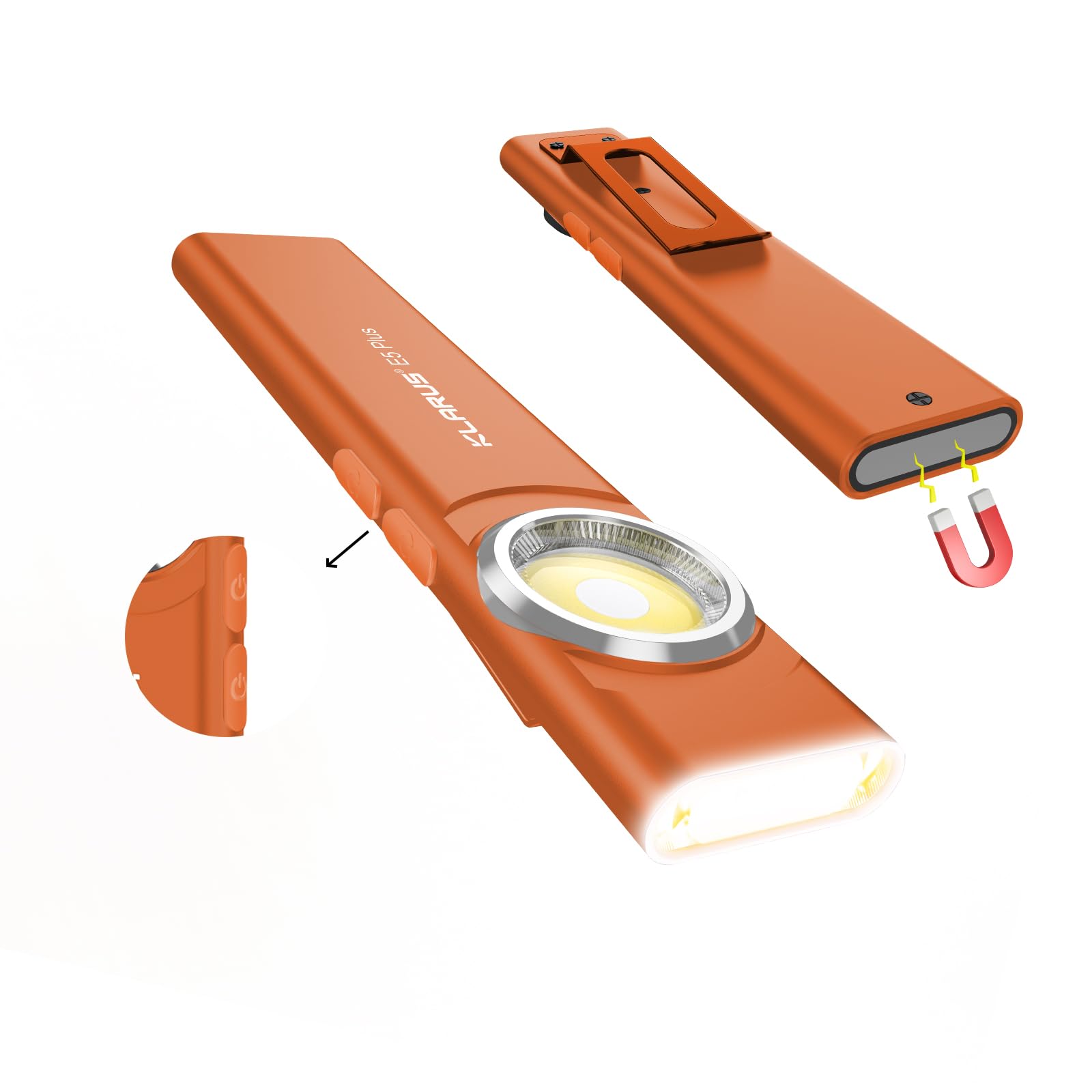
Image 1: Klarus E5 Plus Ultra-Slim EDC Flashlight, showcasing its compact design.
Package Contents:
- Klarus E5 Plus Flashlight
- USB-C Charging Cable
- User Manual (this document)

Image 2: The Klarus E5 Plus flashlight, USB-C cable, and user manual as included in the package.
2. Setup and Charging
Initial Charge:
Before first use, fully charge the Klarus E5 Plus flashlight. The device is equipped with a built-in 500mAh lithium-ion battery.
- Locate the USB-C charging port on the side of the flashlight. It is protected by a silicone cover.
- Gently lift the silicone cover to expose the USB-C port.
- Connect the provided USB-C cable to the flashlight and a compatible USB power source (e.g., wall adapter, computer USB port).
- During charging, the indicator light will illuminate red.
- Charging is complete when the indicator light turns blue. A full charge typically takes approximately 1.5 hours.

Image 3: Illustration of the Klarus E5 Plus charging process, indicating red light for charging and blue light for a full charge.
3. Operating Instructions
The Klarus E5 Plus features an ergonomic dual-switch design for intuitive control of its multiple light sources and modes.

Image 4: The Klarus E5 Plus highlighting the distinct Head Light Switch and Side Light Switch for ease of operation.
Head Light Operation (White Light):
- Turn On/Off: Long press the Head Light Switch for 0.5 seconds.
- Adjust Brightness: With the light on, single-click the Head Light Switch to cycle through brightness levels (Low, High). The Head Light offers 30 lumens (Low) and 150 lumens (High).
- Mode Memory: The Head Light remembers the last used brightness setting.
Side Light Operation (Warm White & Red Light):
- Turn On/Off: Long press the Side Light Switch for 0.5 seconds.
- Adjust Brightness (Warm White): With the warm white light on, single-click the Side Light Switch to cycle through brightness levels (Low, Medium, High, Turbo). The Side Light offers 30 lumens (Low), 80 lumens (Medium), 380 lumens (High), and 650 lumens (Turbo).
- Toggle Warm/Red Light: Double-click the Side Light Switch to switch between warm white and red light modes.
- Red Light Modes: In red light mode, single-click to toggle between constant red (10 lumens) and red strobe.
- Mode Memory: The Side Light remembers the last used brightness setting for warm white light. Red light modes do not have memory.

Image 5: Visual representation of the 8 lighting modes available for both the Side COB and Head COB lights, including brightness levels and red light options.

Image 6: The Klarus E5 Plus showcasing its three light sources: warm side light, white head light, and red side light for various applications.
4. Features
Ultra-Compact and Lightweight Design:
The E5 Plus is designed for maximum portability, measuring 4.45"L x 0.98"W x 0.31"H and weighing only 1.26 oz (39g). Its slim profile allows it to easily fit into pockets, toolkits, or emergency bags without being bulky.

Image 7: The Klarus E5 Plus demonstrating its ultra-light (39g) and ultra-thin (8mm) design, comparable to three AAA batteries or four presidential coins.
Magnetic Base and Multi-purpose Clip:
For hands-free operation, the E5 Plus includes a strong magnetic base that adheres to metal surfaces (e.g., cars, tools, shelving) and a durable clip. The clip allows attachment to belts, backpacks, hat brims, or tent fabric, providing versatile lighting options.

Image 8: Various hands-free applications of the Klarus E5 Plus, including clipping onto a backpack, hat, or shirt pocket, and using its magnetic base for repair work.

Image 9: Close-up of the multi-purpose clip on the Klarus E5 Plus, demonstrating its ability to securely attach to pockets, vests, belts, backpacks, or hats.

Image 10: The Klarus E5 Plus attached via its strong magnetic base to a car hood, providing hands-free illumination for repair tasks.
Durability and Water Resistance:
Constructed from aerospace-grade aluminum alloy, the E5 Plus features a sleek and rugged unibody design. It is IPX4-rated, providing resistance against splashes and rain, making it suitable for various outdoor and work environments.

Image 11: The Klarus E5 Plus attached to a backpack strap during light rain, demonstrating its IPX4 water resistance and impact resistance.
E5 Plus vs. E5 Comparison:
The E5 Plus is an upgraded version of the popular E5 model, incorporating customer feedback for enhanced performance and usability.
- Output: E5 Plus offers 150lm (Head) + 650lm (Side), compared to E5's 100lm + 600lm.
- Battery: E5 Plus has a 500mAh battery, an upgrade from E5's 450mAh.
- Operation: E5 Plus features a dual switch, improving upon E5's single switch.
- Lights: E5 Plus includes constant red + red strobe, while E5 had blue/red strobe.

Image 12: A comparison table detailing the improvements of the E5 Plus over the original E5 model, including increased output, larger battery capacity, dual switch operation, and new red light modes.
Versatile Applications:
The Klarus E5 Plus is suitable for a wide range of activities and tasks, including camping, repairing, running, fishing, cycling, and general walking in low-light conditions.

Image 13: Collage of images showing the Klarus E5 Plus in various practical applications such as camping, car repair, running, fishing, cycling, and walking.
Official Product Video:
Video 1: An official product video from Klarus Direct showcasing the Ultra-Slim Dual Switch Triple-Light EDC Flashlight, demonstrating its features and versatility.
5. Maintenance
- Keep the USB-C charging port clean and ensure the silicone cover is properly sealed when not charging to maintain IPX4 water resistance.
- Clean the flashlight body and lens with a soft, damp cloth. Avoid abrasive materials or harsh chemicals.
- Store the flashlight in a cool, dry place when not in use for extended periods.
- Regularly charge the battery to prolong its lifespan, even if not used frequently.
6. Troubleshooting
- Light does not turn on: Ensure the battery is charged. Perform a long press (0.5s) on either switch to activate.
- Charging issues: Verify the USB-C cable is securely connected to both the flashlight and the power source. Try a different USB-C cable or power adapter. Ensure the charging port is free of debris.
- Inconsistent mode cycling: Ensure you are using single clicks for mode changes and double clicks for light source toggling as described in the Operating Instructions.
7. Specifications
| Specification | Value |
|---|---|
| Brand | Klarus |
| Model Number | E5 PLUS |
| Color | E5 Plus Orange |
| Material | Aluminum |
| Product Dimensions | 4.45"L x 0.98"W x 0.31"H |
| Item Weight | 2.08 ounces (approx. 39g) |
| Light Source Type | LED |
| Number of Light Sources | 3 (Front, Top Warm, Top Red) |
| Brightness (Max Output) | 650 Lumens |
| Power Source | Battery Powered (Built-in 500mAh Lithium-ion) |
| Charging Port | USB-C |
| Charging Time | Approx. 1.5 hours |
| Max Runtime (Low Mode) | Up to 12.5 hours |
| Water Resistance | IPX4 (Splash and Rain Resistant) |
| Special Features | Slim Metal Unibody, Dual Switch, Magnetic Base, Buckle Clip |
8. Warranty and Support
For warranty information, technical support, or any product-related inquiries, please refer to the official Klarus website or contact your authorized dealer. Keep your purchase receipt for warranty claims.


