
GHTENS KTR-2640
Contents
GHTENS 5-in-1 Muscle Electro-stimulator
User Manual
1. Introduction
Thank you for choosing the GHTENS 5-in-1 Muscle Electro-stimulator. This device is designed to provide effective pain relief and muscle stimulation through various modes, including TENS, EMS, IF, RUSS, and DIY. Please read this manual carefully before using the device to ensure safe and optimal operation. Keep this manual for future reference.
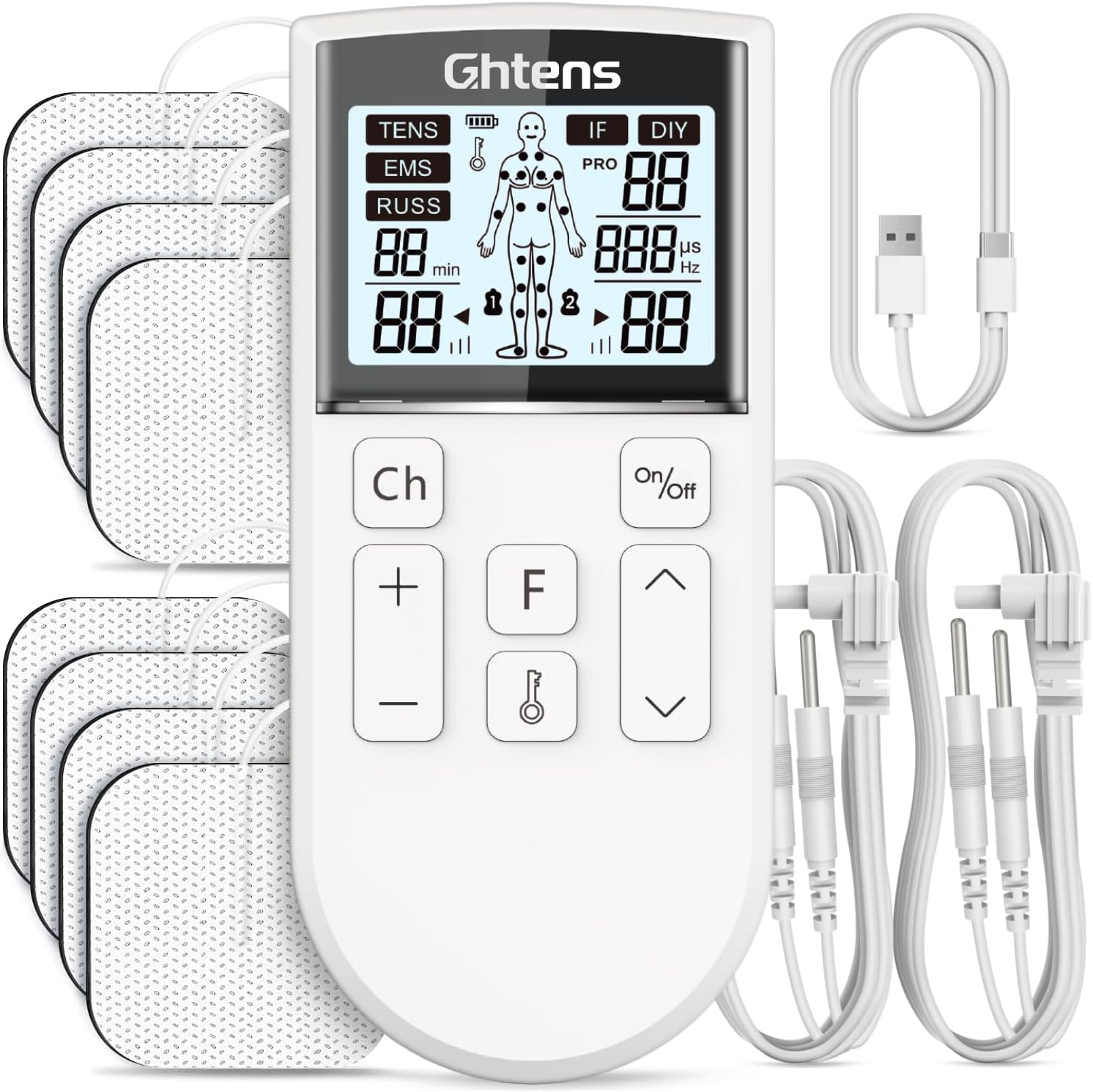
Image 1.1: The GHTENS 5-in-1 Muscle Electro-stimulator, showing the main unit, electrode pads, and connection cables.
2. Safety Information
Important Safety Precautions:
- Do not use if you have a pacemaker, implanted defibrillator, or other metallic or electronic implanted devices.
- Consult a physician before use if you have any pre-existing medical conditions, including heart disease, epilepsy, or are pregnant.
- Do not apply electrodes over open wounds, rashes, swollen, infected, or inflamed areas.
- Keep out of reach of children.
- Do not use while driving or operating heavy machinery.
- Ensure skin is clean and dry before applying electrode pads to ensure proper adhesion and conductivity.
- Avoid placing electrodes on the head, across the chest, or on the front of the neck.
3. Product Overview
3.1 Package Contents
Each GHTENS Muscle Electro-stimulator package contains the following items:
- 1 x GHTENS Electro-stimulation Device
- 2 x Conductive Wires
- 8 x Electrode Pads (5 x 5 cm)
- 1 x USB-C Charging Cable
- 1 x User Manual

Image 3.1: All components included in the GHTENS package.
3.2 Key Features
- 5-in-1 Treatment Modes: TENS, EMS, RUSS, IF, and DIY for comprehensive pain relief and muscle stimulation.
- 80 Programs & 16 Intensity Levels: Offers a wide range of customizable treatment options.
- 2 Independent Channels: Allows for simultaneous treatment of two different body areas or use by two individuals.
- Rechargeable Battery: Built-in 250mAh battery with USB-C fast charging for convenience and portability.
- LCD Screen: Clear display for monitoring battery level, mode, intensity, and program settings.
- Lock Function: Prevents accidental changes to settings during use.
- Improved Electrode Pads: Made from high-quality polyurethane for excellent adhesion, comfort, and reusability (up to 80 times per pad).

Image 3.2: The GHTENS device's LCD screen and control buttons.
4. Setup
4.1 Initial Charging
Before first use, fully charge the device using the provided USB-C cable. Connect the USB-C end to the device and the USB-A end to a compatible power adapter, car charger, power bank, or computer USB port. The LCD screen will indicate the charging status.

Image 4.1: Charging the GHTENS device via USB-C.
4.2 Connecting Electrode Pads
- Ensure the device is turned off.
- Connect the conductive wires to the electrode pads by snapping them onto the pin connectors.
- Insert the other end of the conductive wires into the channel ports (A or B) on the top of the GHTENS device.
- Peel off the protective film from the electrode pads.
- Apply the electrode pads to the desired clean and dry skin area.

Image 4.2: Connecting electrode pads and utilizing independent channels.
5. Operating Instructions
Follow these steps to operate your GHTENS device:
- Turn On: Press the On/Off button to power on the device.
- Select Channel: Press the Ch button to switch between Channel A and Channel B, or to activate both.
- Select Mode: Press the F button to cycle through the 5 treatment modes: TENS, EMS, RUSS, IF, and DIY.
- TENS (Transcutaneous Electrical Nerve Stimulation): Primarily for pain relief, targeting nerve pathways. Effective for back pain, arthritis, and general discomfort.
- EMS (Electrical Muscle Stimulation): For muscle relaxation, recovery, training, and rehabilitation. Simulates muscle contractions.
- RUSS (Russian Stimulation): Focuses on muscle strengthening and recovery, often used in physical therapy.
- IF (Interferential Current): Designed for deep pain relief, particularly chronic pain, by penetrating tissues for a massage-like effect.
- DIY (Do It Yourself): Allows for personalized settings of frequency and pulse width to create custom programs.
- Select Program: Use the Up (^) and Down (v) arrow buttons to choose from the 80 available programs within the selected mode.
- Adjust Intensity: Use the Plus (+) and Minus (-) buttons to adjust the intensity level (1-16). Start with a low intensity and gradually increase until a comfortable sensation is felt.
- Set Duration: Press the On/Off button briefly to adjust the treatment duration, which can be set from 15 to 60 minutes.
- Lock Function: Press and hold the Lock (key icon) button to lock the screen and prevent accidental changes. Press and hold again to unlock.
- Turn Off: Press and hold the On/Off button to power off the device after your session.

Image 5.1: Visual guide for operating the GHTENS device.

Image 5.2: Overview of the 5-in-1 therapy modes.
6. Electrode Pad Usage
The GHTENS device comes with 8 high-quality electrode pads (5x5 cm) designed for comfort and effective stimulation. Proper use and care will extend their lifespan.
- Application: Always apply pads to clean, dry, and healthy skin. Avoid hairy areas for better adhesion.
- Placement: Refer to the diagram below for common pain localization areas. Do not place pads over sensitive areas or areas with skin irritation.
- Reusability: Each electrode pad can be reused up to 80 times with proper care. After each use, reattach the protective film to the adhesive side to prevent drying and contamination.
- Replacement: Replace pads when they lose their stickiness or if you notice a decrease in stimulation effectiveness.

Image 6.1: Structure and features of the improved electrode pads.

Image 6.2: Natural pain relief for various body areas.
7. Maintenance
7.1 Cleaning the Device
Wipe the device with a soft, damp cloth. Do not use abrasive cleaners or immerse the device in water.
7.2 Cleaning Electrode Pads
If the electrode pads lose stickiness due to dust or lint, gently wipe the adhesive surface with a damp cloth or rinse with a few drops of water. Let them air dry completely before reattaching the protective film. Do not scrub or use harsh chemicals.
7.3 Storage
Store the device and accessories in a cool, dry place, away from direct sunlight and extreme temperatures. Keep the electrode pads in their sealed bag or with their protective film reattached when not in use.
8. Troubleshooting
| Problem | Possible Cause | Solution |
|---|---|---|
| Device does not turn on. | Battery is low or depleted. | Charge the device fully using the USB-C cable. |
| No sensation or weak sensation. | Electrode pads are not properly adhered or are dry. Intensity level is too low. Wires are not connected properly. | Ensure pads are firmly pressed onto clean, dry skin. Replace pads if they are no longer sticky. Increase the intensity level gradually. Check that conductive wires are securely connected to both the device and the pads. |
| Sensation is uncomfortable or stinging. | Intensity level is too high. Pads are not fully in contact with skin. | Decrease the intensity level. Ensure pads are fully flat on the skin. Reapply if necessary. |
9. Specifications
- Brand: GHTENS
- Model Number: KTR-2640
- Dimensions: 15.2 x 14.2 x 4.3 cm
- Weight: 240 grams
- Battery: 1 Lithium-ion (250mAh), rechargeable
- Modes: TENS, EMS, RUSS, IF, DIY (5 modes)
- Programs: 80
- Intensity Levels: 16
- Channels: 2 Independent Channels
- Electrode Pads: 8 pads (5 x 5 cm)
- Origin: China

Image 9.1: The portable design of the GHTENS device.
10. Warranty and Support
GHTENS offers a 1-year warranty for this product and a 30-day return policy from the date of purchase.
For any assistance, questions, or support, please contact our customer service team:
- Online Support: Available 24/7 via email at FRsale@ghtens.vip.
- Amazon Orders: Log in to your Amazon account, go to 'Your Orders', find your order, and click 'Contact Seller'.
Ask a question about this manual
Ask about setup, troubleshooting, compatibility, parts, safety, or missing instructions. Manuals+ will review the question and use this page’s manual context to help answer it.