Introduction
The ProtoArc EC200 Ergonomic Office Chair is designed to provide optimal comfort and support for modern professionals. This high-back mesh computer chair features adjustable lumbar support, a 3D adjustable headrest, and a sliding seat mechanism to accommodate various body types and preferences. It is engineered for extended periods of use, promoting healthy posture and enhancing productivity in both home and office environments.
Setup
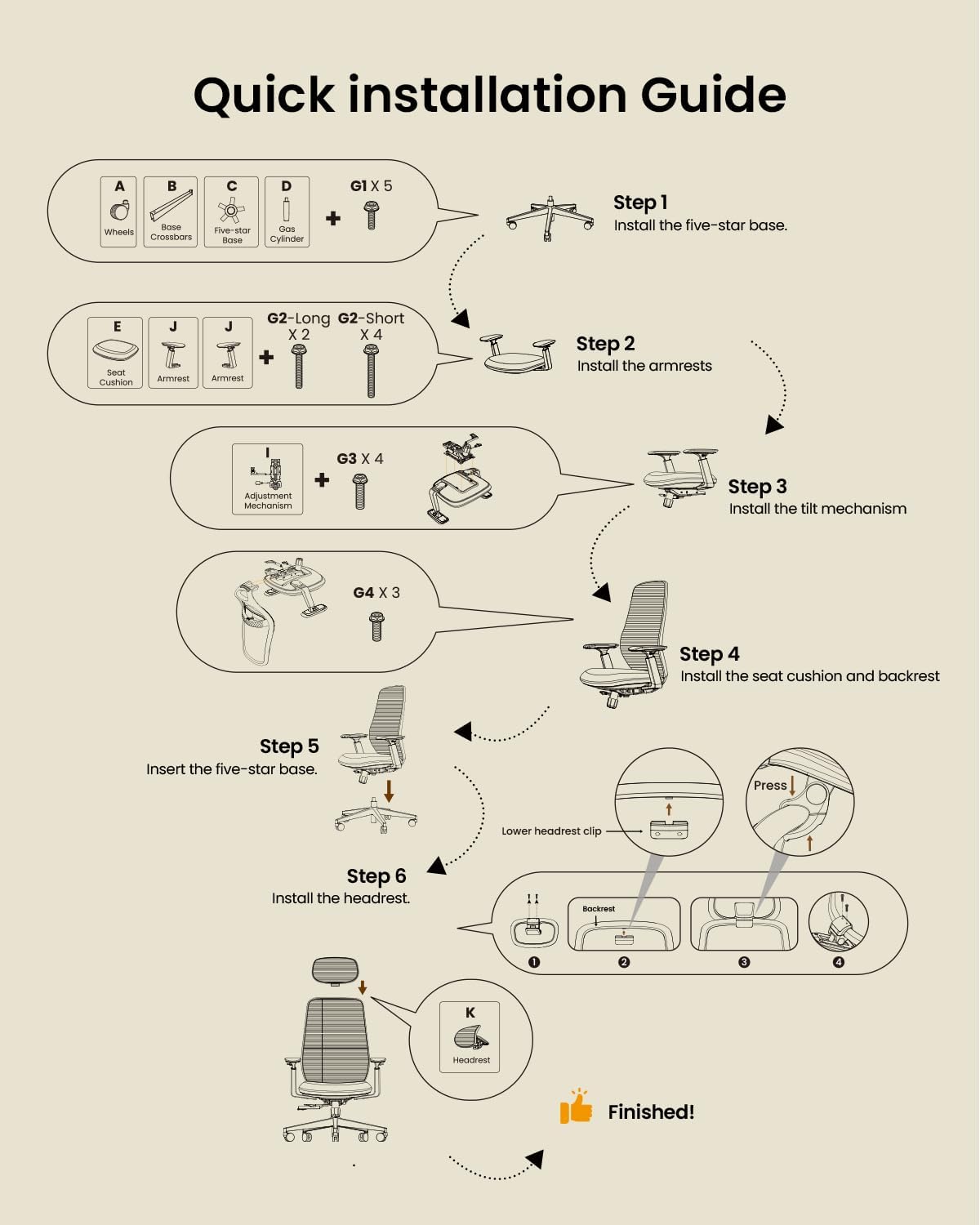
Assembly of the ProtoArc EC200 chair is designed to be straightforward, typically taking approximately 20 minutes with no additional tools required beyond what is provided. A detailed visual installation guide is included to assist with each step.
Assembly Steps:
- Install the five-star base: Attach the five legs to the central hub and secure them. Insert the casters into the ends of the legs.
- Install the armrests: Attach the armrests to the underside of the seat cushion using the provided screws. Ensure correct orientation (left/right).
- Install the tilt mechanism: Secure the tilt mechanism to the underside of the seat cushion.
- Install the seat cushion and backrest: Attach the backrest to the seat cushion assembly.
- Insert the five-star base: Place the assembled seat and backrest onto the gas lift cylinder, which is inserted into the five-star base.
- Install the headrest: Attach the headrest to the top of the backrest and secure it.
Installation Video:
Video 1: EC200 Ergonomic Office Chair Installation Guide. This official video from ProtoArc provides a step-by-step visual guide for assembling the EC200 chair, demonstrating each part and the correct installation procedure.
Operating the Chair
The ProtoArc EC200 offers multiple adjustment points to customize your seating experience for maximum comfort and ergonomic support.
1. Lumbar Support Adjustment
The chair features 2-way adjustable lumbar support with 4-direction customization. It can be adjusted 2.36 inches in height and 0.8 inches in depth to contour to your spine's natural curve, reducing lower back strain.

2. Seat Depth Adjustment
The sliding seat allows for personalized seat depth adjustment in 5 positions, with an instant-lock mechanism. This feature adapts to your leg length, optimizing the sitting area for proper back support and reduced leg pressure.

3. Backrest Recline Angles
The backrest offers 4 tilt angles to suit various activities:
- 90°: Upright work
- 105°: Reading
- 120°: Phone calls
- 130°: Relaxation
Tilt tension control is available via a knob to adjust reclining resistance to your preference.

4. Multi-Dimensional Headrest
The large mesh headrest provides 3D flexibility, including Dual-Axis rotating, height, and depth adjustments. It is designed to support users between 5'4" and 6'3" for optimal head and neck alignment.
5. Armrest Adjustment
The wider armrests offer stability and comfort, with a height adjustment range of 2.76 inches.

Maintenance
To ensure the longevity and optimal performance of your ProtoArc EC200 Ergonomic Office Chair, regular maintenance is recommended.
- Cleaning: Use a soft, damp cloth with mild soap to clean the mesh and fabric surfaces. Avoid harsh chemicals or abrasive cleaners.
- Inspection: Periodically check all screws and bolts to ensure they are tight. Re-tighten if necessary to maintain stability and safety.
- Caster Care: Keep the casters free of hair and debris to ensure smooth rolling.
Troubleshooting
If you encounter any issues with your ProtoArc EC200 chair, please refer to the following common troubleshooting tips:
- Chair not adjusting height: Ensure the gas lift lever is fully engaged. If the issue persists, the gas lift cylinder may need replacement.
- Chair wobbles: Check all assembly screws, especially those connecting the base, armrests, and tilt mechanism, and tighten them securely.
- Casters not rolling smoothly: Inspect casters for trapped debris (hair, lint) and clean them thoroughly.
- Backrest not reclining: Verify the tilt lock mechanism is disengaged. Adjust the tilt tension knob to a looser setting if the resistance is too high.
For further assistance, please contact the ProtoArc Support Team.
Specifications
| Brand | ProtoArc |
| Model Name | EC200 |
| Color | Black |
| Product Dimensions | 20"D x 21.26"W x 44.5"H |
| Item Weight | 40 pounds |
| Maximum Weight Recommendation | 280 Pounds |
| Special Features | Adjustable Backrest, Adjustable Headrest, Adjustable Lumbar, Big and Tall, Ergonomic |
| Back Style | Solid Back (Mesh) |
| Fill Material | Foam |
| Reclining Position Count | 4 Position |
Warranty
The ProtoArc EC200 Ergonomic Office Chair comes with a 5-year warranty, ensuring peace of mind regarding parts and functionality issues.
Support
For any inquiries, assistance, or to address parts or functionality issues, the ProtoArc Support Team is available to help. Please refer to the contact information provided with your product packaging or visit the official ProtoArc website for support details.


