
Introduction
This user manual provides comprehensive instructions for the safe and effective operation of your GHTENS KTR-2640 5-in-1 Electrotherapy Device. This versatile device combines Transcutaneous Electrical Nerve Stimulation (TENS), Electrical Muscle Stimulation (EMS), Interferential Current (IF), Russian Stimulation (RUSS), and DIY modes for various applications including pain relief, muscle relaxation, and rehabilitation. Please read this manual thoroughly before first use and keep it for future reference.
Important Safety Information
Warning: Consult your physician before using this device, especially if you have pre-existing medical conditions, are pregnant, have a pacemaker, or any other implanted electronic device. Do not use on open wounds, swollen, infected, or inflamed areas. Keep out of reach of children. This device is not intended to diagnose, treat, cure, or prevent any disease.
- Do not use while driving or operating heavy machinery.
- Do not place electrode pads on the head, face, front of the neck, or across the chest.
- Discontinue use if you experience any adverse reactions and consult a medical professional.
- Use only the electrode pads and accessories supplied or recommended by GHTENS.
Package Contents

This image displays the complete package contents. You should find the GHTENS KTR-2640 multi-mode electrotherapy device, two lead wires, eight electrode pads, one USB charging cable, and a user manual.
- 1 x GHTENS KTR-2640 Multi-Mode Electrotherapy Device
- 2 x Lead Wires
- 8 x Reusable Electrode Pads (50x50mm)
- 1 x USB-C Charging Cable
- 1 x User Manual
Device Overview
The GHTENS KTR-2640 features a clear LCD display and intuitive controls for easy operation. It is designed for portability and ease of use.

This image shows the front of the GHTENS KTR-2640 device, highlighting its LCD screen and control buttons. The screen displays the selected mode (TENS, EMS, IF, RUSS, DIY), program number, treatment time, intensity levels for two channels, and battery status. The buttons include 'Ch' for channel selection, '+/-' for intensity adjustment, 'F' for function/mode selection, 'On/Off', and up/down arrows for program navigation. A lock button is also visible.
Controls and Display:
- LCD Display: Shows mode, program, time, intensity, and battery.
- On/Off Button: Powers the device on or off.
- Ch (Channel) Button: Selects Channel 1 or Channel 2 for intensity adjustment.
- +/- Buttons: Adjusts intensity level for the selected channel.
- F (Function) Button: Cycles through the 5 therapy modes (TENS, EMS, IF, RUSS, DIY).
- Up/Down Arrows: Navigates through the 80 pre-set programs within each mode.
- Lock Button: Locks the screen to prevent accidental changes during therapy.
Setup and First Use
- Charge the Device: Before first use, fully charge the device using the provided USB-C cable. Connect the cable to the device's charging port and a suitable USB power adapter (not included). The battery indicator on the display will show charging status.
- Connect Lead Wires: Insert the lead wires into the output ports on the top of the device.
- Attach Electrode Pads: Connect the electrode pads to the pins on the lead wires. Ensure a secure connection.
- Prepare Skin: Clean and dry the skin area where the pads will be placed. Remove any lotions, oils, or sweat to ensure good adhesion and conductivity.
- Apply Electrode Pads: Peel the protective film from the electrode pads and firmly place them on the desired treatment area. Ensure the pads are flat against the skin and not overlapping.
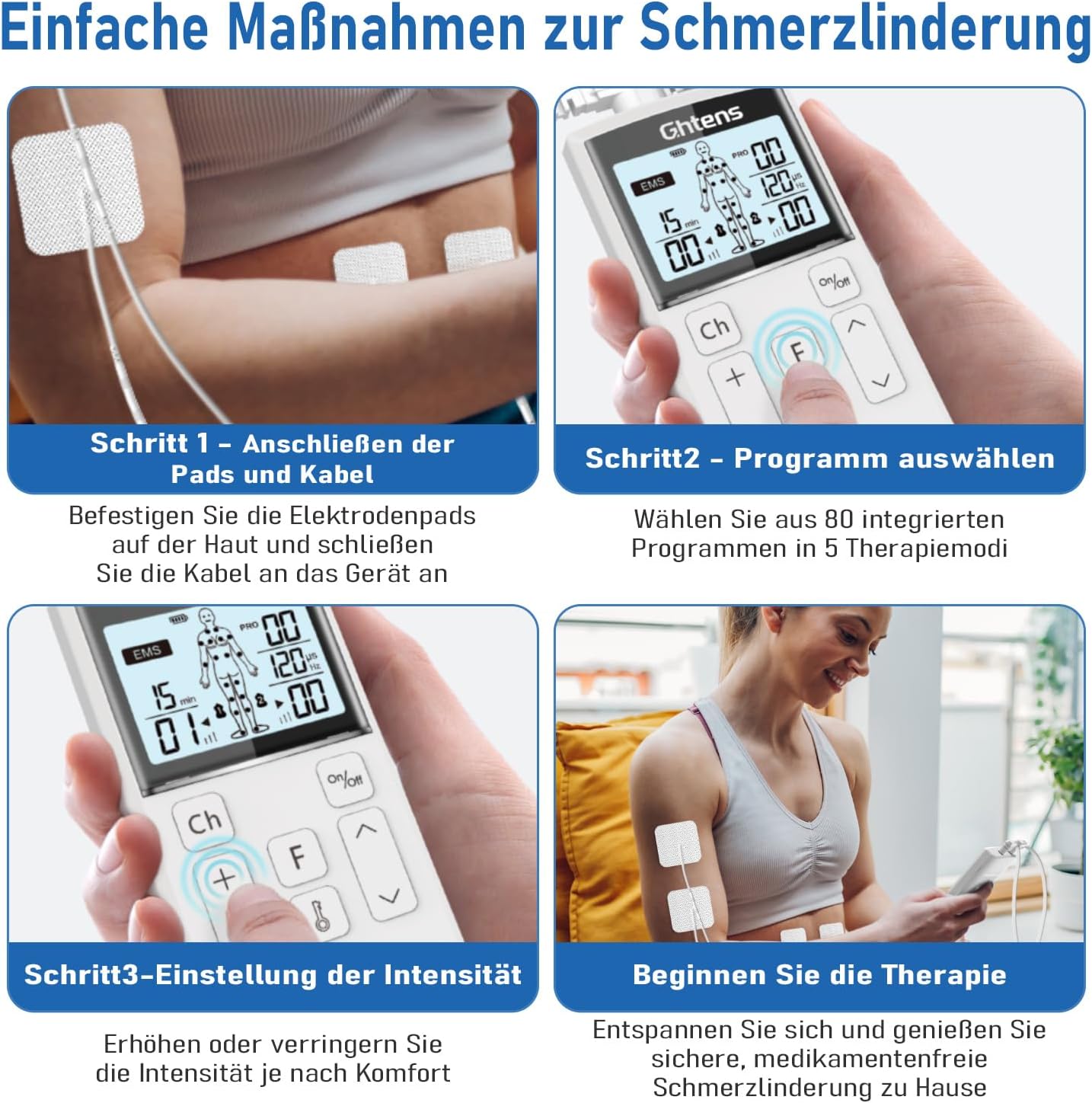
This image illustrates the initial steps for setting up the device. Step 1 shows connecting the electrode pads to the lead wires and then to the device. Step 2 depicts selecting a program from the 80 available options. Step 3 demonstrates adjusting the intensity level. Finally, the image shows a user relaxing during therapy, emphasizing the ease of use.
Operating Instructions
Power On/Off:
Press and hold the On/Off button for 2 seconds to turn the device on or off.
Selecting a Therapy Mode:
Press the F (Function) button to cycle through the five available therapy modes: TENS, EMS, IF, RUSS, and DIY. The selected mode will be displayed on the screen.

This image illustrates the five core functions of the GHTENS KTR-2640 device. TENS is for pain relief, such as stiff shoulders and joint pain. EMS is for muscle relaxation and rehabilitation exercises. IF (Interferential Current) provides deep massage for discomfort. RUSS (Russian Stimulation) is used for muscle strength training and relieving muscle cramps. DIY allows for individual custom settings.
Selecting a Program:
After selecting a mode, use the Up/Down Arrow buttons to choose from the 80 integrated programs. The program number will be shown on the display.
Adjusting Intensity:
The device has two independent channels. Press the Ch button to select either Channel 1 or Channel 2. Once a channel is selected, use the +/- buttons to increase or decrease the intensity level. There are 16 intensity levels available.

This image illustrates the 16 intensity levels available on the device, ranging from soft (levels 1-3) to medium (levels 4-6), strong (levels 7-9), and high (levels 10-16). Users can adjust the intensity to their personal tolerance and comfort level.
Electrode Pad Placement:
Proper placement of electrode pads is crucial for effective therapy. Refer to the body diagram on the device's display or consult a healthcare professional for specific placement recommendations for your condition.
This image demonstrates the dual-channel capability of the device, showing how four electrode pads can be used simultaneously on different body parts. For example, Channel 1 is shown with pads on the arm at intensity level 2, while Channel 2 has pads on the calf at intensity level 4. This allows for simultaneous treatment of two areas or for two people to use the device at once.
Screen Lock Function:
Press the Lock button to lock the screen and prevent accidental changes to settings during therapy. Press it again to unlock.
Battery and Charging
The GHTENS KTR-2640 is equipped with a rechargeable Lithium-ion battery. A full charge provides over 5 hours of continuous use.

This image details the battery specifications and charging features. It highlights USB-C rechargeable battery, 2 hours fast charging, over 5 hours of continuous use, and a 250mAh battery capacity. The image also shows the USB-C charging port on the bottom of the device.
- Charging Port: USB-C
- Charging Time: Approximately 2 hours for a full charge.
- Battery Capacity: 250mAh
- Usage Time: 5+ hours of continuous operation.
Maintenance and Storage
Cleaning the Device:
Wipe the device with a soft, damp cloth. Do not use abrasive cleaners or immerse the device in water.
Cleaning Electrode Pads:
Gently wipe the adhesive side of the pads with a damp cloth or a small amount of mild soap and water. Allow them to air dry completely before reattaching the protective film. Do not scrub or use harsh chemicals.

This image provides a cross-section view of the reusable electrode pads, highlighting their construction. The pads feature a non-woven layer, a conductive wire connection layer, and a gel layer for adhesion and conductivity. They are flexible, skin-friendly, durable, and measure 50x50mm. The image also shows the 2mm universal pin connector for the lead wires.
Storage:
Store the device and accessories in a cool, dry place, away from direct sunlight and extreme temperatures. Reattach the protective film to the electrode pads after each use to maintain their adhesive quality.
Troubleshooting
| Problem | Possible Cause | Solution |
|---|---|---|
| Device does not turn on. | Low battery; device not charged. | Charge the device fully using the USB-C cable. |
| No sensation or weak sensation. | Pads not adhering well; intensity too low; lead wire disconnected. | Ensure pads are firmly on skin; increase intensity gradually; check lead wire connections. Clean pads if adhesive is weak. |
| Skin irritation under pads. | Pads used too long; allergic reaction; skin not clean. | Reduce therapy duration; discontinue use if irritation persists; clean skin thoroughly before use. |
| Device turns off unexpectedly. | Low battery; automatic shut-off. | Recharge the device. The device has an automatic shut-off feature after a set time (e.g., 15-30 minutes) for safety. |
Specifications
- Model: KTR-2640
- Brand: GHTENS
- Therapy Modes: TENS, EMS, IF, RUSS, DIY (5-in-1)
- Programs: 80 pre-set programs
- Intensity Levels: 16 levels
- Channels: 2 independent channels
- Electrode Pads: 8 reusable pads (50x50mm) with 2mm universal pin connector
- Battery: 250mAh Rechargeable Lithium-ion
- Charging: USB-C, approx. 2 hours for full charge
- Continuous Use: 5+ hours
- Dimensions: 15 x 14 x 4 cm
- Weight: 240 grams
Warranty and Support
GHTENS provides a standard manufacturer's warranty for this product. Please refer to the warranty card included in your package or visit the official GHTENS website for detailed warranty terms and conditions. For technical support, troubleshooting assistance, or to inquire about replacement parts, please contact GHTENS customer service through the contact information provided in your product documentation or on the official website.


