
1. Product Overview
The JOYING JY-TT187N8 is an Android 13 car stereo head unit designed for Toyota Tacoma models from 2005 to 2015. It features a 9-inch display and integrates various functionalities including wireless Carplay, Android Auto, GPS navigation, Bluetooth, and a volume knob. This unit is specifically compatible with Tacoma models without the JBL sound system for the 2005-2012 range.
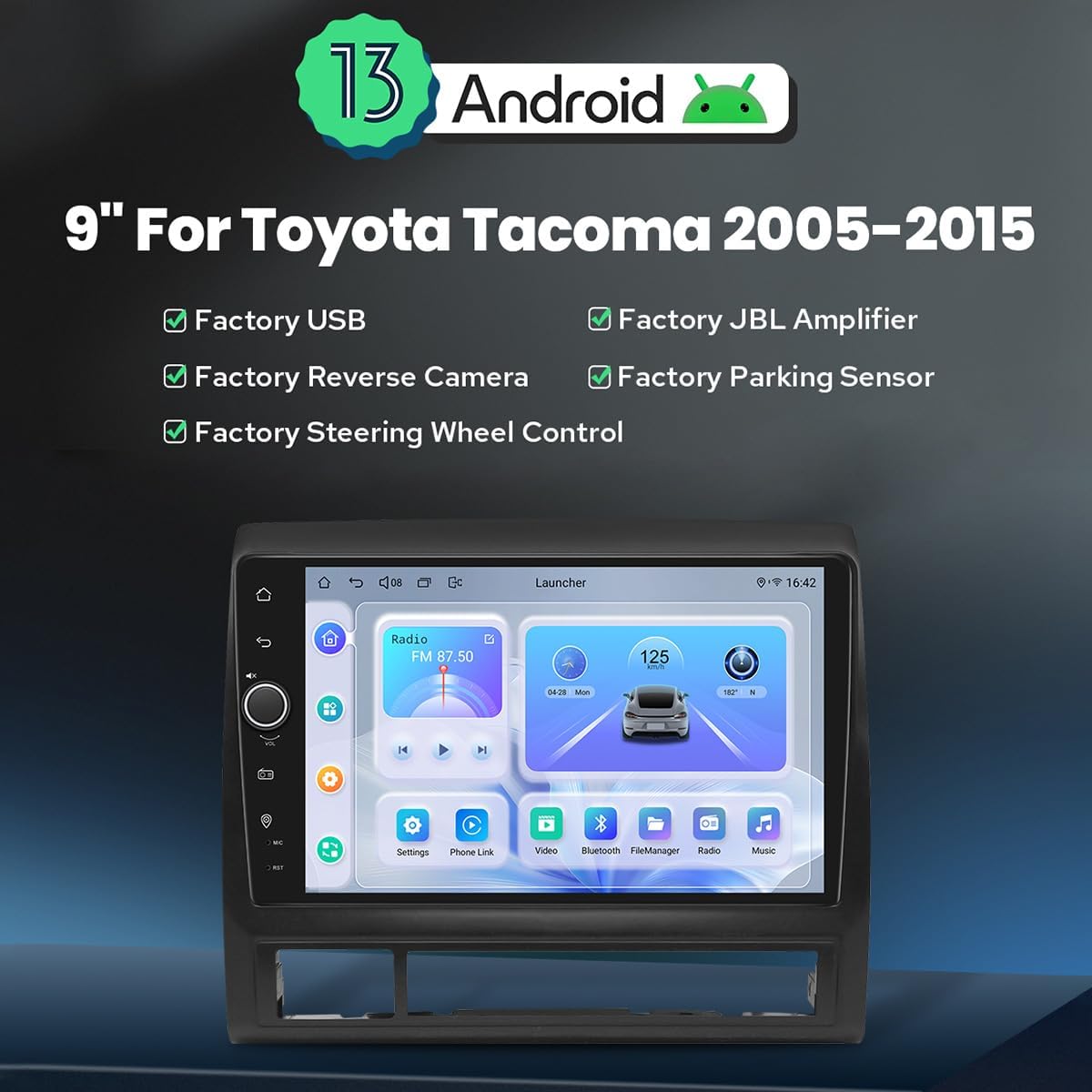
Image: The JOYING JY-TT187N8 9-inch Android 13 Car Stereo, highlighting key features like Android 13, compatibility with factory USB, reverse camera, parking sensor, and steering wheel controls.
2. Setup and Installation
2.1 Compatibility Check
This car radio is designed for Toyota Tacoma models from 2005 to 2015. For 2005-2012 models, it is compatible with vehicles without the JBL sound system. To verify, check for the presence or absence of the JBL logo on your factory radio panel or door speaker grilles.

Image: Visual guide for checking JBL system compatibility in Toyota Tacoma models (2005-2012), showing various factory radio panels and speaker grilles.
2.2 Package Contents
Before beginning installation, ensure all components are present:
- 9" Radio Head Unit (x1)
- Single DIN Cage (x1)
- Left & Right Brackets (x1 set)
- WiFi Antenna (x1)
- GPS Antenna (x1)
- 4G Antennas (x2)
- External Microphone (x1)
- USB Cables (x2)
- AR Cable (x1)
- Screen Ribbon Cable (x1)
- Power Cable (x1)
- User Manual (x1)

Image: A detailed view of all included components, such as the head unit, mounting brackets, various antennas, cables, and the external microphone.
2.3 Installation Process
The JOYING car radio is designed for plug-and-play installation, utilizing necessary cables supplied to connect directly to your vehicle's existing wiring harness. No cutting of factory cables is required. The unit supports factory steering wheel controls.
Important Note: If your vehicle's factory-installed reversing camera displays its feed on the rearview mirror, this product cannot transmit that video feed to its screen. An aftermarket camera may be required for screen display.

Image: The JOYING head unit installed in a Toyota Tacoma dashboard, demonstrating its factory-look style and compatibility with various dashboard configurations.
3. Operating Instructions
3.1 Initial Boot-up and Fast Boot
The first boot-up of the system will take approximately 30-40 seconds. Subsequent starts, once the car key is inserted, will initiate in approximately 2 seconds, entering the user interface quickly.
3.2 Carplay & Android Auto
Connect your mobile phone to the car radio via USB cable or Bluetooth to utilize Carplay or Android Auto. This allows you to access navigation, make phone calls, and stream music directly from your phone on the larger screen.
Image: Displays the user interfaces for both Apple Carplay and Android Auto, showing how phone apps are mirrored and controlled on the head unit screen.
3.3 GPS Navigation
The unit features precise GPS engines and includes GPS antennas for accurate positioning and faster real-time navigation. It supports offline maps; if you are in an area where offline map data is available, you can download and save it to the car stereo for use without an internet connection. Mobile phone map data can also be synchronized to the head unit via Carplay or Android Auto.
3.4 Built-in 4G Module
Insert a SIM card into the dedicated slot for internet access. Note that this module supports data for internet access only and does not support making phone calls or sending SMS messages. Supported FDD-LTE types include B2/B4/B5/B7/B12/B13/B14/B17/B25/B26/B38/B66/B71, and TDD-LTE type B41.
3.5 Audio Features
The unit provides high-quality sound enjoyment with a TDA7851 DSP chip, a 48-band graphic equalizer, and a maximum output power of 4x50W. It supports aftermarket amplifiers via Optical Fiber or Coaxial Digital Input for enhanced sound quality.

Image: Illustrates the audio features including the TDA7851 DSP chip, 48-band graphic equalizer, 4x50W max output, and support for aftermarket amplifiers via fiber optical and SPDIF coaxial output.
3.6 HDMI Output
The HDMI output provides a full digital image and sound-sending interface, allowing uncompressed audio and video signals to be output synchronously without manual adjustment. This supports projection screen displays for rear passengers or on-screen displays with 1080P clear picture and zero delays.
Note: The HDMI cable is not included.

Image: Demonstrates the HDMI output feature, showing its use for projection screens and on-screen displays, along with a close-up of the HDMI OUT port.
3.7 Split-screen Multitasking
The unit supports split-screen multitasking, allowing two applications to run simultaneously. To activate:
- Tap the recent apps icon.
- Find the app you want to run in split-screen, click its icon to bring up the split-screen button, and tap it.
- The first app selected will display on the left side. Choose the second app from recent apps.
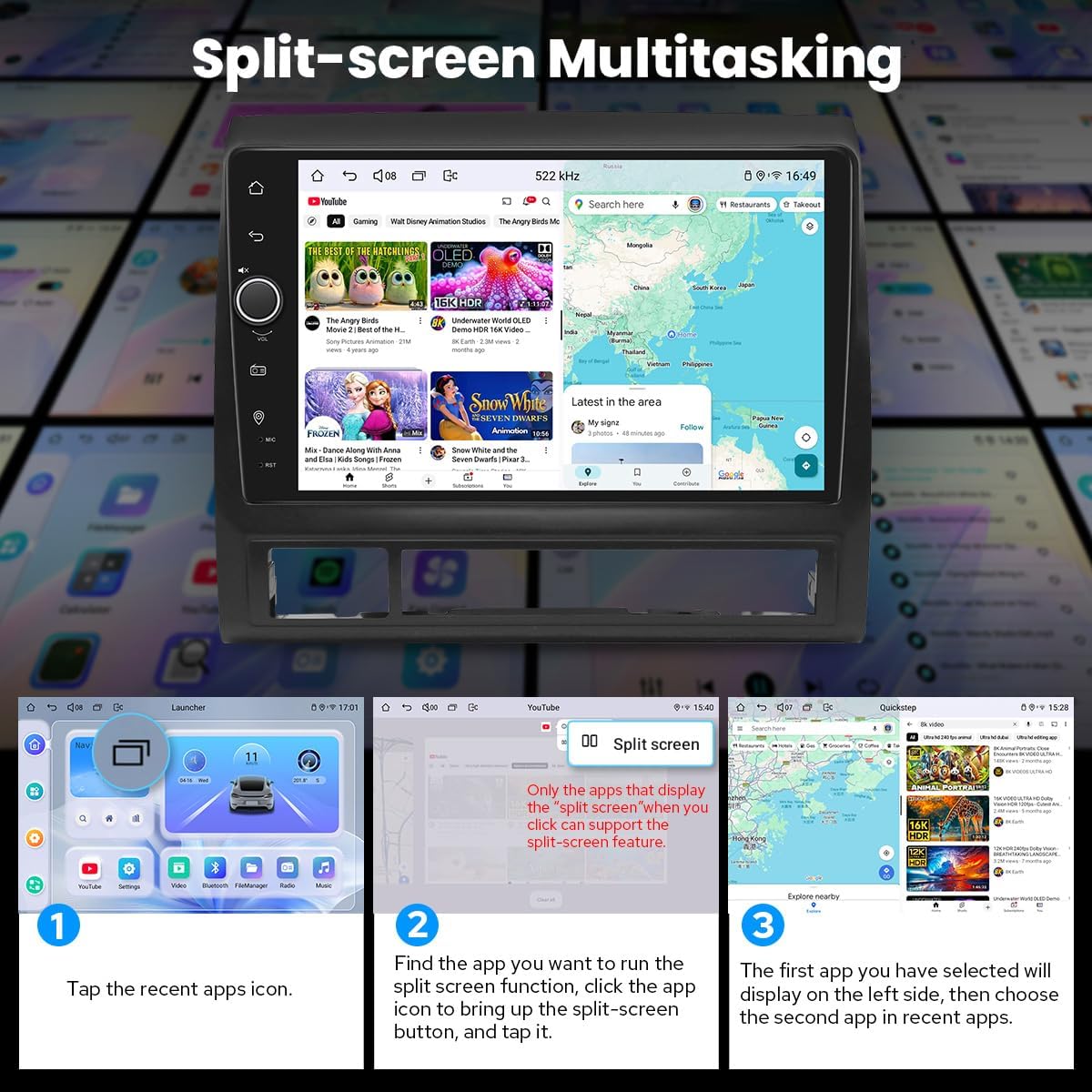
Image: A visual guide demonstrating the steps to activate and use the split-screen multitasking feature on the head unit.
3.8 Personalized Settings
Customize your user experience with various settings:
- Car Boot Logo: Select a custom logo for startup.
- Customizable Wallpapers: Choose from various wallpapers or upload your own.
- Changeable Button Color: Adjust the color of the physical buttons.
- Adjustable Screen Brightness: Control screen brightness for optimal viewing in different lighting conditions.

Image: Shows the personalized settings interface, including options for car boot logo, customizable wallpapers, changeable button colors, and adjustable screen brightness.
3.9 Other Features
The head unit includes additional functionalities:
- AM/FM Radio
- Hands-free Call (via Bluetooth)
- Picture-in-Picture (PiP)
- 3 USB Ports
- Micro SD Card Slot
- 4G SIM Card Slot

Image: Icons representing various features such as Fast Boot, GPS Navigation, AM/FM Radio, Hands-free Call, Picture-in-Picture, 3 USB Ports, Micro SD Card Slot, and 4G SIM Card Slot.
3.10 Enhanced Connectivity
The unit features an independent WiFi antenna, ensuring stable signal quality and providing fast and smooth internet access. It supports 802.11a/b/g/n/AC standards across 2.4GHz/5GHz spectral bands.
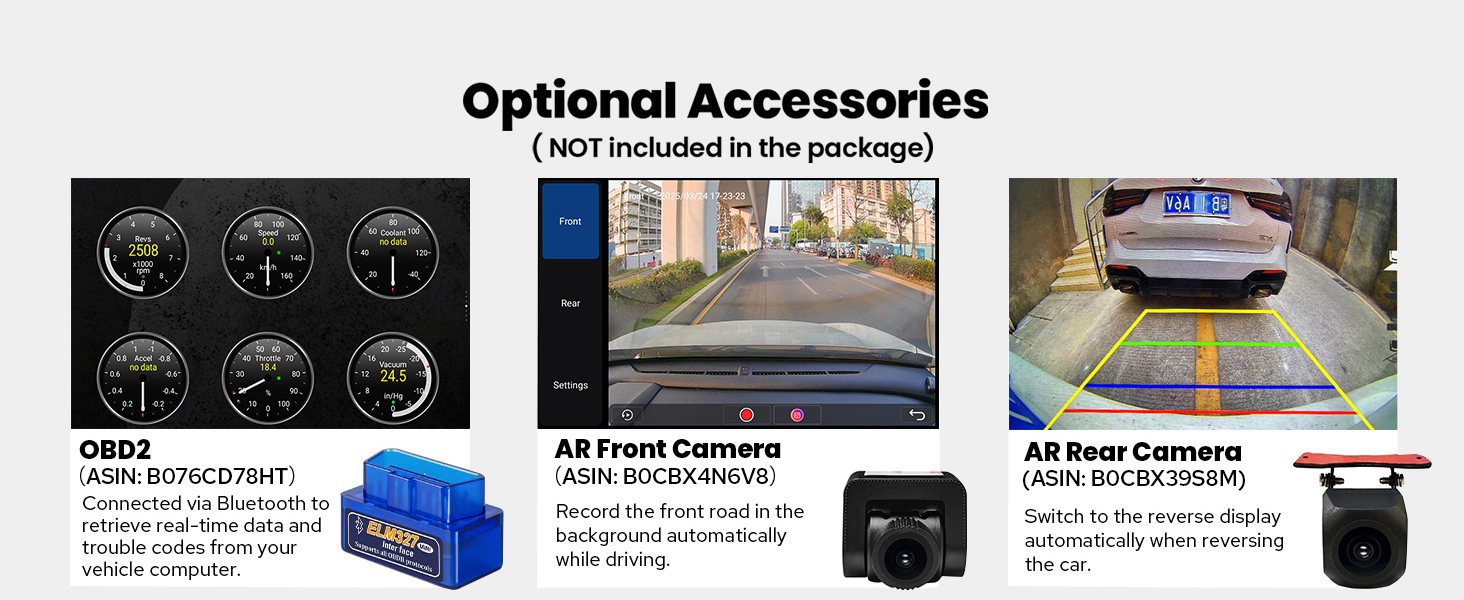
Image: Highlights the upgraded WiFi signal with an independent antenna for stable and fast internet access, showing the antenna connected to the rear of the unit.
4. Maintenance
4.1 General Care
To maintain the performance and longevity of your car radio, regularly clean the screen with a soft, lint-free cloth. Avoid using harsh chemicals or abrasive materials. Keep the unit free from dust and moisture.
4.2 Cooling System
The unit features a dual heat sink design for superior heat dissipation, improved temperature control, and enhanced performance stability. You can set a warning value for volume or CPU temperature. If the CPU temperature or radio's volume rises and exceeds the set warning value, the fan will automatically activate for cooling to prevent overheating.

Image: Illustrates the upgraded cooling system with a dual heat sink design and a fan, showing the CPU temperature monitoring interface.
4.3 Software Updates
Periodically check the manufacturer's website for available software updates to ensure optimal performance and access to the latest features.
5. Troubleshooting
If you encounter any issues with your JOYING car radio, please refer to the following general troubleshooting steps:
- No Power: Check all power connections and ensure the vehicle's ignition is on. Verify the fuse is intact.
- No Sound: Check speaker connections, volume levels, and audio output settings. Ensure the correct audio source is selected.
- GPS Signal Issues: Ensure the GPS antenna is properly installed and has a clear view of the sky.
- Touchscreen Unresponsive: Try restarting the unit. If the issue persists, a factory reset might be necessary (refer to settings menu).
- Carplay/Android Auto Connection Issues: Ensure your phone's software is up to date and try different USB cables if connecting via cable. Verify Bluetooth pairing for wireless connections.
For more specific issues or if general troubleshooting does not resolve the problem, please contact JOYING customer support.
6. Specifications
| Feature | Specification |
|---|---|
| Brand | JOYING |
| Model Number | JY-TT187N8 |
| Operating System | Android 13 |
| Screen Size | 9 inches |
| Display Type | LED, Capacitive Touchscreen |
| Memory Storage Capacity | 128 GB |
| Connectivity Technology | Bluetooth, Ethernet, HDMI, USB, Wi-Fi |
| Connectivity Protocol | Bluetooth, Wi-Fi |
| Supported Satellite Navigation System | BeiDou, GLONASS, GPS |
| Map Type | North America |
| Audio Output Mode | Stereo |
| Special Features | DSP, Equalizer, Front View Camera Input, RCA, RDS, Optical Fiber Output, Coaxial Digital Output, Built-in 4G Module |
| Mounting Type | Dashboard Mount |
| Compatible Devices | Amplifier, Smartphone, Speaker |
| Compatible Vehicle Type | Toyota Tacoma (2005-2015) |
6.1 Optional Accessories (Not Included)
Enhance your experience with these optional accessories:
- OBD2 Scanner: Connects via Bluetooth to retrieve real-time data and troubleshoot vehicle computer codes.
- AR Front Camera: Records the front road automatically while driving.
- AR Rear Camera: Switches to the reverse display automatically when reversing the car.

Image: Displays optional accessories such as an OBD2 scanner, AR front camera, and AR rear camera, which can be integrated with the head unit.
7. Warranty Information
The JOYING JY-TT187N8 car radio comes with a 2-year warranty from the date of purchase. Please retain your proof of purchase for warranty claims. The warranty covers manufacturing defects and malfunctions under normal use. It does not cover damage caused by improper installation, misuse, accidents, or unauthorized modifications.
8. Support
For technical assistance, warranty claims, or any questions regarding your JOYING car radio, please contact JOYING customer support through their official website or the retailer where the product was purchased. Provide your model number (JY-TT187N8) and a detailed description of your issue for efficient support.

