
1. Product Overview
The ZARIMI X23-Ultra Portable Cordless Car Vacuum is a versatile 6-in-1 handheld cleaning device designed for efficient cleaning in various environments, including cars, homes, and offices. It features powerful suction, a brushless motor, and dual rechargeable batteries for extended use.
Key Features:
- 50,000Pa Ultra-Strong Suction & Brushless Motor: Provides professional-grade cleaning power for dust, pet hair, and debris.
- 6-in-1 Multi-Functional Design: Combines vacuuming, blowing, and inflating capabilities.
- Long-Lasting Dual Batteries & 60-Min Runtime: Two high-capacity batteries offer up to 60 minutes of continuous cleaning with quick-swap functionality.
- Lightweight & Portable Cordless Design: Weighs only 1.9 pounds for easy handling and storage.
- Complete Accessories: Includes 2 batteries, 2 reusable filters, a storage bag, and 6 versatile nozzles.
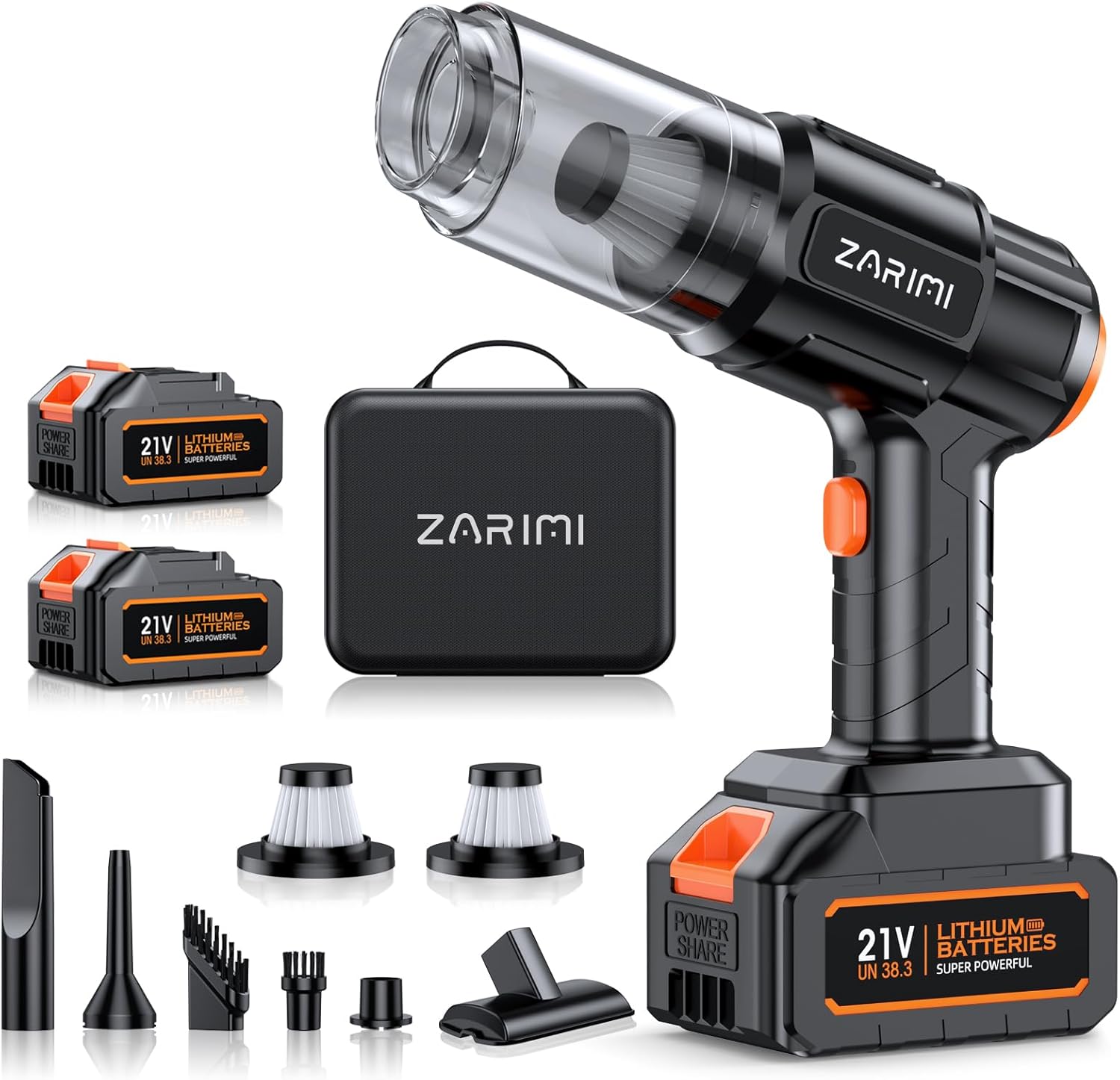
Figure 1: The ZARIMI X23-Ultra Portable Cordless Car Vacuum, showcasing its compact design and powerful suction capabilities.
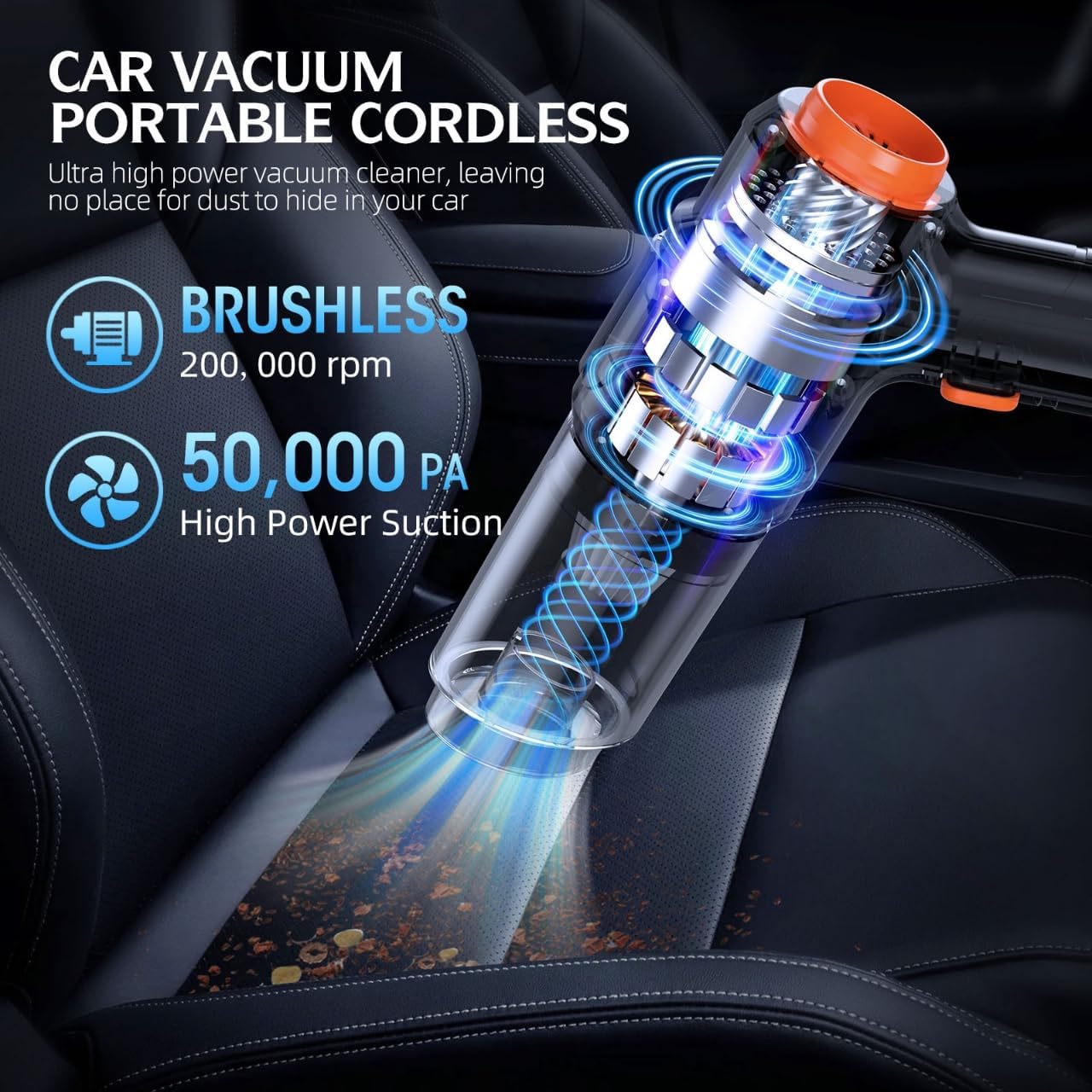
Figure 2: Illustration of the removable rechargeable battery system, highlighting the dual battery setup for extended runtime.

Figure 3: Visual representation of the 6-in-1 multi-functional design, demonstrating its use as an air pump, cleaning brush, car vacuum, air duster, bag vacuum, and home cleaner.
2. Setup
2.1 Unboxing and Component Identification
Upon opening the package, verify that all components are present. The package includes the main vacuum unit, two 21V lithium batteries, a charger, two reusable filters, a storage bag, and six versatile nozzles.

Figure 4: All items included in the ZARIMI X23-Ultra package, neatly arranged in the carrying case.
2.2 Battery Installation and Charging
- Ensure the vacuum is turned off before installing or removing the battery.
- Align the battery with the base of the vacuum unit and slide it in until it clicks securely into place.
- To charge a battery, connect the charger to a power outlet and then to the battery. The indicator light on the charger will show the charging status.
- A full charge typically takes approximately [Insert Charging Time if available, otherwise omit].
2.3 Attaching Accessories
The vacuum comes with various nozzles for different cleaning tasks. To attach a nozzle, simply push it firmly onto the suction or blowing port until it is secure. Ensure a tight fit for optimal performance.
Video 1: A short preview demonstrating the unboxing and initial setup of the ZARIMI X23-Ultra, including battery and accessory attachment.
3. Operating Instructions
3.1 Powering On/Off
To turn the vacuum on, press and hold the power button for approximately 2 seconds. To turn it off, press and hold the power button again for 2 seconds.
3.2 Vacuuming Mode
Attach the desired vacuum nozzle to the front suction port. Select the appropriate nozzle for the surface you are cleaning (e.g., flat nozzle for crevices, brush nozzle for upholstery). Move the vacuum slowly over the area to be cleaned, allowing the powerful suction to pick up debris.

Figure 5: The vacuum in use for general vacuuming, demonstrating its effectiveness on various surfaces.
Video 2: A short preview showing the vacuum being used to clean crumbs and debris from a car seat, highlighting its maneuverability.
3.3 Blowing Mode (Dust Removal)
To use the blowing function, attach the appropriate nozzle to the rear exhaust port. This mode is ideal for dislodging dust from keyboards, car vents, or other hard-to-reach areas before vacuuming.
3.4 Inflating Mode
For inflating items like balloons or small air mattresses, attach the designated inflating nozzle to the rear exhaust port. Ensure the nozzle is securely fitted to prevent air leakage.
4. Maintenance
4.1 Emptying the Dustbin
- Ensure the vacuum is turned off.
- Rotate the dust collection cup counter-clockwise to detach it from the main unit.
- Carefully empty the collected dust and debris into a waste bin.
4.2 Cleaning the Filters
The ZARIMI X23-Ultra includes reusable filters. Regular cleaning is essential to maintain optimal suction power.
- After emptying the dustbin, remove the filter from inside the dust cup.
- Tap the filter gently to dislodge any loose dust.
- For a more thorough cleaning, rinse the filter under running water. Ensure it is completely dry before reinserting it into the dust cup and reattaching the cup to the vacuum.

Figure 6: Step-by-step guide on how to clean the vacuum's filter for sustained performance.
5. Troubleshooting
5.1 Low Suction Power
- Check if the dustbin is full and needs emptying.
- Inspect the filter for clogs and clean it as described in Section 4.2.
- Ensure all attachments are securely fitted to the vacuum.
- Verify that the battery is fully charged.
5.2 Vacuum Not Turning On
- Confirm that the battery is properly installed and fully charged.
- Ensure the power button is pressed and held for the required 2 seconds.
- If using a spare battery, try swapping it to rule out a faulty battery.
5.3 Battery Not Charging
- Check if the charger is correctly plugged into both the power outlet and the battery.
- Ensure the power outlet is functional.
- Inspect the charging cable for any damage.
6. Specifications
| Feature | Specification |
|---|---|
| Brand | ZARIMI |
| Model Name | X23-Ultra |
| Special Feature | 6-in-1 Multi-Functional Design, High Power, Lightweight, Portable |
| Suction Power | 50,000Pa |
| Motor Type | Brushless |
| Battery Type | 21V Lithium Batteries |
| Battery Life | Up to 60 minutes (with dual batteries) |
| Is Cordless? | Yes |
| Form Factor | Handheld |
| Color | Graphite Black |
| Item Weight | 4.38 pounds |
| Package Dimensions | 12.91 x 9.06 x 3.78 inches |
| Included Components | Battery*2, Car Vacuum Portable Cordless*1, Filters*2, Nozzles*6, Storage Bag*1 |
| Recommended Uses | Car interiors, Home, Pet Hair, Keyboard, Inflating |
| Indoor/Outdoor Usage | Indoor, Outdoor |
| Surface Recommendation | Upholstery, Hard Floor, Tight Spaces |
| Power Source | Battery Powered |
7. Warranty and Support
7.1 Quality Guarantee
The ZARIMI X23-Ultra Portable Cordless Car Vacuum comes with a 12-month quality guarantee, providing protection against manufacturing defects. This ensures reliable performance and customer satisfaction.
7.2 Customer Support
For any questions, concerns, or assistance with your ZARIMI X23-Ultra, please contact Amazon Customer Service. They can provide prompt support and guidance for product-related inquiries.