Introduction
This manual provides instructions for the XINFUTE SRC-4020-01 remote control, designed for use with Caixun Smart LCD LED Voice TVs. Please read this manual thoroughly before using the remote control to ensure proper operation and to maximize its lifespan.
Setup
Battery Installation
The remote control requires two AAA batteries (not included).
- Locate the battery compartment on the back of the remote control.
- Slide the battery compartment cover downwards to open it.
- Insert two AAA batteries, ensuring the positive (+) and negative (-) terminals match the diagrams inside the compartment.
- Replace the battery compartment cover by sliding it upwards until it clicks into place.
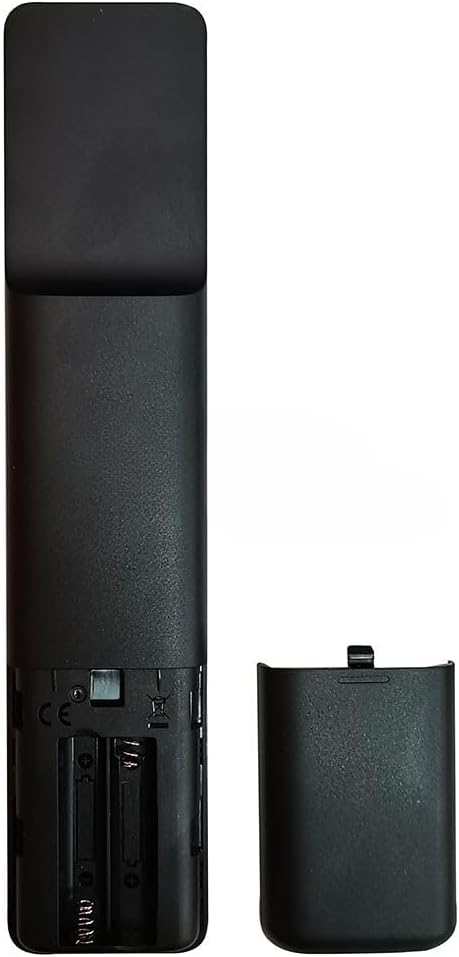
Image: Back of the remote control with the battery cover removed, illustrating the battery insertion points.
Note:
- Do not mix old and new batteries.
- Do not mix alkaline, standard (carbon-zinc), or rechargeable (nickel-cadmium) batteries.
- Remove batteries if the remote control will not be used for an extended period.
Pairing (if necessary)
This remote control is typically ready to use with compatible Caixun Smart TVs without additional pairing. If the remote does not respond, ensure batteries are correctly installed and try pointing it directly at the TV's IR receiver. For voice control functionality, refer to your TV's user manual for specific pairing instructions, as this may vary by TV model.
Operating Instructions
The XINFUTE SRC-4020-01 remote control provides intuitive access to your Caixun Smart TV's functions.
Basic Functions

Image: Front view of the remote control, displaying its various buttons.
- Power Button: Turns the TV on or off.
- Volume Up/Down: Adjusts the TV's volume.
- Channel Up/Down: Changes TV channels.
- Navigation Pad (Up/Down/Left/Right/OK): Used to navigate menus and select options.
- Back/Exit: Returns to the previous screen or exits a menu.
- Home: Accesses the TV's smart home screen or main menu.
- Mute: Mutes or unmutes the TV's audio.
- Input/Source: Changes the input source (HDMI, AV, etc.).
Voice Control
This remote control supports voice commands for compatible Caixun Smart LCD LED Voice TVs. To use voice control:
- Press and hold the dedicated Voice button (usually indicated by a microphone icon).
- Speak your command clearly into the microphone located on the remote control.
- Release the Voice button when you have finished speaking.
Note:
- Ensure your TV is connected to the internet for voice control features to function correctly.
- Voice control functionality and available commands may vary depending on your TV model and software version.
Maintenance
- Clean the remote control regularly with a soft, dry cloth.
- Do not use liquid cleaners or abrasive materials, as they may damage the surface or internal components.
- Keep the remote control away from direct sunlight, heat sources, and moisture.
- Avoid dropping the remote control or subjecting it to strong impacts.
Troubleshooting
| Problem | Possible Cause | Solution |
|---|---|---|
| Remote control not responding. | Dead or incorrectly inserted batteries. | Replace batteries with new ones, ensuring correct polarity (+/-). |
| Remote control not responding. | Obstruction between remote and TV. | Ensure a clear line of sight between the remote control and the TV's IR receiver. |
| Remote control not responding. | Remote control needs re-pairing (for some functions like voice). | Refer to your TV's user manual for specific pairing instructions. |
| Voice control not working. | TV not connected to the internet or voice feature not enabled. | Check your TV's network connection and settings. Ensure the voice button is pressed and held while speaking. |
Specifications
- Model: SRC-4020-01
- Brand: XINFUTE
- Compatible Devices: Caixun Smart LCD LED Voice Televisions
- Special Feature: Ergonomic design
- Max Number of Supported Devices: 1
- Color: As Shown (Black)
- Power Source: 2 x AAA Batteries (not included)
Warranty and Support
All products are inspected before shipment. If you are not satisfied with your purchase, please contact the seller within 24 hours of receipt. For further assistance or inquiries, please refer to the seller's contact information provided at the point of purchase.
For specific TV-related issues or advanced features, please consult your Caixun TV's official user manual or support resources.


