
Introduction
This comprehensive user manual provides detailed instructions for the Skullcandy Dime 3 Wireless Earbuds. It covers everything from initial setup and operation to maintenance, troubleshooting, and product specifications. Please read this manual thoroughly to ensure optimal performance and longevity of your device.
What's in the Box
Upon opening your Skullcandy Dime 3 package, you will find the following components:
- Dime® 3 True Wireless Earbuds
- Wireless Charging Case
- Ear Gels (S, M, L)
- USB-C Charging Cable
- User Manual
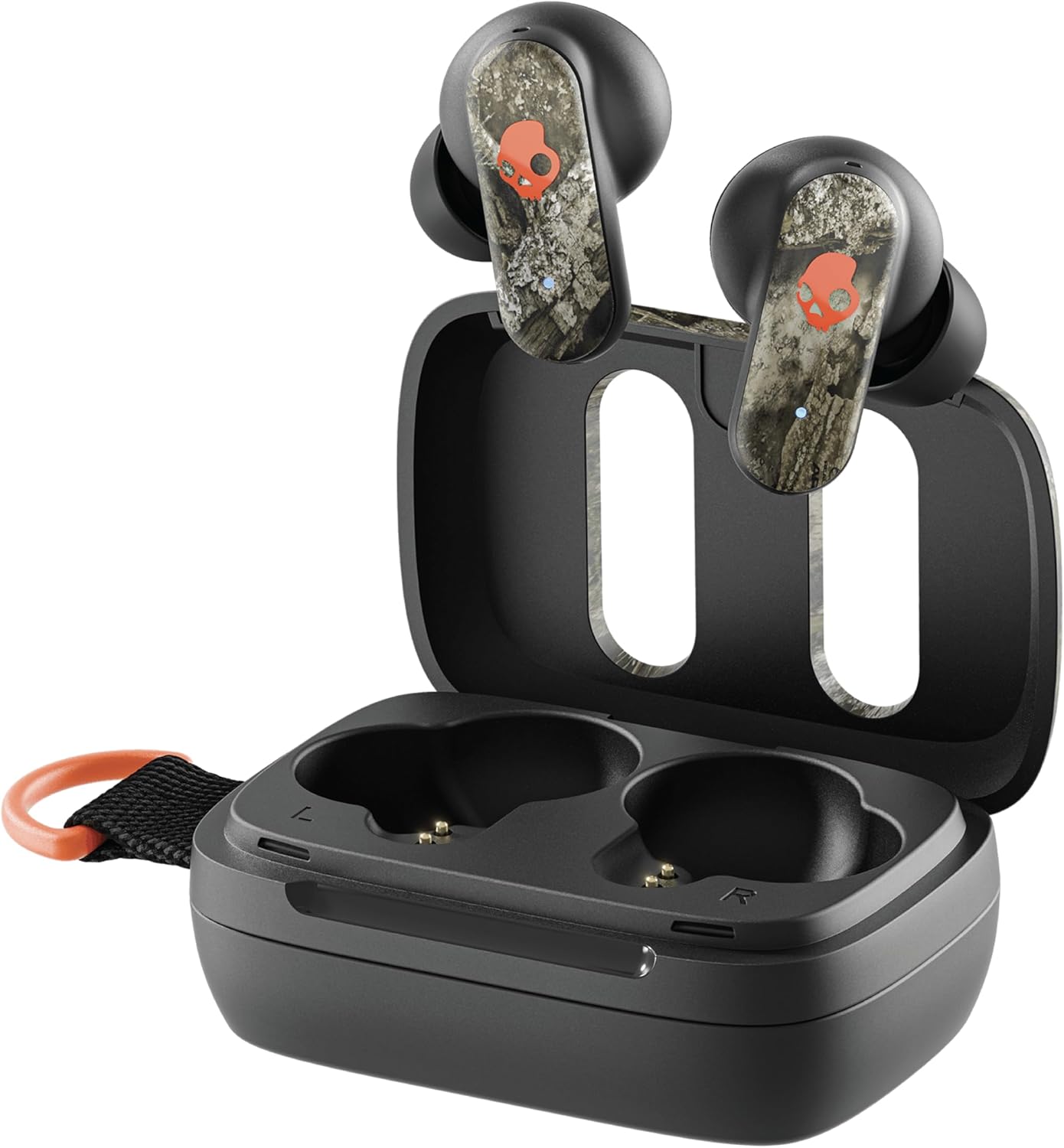
Image: Skullcandy Dime 3 Wireless Earbuds and Charging Case, showing all included components.
Setup
Power On/Off
Your Dime 3 earbuds are designed for convenience. They will automatically power on when removed from the charging case and power off when placed back inside the case.
- To Manually Power Off: Press the button on either earbud two times, then hold for one second.
- To Manually Power On: Press the button on either earbud for one second.
Pairing
To pair your earbuds with a new device:
- Remove both earbuds from the charging case. You will hear a tone indicating they are powered on.
- A voice prompt will announce the earbud battery life, then say "Ready to pair" as the LEDs begin to pulse red and blue. Both earbuds are now in pairing mode.
- Open the Bluetooth settings on your device (phone, tablet, etc.) and locate "Dime 3" in the list of available devices.
- Select "Dime 3" and confirm the pairing prompt that appears on your screen.
Multipoint Pairing
Multipoint pairing allows your earbuds to connect to two devices simultaneously, making multitasking seamless. For example, you can watch a video on your laptop and instantly switch to answer a call on your phone without manually disconnecting.
To pair a second device:
- With your earbuds powered on and connected to the first device, press and hold the button on either earbud for 3 seconds.
- A voice prompt will say "Ready to pair" and the LEDs will pulse red and blue.
- Select the second device from your device's Bluetooth list. A voice prompt will say "Connected".
Once paired to the second device, you can seamlessly stream from either device as needed. You can also disable multipoint pairing in the Skullcandy App if desired.
Operating
Touch Controls
Control your earbuds by pressing the Skullcandy logo button on the front surface of either earbud:
- Play/Pause Audio or Answer/End a Call: Tap either bud 1 time.
- Reject Incoming Call: Hold either bud for 1 second.
- Volume Up: Tap either bud 2 times.
- Volume Down: Tap either bud 3 times.
- Stay-Aware On/Off: Tap either bud 1 time, then hold for 1 second.
- Toggle EQ Modes: Tap the right bud 4 times.
- Activate Assistant: Tap the left bud 4 times.
Clear Voice Smart Mic
Dime 3 is equipped with Clear Voice Smart Mic, an advanced microphone that uses artificial intelligence to isolate the speaker's voice and reduce background noise. This feature is especially effective at eliminating discontinuous noise, such as background chatter in a crowded coffee shop or airport.
Stay-Aware Mode
Stay-Aware Mode makes it easier to hear what's going on around you, allowing you to stay in touch with your surroundings while enjoying audio. This is particularly useful in environments like airports (to hear announcements) or gyms (to be aware of your surroundings).

Image: User demonstrating Stay-Aware Mode, allowing awareness of surroundings.
Voice Assistant
Unlike proprietary earbuds, Skullcandy earbuds work with any voice assistant (Siri, Bixby, Google Assistant). Simply activate your device's voice assistant by holding either earbud for 1 second to enable it and ask away.
EQ Modes
To help you get the best sound quality from your content, your earbuds feature three preset EQ listening modes:
- Music Mode: The default setting, optimized for general listening.
- Bass Boost Mode: Increases low frequencies for a bass-heavy audio experience.
- Podcast Mode: Removes most of the bass response, ideal for podcasts or audiobooks.
To switch between EQ modes, tap the right bud 4 times. A voice prompt will notify you each time your EQ mode changes.
Solo Mode
You can use either earbud by itself to stay tuned in to the world around you. This is called Solo Mode. To use Solo Mode, simply remove either earbud from the charging case. The selected earbud will pair and function normally. To use both earbuds again, remove the other earbud from the case; once powered on, audio will begin to stream automatically in stereo mode.
Fit
Dime 3 is designed to fit comfortably and securely in your ear. Follow these steps to achieve the best fit:
- Place your earbud in your ear at an angle.
- Rotate slightly to the front or the back until it feels secure in place.
Your earbud should feel comfortable and stable. For optimal acoustic performance, ensure your ear gel creates a nice seal just inside your ear. Dime 3 comes with three sizes of ear gels (S, M, L) to help you find the best fit. Try each size to determine which works best for you.

Image: Side view of a user wearing a Skullcandy Dime 3 earbud, illustrating proper fit.

Image: Three pairs of ear gels in different sizes (S, M, L) for customizable fit.
Charging & Battery
The Dime 3 earbuds hold up to 8 hours of playtime on a single charge. The charging case provides an additional 12 hours of battery time, for a total of up to 20 hours of listening time.

Image: Skullcandy Dime 3 earbuds and charging case, illustrating 20 hours of total battery life.
Charging Earbuds
To charge your earbuds, place them in the charging case. The LEDs on the earbuds will turn solid red to indicate they are charging. When fully charged, the LEDs will turn off.
Charging Case
The Dime 3 case can be independently charged whether the earbuds are in it or not. To check the case battery life, plug in the USB-C charging cable. The single LED located next to the USB-C charging port will light up and indicate the current case battery level:
- Red: 0% - 24%
- Yellow: 26% - 75%
- Green: 76% - 100%
With the rapid charge feature, a 10-minute charge of the charging case will provide more than 2 hours of battery playtime.
Battery Notifications
When your earbuds have about 45 minutes of playtime remaining (approximately 15% charge), and again with about 20 minutes (8% charge) of playtime left, a voice prompt will notify you: "Battery Low".
Tile™ Finding Technology
To ensure you never lose your earbuds, Dime 3 comes with Tile™ finding technology built-in. The Tile tracking feature is easy to set up and will allow you to locate either one of your earbuds if you've misplaced them.
To use Tile, you'll need to download the free Tile app. Then, follow the on-screen instructions to connect the app to both Dime 3 earbuds so they're easily trackable.
Troubleshooting
Resyncing Earbuds
If you're having trouble getting audio to play from both earbuds, you can quickly resync them:
- Ensure your earbuds are powered on and your Bluetooth is disconnected from your device.
- Press both earbuds 4 times. Your buds will begin to slowly flash red and blue while they resync.
- Once synced, your buds will quickly flash blue 4 times within 2 seconds.
- You are now ready to reconnect your Bluetooth.
Resetting Dime 3
If you're having pairing difficulties, you can reset Dime 3 by clearing the paired device list and restoring your buds to their default settings:
- First, remove your earbuds from your device's Bluetooth paired list and turn Bluetooth off.
- Remove both earbuds from the case. A tone will indicate that your earbuds are powered on.
- Hold the button on both buds for 6 seconds.
- A tone will indicate a successful reset. Both earbuds will quickly flash purple 5 times.
- A voice prompt will say "Ready to pair". Both earbuds will pulse red and blue.
- Now, turn on your device's Bluetooth and select "Dime 3". Accept the pair or OK prompt that appears on your screen.
- When pairing is complete, a voice prompt will say "Connected" and the LEDs will flash blue.
Specifications
| Feature | Specification |
|---|---|
| Model Name | Dime 3 |
| Connectivity Technology | Wireless |
| Wireless Communication Technology | Bluetooth |
| Bluetooth Version | 5.3 |
| Battery Life (Earbuds) | 8 Hours |
| Total Battery Life (with Case) | 20 Hours |
| Charging Time | 1 Hour (Earbuds) |
| Rapid Charge | 10 minutes charge = 2 hours playtime (case) |
| Water Resistance Level | Water Resistant (IPX4 rating) |
| Noise Control | Sound Isolation |
| Microphone | Built-in (Clear Voice Smart Mic) |
| Control Type | Touch Control |
| Item Weight | 1.2 ounces (0.03 Kilograms) |
| Product Dimensions | 2.33 x 1.55 x 0.9 inches |
Warranty & Support
Skullcandy offers a 1-Year USA Limited Warranty for this product. If you encounter any problems with your Dime 3 earbuds, please reach out to customer support before filing a warranty claim. Most issues can be resolved with a simple contact.
For support, please visit: http://support.skullcandy.com


