
Introduction
This user manual provides comprehensive instructions for the Effireli RD1A4 RD1A1 Replacement Remote Control, designed specifically for Skyworth Air Conditioner model V1BB1A-3. This remote is ready to use without any programming or complex setup.
Please read this manual carefully to ensure proper operation and to maximize the lifespan of your remote control.
Setup
Battery Installation
The Effireli RD1A4 RD1A1 remote control requires two AAA batteries (not included) for operation.
- Locate the battery compartment cover on the back of the remote control.
- Slide the cover downwards or press the latch to open it.
- Insert two AAA batteries, ensuring the positive (+) and negative (-) terminals align correctly with the markings inside the compartment.
- Close the battery compartment cover securely.
Note: Remove batteries if the remote control will not be used for an extended period to prevent leakage.
Initial Use
This replacement remote control is pre-programmed and requires no additional setup. Simply point the remote towards your Skyworth Air Conditioner and begin operation.
Operating Instructions
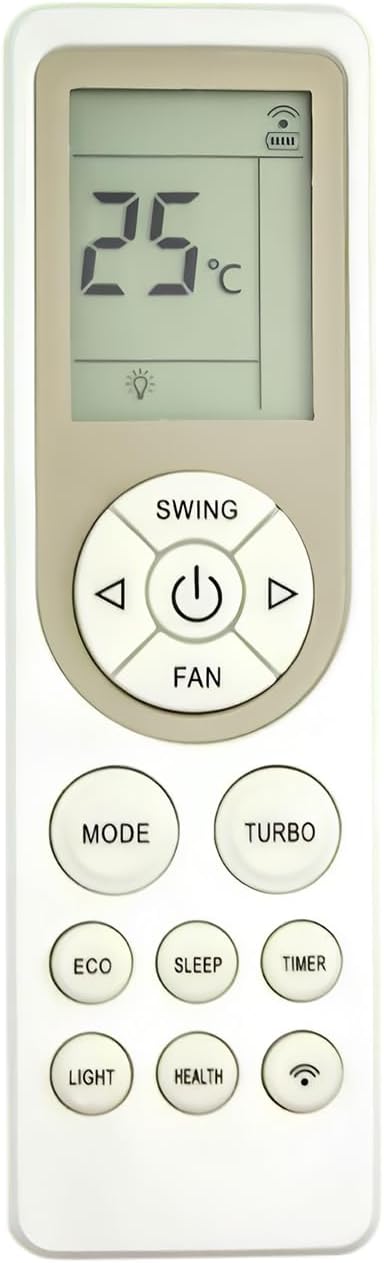
Figure 1: Effireli RD1A4 RD1A1 Replacement Remote Control. This image displays the front view of the remote control, showing its LCD screen at the top, a circular navigation pad with power button in the center, and various function buttons arranged below.
Button Functions
| Button | Function |
|---|---|
| Power (⏻) | Turns the air conditioner On or Off. |
| MODE | Cycles through operating modes (e.g., Cool, Heat, Fan, Dry, Auto). |
| Temperature Adjustment (◀ / ▶) | Adjusts the desired temperature setting. |
| SWING | Controls the vertical louver swing function. |
| FAN | Adjusts the fan speed (e.g., Low, Medium, High, Auto). |
| TURBO | Activates rapid cooling or heating for quick temperature changes. |
| ECO | Engages energy-saving mode for reduced power consumption. |
| SLEEP | Activates sleep mode, which adjusts temperature gradually for comfortable sleep. |
| TIMER | Sets a timer for automatic On/Off operation. |
| LIGHT | Controls the display light on the air conditioner unit. |
| HEALTH | Activates health-related functions, such as air purification or ionizer (if available on the AC unit). |
| Wi-Fi Symbol Button | Used for Wi-Fi connectivity features, if supported by the air conditioner model. Refer to your air conditioner's manual for specific instructions. |
LCD Display Indicators
- Temperature Display: Shows the set temperature in Celsius (°C).
- Light Bulb Icon: Indicates the display light function is active.
- Battery Indicator: Shows the current battery level of the remote control.
- Signal Indicator: Displays when the remote is transmitting a signal.
Maintenance
- Cleaning: Wipe the remote control with a soft, dry cloth. Do not use liquid cleaners or abrasive materials.
- Battery Replacement: Replace batteries when the remote's range decreases or the display becomes dim. Always replace both batteries at the same time with new ones of the same type.
- Storage: Store the remote in a cool, dry place away from direct sunlight and extreme temperatures.
Troubleshooting
| Problem | Possible Cause / Solution |
|---|---|
| Remote not responding. |
|
| Air conditioner not responding to specific functions. |
|
| Remote display is dim or blank. | Batteries are low. Replace with new batteries. |
If your model number isn't listed as compatible or your original remote looks different, please contact Effireli customer support directly to confirm compatibility before troubleshooting further.
Specifications
- Model Number: YK-RD1A4 RD1A1
- Compatible Models: Skyworth Air Conditioner V1BB1A-3
- Connectivity Technology: Infrared (IR)
- Power Source: 2 x AAA Batteries (not included)
- Special Feature: No Programming Required
- Max Number of Supported Devices: 1
- Item Weight: 2.11 ounces (approx. 60 grams)
- Package Dimensions: 5.51 x 1.57 x 0.59 inches (approx. 14 x 4 x 1.5 cm)
- Manufacturer: Effireli
Warranty and Support
Warranty Information
This Effireli remote control comes with a 12-month warranty covering manufacturing defects from the date of purchase. Additionally, a 30-day money-back guarantee is offered.
Returns and exchanges are accepted within the warranty period for eligible manufacturing defects.
Customer Support
For any questions, compatibility concerns, or warranty claims, please contact Effireli customer support. Please have your product model number (YK-RD1A4 RD1A1) and purchase details ready when contacting support.
Contact information is typically provided by the seller or on the product packaging.