Introduction
The SENECESLI AI Smart Glasses are a versatile device combining advanced audio, translation, and camera functionalities within a stylish eyewear design. These glasses are engineered for seamless integration into daily life, offering features such as 11-language translation, high-definition video and photo capture, music playback, and call management. They are ideal for business travel, outdoor activities, and general use, providing a hands-free smart experience.

Image: A person wearing the SENECESLI AI Smart Glasses, illustrating key features such as smooth talk, long battery life, AI shooting, play music, steps & miles tracking, and auto-color change lens.
Package Contents
Upon unboxing your SENECESLI AI Smart Glasses, please verify that all the following items are included:
- 1 x Translation Glasses
- 1 x Cleaning Cloth
- 1 x Charging Cable
- 1 x User Manual (this document)

Image: The complete package contents, including the smart glasses, a cleaning cloth, and a charging cable.
Product Overview
The SENECESLI AI Smart Glasses integrate multiple advanced technologies into a compact and wearable form factor. Key components include the lenses, frame, and the right temple which houses the control interface and electronics.

Image: A direct front view of the SENECESLI AI Smart Glasses, showcasing their design and clear lenses.
Key Features:
- Multifunctional: Supports 11 language translations, automatic lens tint adjustment, music playback, and call functionality for clear and stable conversations.
- HD Camera Capabilities: Features a 2MP camera for video and photo taking with an LED flash, enabling clear capture of objects, landscapes, portraits, and close-ups.
- Smart App Integration: Companion app provides sound alerts for power activities, step tracking, calorie counting, wear detection, gesture controls, and access to a voice helper.
- Immersive Sound Experience: Dual-channel stereo with independent speakers in each temple provides a 360-degree surround sound effect.
- Long Lasting Battery Life: Equipped with a 260mAh battery, offering 15 days standby and over 10 hours of continuous use.

Image: The smart glasses displayed with a summary of their capabilities: AI Photo & Video, Music Call, Voice Assistant, Auto Color Change Lens, and Pedometer Distance.
Setup
Initial Charging:
Before first use, fully charge your smart glasses. Connect the provided charging cable to the charging port on the glasses and to a standard USB power source. A full charge takes approximately 60 minutes.

Image: An illustration showing the battery capacity (260mAh) and estimated usage times: 3 hours listening, 3 hours talk, 15 days standby, and 10 hours daily battery life.
Pairing with Your Device:
To utilize the full features of your smart glasses, pair them with your smartphone via Bluetooth and the dedicated companion app.
- Ensure your smart glasses are powered on.
- Enable Bluetooth on your smartphone.
- Open the companion app (download from your device's app store if not already installed).
- Follow the in-app instructions to search for and connect to your SENECESLI AI Smart Glasses.
- Note for HarmonyOS users: If using a HarmonyOS phone, synchronize wireless device volume by navigating to "Settings" > "Wireless", selecting the smart glasses from paired devices, and enabling "Synchronize Volume of Wireless Device with Mobile Phone".
Operating Instructions
The smart glasses are controlled primarily via the sliding plate and buttons located on the right glasses leg.

Image: A diagram illustrating the location of the sliding plate, rear button, and front button on the right temple of the smart glasses. Only the right glasses leg is equipped with these controls.
Basic Controls:
- Power On/Off: Specific button press (refer to in-app instructions or quick start guide for exact sequence). A sound reminder will confirm power status.
- Music Play/Pause: Use the designated button or gesture.
- Volume Control: Adjust using the sliding plate or specific buttons.
- Answer/Hang Up Call: Use the designated button.
Camera Functions:
The integrated 2MP camera allows for photo and video capture directly from your glasses.

Image: A detailed close-up of the high-definition camera lens integrated into the smart glasses, showing its optical components.
- Photo Taking: Supported. Use the dedicated button or gesture. An LED light assists in low-light conditions.
- Video Recording: Supported (1080 x 720, 30 frames). Initiate and stop recording via controls.

Image: A split image showing a man wearing the smart glasses on the right, and on the left, a visual representation of the camera's field of view capturing a bridge and landscape, emphasizing the "Record anytime" feature.
Translation and Voice Helper:
Leverage the AI capabilities for real-time translation and voice assistance through the connected app.
- 11 Languages Translation: Activate translation mode via the app or a specific gesture/button.
- Voice Helper: Access the voice helper (e.g., for ChatGPT) through the app for queries and commands.
Fitness Tracking:
The glasses can track your physical activity when connected to the app.
- Step Counting: Automatically tracks your steps.
- Calories Tracking: Estimates calories burned based on activity.
- Wear Detection: Automatically detects when the glasses are worn.
Maintenance
Cleaning:
Use the provided cleaning cloth to gently wipe the lenses and frame. Avoid using abrasive materials or harsh chemical cleaners, which can damage the lenses or electronic components.
Storage:
Store the glasses in a protective case when not in use to prevent scratches and damage. Avoid exposing them to extreme temperatures or direct sunlight for prolonged periods.
Troubleshooting
- Glasses not powering on: Ensure the battery is fully charged. Connect to the charging cable and wait for the charging indicator.
- Cannot connect via Bluetooth:
- Ensure Bluetooth is enabled on your phone and the glasses are in pairing mode.
- Restart both the glasses and your phone.
- Try resetting the glasses to factory settings (refer to app for instructions).
- Audio issues (no sound/low volume):
- Check volume levels on both the glasses and your connected device.
- Ensure the glasses are properly paired.
- For HarmonyOS users, verify the "Synchronize Volume of Wireless Device with Mobile Phone" setting is enabled.
- Camera not functioning:
- Ensure the glasses have sufficient battery.
- Check app permissions for camera access.
Reset to Factory Settings:
This function is supported and can be initiated via the companion app. Refer to the app's settings for the exact procedure. This will erase all custom settings and paired device information.
Specifications
| Feature | Specification |
|---|---|
| Item Type | Smart Translation Glasses |
| Material | PC, ABS |
| Product Weight | Approx. 171.00g / 6.03oz |
| Product Size | Approx. 154x150mm / 6.06x5.91in |
| Picture Quality | 1080 x 720, 30 frames |
| Lens Width | Approx. 50mm / 1.97in |
| Lens Height | Approx. 40mm / 1.57in |
| Bridge Width | Approx. 21mm / 0.83in |
| Temple Length | Approx. 154mm / 6.06in |
| Video Recording | 2MP, Supported |
| Photo Taking | 2MP, Supported |
| LED Light for Photo Taking | Supported |
| Battery Capacity | 260mAh |
| Standby Time | 15 days |
| Continuous Use Time | Over 10 hours |
| Manufacturer | SENECESLI |
| Date First Available | May 23, 2025 |
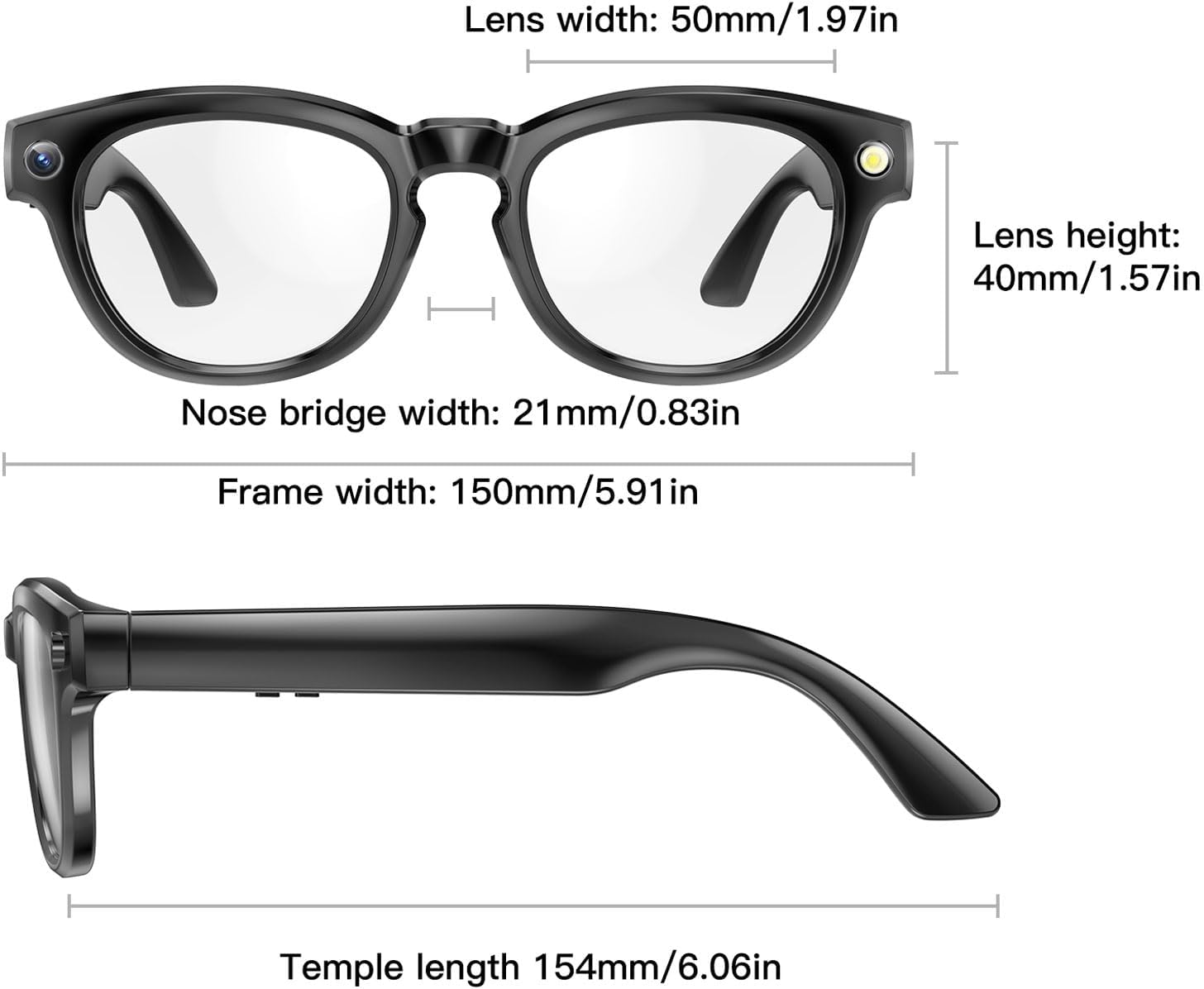
Image: A technical drawing illustrating the key dimensions of the smart glasses, including lens width (50mm/1.97in), lens height (40mm/1.57in), bridge width (21mm/0.83in), frame width (150mm/5.91in), and temple length (154mm/6.06in).
Warranty and Support
For warranty information and technical support, please refer to the official SENECESLI website or contact their customer service. Details may also be available within the companion application or on the product packaging.
Protection plans are available for purchase separately to extend coverage beyond the standard manufacturer's warranty. Please check with your retailer for details on available protection plans.
For further assistance, you may visit the SENECESLI Store on Amazon.