
SUNKTA EF15-C-CA
SUNKTA EF15 Military Smart Watch User Manual
Model: EF15-C-CA
1. Introduction
Thank you for choosing the SUNKTA EF15 Military Smart Watch. This manual provides detailed instructions to help you set up, operate, and maintain your new smartwatch. Designed for durability and functionality, the EF15 offers a robust set of features including fitness tracking, communication tools, and a built-in LED flashlight, all housed in a military-grade, IP68 waterproof body.
2. Product Overview
The SUNKTA EF15 Smart Watch combines advanced technology with a rugged design, featuring a 1.75-inch HD touchscreen and an 800mAh long-lasting battery. It is built to withstand challenging environments while providing comprehensive smart functionalities.
Key Features:
- 1.75-inch HD Large Screen: 390x390 pixel resolution with 60Hz refresh rate for clear visuals.
- 800mAh Long Battery Life: Extended usage and standby times, ideal for travel and outdoor activities.
- Built-in LED Flashlight: Convenient illumination for various situations, with quick access.
- Bluetooth Calling & Notifications: Make/receive calls and get instant alerts directly from your wrist.
- Multiple Sports Modes: 8 built-in modes and over 114 professional modes available via the companion app.
- Life Assistant Functions: Includes remote camera control, music playback, stopwatch, calculator, weather forecast, and more.
- Military Style + IP68 Waterproof: High-strength metal frame, resistant to falls and wear, suitable for hand washing, rain, and short swimming.
Product Components:
Your SUNKTA EF15 package includes:
- SUNKTA EF15 Smart Watch
- Metal Band
- Silicone Band
- Charging Cable
- Instruction Manual
- Cleaning Cloth
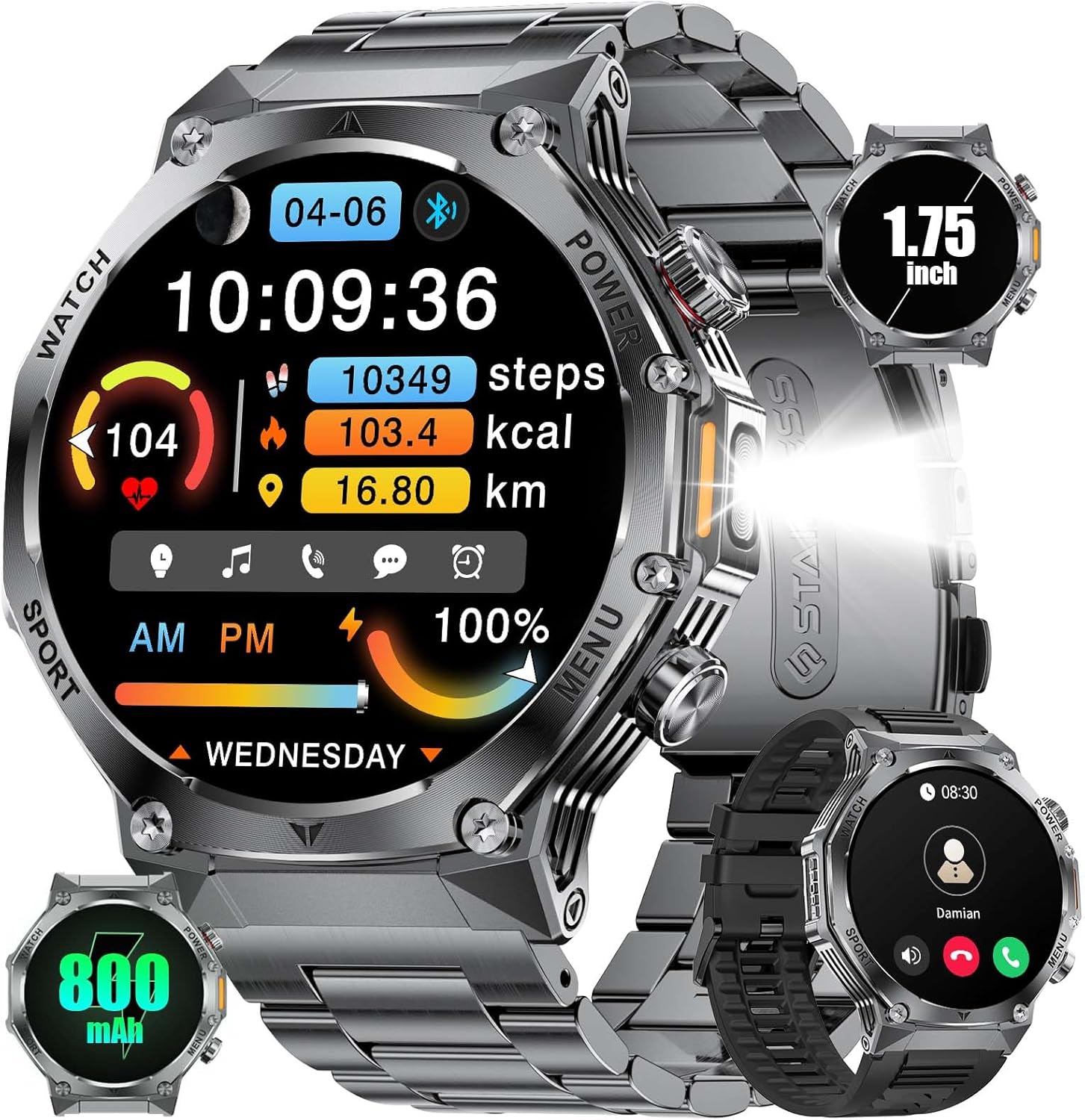
Figure 2.1: Overview of the SUNKTA EF15 Military Smart Watch and its key features.
3. Setup Guide
3.1 Charging the Smart Watch
Before first use, fully charge your smartwatch. The EF15 is equipped with an 800mAh battery, providing extended usage. A full charge typically takes approximately 3 hours.
- Connect the magnetic charging cable to the charging contacts on the back of the watch.
- Plug the USB end of the cable into a standard USB power adapter (5V/1A recommended) or a computer USB port.
- The watch display will indicate charging status.

Figure 3.1: The 800mAh ultra-large battery of the SUNKTA EF15 Smart Watch.
3.2 App Installation and Pairing
To unlock the full potential of your SUNKTA EF15, download and install the companion application on your smartphone. The watch is compatible with iOS 9.0 and above (calls require iOS 13 and above) and Android 5.0 and above, supporting Bluetooth 4.0 and higher.
- Download the App: Search for "FitCloudPro" in your smartphone's app store (Apple App Store for iOS, Google Play Store for Android) and install it.
- Enable Bluetooth: Ensure Bluetooth is enabled on your smartphone.
- Open the App: Launch the FitCloudPro app and follow the on-screen instructions to create an account or log in.
- Add Device: In the app, navigate to the device section and select "Add Device" or "Bind Device."
- Select Your Watch: The app will scan for nearby devices. Select "EF15" or the corresponding device name from the list.
- Confirm Pairing: A pairing request may appear on both your phone and watch. Confirm the pairing on both devices.
- Complete Setup: Once paired, the app will guide you through initial settings, such as personal information and notification preferences.
4. Operating Instructions
4.1 Basic Navigation
The SUNKTA EF15 features a responsive 1.75-inch HD touchscreen and physical buttons for intuitive control.
- Swipe Up/Down: Scroll through menus and notifications.
- Swipe Left/Right: Access quick functions, widgets, or different watch faces.
- Tap: Select an item or confirm an action.
- Press Side Buttons: Typically used for power on/off, returning to the home screen, or accessing specific features like the flashlight.
4.2 Bluetooth Calling and Notifications
Stay connected by making and receiving calls directly from your wrist and getting real-time notifications.
- Making Calls: Sync your contacts via the app. You can dial directly from the watch's dial pad or select from your synced contacts.
- Receiving Calls: When a call comes in, you can answer or reject it from the watch. The built-in speaker and microphone allow for hands-free communication.
- Notifications: Receive alerts for incoming calls, text messages, and app notifications (e.g., social media, email). Customize which app notifications you receive through the FitCloudPro app.
- Do Not Disturb Mode: Activate this mode on the watch or via the app to silence notifications during meetings or sleep.

Figure 4.1: Bluetooth call and message notification features on the EF15 Smart Watch.
4.3 Sports Modes and Fitness Tracking
Track your physical activity with a wide range of sports modes and health monitoring features.
- Built-in Modes: The watch includes 8 core sports modes: Walk, Run, Cycle, Hike, Basketball, Badminton, Mountaineering, and Football.
- Extended Modes: Access over 114 additional professional sports modes (e.g., Tennis, Skiing, Yoga, Gym Training) through the FitCloudPro app.
- Automatic Tracking: The watch automatically tracks steps, calories burned, workout duration, and distance for selected activities.
- Health Monitoring: Monitor heart rate, blood oxygen, and sleep patterns.

Figure 4.2: The EF15 Smart Watch supports over 114 sports modes for comprehensive fitness tracking.
4.4 Built-in LED Flashlight
The EF15 features a convenient LED flashlight, accessible directly from the watch.
- Activation: Typically, a dedicated side button press or a quick swipe on the screen can activate the flashlight.
- Modes: The flashlight may offer different modes, such as constant light or warning mode.

Figure 4.3: The integrated LED flashlight provides illumination for nighttime activities.
4.5 Other Smart Functions
The EF15 serves as a comprehensive life assistant with various practical features:
- Music Control: Control music playback on your smartphone (play, pause, skip tracks) directly from the watch.
- Remote Camera Control: Use your watch as a remote shutter button for your smartphone's camera.
- Sleep Monitoring: Provides detailed analysis of your sleep patterns, including light sleep, deep sleep, and REM stages.
- Weather Forecast: Get real-time weather updates on your wrist.
- Stopwatch & Timer: Built-in stopwatch and countdown timer functions.
- Find Phone/Band: Locate your paired smartphone or watch using an audible alert.
- Customizable Watch Faces: Personalize your watch with a variety of digital and analog watch faces available through the app.
- Password Lock: Enhance security with a built-in password lock feature.

Figure 4.4: The EF15 offers diverse UI watch faces and smart features for daily convenience.
5. Maintenance
5.1 Waterproofing
The SUNKTA EF15 Smart Watch is IP68 rated, meaning it is resistant to dust and can withstand immersion in water up to 1.5 meters for 30 minutes. It is suitable for:
- Hand washing
- Rain exposure
- Sweat during exercise
- Short swimming sessions in shallow water
Important Note:
- Do NOT use the watch in hot water, saunas, or steamy environments, as this can compromise the waterproof seals.
- Avoid prolonged immersion or high-pressure water jets.
- Rinse the watch with clean water and dry it thoroughly after exposure to saltwater or chlorinated water.

Figure 5.1: The EF15 Smart Watch features IP68 waterproofing and military-grade durability.
5.2 Cleaning
To ensure longevity and proper function, clean your watch regularly.
- Wipe the screen and watch body with a soft, lint-free cloth.
- For stubborn dirt, dampen the cloth slightly with water. Avoid using harsh chemicals or abrasive materials.
- Clean the charging contacts periodically to ensure good connection.
- If using the silicone band, clean it with mild soap and water. For the metal band, use a soft brush to remove debris from links.
6. Troubleshooting
If you encounter issues with your SUNKTA EF15 Smart Watch, refer to the following common solutions:
| Problem | Possible Cause | Solution |
|---|---|---|
| Watch does not turn on | Low battery; System crash | Charge the watch for at least 30 minutes. If still unresponsive, press and hold the power button for 10-15 seconds to force restart. |
| Cannot pair with phone | Bluetooth off; App issue; Watch not discoverable | Ensure Bluetooth is on for both devices. Restart both the watch and phone. Clear app cache or reinstall FitCloudPro. Ensure watch is not already paired to another device. |
| Notifications not received | App permissions; Do Not Disturb mode; Bluetooth disconnected | Check app notification permissions on your phone. Disable Do Not Disturb mode on watch/phone. Ensure Bluetooth connection is stable. |
| Inaccurate fitness data | Improper wear; Software calibration | Ensure the watch is worn snugly on your wrist. Update the watch firmware via the app if available. Calibrate settings in the FitCloudPro app. |
| Short battery life | Frequent use of power-intensive features; High brightness | Reduce screen brightness. Limit continuous heart rate monitoring. Disable unnecessary notifications. Use power-saving mode. |
Video Demonstration:
For visual guidance on certain features or troubleshooting steps, please refer to the following video:
Video 6.1: A demonstration of the SUNKTA EF15 Smart Watch's premium feel and display, along with a review of its software capabilities.
If the problem persists, please contact SUNKTA customer support for assistance.
7. Specifications
| Feature | Specification |
|---|---|
| Model | EF15-C-CA |
| Brand | SUNKTA |
| Screen Size | 1.75 Inches |
| Display Type | HD LCD, 390x390 pixels, 60Hz refresh rate |
| Battery Capacity | 800 mAh Lithium Polymer |
| Charging Time | Approx. 3 Hours |
| Average Battery Life | 5-15 days (depending on usage) |
| Connectivity | Bluetooth 5.2 |
| Compatible Devices | iOS 9.0+ (calls iOS 13+), Android 5.0+ |
| Waterproof Rating | IP68 |
| Memory Storage Capacity | 1 GB |
| Special Features | LED Flashlight, Pedometer, Stopwatch, Timer, Music Control, Brightness Adjustment, Find Phone, Alarm Clock, Camera Control, Calculator, Weather Forecast |
| Mounting Hardware | Smart Watch, Metal Band, Silicone Band, Charger, Instruction Manual |
8. Warranty and Support
SUNKTA is committed to providing high-quality products and excellent customer service.
- Warranty: Your SUNKTA EF15 Smart Watch comes with a 24-month warranty from the date of purchase.
- Returns Service: Enjoy a 6-month returns service for eligible issues.
- Online Support: We offer 24-hour online support to assist you with any questions or concerns.
If you experience any issues with accessories, quality, operation, or charging, please do not hesitate to contact our customer service team. We are dedicated to providing a solution within 24 hours.
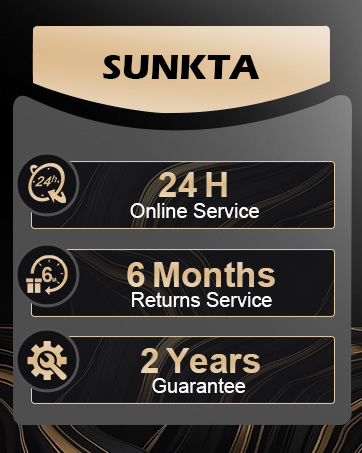
Figure 8.1: SUNKTA customer service commitment.
Related documentsEF15-C-CA


Ask a question about this manual
Ask about setup, troubleshooting, compatibility, parts, safety, or missing instructions. Manuals+ will review the question and use this page’s manual context to help answer it.