
Y-METDRIVING TH006
Contents
Y-METDRIVING TH006 7-inch Double DIN Car Stereo User Manual
Model: TH006
Introduction
Thank you for choosing the Y-METDRIVING TH006 7-inch Double DIN Car Stereo. This manual provides detailed instructions for installation, operation, maintenance, and troubleshooting to ensure optimal performance and a safe driving experience. Please read this manual thoroughly before using the product.
Package Contents
Verify that all items listed below are included in your package:
- Double DIN Car Stereo Unit
- AHD Backup Camera
- Microphone
- User Manual
- Fast Charging Cables (2x)
- Wire Harness
- Disassembly Tool & Fuse
- Camera Cable
- Camera Power Cable
- Remote Control
- Anti-theft Frame Key
- Frame

Image: Detailed view of all items included in the product package.
Installation Guide
Professional installation is recommended. Ensure the vehicle's power is disconnected before starting installation.
1. Pre-Installation Check
- Dashboard Size: Measure your car's dashboard opening. This unit is a standard double DIN size (approximately 178mm W x 102mm H). An additional mounting kit may be required for a tight fit in some vehicle models.
- Wiring Harness: Identify the correct wiring harness for your vehicle.
2. Wiring Method
Connect the wire harness according to the diagram provided. Ensure each speaker cable is not grounded or short-circuited to another cable to prevent damage and ensure sound output.

Image: Detailed wiring diagram for the Y-METDRIVING TH006 car stereo.
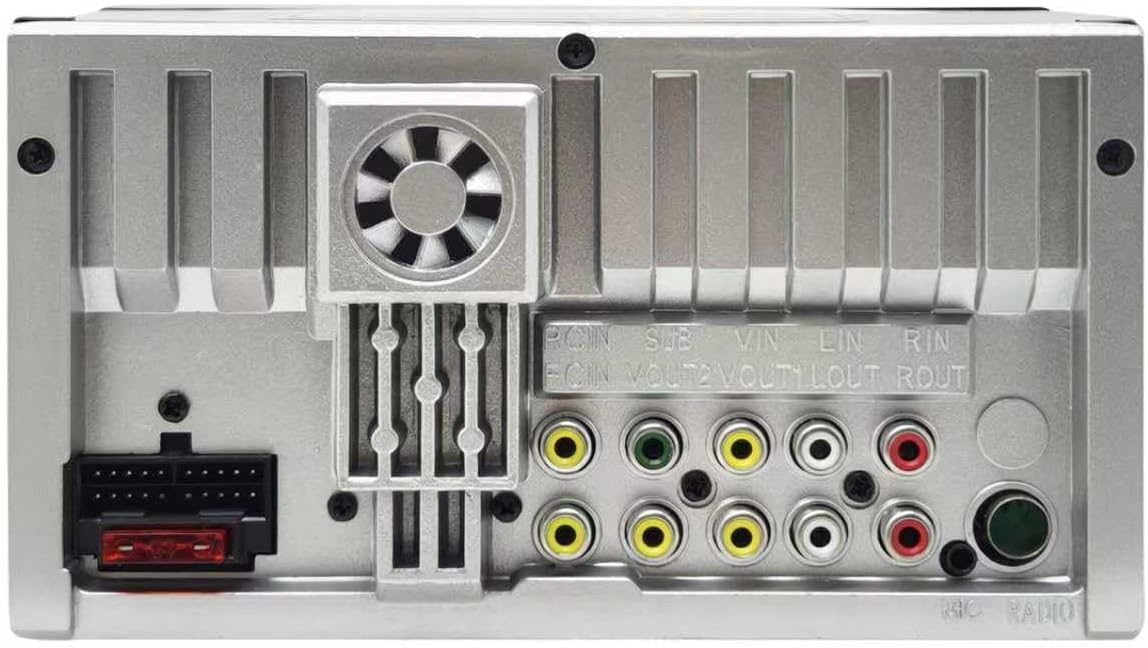
Image: Rear panel of the car stereo with input/output ports.
3. Camera Connection
Connect the AHD backup camera as shown in the diagram. The camera cable connects to the R-CIN input on the stereo. The camera power cable should be connected to the vehicle's reverse light (positive) and ground (negative) for automatic activation when reversing.

Image: Diagram for connecting the AHD rear-view camera.
Operating Instructions
1. Power On/Off and Basic Interface
Press the power button to turn the unit on or off. The 7-inch QLED capacitive touch screen provides a clear visual experience with 1024x600 HD resolution. Navigate through menus by touching the icons on the screen.

Image: The QLED Quantum Screen interface.
2. Wireless CarPlay & Android Auto
Connect your smartphone wirelessly to access navigation, make calls, send messages, and listen to music through the car stereo's display.
For Apple CarPlay (Compatible with iPhone 5 and later):
- Turn on Wi-Fi and Bluetooth on your iPhone.
- Find the Bluetooth of the head unit (e.g., "CAR-KIT") and connect to it.
- Select "Use CarPlay" when prompted.
- Wait for a moment, and you will enter CarPlay mode.

Image: Apple CarPlay connection steps.
For Android Auto (Compatible with Android phone 11.0 and later):
- Turn on Wi-Fi and Bluetooth on your Android phone.
- Find the Bluetooth of the head unit (e.g., "CAR-KIT") and connect to it.
- It will automatically turn on Android Auto after connecting to Bluetooth successfully.

Image: Android Auto connection steps.

Image: Wireless Apple CarPlay and Android Auto in operation.
3. Bluetooth 5.0 Function
Pair your smartphone via Bluetooth 5.0 for hands-free calling and audio streaming.
- Hands-Free Calls: Answer and make calls directly from the stereo.
- Music Streaming: Play music from your phone through the car's speakers.
- Phonebook: Access your phone's contact list.

Image: Bluetooth music and hands-free calling interface.
4. AM/FM Radio
Tune into your favorite radio stations with the built-in AM/FM tuner. The unit supports 18 FM and 12 AM station memory presets.
Image: AM/FM radio interface.
5. USB Interface & Super Charge
The stereo features two USB ports. One port supports data transmission for playing music, videos, or viewing photos from your personal storage devices. The other port offers Super Charge functionality, providing up to 22W power output for efficient phone charging, even while using wireless CarPlay/Android Auto.

Image: Super Fast Charge feature via USB port.
6. Mirror Link (for iOS & Android)
The Mirror Link function allows you to sync your smartphone screen to the stereo display, enabling you to view apps, navigation, and videos directly on the larger screen.

Image: Mirror Link functionality.
7. AHD Rear View Camera
When the vehicle is shifted into reverse, the stereo automatically displays the feed from the AHD rear view camera, providing a wider, clear, and waterproof view for safer parking and maneuvering. It supports good night vision.
Image: AHD Rear View Camera display.
8. Steering Wheel Control
The unit supports steering wheel control learning. Refer to your vehicle's specific instructions for programming the steering wheel buttons to control the stereo's functions (e.g., answer/end calls, skip tracks, adjust volume).

Image: Steering Wheel Control functionality.
9. Audio Settings
The TH006 features built-in DSP processing chips and a 16-band EQ, allowing for detailed sound customization. Adjust the equalizer settings to optimize audio output for your preferences. The 4*45W amplifier provides quality sound.
10. AUX Input
The AUX input supports audio and video input, allowing you to connect external MP3 players or other devices.
Maintenance
- Screen Cleaning: Use a soft, lint-free cloth to gently wipe the QLED touch screen. Avoid abrasive cleaners or solvents.
- General Cleaning: Keep the unit free from dust and debris. Use a dry cloth for exterior cleaning.
- Temperature: Avoid exposing the unit to extreme temperatures, direct sunlight for prolonged periods, or high humidity.
Troubleshooting
If you encounter issues, refer to the following common problems and solutions:
| Problem | Possible Cause | Solution |
|---|---|---|
| Unit does not power on | Incorrect wiring; Blown fuse; No power supply | Check power connections (ACC, B+); Inspect and replace fuse if necessary; Ensure vehicle battery is charged. |
| No sound output | Speaker wires incorrectly connected or shorted; Volume too low; Mute function active | Verify speaker wiring (ensure no shorts to ground or each other); Increase volume; Deactivate mute. |
| Wireless CarPlay/Android Auto not connecting | Bluetooth/Wi-Fi off on phone; Incorrect pairing; Phone OS not supported | Ensure phone's Bluetooth and Wi-Fi are on; Re-pair the device; Check phone's operating system compatibility (iPhone 5+, Android 11.0+). |
| Screen is black or unresponsive | System error; Loose connection; Unit freezing | Restart the unit (power cycle); Check wiring connections; If persistent, contact customer support. |
| Backup camera not displaying | Camera wiring incorrect; Reverse trigger not connected; Faulty camera | Verify camera power and video connections; Ensure reverse trigger wire is correctly connected to the reverse light. |
Specifications
- Brand: Y-METDRIVING
- Model Number: TH006
- Screen Size: 7 inches
- Display Type: QLED
- Native Resolution: 1024x600
- Connectivity Technology: Auxiliary, Bluetooth, USB
- Bluetooth Version: 5.0
- Compatible Devices: Smartphone (iPhone 5+, Android 11.0+)
- Audio Output Mode: Stereo
- Amplifier Output: 4*45W
- USB Charging: Up to 22W (Super Charge Protocol)
- Built-In Media: AHD backup camera, Microphone, User Manual, Fast Charging cables
- Manufacturer: shenzhen tonghang technology co,. ltd
Warranty and Support
Warranty Information
This product comes with a 180-day warranty for return or replacement from the date of purchase. Please retain your proof of purchase for warranty claims.
Customer Support
For any questions, technical assistance, or issues encountered during use, please contact our customer service team via Amazon Email. Our professional team of engineers is available to provide timely support and solutions.
Ask a question about this manual
Ask about setup, troubleshooting, compatibility, parts, safety, or missing instructions. Manuals+ will review the question and use this page’s manual context to help answer it.